
Introduction
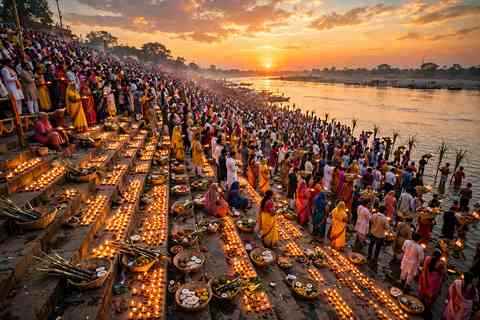
No single image captures the scale of Chhath Puja like a crowded ghat at sunset. Thousands of devotees fill the river steps, the water is lined with glowing diyas, bamboo soops sit in neat rows, and the whole riverbank turns into a sea of light. It is one of the most spectacular festival scenes in India, and it is also one of the hardest to photograph well, because the crowd, the light, and the river all have to come together in one frame.
This prompt does exactly that. It builds a wide, cinematic view of a Chhath ghat at sunset, with layers of devotees, diyas, and golden light, so the image feels grand and alive. It is perfect for festival greetings, news-style posts, and anyone who wants to show friends abroad what Chhath Puja really looks like.
That is why this prompt has been written with so much care. Every line of it has a job to do: the lighting sets the mood, the camera details make the image look professionally shot, the face-lock wording keeps the people looking natural, and the small, specific details, the colours, the props, the setting, tell the AI exactly which festival moment to create. You do not need any editing skills or any expensive camera. You only need this prompt, a free AI tool, and a few minutes, and you can create a Chhath Puja 2026 Ghat Crowd image that looks like it was captured by a professional photographer on the day itself.
The Prompt
Copy the full prompt below and paste it into Gemini or ChatGPT. If you are using your own photo, upload it first and add the face-lock line at the start, so the AI keeps your real face while it rebuilds the scene around you.
Ultra-photorealistic wide cinematic photograph of a crowded Chhath Puja ghat at sunset, thousands of devotees gathered on wide stone river steps, women in bright sarees standing in the river offering arghya, rows of glowing clay diyas lining every step, bamboo soops with fruits and marigolds placed along the bank, the sun setting in a blaze of orange and gold over the calm river, reflections shimmering on the water, crowds in soft focus stretching into the distance, smoke from incense drifting in the warm light, epic festive scale, shot on a DSLR with a 24mm wide-angle lens, vertical 4:5 composition, highly detailed, rich colours, no text, no watermark
Why This Prompt Works
A good AI photo prompt is not just a description, it is a set of instructions that guides the AI the way a photographer guides a shoot. This prompt works so well because it controls the four things that matter most in a festival photograph: the light, the composition, the people, and the details. Get those four right, and the image almost always looks beautiful on the first try.
- The wide-angle lens instruction is the key to this prompt, because it lets the AI show the full scale of the crowd and the river instead of a small, cramped scene.
- Layering the image, diyas in the foreground, devotees in the middle, sunset behind, creates depth, so the eye travels through the photo like a real landscape.
- Repeating the diya motif on every step gives the image its signature glow, which is what people recognise instantly as Chhath Puja.
- Warm sunset colours unify a busy crowd scene, so thousands of people read as one beautiful festival instead of visual noise.
Put together, these choices do something important: they remove the guesswork. Instead of asking the AI for a vague festival photo and hoping for the best, you are giving it a complete brief, like a professional photographer would receive. That is why this prompt consistently produces images that look real, warm, and ready to share, while short, vague prompts usually produce flat, generic results that nobody wants to forward.
How to Use This Prompt
Follow these simple steps, and you will have a beautiful, share-ready image in just a few minutes, even if you have never used an AI image tool before.
- Open Gemini or ChatGPT: open Gemini (with Nano Banana) or ChatGPT on your phone or computer, and tap the image upload button if you want to use your own photo as the base.
- Upload your photo (optional but recommended): if you want the image to look like you, upload a clear, front-facing photo with good light, then add ‘keep the exact same face and person from the uploaded photo’ at the start of the prompt.
- Copy the full prompt: copy the entire prompt from the box below, including the camera, lighting, and composition details, because every detail shapes the final image.
- Paste it and generate: paste the prompt into the chat box, send it, and wait for the first image. Do not shorten the prompt, because the details are what make the result look professional.
- Check the result closely: look at the faces, hands, and key objects in the image. If something looks wrong, note exactly what it is before you regenerate.
- Refine with one small change: change only one thing at a time, for example the saree colour or the number of people, and generate again. Small, clear changes work far better than rewriting the whole prompt.
- Generate two or three versions: always generate a few versions and pick the best one. The first image is rarely the best, and comparing versions helps you spot the most natural, shareable frame.
- Save, crop, and share: save the best image in high quality, crop it to 4:5 for the Instagram feed or 9:16 for WhatsApp status and Reels, and share it with a short, personal caption about the festival.
Pro Tips
These small tricks will take your image from good to great, and they work with almost every festival photo prompt on PromptBazar.
- If the crowd looks messy, add ‘organised rows of devotees, neat lines of diyas’ to give the scene a cleaner, more photogenic structure.
- Ask for a horizontal 16:9 version if you want to use the image as a Facebook cover or a YouTube thumbnail.
- Add ‘evening sky with soft pink clouds’ for extra colour in the sky, which makes the sunset even more shareable.
- Generate two versions, one wide crowd shot and one closer view of a family on the steps, and post them as a pair.
- Use this image with a greeting like ‘Chhath Puja ki shubhkamnayein’ for maximum forwarding in family groups.
One last tip that applies to every festival image: always look at your final image on your phone before you post it, because that is how most people will see it. Check that the faces are clear, the colours are warm, and nothing important is cut off at the edges. If it looks good on your phone screen, it will look good everywhere.
FAQ
Which Chhath ghat does this image show?
The prompt is not tied to one specific ghat, it recreates the classic look of any major Chhath ghat at sunset, with stone steps, a wide river, and rows of diyas. If you want a specific place, add its name and a detail, like ‘Patna ghat with a bridge in the distance’, and the AI will work it into the scene.
Will the crowd in the image look realistic or blurry?
The prompt asks for the foreground to be sharp and the distant crowd to be in soft focus, which is exactly how real wide-angle festival photos look. Faces in the distance are naturally less detailed, and that is what makes the image feel authentic rather than artificial.
Can I use this image for a Chhath Puja greeting poster?
Yes, it is ideal for greeting posters, WhatsApp greetings, and community announcements. Add your greeting text on top with a photo editor, keeping the text in the sky area where there is empty space, and the poster will look professionally designed.
Does this prompt work for a video too?
This is a photo prompt, but you can adapt it for video by adding camera movement, like ‘slow drone shot rising over the ghat, diyas flickering, sunset reflecting on the river, 8 seconds’. That turns the same scene into a stunning AI video for Reels or Shorts.
Try this prompt today, share your Chhath Puja 2026 Ghat Crowd photo with the people you love, and let the festival shine a little brighter in every feed it reaches. Happy Chhath Puja 2026 Ghat Crowd!
Related Viral Prompts
Chhath Puja Sandhya Arghya AI Photo Prompt
Chhath Puja Usha Arghya AI Photo Prompt
Chhath Puja Soop Decoration AI Photo Prompt
#ChhathPuja2026 #AIPhotoPrompt #FestivePhotography #ViralPhoto #PromptBazar


Leave a Reply