
Introduction
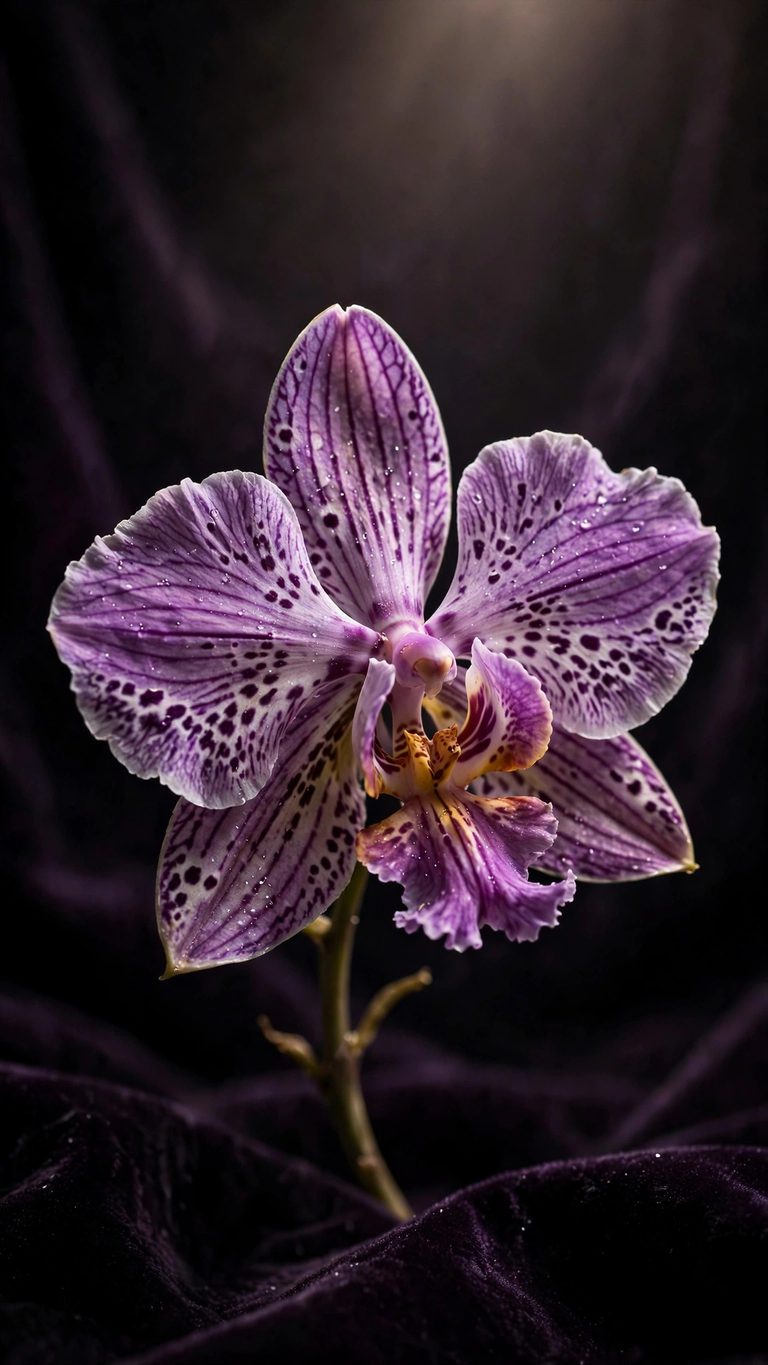
There is a reason luxury brands love orchids: the flower looks expensive. Spotted purple petals unfold like butterfly wings, intricate and improbable, the kind of detail that makes you lean closer to the screen. Photographed studio-style against dark velvet with a single soft spotlight from above, an orchid stops being a plant and becomes jewelry — a portrait of rarity and refinement. Professional botanical photographers spend hours on this setup: the black backdrop, the precise light, the perfect bloom. Every element must be flawless, because there is nowhere to hide in a studio portrait.
This AI photo prompt rebuilds that entire studio in text. One rare purple orchid, full bloom, dark velvet background, spotlight from above — the model handles the lighting physics, the petal geometry, and the luxurious mood while you simply choose your favorite of the four variations. The result is the kind of image that elevates anything it touches: a spa brochure, a perfume ad concept, an art print, or a phone wallpaper that looks like it cost a fortune. Botanical studio photography is one of AI’s strongest genres, and the orchid is its crown jewel.
The Prompt
Here is the complete, copy-ready prompt. Paste it exactly as written into your AI image generator of choice:
Elegant studio-style photograph of a rare purple orchid in full bloom, intricate spotted petals like delicate butterfly wings, single dramatic flower against a dark velvet background, soft spotlight from above, luxurious botanical art, ultra detailed, 8k, professional botanical photography, photorealistic
Why This Prompt Works
This prompt works because it recreates a complete professional studio setup in words, and studio setups are exactly what AI image models render best. Let us break down why each phrase earns its place.
Rare purple orchid in full bloom sets both subject and quality bar. “Rare” nudges the model toward unusual, intricate varieties rather than generic flowers; “full bloom” ensures the flower is open and photogenic, not a bud. The word elegant acts as a global style filter, discouraging anything gaudy or cluttered.
Intricate spotted petals like delicate butterfly wings is the detail engine of the prompt. Spots and wing-like shapes are specific visual textures the model can latch onto — vague prompts produce vague petals, while this simile gives the model a concrete reference image from its training data. Butterfly-wing comparisons are especially effective because they imply symmetry, delicacy, and fine patterning all at once.
Single dramatic flower against a dark velvet background does two jobs. “Single” enforces minimalism — one flower, no distractions. The dark velvet background is a classic luxury-photography choice: it absorbs light, creates rich blacks, and makes the purple petals glow with jewel-like intensity. Velvet specifically suggests a soft, light-swallowing texture that reads as expensive.
Soft spotlight from above is the lighting masterstroke. Top-down spotlighting carves the flower’s three-dimensional form out of the darkness, creating the chiaroscuro effect of a museum piece. Finally, luxurious botanical art plus the technical tail (“ultra detailed, 8k, professional botanical photography, photorealistic”) locks the genre: this is fine art, not a snapshot, rendered at maximum fidelity. The prompt succeeds because every element reinforces the same message — rare, dramatic, luxurious — with zero contradictions for the model to resolve.
How to Use This Prompt
Studio-style prompts like this one are among the easiest to run, because the controlled setup plays to every model’s strengths. Here is how on each platform.
Midjourney: Type /imagine and paste the full prompt. A portrait or square crop suits this subject: add --ar 4:5 for an elegant vertical portrait or --ar 1:1 for a classic botanical study. Upscale your favorite with U1–U4. Midjourney’s handling of dark backgrounds and spotlight falloff is superb — expect the velvet to render as deep, rich black with the orchid glowing above it.
DALL-E 3 (via ChatGPT): Paste the prompt with: “Generate this as a photorealistic studio photograph.” DALL-E 3 follows the single dramatic flower instruction well, keeping the composition clean. If the background comes out gray instead of black, say: “Make the background pure dark black velvet.” One correction usually fixes it.
Flux: Paste the prompt as-is with a portrait or square output size. Flux excels at fine detail — the spotted petal texture and the velvet grain will render with exceptional crispness. Keep guidance at default; this prompt needs no heavy steering.
Across all three, inspect the petal symmetry before upscaling. Orchids are bilaterally symmetric, and a quick glance at the thumbnail will tell you if the model nailed it or if a regeneration is needed.
Pro Tips & Creative Variations
The studio setup in this prompt is a template you can reuse endlessly. Here is how to make it yours.
Change the flower. Replace “purple orchid” with “white calla lily,” “red amaryllis,” “blue iris,” or “black dahlia” — the dark-velvet-and-spotlight treatment flatters almost any bloom. Each flower brings its own character: calla lilies feel sculptural, dahlias feel dramatic.
Change the color story. Keep the orchid but shift the palette: “white orchid with pink spots,” “deep blue orchid,” or “golden orchid” for an opulent variant. Color-swapped versions of the same composition make striking diptychs and triptychs.
Adjust the lighting mood. Swap “soft spotlight from above” for “dramatic side lighting” (more sculptural shadows), “backlit with glowing edges” (ethereal halo effect), or “candlelight warmth” (intimate, vintage feel). Lighting is the fastest way to change the emotional register.
Add atmosphere. “A single water droplet on a petal,” “soft mist around the stem,” or “a butterfly resting on the bloom” adds a secondary point of interest. Use sparingly — the power of this prompt is its minimalism, and every addition dilutes the drama.
Fix common glitches. AI orchids sometimes grow extra petals or merge the flower with the stem. If anatomy looks wrong, add “botanically accurate, correct petal count” or simplify to “single orchid bloom, no stem visible.” Also watch for the background turning gray — reinforce “pure black velvet background” if needed.
Print it large. This prompt’s output is made for printing. The dark background means it looks stunning on canvas or metal prints, and the high-detail tail gives you files sharp enough for 16×20 inches and beyond.
Frequently Asked Questions
Q: Why does my orchid look fake or plastic?
A: A plastic look usually comes from over-smooth rendering. Keep ultra detailed in the prompt and avoid adding words like smooth or perfect. In Midjourney, adding a touch of –style raw can increase photographic realism. Real petals have subtle texture, veins, and imperfections — the detail tokens are what render them.
Q: How do I get a true black background instead of dark gray?
A: Specify it explicitly: pure black velvet background, deep shadows. In DALL-E 3 you may need to say make the background completely black. Also avoid adding any ambient-light words like bright or airy, which fight the darkness. In Midjourney, the original prompt’s dark velvet plus spotlight combination usually nails it on the first try.
Q: Can I use this style for product photography mockups?
A: Yes — and it is a brilliant use case. Replace the orchid with your product (luxury perfume bottle, silk scarf, gold watch) while keeping against a dark velvet background, soft spotlight from above, luxurious and you have an instant high-end product shot. The prompt’s lighting structure transfers directly to objects.
Q: Will this work for a vertical phone wallpaper?
A: Perfectly. Generate at 9:16 (Midjourney –ar 9:16, or request vertical in DALL-E 3 or Flux) and the single-flower composition centers beautifully on a phone screen. The dark background is also battery-friendly on OLED displays and makes app icons pop.
The orchid portrait prompt is a masterclass in doing more with less: one flower, one light, one dark background — and the result looks like a million dollars. Copy the prompt, generate your botanical portrait, and try swapping in your favorite bloom. Luxury, it turns out, is just a paste away.
Related Viral Prompts
- Marigold Garland AI Photo Prompt: Capture Festive Cultural Craft Photography With AI Image Generators
- Wildflower Meadow AI Photo Prompt: Generate Breathtaking Golden Hour Landscape Art With AI Generators
- Rose Blooming Timelapse AI Video Prompt: Create a Mesmerizing Macro Flower Video with Sunrise Light and Bokeh
# A I V i d e o # P r o m p t B a z a r # A I P h o t o # O r c h i d # E l e g a n t

Leave a Reply