
Introduction
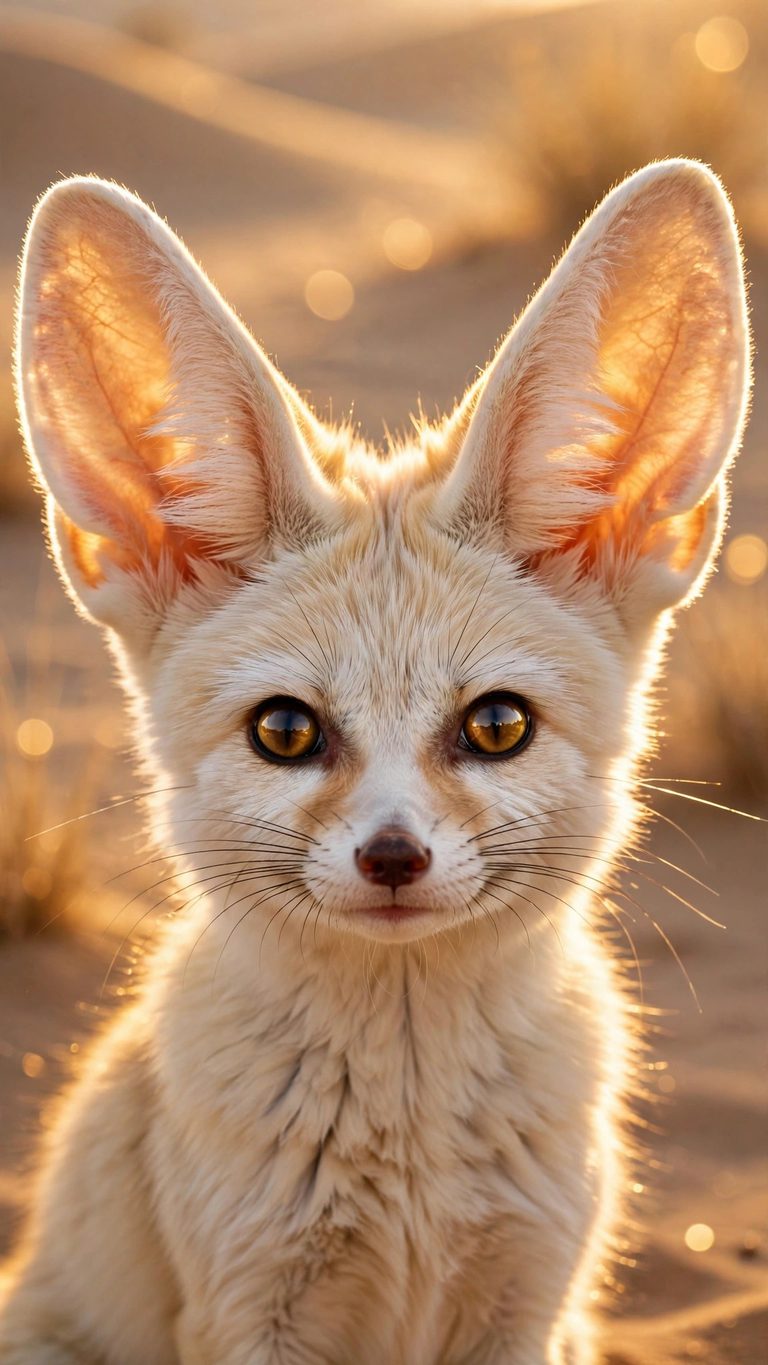
Few creatures on Earth trigger an instant emotional reaction the way a fennec fox does. Those enormous, translucent ears look almost too delicate to be real. Its cream-colored fur glows in warm morning light, and its curious amber eyes lock onto the lens with a directness that feels deeply personal. This AI photo prompt recreates the magic of a professional wildlife portrait: a close-up of a fennec fox in its desert home, whiskers sharp in focus, golden sand melting into soft bokeh behind it. Cute animal content is the undisputed king of social sharing, and the fennec fox is one of the most searched desert animals online. But photographing a real one takes a trip to North Africa, a long telephoto lens, and extraordinary patience. This prompt skips all of that. In under a minute, you can produce an ultra-detailed, 8k portrait that looks like it was shot by a wildlife photographer at dawn. Whether you run an animal page, a nature account, or simply love beautiful images, this prompt delivers heart-melting results every single time. The #FennecFox community on social media is huge and always hungry for fresh, adorable content.
The Prompt
Copy the exact text below and paste it into your favorite AI image generator. Every word is tuned for maximum realism and beauty:
Adorable close-up portrait photograph of a fennec fox in the desert, enormous translucent ears glowing in golden backlight, curious amber eyes staring into the lens, soft sand bokeh background, whiskers sharp in focus, warm morning light on cream fur, heart-melting expression, ultra detailed fur texture, 8k, professional wildlife photography, photorealistic
Why This Prompt Works
This prompt works because it stacks three proven engagement triggers on top of each other. First, there is the baby schema effect: large ears, big eyes, and a small face are the same visual cues that make human babies and puppies irresistible, and the fennec fox has them in abundance. Scientists have shown that these features activate caregiving instincts in the brain, which is why a single glance at this animal makes people smile, comment, and share. Second, there is direct eye contact. When the fox stares into the lens, the viewer feels personally seen, and that one-to-one connection dramatically increases likes, saves, and comments compared to an animal looking away. Third, the lighting does heavy emotional lifting. Golden backlight glowing through those translucent ears creates a halo effect that reads as warmth and magic, while the soft sand bokeh keeps every bit of attention locked on the face. Platform trends confirm the strategy: wildlife and cute-animal photo posts consistently outperform average reach on Instagram, TikTok, and Facebook, and desert animals feel exotic enough to stand out from the usual cat and dog content. The phrase “professional wildlife photography” plus “photorealistic” pushes the generator toward a National Geographic look instead of a cartoon, which matters because authenticity drives trust and shares. Finally, the ultra-detailed fur texture rewards zooming in, and images that invite a closer look earn longer view times, which every algorithm rewards with wider distribution. In short, this prompt is engineered for the exact emotions that make people tap the heart button.
How to Use This Prompt
Turning this prompt into a finished image takes less than five minutes. Follow these steps for each major tool.
Step 1: Pick your generator. This prompt works beautifully in Midjourney, DALL-E 3, Flux, and Stable Diffusion. Midjourney v7 and Flux currently lead on photorealistic detail, DALL-E 3 is the easiest option inside ChatGPT, and Stable Diffusion gives you free, unlimited local control.
Step 2: Paste the prompt verbatim. Copy the full prompt from the box above and paste it unchanged for your first generation. The wording has been tuned for lighting, texture, and realism, so resist the urge to paraphrase until you see the baseline result.
Step 3: Set the portrait format. In Midjourney add –ar 9:16. In DALL-E 3 request a vertical portrait orientation. In Flux or Stable Diffusion set the canvas to 768 by 1344 or 832 by 1216. Portrait images fill a phone screen, which is where most discovery happens.
Step 4: Generate three to four variations. AI generators interpret prompts slightly differently each run. Create a small batch, compare them, and pick the one with the cleanest details, the best lighting, and the most natural composition. One of four is almost always a winner.
Step 5: Upscale and post. Upscale your favorite with your tool built-in upscaler or a dedicated enhancer, then post it with a short hook caption and the post hashtags. Publish during evening peak hours and reply to early comments to push the image into wider distribution.
Pro Tips & Creative Variations
Once you have the base image, the real fun begins with customization. The single most powerful tweak is the catchlight: add the phrase “bright catchlights in the eyes” to make the amber eyes sparkle with life, because reflective highlights are what separate a flat render from a portrait that feels alive. You can also shift the mood entirely. Replace “warm morning light” with “cool blue moonlight” for a dreamy night portrait, or “soft overcast light” for a gentle, editorial feel. Try a fennec fox pup by adding “baby fennec fox kit, extra fluffy” for maximum cuteness, or go wider with “fennec fox standing on a dune crest at sunset, full body” for an environmental portrait. A playful action twist works too: “fennec fox mid-leap catching an insect, motion frozen” adds energy and surprise. For a storytelling series, generate the same fox in three scenes, the close-up portrait, the fox mid-leap, and the fox curled up asleep at dusk, then post them as a carousel. That format earns multiple swipes and much higher engagement. If you want a wallpaper, change the aspect ratio to 16:9 and add “wide cinematic composition”. For print, upscale the final image with a dedicated upscaler before printing, since social media compression hides flaws that a large print will reveal. One caution: keep the ears realistic. Overly huge or glowing-neon ears push the image into fantasy territory and break the wildlife-photography illusion that makes this prompt so shareable. Subtle, sunlit translucency is the sweet spot. Tag your post with #AIPhoto so the AI art community can find it, and watch the comments roll in.
Frequently Asked Questions
Q1: Which AI tool gives the best fennec fox results?
Midjourney v7 and Flux currently produce the most photorealistic animal fur and the cleanest ear anatomy. DALL-E 3 is a close second and is easier to use inside ChatGPT. All four recommended tools handle this prompt well, so use whichever you already pay for.
Q2: Why do the ears sometimes look distorted?
Very large, thin features are hard for AI models. If the ears warp, raise the guidance scale slightly, add “anatomically correct ears” to the prompt, and generate several variations. One of four will almost always be perfect.
Q3: Can I use these images commercially?
It depends on the tool. Paid Midjourney plans and Flux generally allow commercial use of generated images, while free tiers may not. Always check the current terms of service of the generator you use before selling prints or using the image in ads.
Q4: How do I make the fox look like a specific pet?
Describe unique markings in the prompt, such as “small dark patch above the left eye” or “slightly torn right ear tip”. You can also use an image-to-image or character-reference feature with a real photo to keep the markings consistent across generations.
The fennec fox portrait prompt is one of the easiest wins in AI photography: paste it, generate, and post one of the most lovable images the internet has ever seen. Try it today, experiment with the variations above, and share your cutest result with the world. Your next viral post might be one prompt away.
Related Viral Prompts
- Abstract Dune Ripples AI Photo Prompt: Create Mesmerizing Desert Sand Art That Calms and Captivates Viewers
- Bedouin Tent Interior AI Photo Prompt: Generate Cozy Arabian Nights Scenes Full of Warmth and Culture
- Milky Way Over Desert Dunes AI Photo Prompt: Capture Breathtaking Astrophotography Night Sky Wonders
# A I V i d e o # P r o m p t B a z a r # A I P h o t o # F e n n e c F o x # W i l d l i f e

Leave a Reply