
Introduction
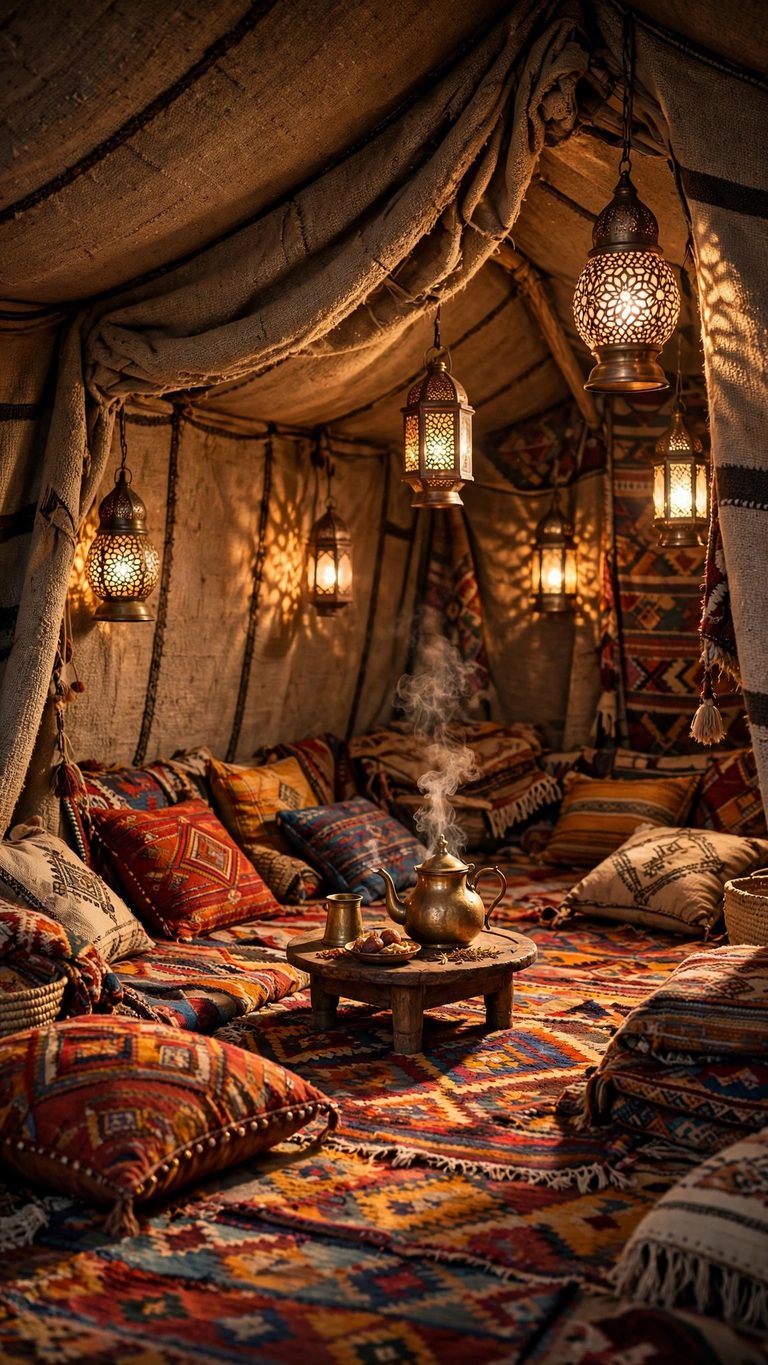
Step inside a traditional Bedouin tent and the desert outside simply disappears. The air smells of cardamom and woodsmoke. Colorful woven carpets cover the floor, low cushions invite you to sink down, and hanging lanterns throw dancing patterned light across fabric walls. A brass teapot steams on a small table, promising tea and unhurried conversation. This AI photo prompt bottles that entire sensory experience into a single rich interior photograph: warm amber tones, intricate textile details, and a cozy atmosphere that feels like a hug. Cultural interior images are having a major moment online, as audiences tire of sterile minimalism and crave spaces with soul, story, and heritage. Travel bloggers, interior design pages, and cozy-aesthetic accounts all share this kind of content because it transports the viewer somewhere they have never been. You do not need to travel to Wadi Rum or the Sahara to capture it. This prompt generates a photorealistic Bedouin tent interior that looks scouted by a professional location photographer, ready to make your followers feel the warmth. The #Bedouin tag connects you with a community that celebrates desert culture and nomadic heritage.
The Prompt
Copy the exact text below and paste it into your favorite AI image generator. Every word is tuned for maximum realism and beauty:
Rich interior photograph of a traditional Bedouin tent, colorful woven carpets and low cushions, brass teapot steaming on a small table, hanging lanterns casting warm patterned light on fabric walls, intricate textile details, inviting cozy atmosphere, warm amber palette, ultra detailed, 8k, professional interior photography, photorealistic
Why This Prompt Works
This prompt succeeds because it sells an experience, not just an image. Psychologists call it experiential vividness: when a viewer can almost smell the tea and feel the cushion beneath them, the image creates a mental vacation, and mental vacations are among the most saved and shared content categories online. Every element in the prompt is chosen to maximize that effect. The colorful woven carpets and low cushions signal comfort and informality, the steaming brass teapot adds a living, human moment, and the hanging lanterns casting patterned light create the single most important feature, dynamic visual interest that rewards a long look. Patterned light is mesmerizing; viewers study it, which increases dwell time, and dwell time tells the algorithm the content is worth distributing. The warm amber palette taps into color psychology too: amber, gold, and deep red are universally associated with warmth, safety, and hospitality, the exact emotions that make someone double-tap. Platform trends favor this content heavily. Cozy aesthetic and “dark academia” style interiors dominate Pinterest and Instagram saves, cultural travel content gets shared by travel bloggers with large audiences, and heritage-focused posts attract thoughtful comments rather than drive-by likes. The phrase “professional interior photography” plus “photorealistic” steers the generator away from a staged catalog look toward an authentic, lived-in atmosphere, and authenticity is what separates a forgettable stock-style image from one that feels like a real place with real stories. Finally, the intricate textile details give the image a craft dimension that appeals to design lovers, expanding your reach beyond travel into the interior decor niche.
How to Use This Prompt
Turning this prompt into a finished image takes less than five minutes. Follow these steps for each major tool.
Step 1: Pick your generator. This prompt works beautifully in Midjourney, DALL-E 3, Flux, and Stable Diffusion. Midjourney v7 and Flux currently lead on photorealistic detail, DALL-E 3 is the easiest option inside ChatGPT, and Stable Diffusion gives you free, unlimited local control.
Step 2: Paste the prompt verbatim. Copy the full prompt from the box above and paste it unchanged for your first generation. The wording has been tuned for lighting, texture, and realism, so resist the urge to paraphrase until you see the baseline result.
Step 3: Set the portrait format. In Midjourney add –ar 9:16. In DALL-E 3 request a vertical portrait orientation. In Flux or Stable Diffusion set the canvas to 768 by 1344 or 832 by 1216. Portrait images fill a phone screen, which is where most discovery happens.
Step 4: Generate three to four variations. AI generators interpret prompts slightly differently each run. Create a small batch, compare them, and pick the one with the cleanest details, the best lighting, and the most natural composition. One of four is almost always a winner.
Step 5: Upscale and post. Upscale your favorite with your tool built-in upscaler or a dedicated enhancer, then post it with a short hook caption and the post hashtags. Publish during evening peak hours and reply to early comments to push the image into wider distribution.
Pro Tips & Creative Variations
To make this prompt truly yours, start with the light. The hanging lanterns are the soul of the image, so emphasize them: add “intricate metal lanterns with cutout star patterns” for even more beautiful light play, or “a single shaft of daylight entering through the tent opening” for a dramatic light-versus-shadow composition. Time of day changes everything: “blue dusk visible through the open tent flap” creates a stunning warm-versus-cool contrast that photographers dream about. You can restyle the textiles too. Swap “colorful woven carpets” for “deep indigo Berber rugs with white geometric motifs” for a Moroccan feel, or “rich crimson Persian carpets” for a more opulent mood. Small props tell stories: add “an open book and reading glasses on a cushion” for a scholar retreat vibe, “a oud instrument leaning against a cushion” for a musical atmosphere, or “dates and flatbread on a brass tray” for a hospitality scene. For a human touch without faces, add “a hand pouring tea from the brass teapot, motion frozen”, hands add life while keeping the focus on the space. If you want a series, generate the tent at three times of day, morning light streaming in, golden afternoon glow, and lantern-lit night, and post them as a carousel showing the tent transformation. Vertical 9:16 works for stories and reels covers, but try a 4:5 crop for the main feed. Tag with #AIPhoto and #Interior to reach both communities, and write a caption that invites imagination, such as asking followers who they would share this tea with.
Frequently Asked Questions
Q1: How do I keep the image from looking like a furniture catalog?
Keep the words “steaming”, “warm patterned light”, and “cozy” in the prompt. Signs of life, steam, rumpled cushions, uneven light, are what make a space feel inhabited rather than staged.
Q2: The textiles sometimes look blurry or melted. How do I fix that?
Intricate patterns are hard for AI. Add “intricate textile details, sharp weave texture” and generate at high resolution. If a specific rug looks wrong, crop it out or regenerate; textiles improve dramatically with a second attempt.
Q3: Can I add people to the scene?
Yes. Add “a Bedouin host in traditional robes pouring tea, face softly out of focus” for atmosphere. Keep faces small or blurred to avoid the uncanny valley that close-up AI faces can trigger.
Q4: Is it okay to post AI-generated cultural scenes?
Yes, as long as you are respectful. Present it as an artistic interpretation, avoid stereotypes, and consider labeling it as AI-generated. Celebrating the beauty of Bedouin hospitality culture is a positive use of the technology.
A Bedouin tent interior is more than a pretty picture, it is an invitation to slow down and savor warmth, craft, and culture. Generate yours with this prompt today, try a dusk or lantern-lit variation, and share a cozy corner of the desert with your audience. They will thank you for the escape.
Related Viral Prompts
- Milky Way Over Desert Dunes AI Photo Prompt: Capture Breathtaking Astrophotography Night Sky Wonders
- Ancient Desert Fort AI Photo Prompt: Build Epic Sunrise Travel Photos of Timeless Arabian Architecture
- Dune Bashing Thrill Ride: Free Viral AI Video Prompt for High-Octane Desert Action Reels That Stop the Scroll
# A I V i d e o # P r o m p t B a z a r # A I P h o t o # B e d o u i n # I n t e r i o r

Leave a Reply