
Introduction
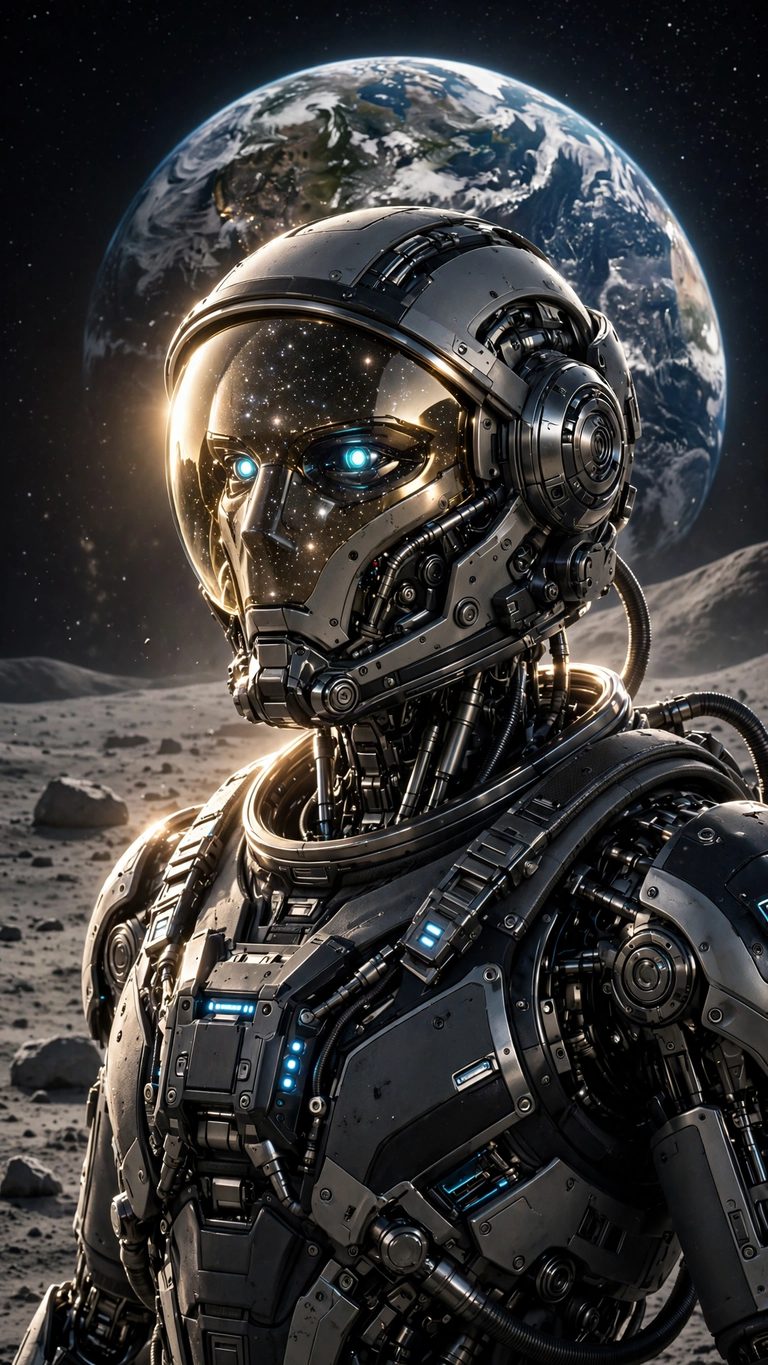
There is a reason the 1968 Earthrise photograph still stops people in their tracks nearly sixty years later. When humanity first saw its home planet hanging in the blackness of space, something shifted in our collective imagination. Space is not just a setting; it is the ultimate canvas for wonder. Now, with AI image generation, you can place your own explorer at the center of that cosmic drama. This robot astronaut portrait prompt produces the kind of image that freezes thumbs mid-scroll: a sleek humanoid machine standing on the lunar surface, Earth rising behind it, rim-lit like the hero of a sci-fi epic. The composition borrows every trick from blockbuster movie posters — a heroic stance, dramatic backlighting, a reflective visor full of stars — and delivers them all in a single paste-and-generate step. Whether you are building a personal brand around AI art, hunting for viral content, or simply chasing the thrill of watching your own vision rendered in photorealistic 8k detail, this prompt is one of the most reliable space-themed generators you will find. In this guide, we break down exactly why it works, how to run it on Midjourney, DALL-E 3, and Flux, and how to spin it into an entire portfolio of cosmic portraits.
The Prompt
Copy the exact prompt below and paste it into your image generator of choice. Every word has been tuned for photorealistic space drama, so resist the urge to trim anything before your first generation.
Epic portrait photograph of a humanoid robot in a sleek astronaut suit standing on the lunar surface, Earth rising in the black sky behind, dramatic rim lighting, reflective visor showing stars, heroic composition, ultra detailed, 8k, photorealistic
Why This Prompt Works
Space imagery triggers something primal in the human brain: awe. Psychologists call it the overview effect, the cognitive shift astronauts report when they see Earth from orbit, a cocktail of wonder, humility, and deep connection. This prompt borrows that emotional payload and puts your viewer one click away from it. The Earth rising in the black sky is not decoration; it is the emotional anchor of the image. Viewers who would scroll straight past another robot portrait stop cold when they see their home planet framed against infinity, because it reframes the robot as an emissary of humanity rather than a cold machine.
The composition does enormous heavy lifting too. A heroic low-angle stance reads as confidence and aspiration, the same visual language used in blockbuster posters and Olympic victory photographs. Dramatic rim lighting carves the astronaut’s silhouette out of the black sky, producing edge contrast that the human eye simply cannot ignore — our visual system is wired to track high-contrast boundaries. Then there is the reflective visor showing stars: an image inside the image. That single detail rewards a second look, and images that reward a second look earn longer dwell time, the metric every recommendation algorithm quietly worships. The words ultra detailed, 8k, and photorealistic act as quality tokens, steering the model toward crisp textures, believable metal, and cinematic depth of field instead of a plasticky cartoon render.
On the trend side, space content is evergreen. Space-themed posts accumulate billions of views across TikTok and Instagram, and robot aesthetics ride the enormous cultural wave around artificial intelligence itself. The 9:16 portrait format is native to Reels, Shorts, and TikTok, so the output slots perfectly into the feeds where viral content is born. Because the result looks like a film still, people save it as a wallpaper, drop it into group chats, and repost it with captions about dreams and exploration. That save-and-share loop is the true engine of virality, and this prompt was built to feed it.
How to Use This Prompt
Running this prompt is simple, but each platform has its quirks. Follow these steps for the best first result.
Midjourney: Type /imagine in Discord or the web app, paste the full prompt, then add –ar 9:16 –v 7 at the end to lock in the vertical format on the latest model. If your first result feels too stylized, add –style raw for a more photographic, less illustrated finish. Generate four variations, pick the strongest, then hit Vary (Subtle) once or twice to refine the visor reflection and the Earth’s glow without losing the composition you love.
DALL-E 3: Paste the prompt directly into ChatGPT and add the sentence “Render in 9:16 vertical portrait orientation” since DALL-E 3 does not take aspect-ratio flags. DALL-E 3 is excellent at following descriptive language literally, so the visor stars and Earth placement tend to come out faithfully. If the robot looks too human, append “clearly mechanical robot face visible through the visor” and regenerate.
Flux: Paste the prompt into your Flux interface, set the aspect ratio to 9:16 (or 768×1344), use 30 to 40 sampling steps, and keep guidance around 3.5 for a natural photographic look. Flux renders fine mechanical detail beautifully, so lean into close crops: try generating once, then cropping the visor region and running a second pass for an extreme-detail companion image.
Whichever tool you use, generate in batches of four and judge the Earth first — if the planet looks like a flat sticker instead of a glowing sphere, reroll before you fall in love with the rest of the frame.
Pro Tips & Creative Variations
Small tweaks turn a great prompt into a signature style. Start with the three levers baked into this prompt. First, keep the Earth rise dramatic: words like colossal, glowing blue marble, or partially shadowed Earth push the model away from a timid background dot and toward a cinematic celestial body. Second, push the visor star reflection harder with phrases like mirror-like visor reflecting a dense starfield or tiny constellation reflections in the visor — this is the detail viewers zoom into. Third, keep the rim light strong: backlit, glowing edge light, or halo of sunlight behind the figure guarantees that heroic separation from the black sky.
Once you have your hero shot, build a series. Swap the lunar surface for the rust-red dunes of Mars, the methane lakes of Titan, or the deck of a derelict space station to create a whole exploration saga. Change the explorer: a female-presenting android, a bulky industrial mech in a patched suit, or a child-sized robot gazing up at Earth for maximum emotional impact. Experiment with eras — a retro 1970s NASA-style suit versus a futuristic exosuit tells two completely different stories. Try cinematic color grades by appending teal and orange cinematic grade or desaturated monochrome silver for a fine-art variant. You can even flip the concept: put the robot inside the visor reflection of a human astronaut, Earth rising behind them both. Creators who post these as a carousel series — same character, new worlds — report far higher follow rates than single-image posts, because viewers subscribe to the journey, not just the picture.
Frequently Asked Questions
Q: Which generator gives the most photorealistic result for this prompt?
A: All three handle it well, but they shine differently. Midjourney v7 delivers the most cinematic lighting and the prettiest Earth glow out of the box. DALL-E 3 follows the compositional instructions most literally, which helps if your Earth keeps drifting to odd positions. Flux produces the sharpest mechanical detail on the suit and visor. For pure viral impact, start with Midjourney; for precision, use DALL-E 3.
Q: The Earth in my generations looks fake or flat. How do I fix it?
A: Strengthen the Earth descriptors: try luminous blue Earth with visible continents and cloud swirls, glowing atmosphere. Avoid the word “small,” which the model takes literally. Generating at higher resolution and adding volumetric light also helps the planet feel like it sits in real space rather than pasted on top.
Q: Can I use images from this prompt commercially?
A: Generally yes, but check your generator’s current terms. Midjourney’s paid plans, DALL-E 3 via ChatGPT Plus, and most Flux licenses permit commercial use of images you generate. If you plan to sell prints or use the image in ads, keep a record of the plan you generated it under and review the terms at the time of use, since policies evolve.
Q: How do I turn this into a consistent character series?
A: Use the same seed or character-reference feature. In Midjourney, add –cref with the URL of your favorite result to keep the robot’s design stable across new worlds. In DALL-E 3, describe the suit’s signature details identically each time. Post the series as a carousel with a story caption, and watch your saves climb.
Space has inspired humanity’s biggest dreams for millennia, and now you can bottle that feeling in a single image. Paste the prompt, generate your robot astronaut, and share your Earthrise — then tag it so the world can feel that overview effect with you. Your cosmic portrait is one click away.
Related Viral Prompts
- Glowing Robot Eye Macro: Intense AI Photo Prompt for Hyper-Detailed Futuristic Close-Up Portraits to Try Today
- Wholesome Robot Family Photo: Cute AI Photo Prompt for a Feel-Good Park Portrait Everyone Shares Today
- Lone Robot at Sunset: Poetic AI Photo Prompt for a Contemplative Silhouette That Moves Viewers to Tears
# A I P h o t o # P r o m p t B a z a r # R o b o t A s t r o n a u t # S p a c e # E p i c

Leave a Reply