
Introduction
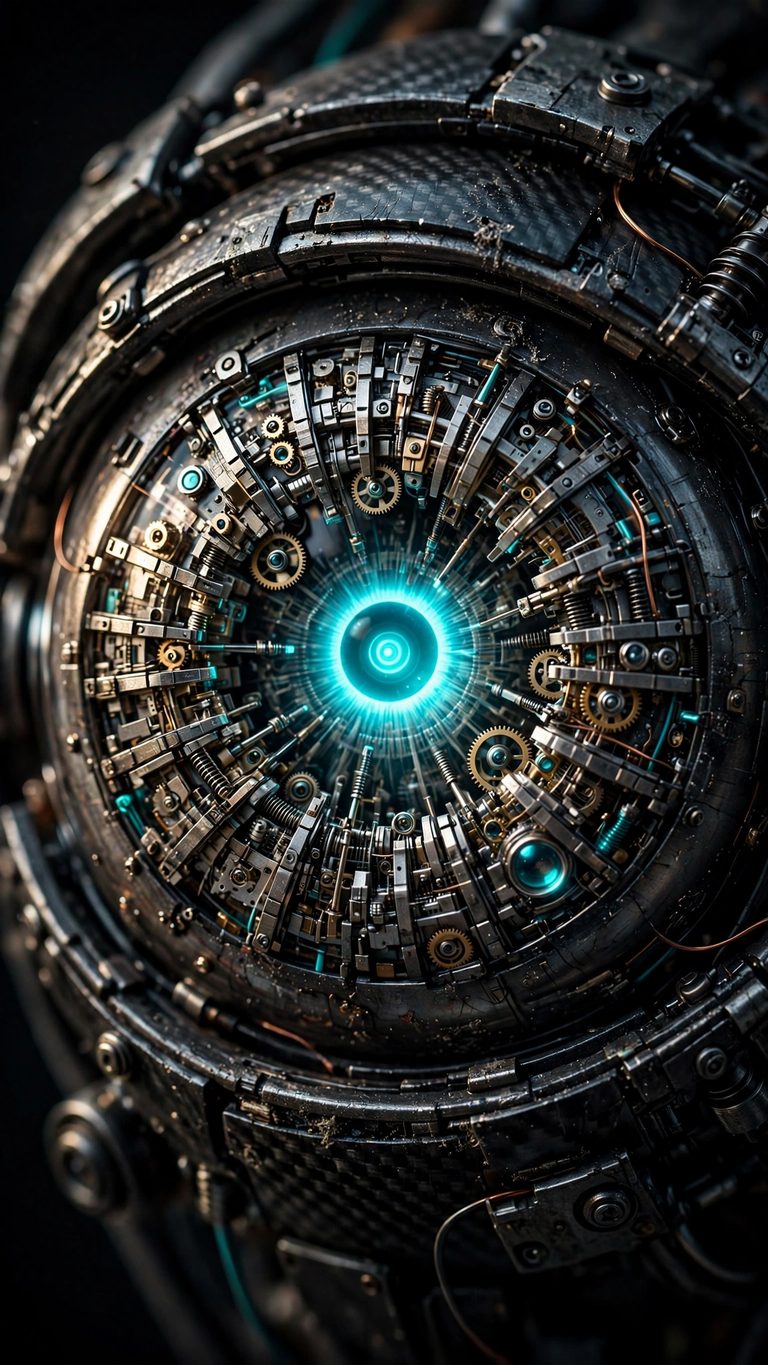
There is a peculiar magnetism to a close-up of an eye. Human or machine, an eye staring straight at the camera triggers an ancient reflex: we look back. Now imagine that eye is mechanical — an intricate iris of gears, lenses, and a glowing cyan pupil, rendered so sharply you can count the machined ridges. This robot eye macro prompt creates exactly that arresting image, and it exploits one of the oldest truths of visual media: intensity stops the scroll. Macro photography has always fascinated viewers because it reveals hidden worlds, and a robotic eye is a hidden world most people have never seen. The extreme detail, the dramatic lighting against pure darkness, and that single point of cyan glow combine into a thumbnail that practically demands a tap. Creators use images like this as profile pictures, video intros, album covers, and the opening frame of tech explainers. In this guide, you will learn the visual psychology that makes a mechanical gaze so hypnotic, how to generate it flawlessly on Midjourney, DALL-E 3, and Flux, and how to remix it into a gallery of futuristic close-ups.
The Prompt
Paste this prompt exactly as written for your first generation. The stacked detail keywords are doing deliberate work — every one pushes the model toward sharper, richer mechanical texture.
Intense macro photograph of a robotic eye, intricate mechanical iris with glowing cyan pupil, tiny gears and lenses visible, extreme detail, dark background, dramatic lighting, futuristic intensity, hyper-detailed, ultra sharp, 8k, photorealistic
Why This Prompt Works
The power of this prompt starts with biology. Humans are hardwired to notice eyes — our brains contain dedicated neural circuitry for gaze detection, and a direct stare activates attention and even mild arousal within milliseconds. A robotic eye hijacks that circuitry while adding a second hook: novelty. We know what a human eye looks like, so a mechanical one forces the brain to linger, decoding gears, lenses, and glowing elements it has never encountered in nature. That decoding time is dwell time, and dwell time is the currency of every feed algorithm.
The macro framing multiplies the effect. Macro photography has a devoted audience because it transforms the familiar into the alien; here, the subject is already alien, so the magnification feels like a journey into science fiction. The glowing cyan pupil functions as a single high-saturation focal point against a dark background, and color theory tells us the eye darts straight to the brightest, most saturated region of a frame. Dramatic lighting sculpts the tiny gears with highlights and deep shadows, creating texture you can almost feel. Meanwhile, the stacked quality tokens — extreme detail, hyper-detailed, ultra sharp, 8k, photorealistic — act like a volume knob for crispness, suppressing the soft, mushy renders that plague close-up generations.
Trend-wise, this image is endlessly reusable. Futuristic macro shots dominate tech YouTube thumbnails, AI-themed TikToks, and cyberpunk mood boards. The square-friendly composition crops cleanly to a profile picture or channel avatar, and the intense gaze makes it one of the highest-converting thumbnail styles for videos about AI, robotics, and the future. People share it because it looks like a movie prop from a film that does not exist yet — and everyone wants to be the one who discovered it first.
How to Use This Prompt
Macro detail is demanding, so give your generator the best possible conditions with these steps.
Midjourney: Run /imagine, paste the prompt, and append –ar 9:16 –v 7. Because this is a detail-heavy image, consider –style raw to avoid an overly processed look, and try –q 2 on older versions for extra rendering passes. Generate four, zoom into the iris at full size, and pick the one where the gears read as actual machinery rather than blurry texture. Use Vary (Subtle) to polish the winner.
DALL-E 3: Paste the prompt into ChatGPT and add “extreme close-up, the eye fills the entire frame” to prevent the model from zooming out and adding a robot face you did not ask for. DALL-E 3 is strong at literal detail, so explicitly requesting visible gears and layered lenses pays off. If the pupil glow looks weak, follow up with “make the cyan pupil glow brighter, like a light source.”
Flux: Set 9:16 or a square 1:1 ratio, 35 to 50 steps, and guidance near 3.5. Flux excels at fine mechanical detail, so this prompt plays to its strengths — inspect the iris at 100 percent and you will often find believable threading on screws and layered lens coatings. For maximum sharpness, generate slightly larger than you need and downscale.
Across all tools, avoid adding words like “cute” or “friendly” — they soften the intense mood that makes this image work. Keep the background pure dark for gallery-grade contrast.
Pro Tips & Creative Variations
Three levers control the magic here. First, keep the iris detail extreme: phrases like layered mechanical iris, microscopic engraving, or visible servo mechanisms push the model past generic “robot eye” territory into something that rewards pixel-peeping. Second, keep the cyan glow vivid — describe it as luminous, emitting light, or casting a cyan glow onto surrounding metal so the pupil reads as a light source rather than a painted dot. Third, keep the background pure dark: pitch black background or void-black backdrop eliminates distractions and makes the eye float like a specimen in a museum case.
For variations, build a whole series of machine senses. Generate a robotic ear with acoustic chambers, a mechanical hand with fiber-optic nerves, or a speaker-grille mouth — a “machine anatomy” collection performs beautifully as a carousel. Shift the mood with color: a red pupil reads as menacing security drone, amber as vintage mainframe, violet as alien intelligence. Try materials too — a brass-and-glass Victorian robot eye, a chrome liquid-metal iris, or a cracked, battle-damaged eye with a flickering pupil for storytelling. Angle experiments work wonders: a three-quarter view adds depth, while a perfectly symmetrical front view feels like a passport photo from the future. Creators who post these as matching profile picture and banner sets give their whole account an instant sci-fi rebrand, and that cohesive aesthetic is what turns casual viewers into followers.
Frequently Asked Questions
Q: My generations keep showing a whole robot face instead of just the eye. How do I fix it?
A: Add explicit framing language: “extreme macro, the robotic eye fills the entire frame, no face visible.” All three major generators sometimes pull back to show context; insisting on the crop in plain language usually solves it. In Midjourney, –zoom 1 will not help here — rephrase instead of fighting with parameters.
Q: The mechanical details look blurry or melted. What helps?
A: Push the quality stack harder and give the model more steps. In Flux, raise steps toward 50. In Midjourney, add intricate mechanical engineering detail and avoid –style raw if it is softening things. Also generate at the largest size your plan allows; upscaling a sharp render beats sharpening a soft one every time.
Q: Can I use this as a logo or channel avatar?
A: Absolutely — the centered, high-contrast composition was practically born for avatars. For logo use, generate a symmetrical front view, then simplify: you can vectorize it or ask an image editor to flatten the background to solid black. Check your generator’s commercial terms, and consider trademarking only original designs you have meaningfully customized.
Q: How do I make a matching set of images in the same style?
A: Keep the lighting and background descriptors identical across prompts and only swap the subject. In Midjourney, use –cref with your eye image or –sref with a style reference for visual consistency. A matching set of three to five macro shots makes a striking carousel or banner.
Some images whisper and some stare straight into your soul — this one does the latter. Paste the prompt, generate your robotic eye, and watch how fast it becomes the most-saved image in your gallery. Try it now and see who looks back.
Related Viral Prompts
- Wholesome Robot Family Photo: Cute AI Photo Prompt for a Feel-Good Park Portrait Everyone Shares Today
- Lone Robot at Sunset: Poetic AI Photo Prompt for a Contemplative Silhouette That Moves Viewers to Tears
- Steampunk Robot Portrait: Magnificent AI Photo Prompt for a Victorian-Era Brass-and-Copper Masterpiece
# A I P h o t o # P r o m p t B a z a r # R o b o t E y e # M a c r o # F u t u r i s t i c


Leave a Reply