
Introduction
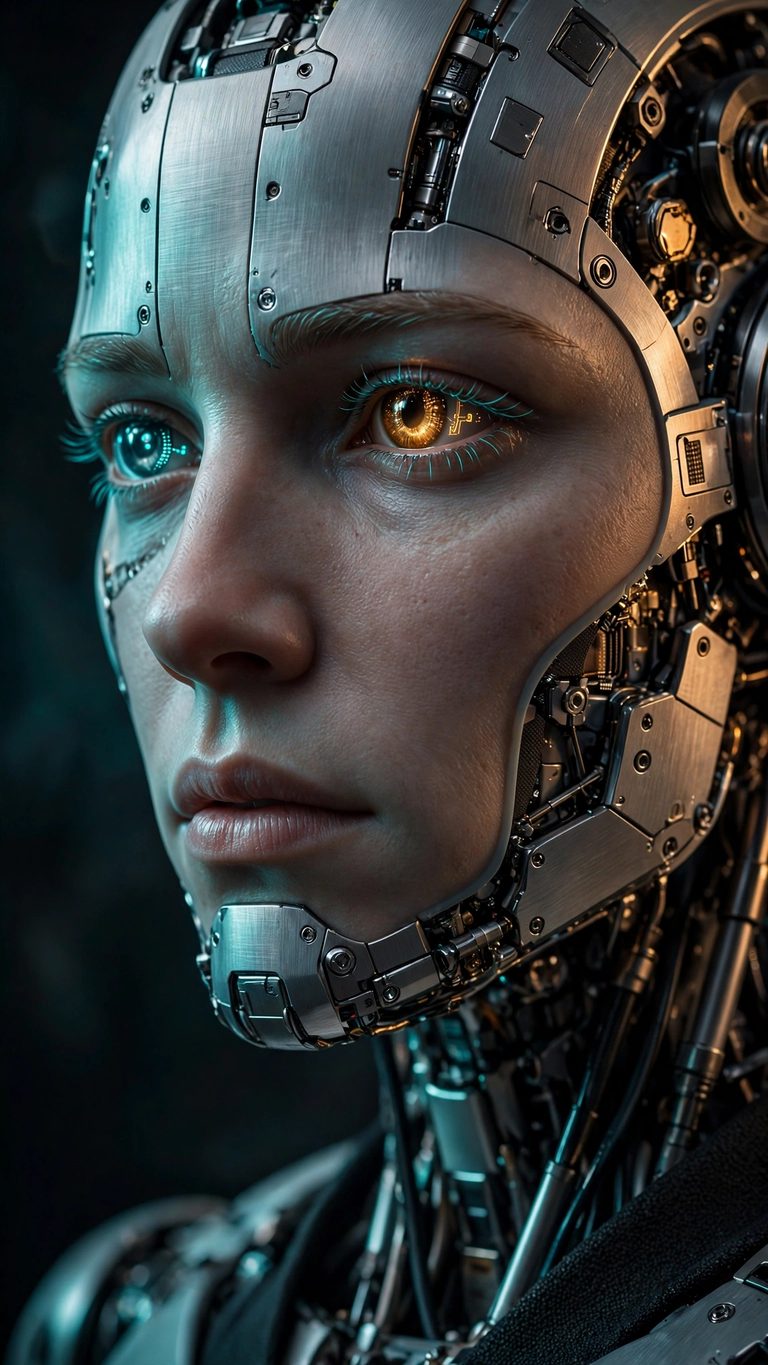
There is a moment in every great portrait when the subject stops being a subject and becomes a presence. This humanoid robot studio portrait prompt recreates exactly that moment, except the sitter is not human. Three-quarter view, expressive synthetic eyes, and brushed-metal skin rendered under dramatic teal-and-amber split lighting produce an image that makes viewers pause mid-scroll and ask the only question that matters: is this a machine, or is this someone?
Studio portraiture has always been about control: control of light, of expression, of the narrow emotional bandwidth between camera and sitter. Applying that discipline to a lifelike android creates a fascinating tension. The lighting is textbook — cinematic, deliberate, gallery-worthy — but the face it reveals is something no photographer has ever framed before. That collision between classical portrait craft and speculative subject matter is precisely what makes the resulting images so magnetic.
What makes this prompt especially powerful is how it flirts with the uncanny without falling into it. The contemplative mood, the hyper-detailed face, and the contrast of warm amber against cool teal keep the robot readable as both artifact and character. The result feels less like a product render and more like the cover of a novel about the future — the kind of image people save, share, and study.
The Prompt
Copy the full prompt below and paste it into your favorite AI image generator. Do not change a word if you want the exact look described here — every phrase earns its place.
Striking studio portrait of a lifelike humanoid robot, three-quarter view, expressive synthetic eyes, brushed metal and soft silicone textures, dramatic split lighting in teal and amber, dark background, contemplative mood, hyper-detailed face, ultra sharp, 8k, photorealistic
Why This Prompt Works
The first reason this prompt works is that it weaponizes the most powerful hook in visual psychology: the human face. Our brains are hardwired to seek out faces and read emotion in them within milliseconds. When the face is synthetic yet expressive, that instinct misfires just enough to create fascination. Viewers lean in, zoom, and stare — and in feed-based platforms, that extra dwell time is the single strongest signal that pushes a post into wider distribution. A portrait that holds the eye for three seconds instead of one wins the algorithm.
The second pillar is the split lighting. Teal-and-amber is the most commercially proven color contrast in modern cinematography — it flatters skin (or skin-like silicone), separates the subject from the background, and reads as expensive. Against a dark background, the robot’s metallic contours catch highlights that define its artificiality while the warm side of the face keeps it emotionally approachable. This is not random ‘dramatic lighting’ verbiage; it is a deliberate two-tone scheme that professional portraitists charge hundreds of dollars to reproduce.
Third, the prompt thrives on platform trends. AI robot portraits sit at the intersection of two massive content waves: the endless public fascination with humanoid robotics and the portrait-photography revival driven by mobile portrait modes. The ‘contemplative mood’ instruction gives the image philosophical weight, which is exactly what turns a pretty picture into a shareable one. People do not just like this image — they post it with captions about consciousness, the future, and what it means to be alive. That layer of meaning is what converts a like into a repost and a repost into a thread.
Finally, the prompt is engineered for shareability through ambiguity. Is the robot sad? Thoughtful? Waiting? Because the expression is contemplative rather than explicit, every viewer projects their own reading onto it — and people share images that let them express something about themselves. In comments sections, you will see debates about AI sentience, jokes about robot portrait studios, and genuine admiration for the craft. A prompt that generates conversation, not just consumption, is a prompt that keeps traveling.
How to Use This Prompt
Midjourney v7: Paste the prompt as-is into the imagine bar. The prompt is already tuned for Midjourney’s strengths: it specifies composition (three-quarter view), material detail (brushed metal, soft silicone), and lighting in photographer-grade language. Add –ar 2:3 for the 9:16 portrait format noted in the settings, and consider –style raw if you want maximum photorealism with fewer beautification artifacts. If the eyes come out too glossy or doll-like, run a variation pass and strengthen ‘expressive synthetic eyes’ by repeating it once — Midjourney weights repeated tokens.
DALL-E 3: DALL-E 3 excels at following natural-language descriptions, so this prompt plays directly to its strengths. Paste it into ChatGPT or the image tool and let the model interpret the scene. DALL-E 3 tends to render faces well and handles the contemplative mood gracefully. If the output feels too polished or ‘advertising-like,’ ask for a follow-up edit such as ‘make the lighting moodier and the background darker’ — DALL-E’s conversational editing is its killer feature, so iterate in plain English rather than rewriting the whole prompt.
Flux: Flux (especially Flux Pro and the Schnell/Dev variants) renders material realism beautifully. Use the prompt verbatim and set your aspect ratio to portrait. Flux is particularly good at brushed-metal textures and fine facial detail at high resolution, which is exactly where this image lives or dies. If you find the teal-and-amber split too subtle, append ‘strong rim light, high contrast split lighting’ to push the drama. Keep guidance moderate so the face stays natural rather than over-processed.
Pro Tips & Creative Variations
1. The eyes are everything. In this portrait, the synthetic eyes carry the entire emotional payload. Before publishing, zoom to 100% and check them: catchlights should be present but not blown out, irises should have visible mechanical detail, and both eyes should agree on a single gaze direction. If your generator gives you wandering or mismatched eyes, regenerate with the phrase ‘perfectly symmetrical expressive eyes with detailed catchlights’ appended. One strong eye render is worth more than any background trick.
2. Keep the split lighting honest. The teal-and-amber scheme works because the two colors stay separated — teal on one side, amber on the other, dark falloff behind. If your output muddies into a generic orange-teal wash, simplify the prompt’s lighting clause on a reroll to ‘dramatic split lighting, one side cool teal, one side warm amber, black background.’ Clean separation reads as cinematic; blending reads as a filter.
3. Vary the robot, not the recipe. Once you have a winning render, explore creative variations without abandoning what works. Try an older, weathered android with scratched plating and patina for a ‘retired machine’ narrative; a pristine white-and-chrome service robot for a clinical, high-fashion feel; or a female-presenting android with subtle silicone skin seams for a fashion-editorial look. Swap the background from pure black to a dark studio gradient or a blurred server room. Change the mood word — ‘melancholic,’ ‘defiant,’ ‘serene’ — and the same prompt becomes a whole portrait series.
4. Crop and grade like a photographer. AI generators sometimes leave dead space or odd framing. A tight crop that puts the eyes on the upper third transforms a good render into a great portrait. In post, a gentle S-curve for contrast and a slight desaturation of the teal channel will make the amber side of the face glow. These thirty seconds of editing are what separate gallery-grade results from raw outputs.
Frequently Asked Questions
Q: What aspect ratio should I use for this robot portrait?
A: Use a portrait ratio — 9:16 or 2:3 — as noted in the prompt settings. Portrait formats flatter the three-quarter composition, give the lighting room to fall off into darkness, and dominate mobile feeds where most viewers will discover the image. Landscape crops dilute the intimate, confrontational feel that makes the portrait work.
Q: Why do my robot faces look cartoonish instead of photorealistic?
A: Cartoonish results usually come from weak material and lighting tokens. This prompt’s strength is its specificity: ‘brushed metal and soft silicone textures,’ ‘dramatic split lighting,’ ‘hyper-detailed face.’ If your generator is smoothing everything into plastic, add negative-style guidance like ‘not cartoon, not illustration, not 3d render look’ and emphasize ‘photorealistic, 8k, ultra sharp.’ In Midjourney, –style raw helps preserve photographic grit.
Q: Can I use this prompt commercially?
A: The prompt text itself is free to use and adapt. Images you generate are governed by your generator’s terms of service — most major platforms grant commercial rights to paid-tier users, but always check the current terms of the specific tool you use. If the image will appear in advertising, generate several variants and pick the cleanest render, since AI artifacts are most visible in print.
Q: How do I make a series of matching portraits?
A: Lock the recipe and vary one ingredient at a time. Keep the lighting clause, background, and ‘three-quarter view, contemplative mood’ identical across generations, and change only the robot’s design or the mood adjective. Save your seed or reference image if your tool supports it (Midjourney’s –seed or character reference features are ideal). Consistency across a series is what turns single images into a portfolio.
This humanoid robot studio portrait prompt proves that the future of portraiture is not about replacing photographers — it is about giving everyone a studio, a sitter, and lighting worth remembering. Copy the prompt, generate your first portrait, and share the gaze that stops the scroll. Your android is waiting for its close-up.
Related Viral Prompts
- Cute Robot Reading AI Photo Prompt: Create a Heartwarming Robot Child Reading in a Cozy Library Glow
- AI Server Room Symmetry AI Photo Prompt: Capture a Perfectly Symmetrical Glowing Blue Data Center Aisle
- Robot Human Hand Touch AI Photo Prompt: Create an Emotional Man-Meets-Machine Moment in Golden Light
# A I P h o t o # P r o m p t B a z a r # H u m a n o i d R o b o t # P o r t r a i t # A I


Leave a Reply