
Introduction
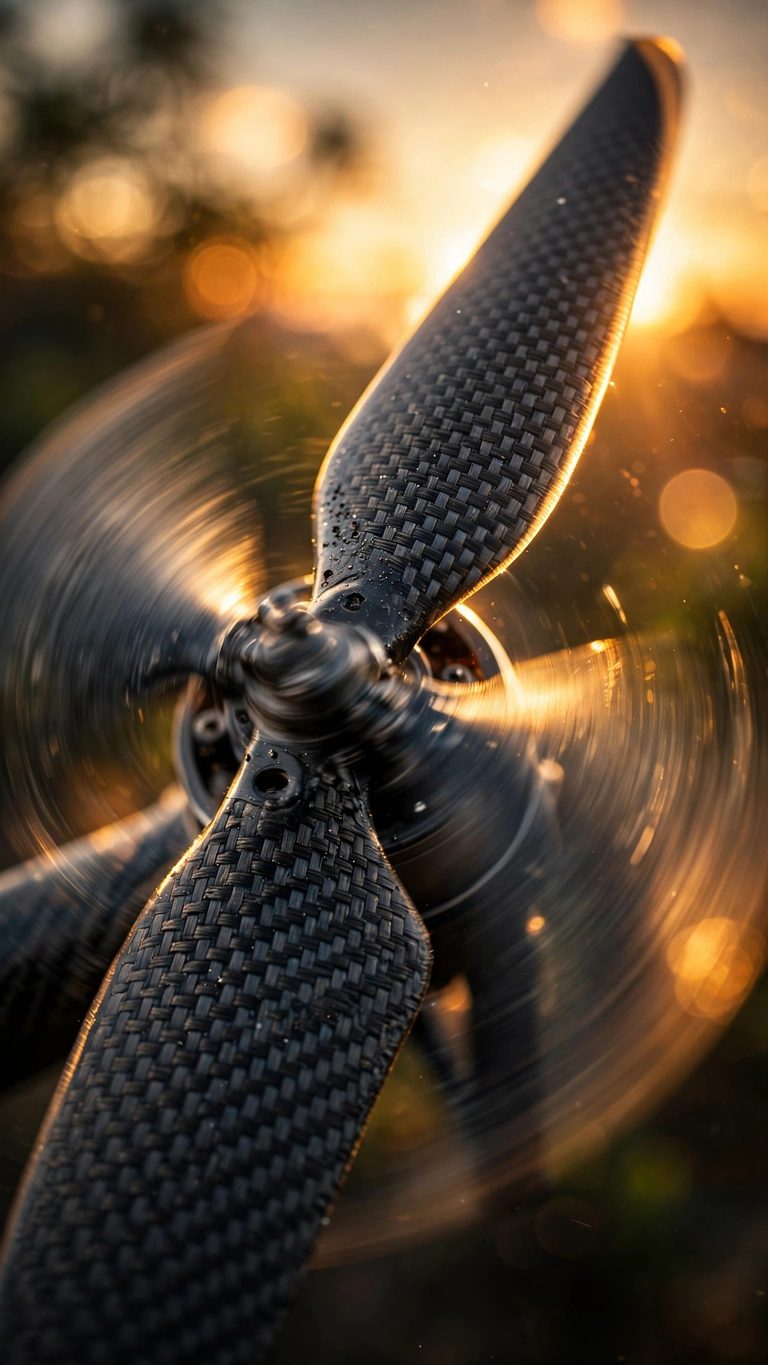
There is a special kind of thrill in seeing speed frozen inside a still image: a spinning propeller caught mid-rotation, its edges dissolving into motion while every carbon fiber weave stays tack sharp. Drones have gone from military hardware to everyday creative tools, filming weddings, racing through forests at eighty miles per hour, and delivering packages to doorsteps. Yet most drone photos look the same: a quadcopter hovering against a blue sky. The macro shot is the antidote. By pushing the camera right up to the propeller, you reveal the hidden engineering beauty of the machine, the woven carbon textures, the precision-molded blades, the raw physics of lift, and you wrap it in golden sunset light for pure cinema. This AI photo prompt delivers that exact frame: motion, detail, and drama in a single vertical image built for the era of short-form video covers and tech wallpapers.
The Prompt
Copy the prompt below character for character into your image generator. The magic of this image lives in the tension between sharp detail and beautiful blur, so keep every phrase intact for your first generation.
Dynamic macro photograph of a drone propeller spinning with motion blur, carbon fiber textures in sharp detail, sunset bokeh behind, dramatic backlight creating glowing edges, sense of speed and power, hyper-detailed, ultra sharp, 8k, photorealistic
Why This Prompt Works
This prompt is built on contrast, and contrast is what makes images unforgettable. “Spinning with motion blur” combined with “carbon fiber textures in sharp detail” creates a dynamic tension: part of the frame screams speed while another part whispers precision engineering. That push-pull holds the viewer’s eye far longer than an image that is uniformly sharp or uniformly blurred. “Macro photograph” is the key that unlocks it all, because it tells the model to get extremely close, filling the frame with textures and curves that are invisible in ordinary drone photos. Most people have never truly looked at a propeller; this prompt makes them look.
The lighting design is pure golden-hour cinema. “Sunset bokeh behind” places soft, glowing out-of-focus orbs of warm light in the background, which does three jobs: it adds gorgeous color, it creates depth that separates subject from background, and it signals a time of day everyone associates with beauty. “Dramatic backlight creating glowing edges” rims the propeller blades with light, outlining their shape against the darker foreground exactly like a professional automotive or sports shoot. “Sense of speed and power” is an emotional direction that keeps the whole composition feeling aggressive and alive rather than clinical. The “hyper-detailed, ultra sharp, 8k, photorealistic” finish ensures the carbon weave and metallic hardware render with convincing tactility.
For content creators, this aesthetic is endlessly useful. #Drone content spans racing, cinematography, reviews, and tutorials, and every one of those niches needs striking visuals. A macro motion shot works as a YouTube thumbnail, a Reels cover, a blog hero image, or a phone wallpaper, and it stands out precisely because it is not another drone-in-the-sky photo. The vertical 9:16 format matches where drone culture lives now: short video platforms and Stories. Images like this also perform well as prints and posters, since the abstract quality of blurred blades and bokeh reads as art, not just tech documentation.
How to Use This Prompt
Follow these steps for the best result. First, copy the complete prompt exactly as written above. Second, open your image generator of choice: the recommended settings for this post are “9:16 portrait, DALL-E 3 / Midjourney v7,” both of which handle the tricky combination of blur and sharpness well. In Midjourney v7, use /imagine with the prompt and add –ar 9:16. In DALL-E 3, paste the prompt and request a vertical 9:16 orientation. Flux and Stable Diffusion users can also run it: choose the 9:16 preset in Flux, or a 768 by 1344 portrait resolution in Stable Diffusion with 30 or more steps.
Third, generate a batch of four to six images. Motion blur is one of the most variable things AI models render, and you want to compare how different generations handle the balance between blurred blade tips and sharp hub details. Fourth, pick the winner based on two criteria: the carbon fiber texture must look woven and real, and the blur must read as spinning motion rather than camera shake. Fifth, upscale the chosen image before publishing, since macro detail rewards every extra pixel. If the blur looks too extreme, add “subtle motion blur” in a follow-up generation; if it looks too static, strengthen it with “strong rotational motion blur.” Keep notes on which phrasing worked so your next drone shots stay consistent.
Pro Tips & Creative Variations
This prompt is a launchpad for a whole series of dynamic tech macros. The simplest remix is changing the time of day: “blue hour bokeh” gives a cool electric mood, “night city lights bokeh” turns it into an urban racing poster, and “bright daylight with shallow depth of field” creates a clean review-style detail shot. You can also change the environment entirely: “rain droplets on the blades with storm clouds behind” adds drama, while “desert dust swirling around” gives a rugged expedition feel.
Explore other parts of the drone with the same formula. Swap “propeller” for “camera gimbal,” “brushless motor,” or “landing gear” and keep the motion-blur-plus-sharp-detail structure for a matching set of engineering close-ups. An “FPV racing drone speeding through a neon gate, motion blur” variation captures the sport itself, while “drone propellers spinning at takeoff, dust and grass blurring below” tells a launch story. For a calmer counterpoint, try the same macro setup on a stationary propeller with “morning dew drops” for a contemplative, beautiful contrast piece.
Control the intensity of the effect with precise language. “Slight motion blur on blade tips, hub tack sharp” gives a realistic action-freeze look, while “extreme radial blur, sense of violent speed” pushes toward abstract art. Adding “low camera angle” makes the drone feel powerful and dominant; “top-down view of all four propellers spinning” creates a mesmerizing symmetrical composition. For commercial or review use, pair the macro with a clean product shot of the full drone so viewers get both the emotion and the information. And remember: in macro work, less is more, so keep the background simple and let the textures do the talking.
Frequently Asked Questions
Q: The motion blur sometimes looks like the whole image is out of focus. How do I fix it?
A: Anchor the sharpness explicitly. Phrases like “propeller hub and carbon fiber in tack-sharp focus, only blade tips blurred” tell the model exactly where the blur belongs. If a generation still looks uniformly soft, regenerate rather than trying to salvage it: blur placement varies a lot between generations, and a fresh batch usually produces at least one well-balanced version.
Q: Can I use this prompt for other spinning objects, like fans or wheels?
A: Yes, the formula is universal. Replace “drone propeller” with “car wheel,” “ceiling fan,” or “bicycle wheel” and adjust the texture cue to match, such as “brushed aluminum” or “rubber tread.” Keep the bokeh background and backlight phrases, since they are what give the image its cinematic quality regardless of subject.
Q: Which generator handles motion blur best?
A: Midjourney v7 and DALL-E 3 both render convincing motion blur from this prompt, which is why they are the recommended settings. Flux is also strong, especially with explicit blur direction like “rotational motion blur.” In Stable Diffusion, motion blur benefits from higher step counts and detailed prompts, so do not skimp on the descriptive phrases.
Q: How do I make the image work as a phone wallpaper?
A: The 9:16 portrait ratio already matches most phone screens. Choose a generation with the sharpest hub detail positioned slightly above center, so it sits clear of clock and widget overlays. Upscale to the highest resolution your tool offers, and consider a version with slightly darker edges so home-screen icons stay readable over the image.
This drone propeller macro prompt captures speed, engineering, and golden light in a single frame. Copy the prompt, generate your 9:16 shot, and give your audience a view of drone tech they have never seen before. Try it now and feel the difference real motion makes.
Related Viral Prompts
- AI Photo Prompt: Serene Smart Speaker Minimal Interior With Morning Light, Oak Table and Scandi Calm
- Unfolding Smartphone Hologram City: The Ultimate AI Video Prompt for Futuristic Tech Reels and Shorts
- Drone Swarm Phoenix Light Show: An Epic Viral AI Video Prompt for Breathtaking Night Sky Spectacle Videos
# A I P h o t o # P r o m p t B a z a r # D r o n e # M a c r o # M o t i o n

Leave a Reply