
Introduction
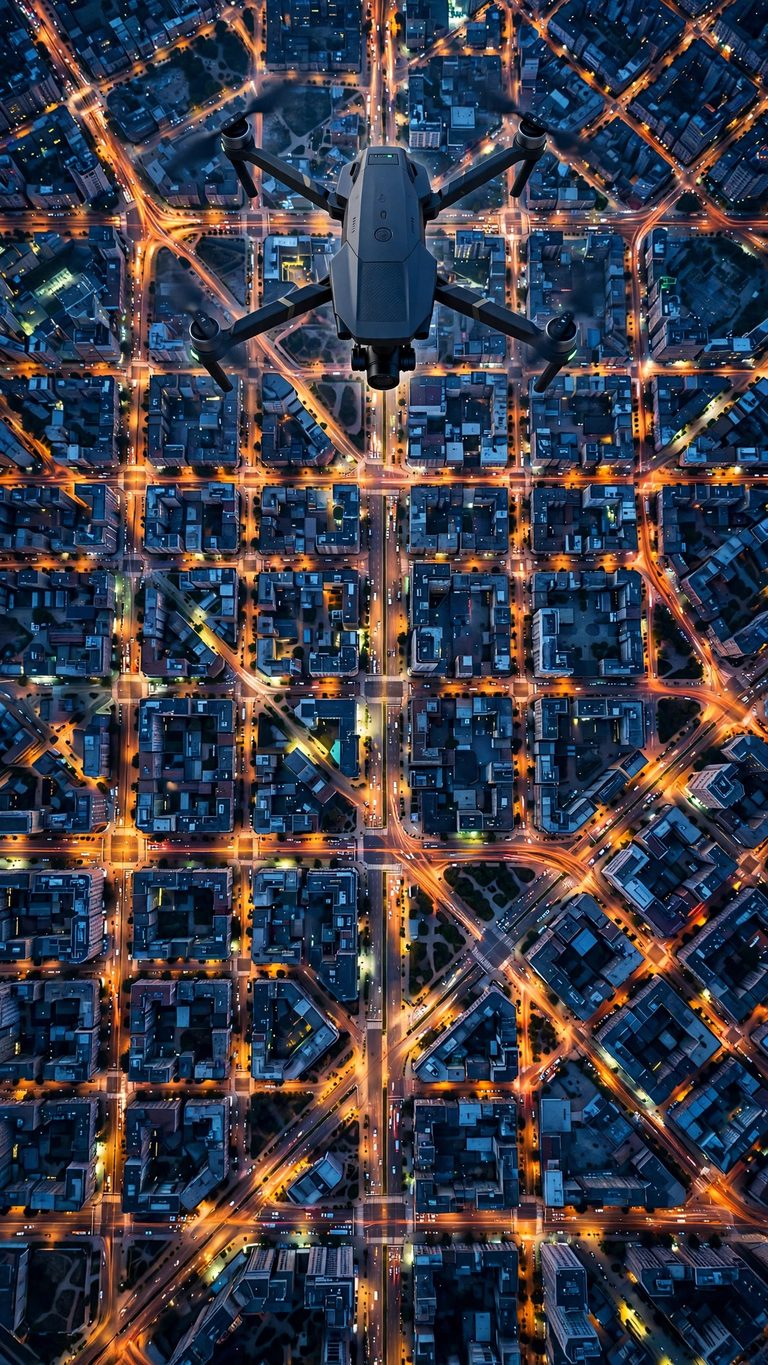
There is a moment every evening when the city transforms. The sun dips below the skyline, the sky turns a deep electric blue, and a million windows and headlights flicker on at once. Photographers call it the blue hour, and from a drone hovering hundreds of feet up, it looks like pure magic: glowing streets forming perfect geometric grids, rivers of car lights carving amber trails through the dark. Until recently, capturing that view meant owning an expensive drone, getting flight permissions, and braving the cold at exactly the right ten-minute window. Now a single AI photo prompt can put you above the city at blue hour in seconds. This prompt imagines a cinematic camera drone hovering over a glowing city grid, with tiny cars drawing light trails below and geometric street patterns stretching to the horizon in deep blue and amber tones. It is the kind of image that makes people stop mid-scroll and wonder how on earth it was taken. Whether you make travel content, tech videos, or just love a jaw-dropping wallpaper, this aerial scene delivers instant drama with zero flight time.
The Prompt
Copy the full prompt below exactly as written, paste it into your AI image generator, and prepare for takeoff.
Breathtaking top-down aerial photograph of a cinematic camera drone hovering over a glowing city grid at blue hour, tiny cars with light trails below, geometric street patterns, deep blue and amber tones, sharp detail, professional drone photography style, ultra detailed, 8k, photorealistic
Why This Prompt Works
This prompt succeeds because it stacks three proven visual ingredients: a spectacular vantage point, perfect timing, and color contrast that the human brain cannot ignore. The top-down aerial perspective is inherently fascinating. Most of us never see our cities from directly above, so the geometric street patterns trigger the same delight we feel looking at maps or satellite imagery. Our brains love finding order in complexity, and a glowing grid delivers that satisfaction instantly. Setting the scene at blue hour is the second masterstroke. Blue hour is the brief window when the sky holds rich blue tones while artificial lights blaze at full strength, creating a natural contrast no filter can fake. Photographers plan entire trips around those few minutes, and the prompt captures the effect with the simple phrase “blue hour” plus “deep blue and amber tones.”
Those two colors do the heavy lifting. Blue and amber are near-complements, so the cool sky and warm streetlights vibrate against each other and give the image its cinematic glow. The tiny cars with light trails add the final ingredient: motion. Long-exposure light trails imply speed and life, turning a static map-like view into a living city. Psychologically, the drone itself matters too. Including “cinematic camera drone hovering” in the frame gives viewers a surrogate, a sense that they are the pilot looking down, which makes the image feel like an experience rather than just a picture. On the trends side, aerial content is evergreen on social platforms. Drone footage consistently outperforms ground-level shots for watch time because the perspective feels premium and rare. A still image with this composition borrows all of that prestige. It works as a YouTube thumbnail, a tech channel banner, a presentation background, or a phone wallpaper, and its strong geometry stays readable even as a small preview, which is exactly what shareability demands in the #Aerial and #Cityscape communities.
How to Use This Prompt
This prompt was built for a 9:16 portrait frame and tuned for DALL-E 3 and Midjourney v7, a combination that suits vertical video covers, stories, and wallpapers.
DALL-E 3: Paste the prompt and add “vertical 9:16 portrait orientation.” DALL-E 3 is excellent at following the geometric logic of street grids, so the city below should look convincingly planned. If the drone looks too large or too small, follow up with “make the drone smaller in frame, emphasize the city grid.”
Midjourney v7: Add –ar 9:16 –v 7 after the prompt. Midjourney renders atmospheric blue hour skies beautifully. If you want extra cinematic grain, add –style raw and let the natural contrast do the work.
Flux: Flux excels at fine detail, which matters for tiny cars and street patterns. Paste the prompt at a portrait resolution like 768 by 1344 and keep guidance moderate to avoid over-sharpened artifacts in the light trails.
Stable Diffusion: An SDXL model at 768 by 1344 handles the 9:16 frame well. Put the prompt in the positive field and use a negative prompt such as “blurry, distorted perspective, warped streets” to keep the geometry clean. Generate a few seeds and choose the one where the grid looks most natural. Across all tools, resist the urge to crop to landscape unless you need a banner: the tall frame emphasizes altitude and makes the viewer feel the height.
Pro Tips & Creative Variations
The city below is your canvas, so start by changing it. Replace “glowing city grid” with “coastal city with a curving harbor,” “desert city with a glowing highway oasis,” or “snow-covered city with warm lit streets” to create completely different moods while keeping the winning composition. Time of day is another powerful lever. Try “golden hour” for warm nostalgic tones, “midnight with neon districts” for cyberpunk energy, or “dawn with pink clouds” for a softer travel-poster feel. Each variation keeps the drone and the top-down geometry but tells a new story.
You can also change what the drone is looking at. Swap the city grid for “a winding river delta at dusk,” “a container port with stacked colorful cargo,” or “a music festival crowd forming patterns of light” for images that stand out in a sea of city shots. Weather adds drama too: “light rain with reflective streets” doubles the glow, while “low clouds with city lights piercing through” creates mystery. For the drone itself, specify the model style if you want realism, like “professional quadcopter with red navigation lights,” or remove it entirely with “no drone visible, pure top-down view” for a clean abstract map aesthetic. Detail lovers can zoom the concept in or out: “extreme high altitude showing the whole metropolitan area” gives epic scale, while “low hover above a single glowing intersection” feels intimate and cinematic. If you are building a series for a channel or wallpaper pack, keep the blue hour palette constant and rotate through cities, real or imagined. Tag the standouts with #Drone so fellow aerial fans can find your work. Finally, upscale your favorite result before posting, because fine street detail and light trails reward higher resolution more than almost any other subject.
Frequently Asked Questions
Will the city look like a real place?
Usually it looks plausible rather than specific. The generator invents a convincing street grid, but it will not recreate an actual city accurately. If you need a recognizable skyline, generate the aerial grid first and composite a real skyline silhouette in an editor, or describe distinctive landmarks in the prompt.
Why do my light trails look messy?
Light trails need the “long exposure” feel to read correctly. If they look chaotic, add the phrase “smooth long-exposure light trails” and reduce competing detail by simplifying to “few cars with clean light trails.” Fewer, cleaner trails almost always look more professional.
Can I use this for a YouTube thumbnail?
Absolutely, though thumbnails usually need 16:9 landscape. Regenerate with a landscape aspect ratio and leave empty sky space at the top for your title text. The strong blue and amber contrast will pop against YouTube’s interface.
Do I need to worry about drone regulations for AI images?
No. Since the image is fully AI-generated, no real drone flew and no airspace rules apply. That is one of the joys of this prompt: you get the blue hour aerial look with zero permits, zero risk, and zero battery anxiety.
Blue hour only lasts minutes in real life, but with this prompt it lasts as long as you want. Paste it into your generator, pick your city, and hover above the glowing grid tonight. Try the prompt now and share your aerial masterpiece with #Aerial to inspire the next takeoff.
Related Viral Prompts
- AI Photo Prompt: Exquisite Luxury Smartwatch Macro Photo With Sapphire Dial and Titanium Case Detail
- AI Photo Prompt: Minimalist Wireless Earbuds Product Photo With Pastel Background and Fresh Water Drops
- AI Photo Prompt: Futuristic Holographic Keyboard Photo With Glowing Cyan Keys in a Cyberpunk Workspace
# A I P h o t o # P r o m p t B a z a r # D r o n e # A e r i a l # C i t y s c a p e

Leave a Reply