
Introduction
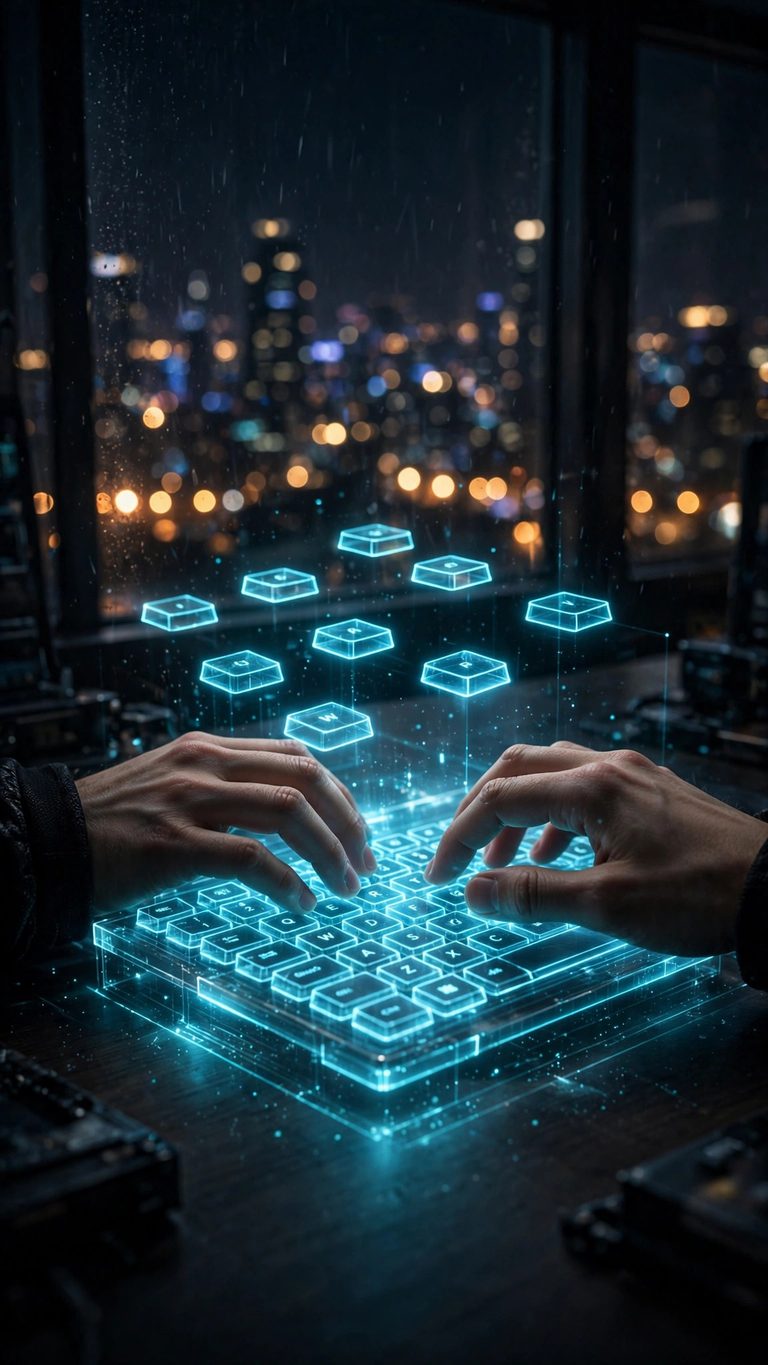
Picture the ultimate desk setup. No plastic keys, no cables, no clutter. Just light itself: a keyboard projected onto a dark desk, glowing cyan keys hovering in mid-air, fingers dancing across photons while a city glitters through the window behind. It is the workspace of science fiction movies, the kind of scene that makes every tech lover whisper “I want that.” Holographic interfaces have fascinated us for decades, from sci-fi films to concept videos with millions of views, because they promise a future where technology dissolves into pure light. This AI photo prompt captures that dream in a single frame: a holographic keyboard projected onto a dark desk, glowing cyan keys floating in mid-air, fingers typing on light, with bokeh city lights and a cyberpunk workspace mood wrapping it all in drama. Whether you create tech content, design wallpapers, or just love cyberpunk aesthetics, this prompt delivers an image that feels like a still from the future. Let us explore why it captivates and how to perfect it.
The Prompt
Here is the exact prompt. Copy it precisely and step into the future.
Futuristic photograph of a holographic keyboard projected onto a dark desk, glowing cyan keys floating in mid-air, fingers typing on light, bokeh city lights through window behind, cyberpunk workspace mood, dramatic lighting, ultra detailed, 8k, photorealistic
Why This Prompt Works
This prompt works because it visualizes a fantasy nearly everyone in tech shares: the dematerialization of gadgets into light. The “holographic keyboard projected onto a dark desk” immediately establishes the core wonder. Projection onto darkness is key, because holograms only read as holographic against dark backgrounds, just like in the movies. The prompt understands this physics intuitively. “Glowing cyan keys floating in mid-air” adds the crucial depth cue. Keys that hover rather than sit flat create parallax and dimension, transforming a flat projection into a volumetric display. Cyan is the perfect color choice: it is the universal sci-fi interface color, associated with holograms, HUDs, and futuristic UI across decades of films and games, so viewers decode the concept instantly.
“Fingers typing on light” introduces the human element that elevates this from a tech render to a story. Hands give scale, imply interaction, and let viewers imagine themselves at the desk. It is the difference between looking at a gadget and wanting a gadget. The “bokeh city lights through window behind” layers in environmental storytelling. Bokeh, those soft out-of-focus orbs of light, adds depth, warmth, and cinematic quality while the city view places the scene in a high-rise future metropolis. It answers the unasked question of where this amazing desk lives. The “cyberpunk workspace mood” and “dramatic lighting” instructions push the generator toward high contrast, rich color, and atmosphere rather than a flat sterile render. Psychologically, the image triggers aspiration. Desk setup content is one of the most engaging tech niches because everyone has a desk and everyone wants a better one. A holographic keyboard is the ultimate setup flex, an impossible upgrade that viewers cannot buy but love to imagine. That aspirational charge drives shares, saves, and comments, especially among #Cyberpunk and #Hologram fans who collect futuristic imagery like art.
How to Use This Prompt
This prompt was designed for a 9:16 portrait frame and tuned for DALL-E 3 and Midjourney v7, perfect for wallpapers, story posts, and vertical video backgrounds.
DALL-E 3: Paste the prompt with “vertical 9:16 portrait orientation” added. DALL-E 3 handles the tricky “fingers typing on light” interaction reasonably well. If the hands look odd, simplify to “hands hovering above glowing keys” and iterate.
Midjourney v7: Append –ar 9:16 –v 7. Midjourney excels at the cyberpunk mood and bokeh rendering. Add –style raw if you want the scene to feel more photographic and less illustrated.
Flux: Flux renders light effects and fine finger detail with strong realism. Generate at 768 by 1344 with moderate guidance so the cyan glow stays luminous rather than harsh.
Stable Diffusion: Use SDXL at 768 by 1344. The hands are the risk area, so include “well-formed hands, natural fingers” in the positive prompt and “deformed hands, extra fingers” in the negative prompt. Generate several seeds and choose the one with the most natural hand pose. Across all tools, keep the scene dark overall: the hologram only glows if the room stays moody.
Pro Tips & Creative Variations
Color is your fastest remix tool. Swap cyan for “glowing magenta keys” for synthwave energy, “amber holographic keys” for a warm retro-future feel, or “rainbow gradient keys” for playful creator content. You can even split the palette with “cyan keys and magenta function row” for extra visual interest. The projection surface can change too. Try “holographic keyboard projected onto a glass table,” “onto a wooden desk for warm contrast,” or “floating in mid-air with no desk at all” for a pure sci-fi command deck.
The environment behind the desk sets the story. Replace the city window with “rain-streaked window with neon signs” for noir cyberpunk, “a space station viewport showing Earth” for ultimate escapism, or “a cozy dark room with LED strips” for the relatable battlestation vibe. Hands can be varied as well: “robotic hand typing” leans into the future theme, “hands with glowing nail art” adds style, or remove hands entirely with “empty holographic keyboard glowing in a dark room” for a mysterious product-shot feel. Expand the concept by adding companion holograms: “holographic monitor floating above the desk,” “a holographic globe beside the keyboard,” or “notifications and widgets floating in the air.” Each addition builds a fuller future workspace. For content series, keep the cyan palette and camera angle consistent while changing the window view, creating a cohesive #Keyboard collection that feels like episodes of the same future. One watch-out: fingers interacting with light often confuse generators, so always inspect hands closely and regenerate or inpaint anything anatomically suspicious before posting.
Frequently Asked Questions
Why do the hands look strange in my results?
Hands are the hardest subject for AI image models, and “typing on light” gives the model an unusual interaction to solve. Generate batches, pick the best hands, and use negative prompts like “deformed hands, extra fingers.” For critical work, generate the scene without hands and composite real hands in an editor.
Can I make the keyboard a different language layout?
AI models cannot reliably render specific key legends or layouts. Keep key markings abstract by adding “glowing keys with abstract symbols, no readable text” to avoid garbled letters. The image reads as futuristic either way.
How do I strengthen the cyberpunk mood?
Deepen the darkness, enrich the cyan, and add atmosphere: append “volumetric light rays, subtle fog, neon reflections on desk surface.” These cinematic cues push any generator toward a moodier, more filmic result.
Is portrait really the best format for a desk scene?
For this concept, yes. The 9:16 frame stacks the keyboard, hands, and city window vertically like a movie poster, which suits wallpapers and stories. If you need a desktop wallpaper, regenerate at 16:9 and add “wide panoramic workspace” to fill the extra width.
The future of typing is light itself, and this prompt puts it on your desk tonight. Copy the prompt, choose your generator, keep the frame tall and the room dark, and watch cyan keys come alive. Try it now and share your cyberpunk workspace with #Cyberpunk to light up the feed.
Related Viral Prompts
- AI Photo Prompt: Retro Gadget Flat Lay Photography of Vintage Tech on Warm Wood With Nostalgic Warm Tones
- AI Photo Prompt: Cute Retro Robot Toy Studio Portrait With Glowing Eyes, Pastel Backdrop and 8K Detail
- AI Photo Prompt: Dramatic VR Headset Studio Shot Floating in Dark Space With Blue Glow and Rim Lighting
# A I P h o t o # P r o m p t B a z a r # H o l o g r a m # K e y b o a r d # C y b e r p u n k

Leave a Reply