
Introduction
There is a reason your thumb stops scrolling when a perfectly arranged collection of old cameras, cassette players, and game cartridges fills the screen. Vintage technology hits a very specific nerve: it reminds us of a slower, more tactile era when every gadget had buttons you could feel, dials you could turn, and a satisfying mechanical click that no touchscreen will ever reproduce. Flat lay photography has become the internet’s favorite way to celebrate that nostalgia, and nowhere does it work better than with retro tech. A great flat lay does more than show objects; it tells the story of an entire decade. The warm grain of a wooden table, the soft spill of window light, the careful spacing of a film camera beside a stack of cassette tapes: all of these details turn a pile of old electronics into an image people save, share, and pin. In this guide, you will get a copy-and-paste AI photo prompt that recreates this exact look, plus a full breakdown of why it works and how to customize it for your own feed. Whether you run a retro tech page, sell vintage finds online, or simply love the aesthetic, this #FlatLay formula is about to become one of your most-used creative tools.
The Prompt
Copy the text below exactly as it appears and paste it into your favorite AI image generator. Every word was chosen to steer the model toward a balanced, warm, photorealistic composition, so resist the urge to trim it before your first generation.
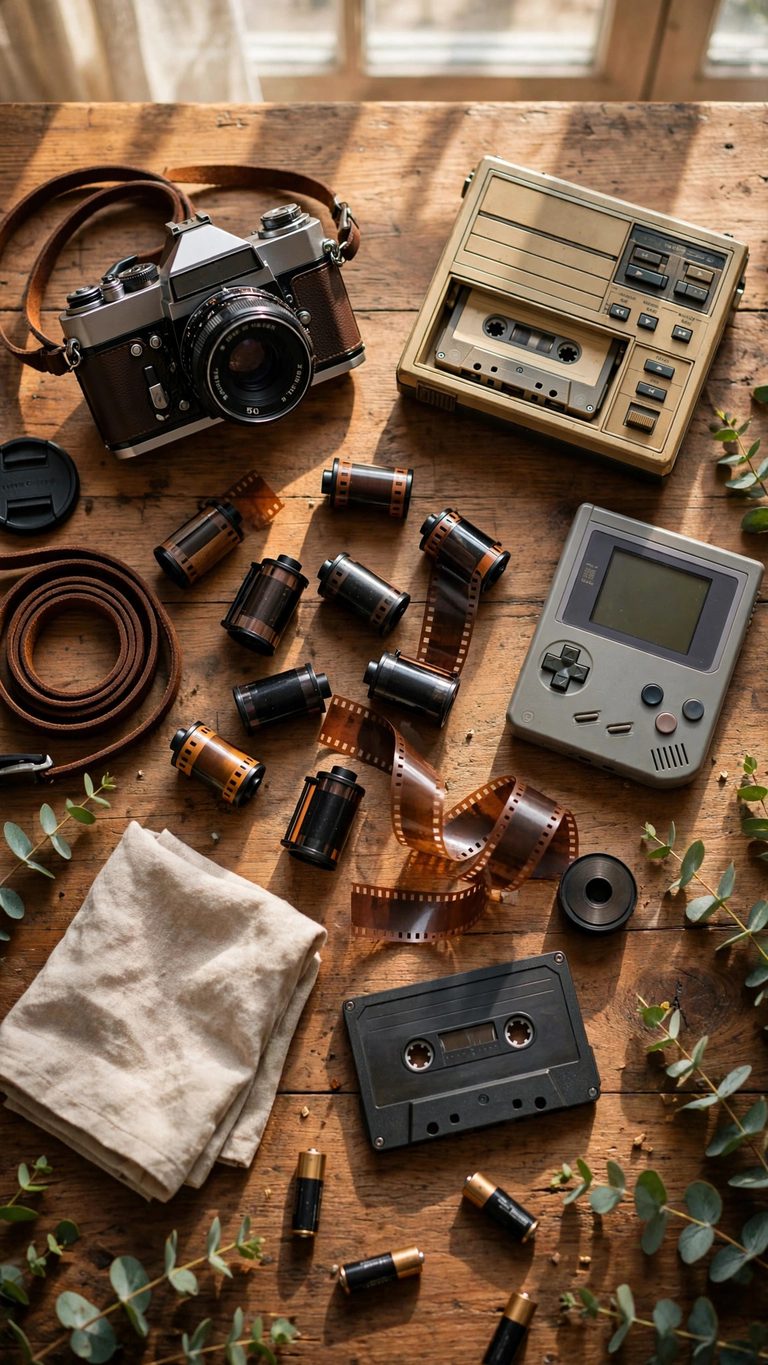
Beautiful flat lay photograph of vintage tech gadgets arranged artfully on warm wooden table, retro camera, cassette player, old game console, film rolls, soft window light, nostalgic warm tones, perfect composition, ultra detailed, 8k, photorealistic
Why This Prompt Works
Every phrase in this prompt earns its place. “Flat lay photograph” locks the camera into a top-down, overhead angle, which is the single most flattering way to show a group of small objects and the easiest layout for an AI model to keep coherent. “Arranged artfully” is the anti-clutter instruction: without it, models tend to pile objects into a messy heap, but this cue pushes them toward deliberate spacing and visual rhythm. Naming specific objects, a retro camera, a cassette player, an old game console, and film rolls, matters far more than writing “old gadgets.” Image models render concrete nouns with far better accuracy and detail than vague categories, and these particular items instantly anchor the scene in the eighties and nineties, which is exactly where #RetroTech nostalgia lives.
The environment cues do the heavy lifting for mood. “Warm wooden table” adds organic texture and a honey-colored base that unifies objects of different shapes and colors. “Soft window light” tells the model to use natural, diffused illumination with gentle shadows instead of a harsh flash look, which is what makes the image feel like a real photograph taken in a real room. “Nostalgic warm tones” applies a cohesive color grade, pulling everything toward ambers and soft browns so the final image feels like a memory rather than a product catalog. Finally, the quality stack of “perfect composition, ultra detailed, 8k, photorealistic” raises resolution, sharpness, and realism in one sweep.
From a content-strategy angle, this prompt rides two massive trends at once. Throwback content consistently outperforms on Instagram, Pinterest, and Facebook because nostalgia is one of the strongest emotional drivers of sharing. Vintage tech unboxings, “remember this” carousels, and thrift-haul videos all draw huge audiences, and a single striking flat lay can anchor any of them. These images are also endlessly reusable: they work as post headers, YouTube thumbnails, Pinterest pins, desktop wallpapers, and even listing photos for sellers of refurbished classics. The overhead symmetry is calming to look at, the warm palette is thumb-stopping in a feed full of cold blue tech ads, and the subject matter invites comments, because everyone has a story about the first gadget they ever owned.
How to Use This Prompt
Getting a great result takes less than five minutes. First, copy the full prompt text exactly as written above, including the quality tags at the end. Second, open your image generator of choice. This prompt was designed around the settings “9:16 portrait, Flux / Stable Diffusion,” so it performs beautifully in Flux and Stable Diffusion, but it also works well in Midjourney and DALL-E 3 with small adjustments. Third, set a vertical 9:16 aspect ratio: in Midjourney add –ar 9:16 to your /imagine command, in DALL-E 3 simply ask for a vertical portrait orientation in your request, in Flux pick the 9:16 preset, and in Stable Diffusion use a portrait resolution such as 768 by 1344. The vertical format is ideal for Reels covers, Stories, and Pinterest pins, which is where retro tech content gets the most traction.
Fourth, generate three to four variations in one batch. AI flat lays vary in how they space objects, and you want options: keep the one with the most balanced composition and the fewest distorted details. Fifth, inspect the gadgets closely, especially any tiny dials or lettering, and regenerate if something looks melted or unreadable. Sixth, upscale or enhance your favorite version before posting. If you are using Stable Diffusion, consider adding a simple negative prompt such as “cluttered, messy, blurry, distorted objects” to reinforce the tidy arrangement. Save your winning generation settings so you can reproduce the style across a whole series of posts.
Pro Tips & Creative Variations
Once you have the base look dialed in, the real fun begins, because this prompt is a template you can remix endlessly. Start by swapping the gadgets to match a specific era or theme. Replace the game console with a brick-style mobile phone and a pager for a pure nineties office vibe, or go seventies with a rotary phone, a Polaroid camera, and vinyl records. A handheld gaming device, floppy disks, and a chunky CRT monitor make a perfect retro computing spread, while a Walkman, mixtapes, and wired earbuds scream eighties music culture. Each swap keeps the warm-wood-and-window-light formula intact while giving you a fresh post.
Next, experiment with the surface and lighting. A dark walnut table with low, moody side light creates a dramatic collector’s-cabinet feel, while a white linen cloth with bright airy light suits a clean Scandinavian resale listing. Golden-hour light through the window adds long shadows and extra warmth, perfect for autumn-themed content. Props are another easy win: a steaming coffee cup, a small potted plant, an open notebook, or a pair of reading glasses add lifestyle context and fill negative space without cluttering the frame.
For advanced control, try seasonal and color variations. Add “surrounded by warm Christmas fairy lights” for a holiday post, or “muted monochrome tones” for an art-print look. If the vertical 9:16 crop feels too tight, generate a 1:1 square version for classic Instagram feed posts, or a 16:9 landscape for YouTube thumbnails. You can also ask for “extreme top-down symmetry” for a satisfying grid layout, or “slightly scattered, candid arrangement” for a more casual, real-desk feel. Keep the object list to four or five items maximum; more than that and even the best model starts to crowd the frame.
Frequently Asked Questions
Q: Can I list my own specific gadgets instead of the ones in the prompt?
A: Absolutely, and you should. The model renders named objects far more accurately than generic ones, so replacing “retro camera” with “1980s film SLR camera” or “old game console” with “16-bit gray game console with two controllers” usually improves detail and recognizability. Keep the rest of the prompt unchanged so the lighting and composition stay consistent.
Q: Why does the flat lay angle work so well for AI generation?
A: An overhead view removes most perspective complexity. The model does not have to calculate depth, vanishing points, or occluded edges the way it would for a three-quarter product shot, so objects come out cleaner and more anatomically correct. It also makes composition naturally balanced, since the frame becomes a simple two-dimensional arrangement problem.
Q: Will this prompt work on free AI image tools?
A: Yes. The prompt uses plain descriptive language rather than model-specific parameters, so it works in free tiers of most generators. For best results in Stable Diffusion, use at least 25 to 30 sampling steps and the portrait resolution mentioned above. Free tools may need an extra regeneration or two to nail the object details.
Q: My generations look cluttered. How do I fix that?
A: Reduce the object list to three or four items and strengthen the arrangement cue with phrases like “neatly spaced with breathing room” or “minimalist flat lay.” In Stable Diffusion or Flux, add “cluttered, overlapping, messy” to your negative prompt. Generating at a slightly lower object count almost always beats trying to cram in more gadgets.
This retro gadget flat lay prompt turns pure nostalgia into scroll-stopping content you can generate in minutes. Copy the prompt, run it in your favorite AI image tool at 9:16, and start building your vintage tech series today. Try it now and watch how fast your audience starts tagging friends who remember every single gadget in the frame.
Related Viral Prompts
- AI Photo Prompt: Cute Retro Robot Toy Studio Portrait With Glowing Eyes, Pastel Backdrop and 8K Detail
- AI Photo Prompt: Dramatic VR Headset Studio Shot Floating in Dark Space With Blue Glow and Rim Lighting
- AI Photo Prompt: Dynamic Drone Propeller Macro Photo With Motion Blur, Sunset Bokeh and Dramatic Backlight
# A I P h o t o # P r o m p t B a z a r # R e t r o T e c h # F l a t L a y # N o s t a l g i a


Leave a Reply