
Introduction
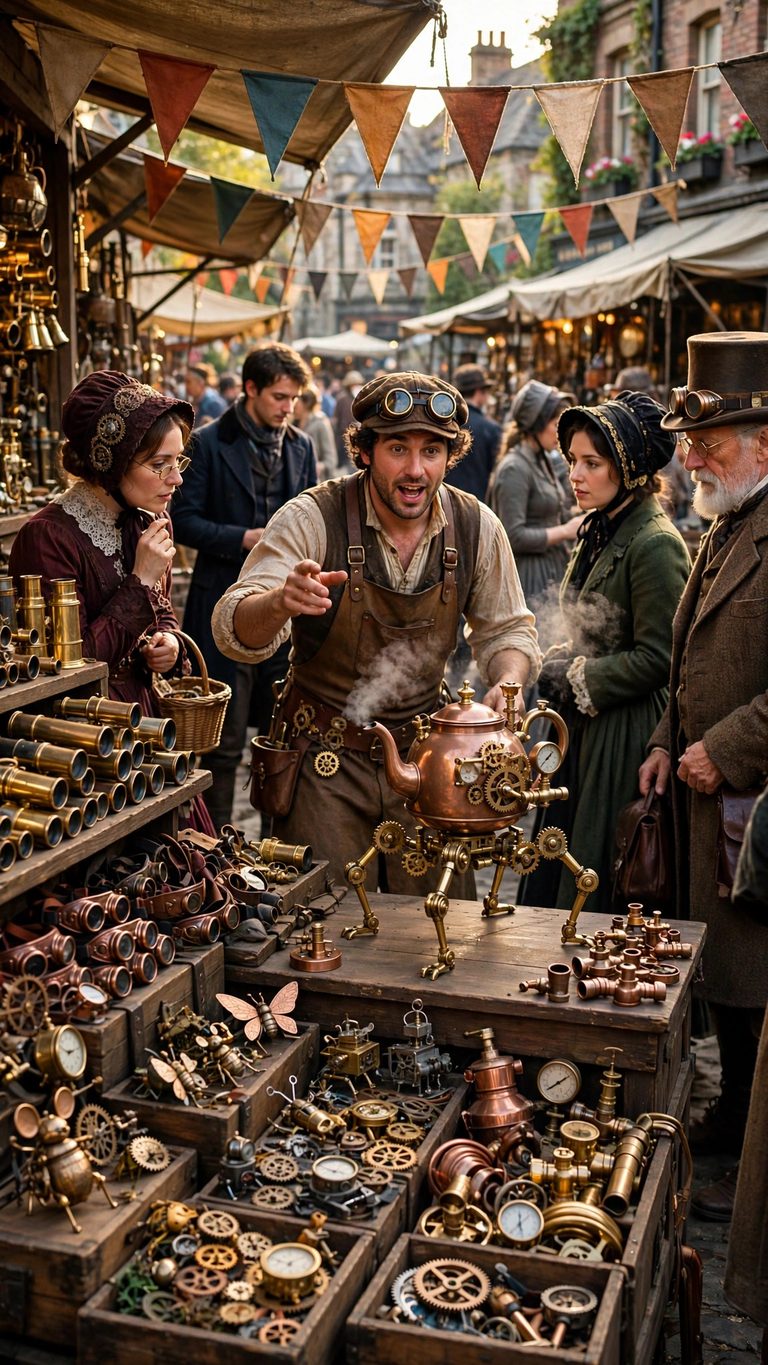
The market wakes up with a hiss of steam and a glint of brass. Stall after stall stretches down the cobbled lane, piled high with brass telescopes, clockwork toys that twitch and whir, copper goggles, and gleaming steam valves. A vendor in a top hat cranks the key of a walking teapot automaton, and it takes three wobbling steps while the crowd gasps and laughs. Shoppers in Victorian dress lean over the tables, turning curiosities over in gloved hands, while bunting flags snap overhead in the warm afternoon light. This is the steampunk gadget market: delightful organized chaos, a treasure hunt you can see. Market scenes are engagement machines on social media because they are packed with discovery; every corner of the frame holds something new, which makes viewers zoom in, screenshot, and tag friends. The walking teapot automaton gives the image a hero moment, a single delightful focal point amid the glorious clutter. In vertical 9:16 the lane of stalls recedes upward like an invitation to wander in. With the AI photo prompt below, you can open this market in seconds, no airship ticket to Victorian London required.
The Prompt
Copy the exact prompt below and paste it into your favorite AI image generator to recreate this scene.
Lively steampunk photograph of an open-air gadget market, stalls piled with brass telescopes, clockwork toys, copper goggles and steam valves, a vendor demonstrating a walking teapot automaton, shoppers in Victorian dress examining curiosities, bunting flags overhead, warm afternoon light, delightful organized chaos, ultra detailed, 8k, masterpiece
Why This Prompt Works
This prompt works because it balances abundance with anchoring. Open-air market scenes can easily become visual noise, but this prompt avoids that trap with two smart moves. First, it lists specific inventory, brass telescopes, clockwork toys, copper goggles, steam valves, instead of the vague word gadgets. Specific objects give the generator concrete things to render, which is why the stalls look piled with real curiosities rather than blurry clutter. Second, it anchors the whole scene with a hero moment: a vendor demonstrating a walking teapot automaton. That single vivid action gives the viewer somewhere to look first, and then the eye wanders across the stalls. Without that anchor, market prompts often produce evenly busy images with no focal point. The human layer, shoppers in Victorian dress examining curiosities, adds life and period authenticity while giving the scene natural scale. Bunting flags overhead is a small token with a big payoff: it frames the top of the composition and adds festive color rhythm. Warm afternoon light unifies the chaos with a golden glow, so the many objects feel like one scene instead of a collage. The mood token, delightful organized chaos, is perfectly chosen, because it tells the model to keep the clutter charming rather than messy. And the quality stack, ultra detailed, 8k, masterpiece, keeps the small objects on the stalls legible instead of melting into mush. Dense but readable is the formula, and this prompt nails it.
How to Use This Prompt
Using this prompt takes less than a minute in any major generator. Follow these steps:
1. Midjourney v7: Paste the full prompt into the prompt box. Add –ar 9:16 –v 7 for the vertical format. The default stylization handles busy scenes well; use –style raw only if you want a more documentary, less painterly look.
2. DALL-E 3: Paste the prompt into the image tool and request a vertical portrait orientation. DALL-E is strong with many small objects; if the teapot automaton looks odd, ask for it larger in the foreground in a follow-up.
3. Flux: Paste as-is with a 9:16 aspect ratio and 30 to 50 steps. Flux keeps dense scenes coherent; if shoppers’ faces blur, that is fine at market scale, but you can crop tighter to one stall.
4. Stable Diffusion (SDXL): Use a photorealistic checkpoint, 30 to 40 steps, CFG around 6. Negative prompt: blurry, empty stalls, modern objects, plastic toys. Upscale 2x so the small curiosities stay crisp.
Pro Tips & Creative Variations
A gadget market is a playground for remixing because the inventory is the prompt. Change the stock for a new theme: a clockwork toy stall only, with wind-up birds and tin soldiers; a telescope and navigation stall for an explorer vibe; or a potion and alchemy stall with bubbling brass stills for a magical variant. Change the hero moment: the vendor demonstrating a walking teapot automaton could become a flying clockwork dragon on a leash, a self-playing brass band, or a fortune-telling automaton in a glass booth. Change the hour: a night market lit by gas lamps and Edison bulbs turns the same stalls into a glowing bazaar. Change the weather: morning mist curling between the stalls, or light rain with shoppers under brass-ribbed umbrellas. Zoom in for a stall portrait: close-up of one table, brass telescopes gleaming, vendor’s hands polishing a lens, shallow depth of field, makes a gorgeous detail shot. Pull back for an aerial view: the whole market from above, bunting crisscrossing like festival ribbons. Add a story: a pickpocket automaton, a child reaching for a clockwork bird, or a mysterious hooded figure buying a strange device. For a product-catalog feel, generate single items from the market, one brass telescope on a velvet cloth, as standalone posts. Save the seed and build a whole market district, one stall at a time.
Frequently Asked Questions
Q: My market looks like random clutter. How do I make it feel organized?
A: Keep the specific inventory list, which gives the clutter structure, and keep the hero moment, the vendor with the teapot automaton, which gives the eye a home base. Adding warm afternoon light also unifies busy scenes.
Q: The walking teapot automaton keeps looking weird. Any tips?
A: Describe it more concretely: brass teapot with little mechanical legs mid-step. If it still misbehaves, make it larger in the foreground; small complex objects are where generators struggle most.
Q: Which model is best for dense, detailed scenes like this?
A: Flux and DALL-E 3 handle many distinct objects best. Midjourney v7 gives the most cinematic light. Generate in one, upscale, and pick the sharpest result.
Q: Can I turn this into a series?
A: Yes, and it is ideal for one. Reuse the seed and change only the stall inventory or the time of day to create a consistent market-district series that followers will binge.
A gadget market piled with brass telescopes and clockwork toys, a vendor showing off a walking teapot automaton under bunting flags: this is the treasure-hunt image viewers cannot resist zooming into. Copy the prompt, open your market, and then restock it: change the inventory, the hour, or the hero gadget. Every stall is a new post waiting to happen.
Related Viral Prompts
- Mechanical Horse Race AI Photo Prompt: Brass Steampunk Steeds Thundering at Full Gallop in Stunning 8K Detail
- Victorian Lady Inventor AI Photo Prompt: Elegant Steampunk Portrait With Copper Goggles in 8K Detail
- Underwater Brass City AI Photo Prompt: Jules Verne Steampunk Metropolis Glowing on the Ocean Floor in 8K
# A I P h o t o # P r o m p t B a z a r # S t e a m p u n k # M a r k e t # G a d g e t s

Leave a Reply