
Introduction
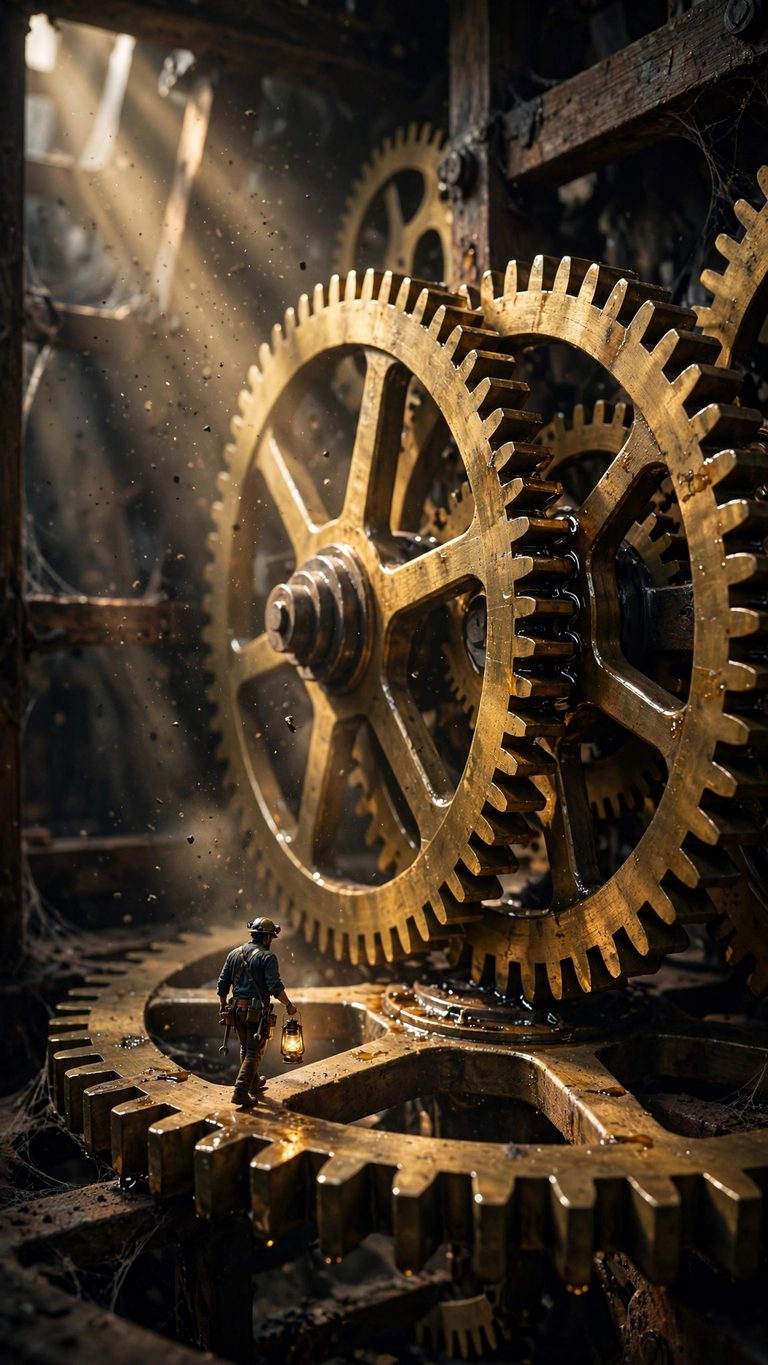
Step inside the clock tower and the world goes quiet except for the machinery. Enormous brass gears mesh in perfect synchronization, teeth as tall as a man, oil glistening on every ridge. A tiny maintenance worker with a lantern picks his way across a single cog, his small flame the only warm thing in a cathedral of metal. Dust particles drift through shafts of light falling from far above, and deep shadows pool between the wheels. This is steampunk at its most hypnotic: the macro view, where machinery becomes landscape. Close-up images of gears perform exceptionally well online because they trigger a specific kind of fascination, the ASMR-like pleasure of perfect mechanical order. Every tooth lines up, every surface gleams, and the tiny human figure gives the viewer an instant, dizzying sense of scale. In vertical 9:16, the gears stack upward like a tower you could climb, pulling the eye from shadow to golden highlight. With the AI photo prompt below, you can photograph the inside of this impossible machine in seconds, no scaffolding or clock tower key required.
The Prompt
Copy the exact prompt below and paste it into your favorite AI image generator to recreate this scene.
Hypnotic macro photograph inside a giant clock tower, enormous brass gears meshing in perfect sync, oil glistening on teeth, tiny maintenance worker with lantern walking on a cog for scale, dust particles floating in shafts of light, deep shadows and golden highlights, mechanical symphony frozen in time, ultra detailed, 8k, masterpiece
Why This Prompt Works
This prompt works because it understands what macro photography is actually about: scale, texture, and light. The genius move is the tiny maintenance worker with a lantern walking on a cog for scale. Without him, the model might render gears of ambiguous size; with him, every viewer instantly grasps that these wheels are enormous, and the image gains a human story, a lone figure tending an impossible machine. The texture tokens are doing heavy work: oil glistening on teeth tells the generator to render specular highlights along the gear edges, which is what makes metal look real instead of matte and flat. Dust particles floating in shafts of light adds atmosphere and depth, because floating particles are how the eye reads a beam of light in a dark space. The lighting contrast, deep shadows and golden highlights, creates the chiaroscuro that makes macro shots dramatic; without that contrast the scene would be a flat gray engine room. The phrase mechanical symphony frozen in time steers the mood toward awe rather than industrial grime, keeping the palette golden and majestic. Finally, the quality stack of ultra detailed, 8k, masterpiece ensures the fine ridges on the gear teeth and the glints of oil render sharply instead of smearing. Macro prompts like this punch above their weight because they ask the model to concentrate detail into a small area, which is exactly where current generators excel.
How to Use This Prompt
Using this prompt takes less than a minute in any major generator. Follow these steps:
1. Midjourney v7: Paste the full prompt into the prompt box. Add –ar 9:16 –v 7 for the vertical format. Add –style raw for photographic realism, which suits macro work. If the gears look too clean, that is fine, oil and dust add the grime.
2. DALL-E 3: Paste the prompt into the image tool and request a vertical portrait orientation. DALL-E is good at keeping the tiny worker proportional; if he vanishes, emphasize tiny human figure with lantern for scale in a follow-up.
3. Flux: Paste as-is with a 9:16 aspect ratio and 30 to 50 steps. Flux excels at fine mechanical detail. If the gear teeth blur, increase steps and add crisp focus on the nearest gear.
4. Stable Diffusion (SDXL): Use a photorealistic checkpoint, 35 to 45 steps, CFG around 6. Negative prompt: blurry, cartoon gears, plastic, deformed human. Upscale 2x, because macro detail rewards resolution.
Pro Tips & Creative Variations
The gear macro is a template you can aim at any machine. Change the scale story: replace the worker with a tiny airship flying between the gears, or a cat walking along a cog, for a whimsical variant. Change the metal: aged copper with green patina, blackened iron with rust, or silver gears in a moonlit tower each create a different mood. Zoom even closer: extreme macro of two gear teeth meshing, oil droplet suspended, dust glowing, turns the machine into abstract art. Pull the camera back: wide shot of the entire clock tower interior with the worker as a speck of light reveals the full cathedral scale. Change the lighting for drama: blue moonlight through the tower windows versus the golden shafts, or a storm-lit version with lightning flashes between the wheels. Add story elements: a second worker with a rope, tools scattered on a cog, or a pocket watch wedged between two teeth like a paused moment in time. For a horror variant, darken the prompt toward deep shadows, single lantern, something moving in the dark. For wallpaper or print, widen to 16:9 so the gear train stretches horizontally. Save the seed of your best result and re-roll with small swaps to build a consistent machinery series for a themed account.
Frequently Asked Questions
Q: The gears look great but the tiny worker keeps disappearing. How do I keep him?
A: Keep the for scale phrase, which tells the model the figure is load-bearing for the composition. If he still vanishes, simplify: one small worker with a lantern standing on the nearest cog. Fewer elements means the model is less likely to drop him.
Q: Which model renders the sharpest gear detail?
A: Flux and Midjourney v7 with –style raw produce the crispest macro detail. Always upscale the final image 2x; macro shots live or die by fine texture.
Q: How do I make the scene moodier or brighter?
A: Lighting is controlled by the deep shadows and golden highlights tokens. For moodier, increase the shadow wording; for brighter, add sunlight flooding the tower interior. One token change rebalances the whole image.
Q: Can I animate this into a video later?
A: Yes. Gear macros are ideal for image-to-video tools because the motion is simple and cyclical: describe the gears slowly turning and the lantern swaying for a seamless loop.
Giant brass gears meshing in perfect sync, a tiny lantern-bearer for scale, dust drifting through shafts of light: this is the macro shot that makes machinery feel like a cathedral. Copy the prompt, generate your clock tower interior, and then explore: change the metal, the light, or the scale story. Precision has never looked this beautiful.
Related Viral Prompts
- Steampunk Gadget Market AI Photo Prompt: Build a Bustling Victorian Curiosity Market Scene in Vertical 9:16
- Mechanical Horse Race AI Photo Prompt: Brass Steampunk Steeds Thundering at Full Gallop in Stunning 8K Detail
- Victorian Lady Inventor AI Photo Prompt: Elegant Steampunk Portrait With Copper Goggles in 8K Detail
# A I P h o t o # P r o m p t B a z a r # S t e a m p u n k # G e a r s # M a c r o

Leave a Reply