
Introduction
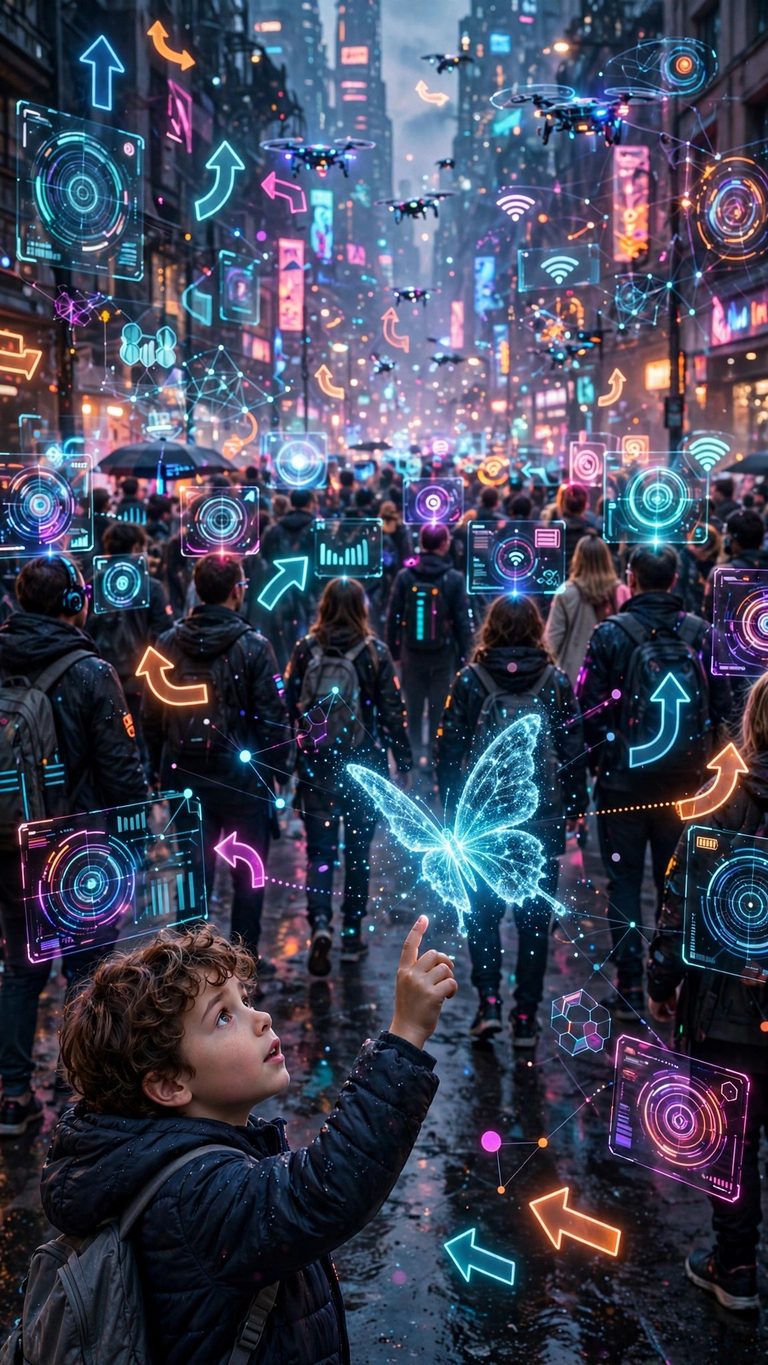
Imagine stepping onto a street where the air itself has become an interface. Above every passerby floats a glowing name tag; holographic shop signs jostle for attention beside navigation arrows that paint directions onto the pavement; and in the middle of it all, a child stands on tiptoes, reaching up to touch a digital butterfly that exists only in the light. This is the augmented-reality city — the cyberpunk future that feels closest, because pieces of it are already in our pockets. Unlike the genre’s darker corners, the AR street is vibrant, information-dense, and oddly joyful: technology not as oppression but as atmosphere, a second sky made of data. It is also one of the hardest scenes to photograph in real life, which makes it perfect territory for AI. No camera can capture a digital butterfly that does not exist — but a well-built prompt can, and this one does it with dusk light melting into neon for a palette that flatters every glowing overlay. The #AR and #Future tags are riding a real cultural wave as headsets and smart glasses move mainstream, so #AIPhoto renders of augmented streets land with audiences primed to believe them. This #Cyberpunk prompt from #PromptBazar hands you that shimmering, data-thick street in a single copy-paste.
The Prompt
Here is the full prompt. The “information-dense” and “vibrant” clauses are load-bearing — they tell the model to fill the air, not leave it empty.
Fascinating cyberpunk photograph of a busy street where augmented-reality overlays float above every person, glowing name tags, holographic shop signs and navigation arrows filling the air, a child reaching up to touch a digital butterfly, vibrant information-dense composition, dusk light mixing with neon, ultra detailed, 8k, masterpiece
Why This Prompt Works
Density is the design principle here, and the prompt engineers it deliberately. “Augmented-reality overlays float above every person, glowing name tags, holographic shop signs and navigation arrows filling the air” is essentially a packing instruction: it tells the model that empty sky is a failure state. Image models default to clean compositions, so without explicit density language you get three lonely holograms; with it, you get the glorious clutter that makes AR scenes feel real. The child reaching for the digital butterfly is the emotional keystone. In an image that could easily become a cold tech demo, one small human gesture supplies wonder, scale, and narrative — viewers project themselves into the child’s curiosity, and that projection is what earns saves and shares. The dusk-plus-neon lighting is a technical masterstroke: dusk provides enough ambient visibility that the street and people read clearly, while the neon and holograms supply the glow that sells the future. Pure night would swallow the overlays’ context; pure day would wash them out. Psychologically, AR imagery resonates because it visualizes a future the audience already half-inhabits — everyone with a smartphone lives part-time in an overlay world, so the scene feels like prophecy rather than fantasy. That plausibility is catnip for engagement: #Future-tagged #AIPhoto content gets shared with “this is basically already happening” commentary, which is the highest compliment a speculative image can earn. Trend-wise, information-dense compositions also reward the zoom-in behavior — viewers pinch to explore the tiny labels and arrows, and that interaction time signals quality to every platform algorithm. The “ultra detailed, 8k, masterpiece” tail ensures the model spends its detail budget on the fine print of the overlays rather than smoothing them into blobs.
How to Use This Prompt
Density needs room, so mind your canvas. In Midjourney v7, paste the prompt with --ar 9:16 per the settings; the portrait frame stacks the street vertically so overlays can fill the sky above the crowd. Add --style raw if the holograms render too cartoonish. In DALL-E 3, request 9:16 portrait — DALL-E is excellent at the “glowing name tags” and UI-like elements, often producing the most legible overlays of the three platforms. Generate three or four and pick the densest. In Flux, keep guidance around 4–5 on a 9:16 canvas; Flux handles crowds well, which matters since a busy street needs believable people under the holograms. Across all platforms, if the overlays look sparse, strengthen the density clause with “dozens of holographic elements filling the sky.” If the child gets lost, add “child in the foreground, clearly visible.” Watch for gibberish text in the name tags — either accept it as abstract UI texture or add “abstract glowing glyphs, no readable text.” Upscale before posting; the tiny overlay details are exactly what viewers zoom into, and they need the pixels. This format shines as a story, a reel cover, or the opening frame of a “future cities” carousel.
Pro Tips & Creative Variations
The overlay layer is infinitely reskinnable. Change the UI language: swap name tags for “floating health stats and mood indicators,” “real-time translation subtitles above tourists,” or “dating-profile cards above singles” — each turns the same street into a different satire or utopia. Change the era of the tech: “retro CRT-style green terminal overlays” gives a 1980s vision of AR, while “minimalist Apple-style glassmorphism panels” gives the corporate near-future. Change the star moment: the child and butterfly could become “an old man swiping away spam holograms like flies” (comedy), “a street artist painting a hologram mural” (culture), or “a couple sharing one overlay, foreheads nearly touching” (romance). Time-of-day swaps rewrite the palette — “midnight rain” makes every overlay reflect in the wet street, doubling the density for free. For a darker take, add “intrusive ad overlays the pedestrians can’t dismiss, weary faces” and the joyful street becomes a critique of the attention economy. Composition experiments: “view from a rooftop looking down at the glowing crowd” turns the street into a circuit board, while “first-person view, overlays responding to the viewer’s gaze” makes it immersive. And for a series: render the same street corner in 2026, 2036, and 2046 with escalating overlay density — a visual essay on the future arriving that your #AR audience will argue about in the comments, which is precisely the point.
Frequently Asked Questions
The hologram text is gibberish. Can I fix it? Current models cannot reliably render legible micro-text. Treat the glyphs as texture, add “abstract glowing symbols, no readable text,” or composite real text over the image in an editor afterward for a polished result.
My street looks empty — where are the overlays? The model defaulted to a clean composition. Regenerate with the density language doubled: “dozens of glowing overlays filling the air, information-dense, busy sky.” More explicit quantity words help.
Can I feature a specific person in the AR crowd? Yes — add a foreground subject like “a woman in a yellow raincoat in the foreground, her name tag reading clearly.” Foreground placement plus a distinctive outfit keeps the model from losing your hero in the crowd.
Is AR imagery good for tech-brand content? Excellent — it is the go-to visual metaphor for connectivity, data, and innovation. Check your image generator’s commercial-use terms, and consider generating at the highest resolution for deck and hero-image use.
The future is already floating above the street — you just need to render it. Paste the prompt, fill that 9:16 sky with light, and let the child reach for the butterfly. Share your augmented avenue with #PromptBazar and give the #Cyberpunk feed a glimpse of tomorrow, today.
Related Viral Prompts
- Rainy Window City View: A Melancholic Cyberpunk AI Photo Prompt for Moody Neon Night Photography Art
- Neon Streets Rain Aerial AI Video Prompt: Create a Cinematic Cyberpunk City Flyover That Stops the Scroll
- Cyborg Portrait Close-Up AI Video Prompt: Generate a Hypnotic Neon-Lit Android Face That Watches You Back
# A I P h o t o # P r o m p t B a z a r # C y b e r p u n k # A R # F u t u r e

Leave a Reply