
Introduction
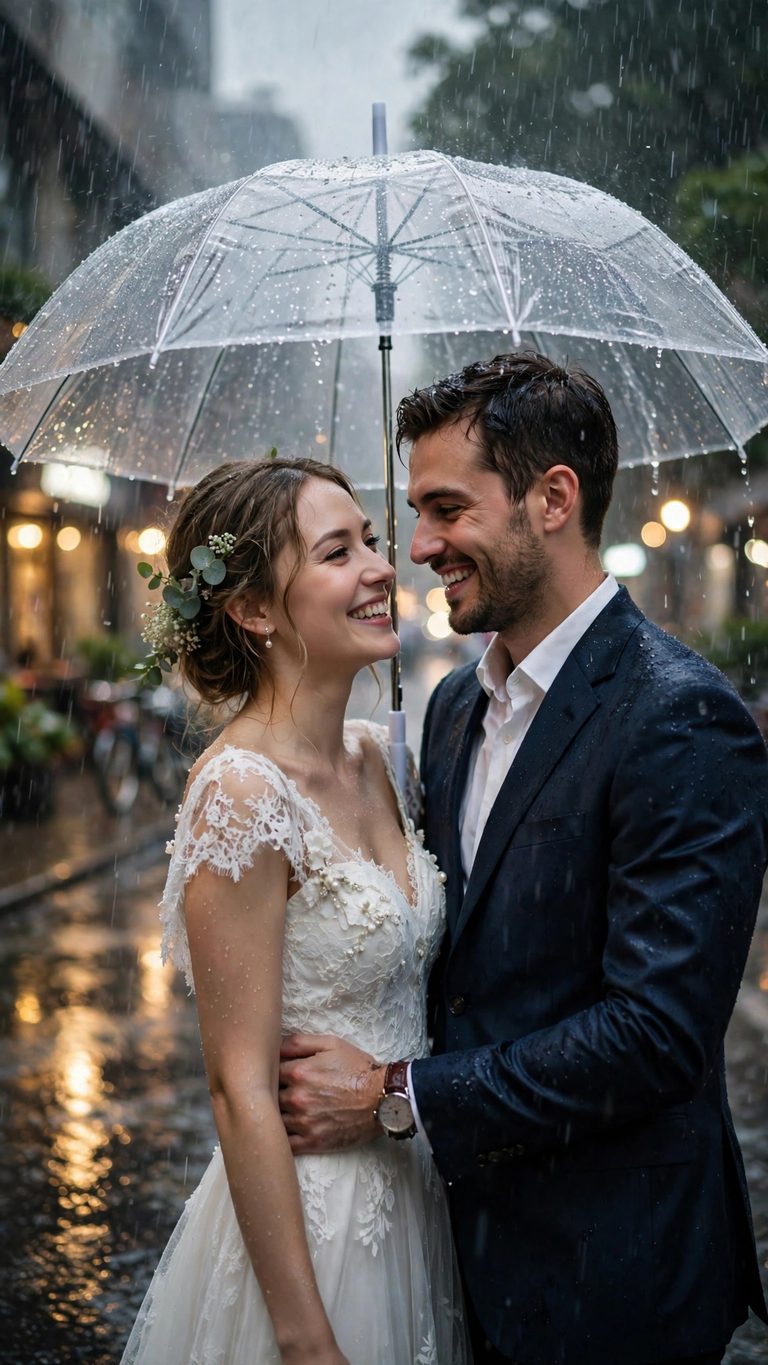
Ask any wedding photographer about their dream shoot and many will whisper the same word: rain. There is nothing — nothing — like monsoon light on a wedding day. The sky turns dramatic, the streets turn to mirrors, and a simple transparent umbrella becomes the most romantic prop ever invented. Couples who once feared rain on their wedding day now pray for it, because rain portraits are the ones that end up framed. This Monsoon Wedding AI Photo Prompt creates a romantic photograph of a wedding couple under a transparent umbrella in monsoon rain — raindrops rendered as sparkling bokeh, wet street reflections doubling the beauty, joyful smiles, dreamy overcast light, and dramatic monsoon clouds above. No waiting for the weather, no ruined outfits, no rescheduling. Just pure rain-kissed romance on demand. Whether you are a couple dreaming of a rain-soaked pre-wedding shoot, a photographer building a monsoon portfolio, or a creator chasing #ViralReels with something genuinely different, this guide hands you the exact prompt, explains the science of why rain photographs so beautifully, shows you how to run it on Midjourney, DALL-E 3, and Flux, and offers variations from misty mornings to thunderstorm drama.
The Prompt
Here is the full prompt, ready to copy. Rain is notoriously hard for AI to render well — this version has been tuned with specific phrases like “raindrops bokeh” that keep the rain beautiful instead of messy.
Romantic photograph of a wedding couple under a transparent umbrella in monsoon rain, raindrops bokeh sparkling, wet street reflections doubling the beauty, joyful smiles, dreamy overcast light, hyper-detailed, cinematic wedding photography, ultra detailed, 8k quality, monsoon clouds dramatic above, love conquering rain
Why This Prompt Works
This prompt works because it weaponizes everything photographers love about rain. Start with “raindrops bokeh sparkling” — this is the critical phrase. Uncontrolled, AI rain looks like gray static or smeary streaks. By specifying bokeh, the prompt converts raindrops into glowing orbs of light, which is exactly how a real camera renders out-of-focus rain against backlight. The result reads as intentional artistry rather than bad weather. “Wet street reflections doubling the beauty” is the compositional genius: reflections create natural symmetry, and symmetry is deeply pleasing to the human eye — it also literally doubles the visual information in the frame, making the image feel richer without any extra elements.
“Transparent umbrella” is a deliberate prop choice, not a random one. An opaque umbrella would hide the couple; transparency keeps their faces visible while framing them in a perfect arc — it functions like a natural vignette that draws every eye to the couple. “Dreamy overcast light” solves the hardest problem in portrait photography: harsh shadows. Overcast skies are nature’s softbox, giving flawless, even skin tones that need no retouching, and the prompt bakes that in. “Joyful smiles” matters enormously here — rain plus solemn faces reads as miserable; rain plus joy reads as “love conquering rain,” which is the exact emotional narrative the prompt names outright. That narrative is why monsoon wedding content gets shared: it turns a feared wedding-day disaster into a triumph.
“Dramatic monsoon clouds above” adds the epic sky that separates an ordinary rainy photo from a cinematic one — dark, textured clouds give the image scale and mood. And “cinematic wedding photography” with “ultra detailed, 8k quality” ensures the rain, the reflections, and the fabric textures all render with film-like richness. Together, these choices make this #AIPhotoPrompt feel less like a weather report and more like a love story — which is precisely why #Monsoon and #Romantic wedding content travels so far.
How to Use This Prompt
Rain prompts need a little platform-specific care. On Midjourney, paste the prompt with --ar 4:5 --style raw --v 7. If the rain looks too heavy or too faint, adjust with plain language: “light drizzle” or “heavy monsoon downpour” both work as modifiers. Midjourney sometimes renders umbrellas opaque, so verify transparency in your first batch and add “see-through umbrella” if needed. On DALL-E 3, paste the prompt into ChatGPT plus “vertical portrait, couple clearly visible through the umbrella.” DALL-E 3 is strong at reflections — if the street reflection looks weak, ask for “strong mirror-like wet street reflection” in a follow-up. On Flux, use the prompt verbatim at portrait ratio; Flux renders water droplets and wet fabric with exceptional realism, so check the umbrella surface and the couple’s clothing for convincing wet-look detail.
Across all platforms, generate at least four variants and look for three things: visible faces through the umbrella, believable rain (bokeh or streaks, not gray mush), and a reflection that actually mirrors the couple. A subtle cool-tone grade in editing enhances the monsoon mood — pull the temperature slightly blue and lift the highlights on the raindrops. Post with #PromptBazar, #Monsoon, and #Wedding to catch the seasonal audience that actively searches for rain-wedding inspiration.
Pro Tips & Creative Variations
Rain is a mood machine, and small tweaks spin this prompt into wildly different stories. For soft romance, change the rain to “gentle drizzle with mist” and the light to “soft diffused morning glow” — the result feels like a watercolor painting, perfect for save-the-date cards. For high drama, go the opposite way: “monsoon downpour, dramatic dark clouds, lightning glow on the horizon” turns the portrait into an epic movie poster — the “love conquering rain” narrative at maximum intensity.
Prop swaps refresh the concept instantly. Trade the umbrella for “couple dancing in the rain, no umbrella, laughing” for a carefree, cinematic moment, or “bride holding umbrella over the groom” for a tender role-reversal that commenters adore. Setting swaps work too: “rainy palace courtyard with arches” for royal monsoon grandeur, “rain-soaked garden with fairy lights” for evening magic, or “Mumbai Marine Drive in monsoon rain” for an iconic city romance.
Color grading variations give you a series: keep the natural cool monsoon grade for authenticity, or try “warm golden reflections on wet street at dusk” for a rain-meets-golden-hour hybrid that looks impossibly dreamy. For photographers, generate a before/after style pair — same couple, same pose, one in “bright daylight” and one in this monsoon version — and post as a carousel asking followers which they prefer. Comparison carousels drive comments, and comments drive reach. Whatever variation you choose, protect the two non-negotiables from the original brief: “raindrops bokeh” for beautiful rain and “wet street reflections” for that doubled, mirror-world beauty.
Frequently Asked Questions
Q1: Why does AI rain often look bad, and does this prompt avoid it?
AI rain fails when the model renders it as uniform gray noise. This prompt avoids that with “raindrops bokeh sparkling” (turning drops into light orbs) and “wet street reflections” (giving rain a visible effect). If rain still looks off, reduce it: “light drizzle” almost always renders more cleanly than “heavy downpour.”
Q2: Can I use this for pre-wedding shoots rather than the wedding day?
Perfectly. Swap “wedding couple” for “engaged couple in elegant casual outfits” and you have a pre-wedding monsoon shoot. Many couples actually prefer the rain concept for pre-weddings since there is no outfit-ruining risk with AI.
Q3: The umbrella keeps rendering opaque. How do I fix it?
Reinforce transparency: “fully transparent clear umbrella, couple clearly visible through it.” On Midjourney, generating a few extra variants usually produces a transparent one — pick the best and move on.
Q4: What outfits work best in this rain portrait?
Flowing fabrics photograph beautifully in rain — a lehenga or gown with movement, plus a classic sherwani or suit. The prompt’s “joyful smiles” and wet-look fabrics do the rest. Avoid very dark outfits head-to-toe; they can merge with dramatic clouds.
Rain on a wedding day is not bad luck — it is a love story waiting to be photographed. Copy this Monsoon Wedding AI Photo Prompt, step under that transparent umbrella, and create a rain-kissed portrait full of drama and joy. Share it with #PromptBazar and #Monsoon, and show the world that love truly conquers rain!
Related Viral Prompts
- Wedding Invitation AI Photo Prompt: Luxury Gold Foil Flat Lay With Rings, Ribbon and Wax Seal Monogram
- Bridal Entry AI Video Prompt: Create a Regal Slow-Motion Grand Entrance With Falling Petals in 8K Cinema
- Wedding Decor AI Video Prompt: Luxurious Cinematic Macro Shots of Centerpieces, Candles & Florals for Viral Reels
# A I V i d e o # P r o m p t B a z a r # A I P h o t o P r o m p t # M o n s o o n # W e d d i n g # R o m a n t i c

Leave a Reply