
Introduction
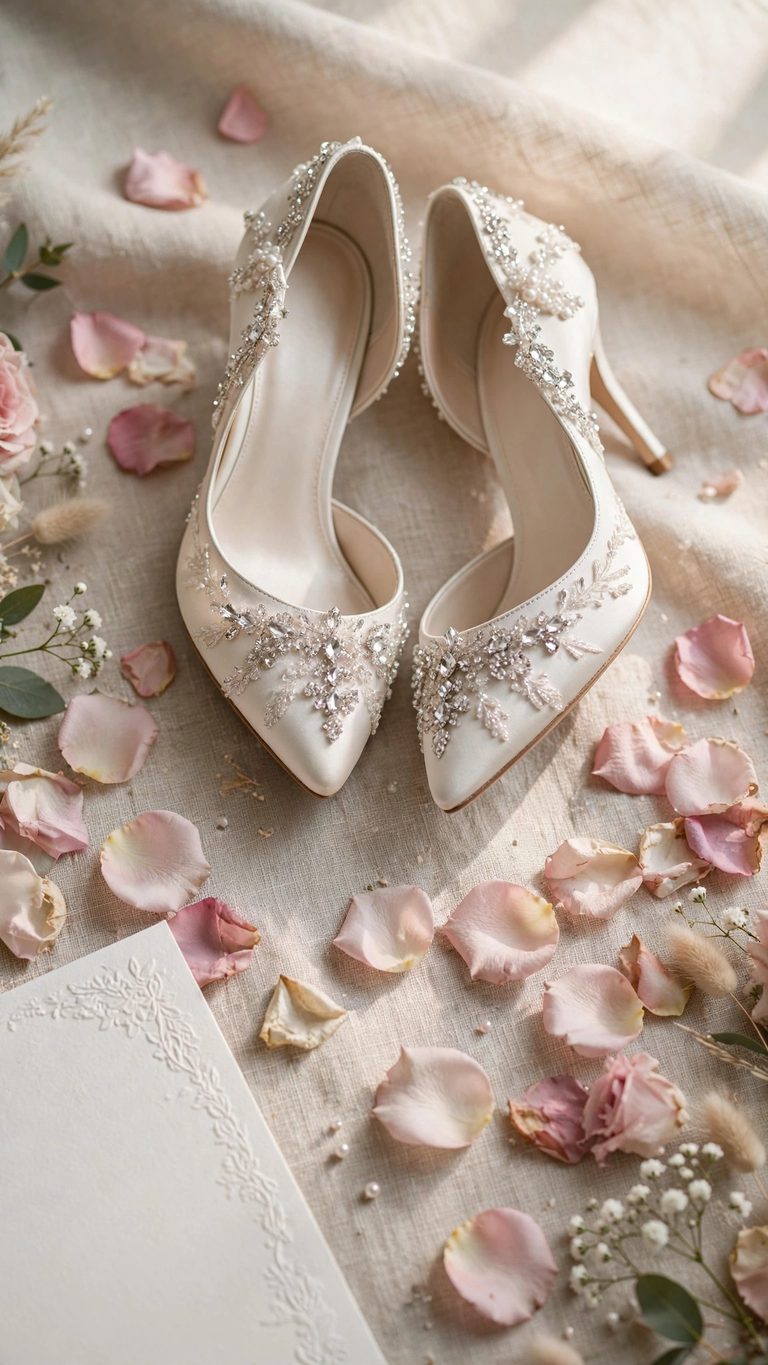
Every bride knows the secret: the shoes matter. Tucked beneath layers of silk and embroidery, those crystal-studded heels or hand-embroidered juttis carry the whole wedding day — down the aisle, through the first dance, into forever. Yet in the chaos of the morning, this tiny treasure rarely gets the photograph it deserves. Enter the flat lay: the most-loved detail shot in modern wedding photography, and the format behind thousands of saved Pinterest boards. This Bridal Shoes AI Photo Prompt creates an elegant flat lay of bridal shoes with crystal details, scattered rose petals, a corner of the wedding invitation peeking in, and a delicate ankle bracelet glinting softly — all bathed in soft natural light with a delicate feminine aesthetic. No stylist, no lightbox, no 6 a.m. photo session required. Just one beautifully engineered prompt. Whether you are designing wedding invitations, building a bridal Instagram theme, or collecting #AIPhotoPrompt inspiration for your own big day, this guide gives you the exact prompt, explains why every element in it earns its place, and walks you through generating it on Midjourney, DALL-E 3, and Flux — plus creative variations that turn one idea into an entire #BridalShoes collection.
The Prompt
Here is the complete prompt, ready to copy. Paste it exactly as written — the specific details like the ankle bracelet and invitation corner are what give this flat lay its storytelling magic.
Elegant flat lay photograph of bridal shoes with crystal details, scattered rose petals, wedding invitation corner visible, soft natural light, delicate feminine aesthetic, hyper-detailed, fine-art wedding photography, ultra detailed, 8k quality, delicate ankle bracelet glinting softly, feminine bridal charm complete and lovely
Why This Prompt Works
This prompt works because it understands what makes a flat lay photograph irresistible: layered storytelling inside a single frame. A pair of shoes alone is a product shot; a pair of shoes surrounded by rose petals, an invitation corner, and a glinting ankle bracelet is a narrative. Each prop answers a question the viewer did not know they were asking — whose wedding, what style, how does she feel? That curiosity is what makes people pause, zoom in, and save the image, which is exactly the behavior that drives #Wedding content to go viral.
Technically, the prompt is a masterclass in light and texture direction. “Soft natural light” is the single most flattering instruction you can give an AI for delicate subjects — it keeps crystals sparkling without harsh glare and renders silk, paper, and petals with gentle dimension. “Scattered rose petals” breaks the symmetry that makes flat lays feel stiff; the randomness reads as artful rather than accidental because the prompt also says “elegant” and “delicate feminine aesthetic,” which guide the model toward tasteful placement. “Wedding invitation corner visible” is a genius compositional anchor: it adds typography and paper texture, gives the eye a second focal point, and instantly codes the image as wedding-related for anyone scrolling fast.
The detail phrases do the heavy photorealism work. “Crystal details” on the shoes plus “delicate ankle bracelet glinting softly” give the model two separate sparkle sources at different scales, which creates depth and light play across the frame. “Hyper-detailed” and “fine-art wedding photography” push the render away from catalog-flat lighting toward the rich, editorial look that brides screenshot for inspiration boards. And “ultra detailed, 8k quality” ensures that when someone pinches to zoom — and they will — the embroidery, the crystal facets, and the petal veins all hold up. That zoom-worthiness is why this #AIPhotoPrompt earns saves, and saves are the currency of wedding content.
How to Use This Prompt
Running this prompt is simple on all three major platforms, with small tweaks for each. On Midjourney, paste the prompt and add --ar 4:5 --style raw --v 7. Flat lays benefit from a slightly top-down feel, so you can add “overhead flat lay composition” to reinforce the angle if the first result drifts. Midjourney’s --style raw keeps the petals and paper textures honest instead of over-smoothed. On DALL-E 3, paste the prompt into ChatGPT and follow it with “vertical portrait orientation, soft window light from the left.” DALL-E 3 is excellent at following prop instructions, so if you want the invitation corner larger or the bracelet repositioned, just say so in plain English and regenerate. On Flux, use the prompt verbatim with a portrait aspect ratio; Flux’s fine-detail rendering makes the crystal facets and invitation typography especially crisp — inspect the text on the invitation corner at full zoom, since AI text can occasionally wobble and you may want to regenerate once for clean lettering.
A universal tip: generate in batches of four and choose the layout with the most natural petal scatter — perfectly symmetrical petals are the tell of an AI image. After generation, a gentle clarity boost and a slight warm filter in any editor will make the crystals pop. Post with #PromptBazar, #BridalShoes, and #Detail to reach the wedding-planning audience that saves this exact style of image.
Pro Tips & Creative Variations
The flat lay format is endlessly remixable, and small prop swaps create entirely new moods. Start with the “something blue” twist: add “a small blue sapphire ring hidden among the petals” for a charming good-luck detail that commenters love to spot and tag friends about — hidden-object images drive engagement because people zoom and share their finds. For a heritage look, swap crystal heels for “hand-embroidered ivory juttis with gold thread” and change the marble implication to “vintage lace fabric background” — perfect for South Asian bridal content that celebrates craftsmanship.
Seasonal variations keep the concept evergreen. A winter version: “frosted eucalyptus sprigs and silver ribbon” instead of rose petals. A monsoon-romance version: “raindrops on petals, moody soft light.” You can also change the story the props tell: replace the invitation corner with “a handwritten vow card” for intimacy, or add “the groom’s watch beside the shoes” for a his-and-hers flat lay that couples adore. Lighting experiments pay off too — “morning window light with soft shadows” gives an airy bridal-prep feel, while “warm candlelit glow” turns the same layout into an evening-luxury editorial.
For content creators, batch-generate a series: same shoes, five different petal colors and backgrounds, posted as a carousel. Carousels with subtle variations get swiped through completely, which the algorithm rewards. And remember the pro tip from the original brief — “flower petals scattered” plus “soft natural light” is the non-negotiable core; everything else is your creative playground. Each variation stays unmistakably part of your #Wedding aesthetic while giving followers a reason to save every single one.
Frequently Asked Questions
Q1: The AI keeps garbling the text on the invitation. How do I fix it?
AI models still struggle with small typography. Keep the invitation as a “corner visible” detail rather than the hero — partial text hides flaws. On Flux or DALL-E 3, regenerate once or twice; short visible words usually resolve cleanly within a few attempts.
Q2: Can I make this work for the groom’s details too?
Definitely. Swap the shoes for “polished leather brogues,” the bracelet for “a classic watch,” and the petals for “a boutonniere and cufflinks.” The flat lay structure — hero item plus scattered props plus soft light — works identically and gives you a matching his-and-hers set.
Q3: What background works best for this flat lay?
The prompt implies a clean surface that lets the props shine. Marble, white linen, or soft blush silk all work beautifully. Avoid busy patterns — they fight with the crystal details for attention and make the image harder to read at thumbnail size.
Q4: How do I keep the feminine aesthetic without it looking clichéd?
Balance is key: the prompt’s “delicate” and “elegant” do the work, but you can modernize it by adding “minimalist styling, negative space” for a contemporary editorial feel that still reads unmistakably bridal.
The smallest details often tell the biggest love stories, and a bridal shoe flat lay proves it in a single frame. Copy this Bridal Shoes AI Photo Prompt, generate your elegant detail shot, and give those crystal heels their moment in the spotlight. Share your creation with #PromptBazar and #BridalShoes — your flat lay might be the exact inspiration another bride has been searching for!
Related Viral Prompts
- Mandap Night AI Photo Prompt: Magical Diya-Lit Wedding Decor Glowing Brightly Under a Starry Night Sky
- Monsoon Wedding AI Photo Prompt: Romantic Rain Portrait Under a Transparent Umbrella in Monsoon Rain
- Wedding Invitation AI Photo Prompt: Luxury Gold Foil Flat Lay With Rings, Ribbon and Wax Seal Monogram
# A I V i d e o # P r o m p t B a z a r # A I P h o t o P r o m p t # B r i d a l S h o e s # D e t a i l # W e d d i n g

Leave a Reply