
Introduction
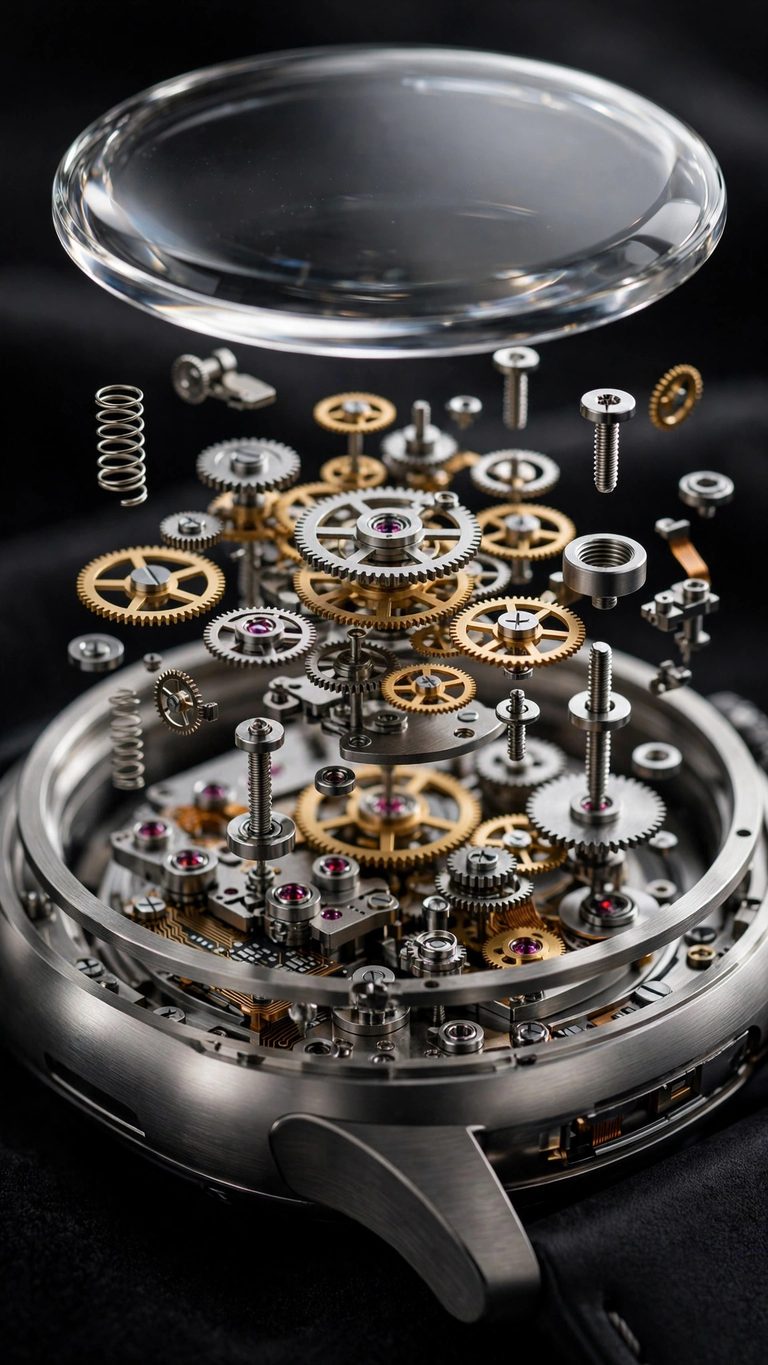
There is a special pleasure in watching something complicated assemble itself perfectly: gears clicking into place, parts gliding together, chaos resolving into order. This prompt captures that feeling at its most luxurious. A high-end smartwatch builds itself under studio lights, gears meshing, the glass screen lowering into the case, tiny screws spinning home one by one.
Macro content is a dependable engine of watch time. Extreme close-ups reveal a hidden world, and timelapse turns slow mechanics into a hypnotic eight-second loop. Tech channels learned this from teardown videos, but AI goes further: no camera rig, no macro lens, no disassembled watch. Just a prompt and a render.
Whether you post satisfying videos or run a wearables page, this scene holds attention to the final frame. Below are the exact prompt, the psychology of why self-assembly is so watchable, a workflow for every major AI video tool, and variations across the gadget world.
The Prompt
Copy the prompt below exactly as written and paste it into your AI video generator of choice. It is tuned for extreme close-ups and flawless mechanical motion.
Hypnotic macro timelapse of a luxury smartwatch assembling itself piece by piece, gears clicking, glass screen lowering perfectly, screws spinning into place, extreme close-ups of intricate mechanics, studio lighting, satisfying precision, ultra detailed, photorealistic, 8k, mesmerizing mechanical precision, flawless engineering
Why This Prompt Works
This prompt targets one of the most reliable attention mechanisms on the internet: the satisfaction loop. Psychologists link the appeal of “oddly satisfying” content to the brain’s reward response when pattern, order, and completion align. A smartwatch assembling itself delivers that reward on a loop, because every gear click and screw placement is a micro-completion. The macro perspective intensifies the effect by removing all context; there is nothing to distract from the pure choreography of parts finding their homes.
The word “timelapse” in the prompt is doing structural work. It tells the model to compress motion and emphasize process over realism of speed, which produces that hypnotic, slightly accelerated mechanical dance viewers associate with high-end manufacturing films. “Extreme close-ups of intricate mechanics” pushes the framing tight, and tight framing is a retention tool: when the subject fills the frame, there is nowhere for the eye to wander, so viewers stay locked until the payoff. The final payoff, a complete luxury smartwatch, lands with the quiet triumph of a puzzle solved.
Trend-wise, this sits at the crossroads of three proven formats: satisfying machinery content, luxury product cinematography, and tech teardown culture. Macro assembly clips earn exceptional loop rates because viewers rewatch to catch details, a gear they missed, the exact moment the screen seats itself, and loops are pure gold for algorithmic ranking. Shareability comes from the “how is this real” reaction; the mechanical precision looks so flawless that viewers send it to friends just to ask whether it is CGI or a real factory film. That debate in the comments is engagement the algorithm rewards handsomely.
How to Use This Prompt
Follow these steps to generate the macro assembly scene on any major AI video platform.
- Select your generator. Paste the prompt into Veo 3, Runway, Kling, Pika, or Sora. Veo 3 and Kling currently produce the sharpest fine detail at macro distances, which matters when the subject is tiny gears and screws.
- Lock the 9:16 vertical frame. This post is built for TikTok, Reels, and Shorts. Use portrait output in Veo 3, the 9:16 canvas in Runway, vertical mode in Kling, or 1080×1920 in Pika and Sora.
- Set the 8-second macro timelapse. The tuning calls for an 8-second clip with a macro timelapse feel. If your tool offers speed or motion controls, keep the camera nearly static and let the parts do the moving; stillness at macro scale reads as confidence and precision.
- Generate and cherry-pick. Mechanical coherence is the challenge here, so run four or five generations. Choose the take where gears mesh cleanly and the screen seats without warping. Reject any take where parts visibly melt or teleport.
- Finish with sound. Layer crisp mechanical clicks, soft whirs, and a satisfying final “snap” when the watch completes. Caption it with a hook like “POV: your smartwatch builds itself,” export at 1080×1920, and post. Loop the ending into the opening frame for infinite replay value.
Pro Tips & Creative Variations
The self-assembly concept scales far beyond one smartwatch. Apply the same prompt skeleton to wireless earbuds clicking into their charging case, a mechanical keyboard building itself key by key, a drone unfolding its arms and spinning up its propellers, or a foldable phone assembling its hinge layer by layer. Each variation taps the same satisfaction psychology while opening a new niche audience, and a channel that rotates through them builds a recognizable “things building themselves” brand.
Material and lighting swaps change the mood dramatically. The base prompt uses studio lighting for a premium feel, but try “warm workshop lighting with floating dust” for a craftsman vibe, or “dark background with rim light tracing every edge” for a dramatic flagship-ad look. You can also redirect the assembly narrative: a “disassembly in reverse” version, where the watch comes apart into floating components, performs just as well and gives you a second video from the same idea.
For creators selling products, this format is a stealth advertisement. Generate the assembly with your brand colors on the watch face or strap, and end the clip on a pristine hero shot of the finished device. Add on-screen text naming the model or your store, and the satisfying content does the persuasion for you. Finally, experiment with scale contrast: follow the macro assembly with a one-second wide shot of the finished watch on a wrist. The jump from microscopic to human scale delivers a small jolt of awe that boosts replays, and replays are the metric that turns a good satisfying clip into a viral one.
Frequently Asked Questions
Why do my gears look warped or melty in some generations?
Small mechanical parts are a known weak point for video models. The fix is volume: generate four or five takes and keep only the cleanest. Phrases like “flawless engineering” and “satisfying precision” already bias the model toward coherence, and keeping the camera static reduces the motion the model must simulate.
Can I show a specific smartwatch brand or model?
You can describe design cues, such as a round face, a digital crown, or a particular strap style, but avoid trademarked brand names in prompts intended for commercial posts. A generic luxury smartwatch reads as premium without legal risk, and viewers will project their favorite brand onto it anyway.
How long should the final video be?
Eight seconds is the sweet spot for the loop effect, but the format also works at 10 to 15 seconds if you add a second phase, such as the finished watch lighting up and displaying a watch face. Just make sure the assembly completes with at least two seconds of hero shot at the end so the payoff breathes.
What audio works best with macro assembly videos?
Crisp, tactile sound is essential. Layer mechanical clicks, ratchets, and soft metallic snaps synced to the visual beats, and finish with a single clean “click” as the last part seats. Many creators post these with ASMR-style audio, and that crossover audience is huge, so consider hashtags around satisfying and ASMR content alongside smartwatch and macro tags.
Satisfying content never goes out of style, and this prompt delivers it in its purest form: a luxury smartwatch assembling itself with impossible precision. Paste it into Veo 3, Runway, Kling, Pika, or Sora, render in 9:16, and let gears, glass, and screws do the entertaining. Try the prompt today, then adapt the formula to earbuds, keyboards, and drones. Your audience’s need for perfectly clicking things is bottomless.
Related Viral Prompts
- Home Robot Making Breakfast: A Cozy Heartwarming AI Video Prompt for Futuristic Smart Kitchen Living
- Floating Holographic Touch Display: A Mind-Blowing Viral AI Video Prompt for Sci-Fi UI Interaction Videos
- Earbuds Splash Macro AI Video Prompt: Craft a Premium Slow-Motion Product Commercial in Just 8 Seconds
# A I V i d e o # P r o m p t B a z a r # S m a r t w a t c h # M a c r o # S a t i s f y i n g



Leave a Reply