
Introduction
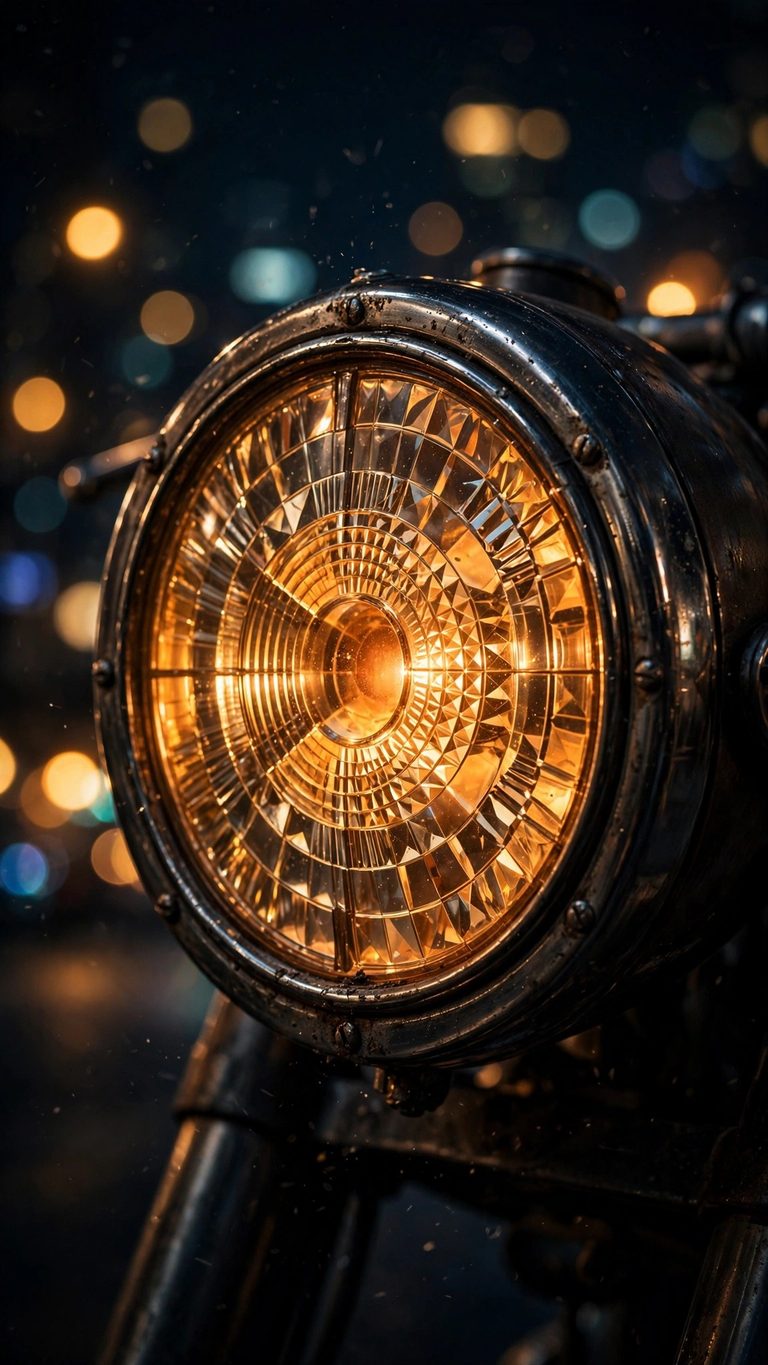
Picture a single circle of warm amber light floating in total darkness, its glass surface etched with intricate reflector patterns that catch and scatter every photon like a tiny cathedral window. That is the image this prompt creates: a vintage motorcycle headlight, rendered in extreme macro, glowing against the night while blurred city lights drift behind it like distant fireflies.
Macro photography has a special power in the world of automotive content. Instead of showing the whole machine, it isolates one perfect detail and lets texture do the storytelling. This AI photo prompt leans into that power, turning a humble headlight into a glowing relic with museum-piece drama. Whether you run a bike enthusiast page, design posters, or just love moody night photography, this prompt gives you a gallery-worthy image in seconds. The result feels expensive, cinematic, and strangely emotional, because light in darkness always carries a hint of mystery. Best of all, you can generate it again and again with small tweaks and never get the same frame twice.
The Prompt
Here is the exact prompt behind this image. Copy it word for word to reproduce the result, then customize it with the ideas below.
Striking macro photograph of a round vintage motorcycle headlight glowing warm amber in darkness, intricate glass reflector patterns, chrome ring gleaming, bokeh city lights behind, dramatic chiaroscuro lighting, hyper-detailed textures, ultra sharp, 8k, photorealistic
Why This Prompt Works
The first reason this prompt works is pure visual psychology. Human eyes are drawn to contrast, and nothing creates contrast like a single bright object in a dark field. The warm amber glow triggers feelings of comfort, nostalgia, and craftsmanship, while the surrounding darkness adds drama and focus. Macro framing amplifies the effect: by filling the frame with the headlight, the prompt eliminates distractions and forces the viewer into an intimate encounter with texture. The glass reflector patterns become geometric art, and the chrome ring becomes a mirror for imagined city streets.
The second reason is timing. Automotive detail photography is one of the fastest-growing content trends on visual platforms, and posts tagged with markers like #AIPhoto are riding a wave of curiosity about what AI can render. Close-up car and bike imagery consistently outperforms full-vehicle shots for saves and shares, because it feels premium and works beautifully as a wallpaper, poster, or story background. Chiaroscuro lighting is also having a moment, borrowed from classical painting and film noir, and audiences associate it with high production value. This prompt stacks all three trends into one frame.
Finally, the prompt is engineered for shareability. The bokeh city lights in the background give the image depth and context without stealing attention, and the ultra sharp 8k detail language pushes generators toward crisp, realistic output that holds up on large screens. A striking macro shot like this works as a profile header, a print, or a thumbnail, and it invites comments because people want to know how it was made. When you pair it with hashtags such as #BikeHeadlight, the image finds its natural audience: riders, photographers, and lovers of mechanical beauty.
How to Use This Prompt
Follow these steps to get the best result in Midjourney, DALL-E 3, Flux, or Stable Diffusion. The recommended settings for this post are: 9:16 portrait, Midjourney v7 / Flux.
- Pick your generator. Midjourney v7 and Flux both handle macro detail and realistic glass reflections extremely well, and this post’s settings recommend exactly those two.
- Set the aspect ratio first. Use –ar 9:16 in Midjourney or a 9:16 portrait canvas in Flux to match the recommended portrait format, which is ideal for phone wallpapers, stories, and reels covers.
- Paste the prompt exactly as shown in the <pre> block below into your generator. Do not reword it on the first run, so you can see the baseline quality.
- In Midjourney, add –v 7 –style raw for maximum photorealism and fewer stylized artifacts. In Flux, use the dev or pro model with a high detail guidance setting.
- If the amber glow looks too orange or too dim, adjust with a small modifier such as ‘soft warm glow’ or ‘subtle amber tint’ on the next variation.
- Upscale your favorite result. The ‘8k, ultra sharp’ phrasing already pushes detail, but a final upscale makes the reflector patterns crisp enough for printing.
DALL-E 3 and Stable Diffusion users can also try this prompt. In DALL-E 3, request a vertical 9:16 image and keep the lighting description intact, since DALL-E renders bokeh very naturally. In Stable Diffusion, pair the prompt with a photorealism checkpoint and a negative prompt like ‘cartoon, blurry, deformed’ to protect the fine glass detail.
Pro Tips & Creative Variations
Once you have a great baseline, these variations keep the concept fresh and let you build a whole series around it.
- Change the glow color for a whole new mood. Swap ‘warm amber’ for ‘ice blue’ to get a futuristic LED feel, or ‘deep red’ for a menacing custom-bike look.
- Swap the vehicle part. The same macro treatment works beautifully on a round vintage car headlight, a brass motorcycle gauge, or a chrome fuel cap.
- Control the background. Replace ‘bokeh city lights’ with ‘rainy street reflections’ for a moody cinematic variant, or ‘starry night sky’ for a surreal minimalist version.
- Play with the era. Add ‘art deco styling’ for a 1930s luxury feel, or ‘steampunk brass fittings’ for a fantasy twist on the same composition.
- Use it as a design asset. This macro shot makes a stunning phone wallpaper, album cover, or YouTube thumbnail background with text overlaid on the dark side.
- Experiment with depth of field. Add ‘shallow depth of field, razor-thin focus plane’ for an even dreamier macro look, or ‘deep focus, everything tack sharp’ for a technical catalog feel.
- Try a diptych. Generate the glowing headlight alongside its dark unlit twin for a striking before-and-after contrast post that doubles engagement.
Frequently Asked Questions
Which AI tool gives the best results with this prompt?
Midjourney v7 is the top pick for most users because it renders glass, chrome, and bokeh with exceptional realism. Flux is a close second and gives you more control over composition. DALL-E 3 handles the lighting mood well but sometimes softens the fine reflector detail, so upscale if you use it.
Why is the aspect ratio 9:16 important here?
The 9:16 portrait ratio matches phone screens, stories, and reels, which is where this kind of moody macro image performs best. A vertical frame also emphasizes the round headlight against the tall field of darkness, making the composition more dramatic than a wide crop would be.
How do I keep the text-free clean look?
This prompt contains no text elements, so generators rarely add any. If stray letters appear in the bokeh, regenerate or add a negative prompt like ‘text, watermark, letters’ in Stable Diffusion. In Midjourney, the –no text parameter also helps.
Can I use this image commercially?
That depends on the terms of the AI tool you use, since most generators grant commercial rights to paid subscribers but restrict free tiers. Check your plan’s license, and note that AI-generated images are generally safe from trademark issues here because no brand or logo is depicted.
This vintage headlight macro prompt proves that you do not need a full motorcycle to make jaws drop. One glowing lens, rendered in stunning detail, is enough to anchor a post, a wallpaper, or a print. Copy the prompt below, run it in Midjourney or Flux, and share your amber-lit masterpiece with the world today.
Related Viral Prompts
- Retro Pickup Truck Neon Gas Station AI Photo Prompt: Pink and Teal Midnight Vaporwave Aesthetic for Viral Retro Art
- Luxury Car Chrome Grille Close-Up AI Photo Prompt: Dramatic Studio Lighting for Premium Automotive Advertising Style
- Adventure Bike Desert Sunset Silhouette AI Photo Prompt: Epic Wanderlust Dune Scene with Rider for Viral Travel Posts
# A I P h o t o # P r o m p t B a z a r # B i k e H e a d l i g h t # M a c r o # B o k e h

Leave a Reply