
Introduction
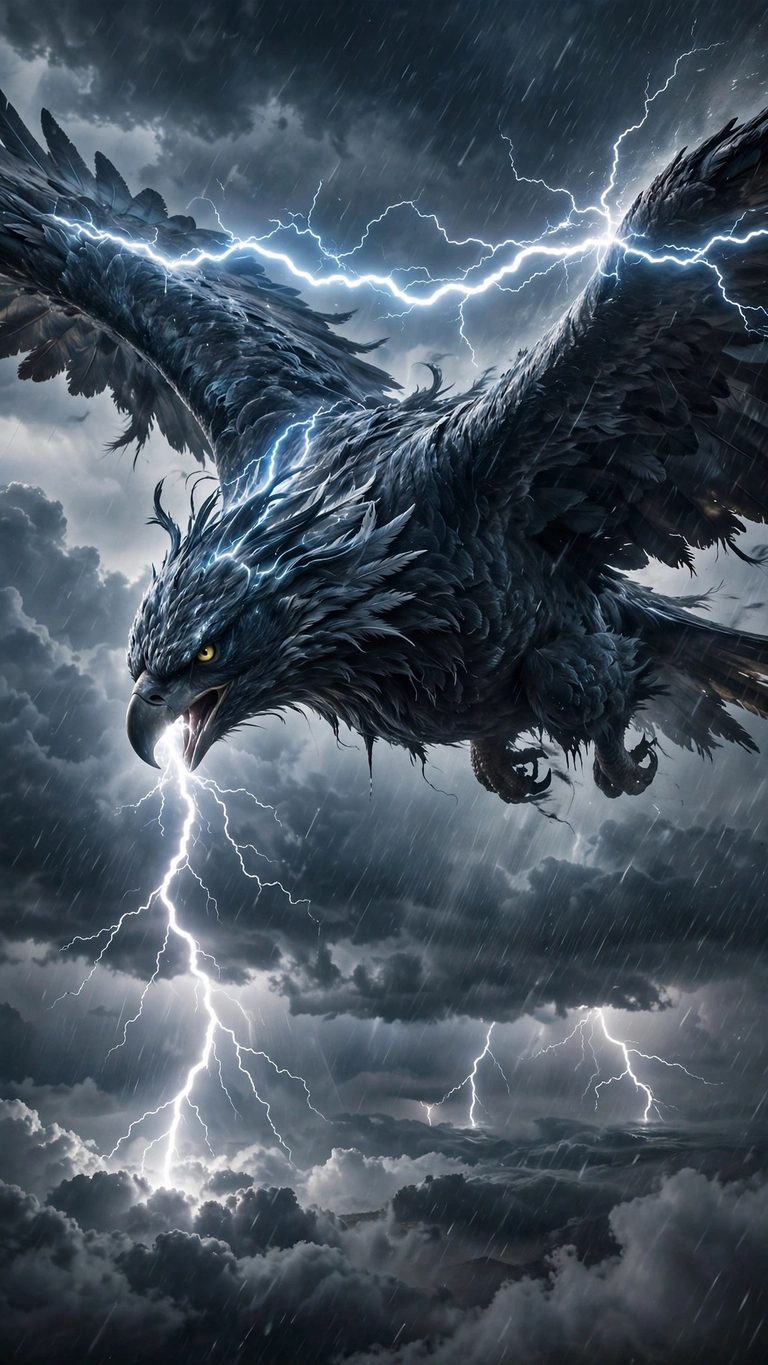
Few forces on Earth command attention like a thunderstorm, and this prompt fuses that raw power with mythology’s most electrifying creature. A colossal thunderbird, lightning crackling between its wingtips, soars through a raging storm as rain lashes sideways and its screech shakes the clouds; bolts strike wherever it points its beak while the camera struggles to track its blinding speed. It is eight seconds of elemental fury, and it is engineered to electrify a feed. Storm content has a permanent, passionate audience: weather watchers, mythology lovers, and fantasy fans all collide on #Storm and #Lightning posts, and a mythical creature riding the tempest gives every one of those communities something to obsess over. Lightning itself is one of the most rewatchable natural phenomena on video, bright, sudden, and different every time, which drives the repeat views that algorithms reward. This guide hands you the exact prompt, explains the visual psychology of storm spectacle, and shows you how to generate your thunderbird in Veo 3, Runway, Kling, Pika, or Sora.
The Prompt
Here is the full prompt, ready to copy and paste into your favorite AI video generator:
Electrifying fantasy scene of a colossal thunderbird with lightning crackling between its wingtips soaring through a raging thunderstorm, rain lashing sideways, its screech shaking the clouds, bolts striking where it points its beak, camera struggling to track its speed, raw elemental power, ultra realistic, cinematic
Why This Prompt Works
This prompt taps into humanity’s oldest awe response: the storm. Thunder and lightning trigger a primal mix of fear and fascination that predates civilization, and wrapping that energy in a mythical thunderbird gives viewers a character to project the storm’s power onto. Visually, the prompt is a contrast masterpiece: the dark, churning storm clouds make every lightning bolt pop with blinding intensity, and high-contrast imagery is proven to arrest scrolling thumbs faster than mid-tone scenes. The lightning crackling between the wingtips is the signature detail; it turns the bird into a living circuit, a visual concept so striking that viewers rewatch just to trace the arcs. Motion is relentless, with rain lashing sideways, the bird’s blinding speed, and a camera struggling to track it, the frame never rests, which sustains attention through the full eight seconds and encourages loops. The screech shaking the clouds adds an implied audio dimension; even silent, viewers imagine the sound, and imagined sound deepens immersion. Platform trends strongly favor this niche: #Lightning compilations are evergreen viral content, storm-chasing pages have massive engaged followings, and mythology-plus-nature crossovers like this one stand out because they are rare. The prompt’s specificity, bolts striking where it points its beak, gives the generator a cause-and-effect beat that reads as intelligence and intent, making the creature feel alive rather than decorative. Ultra realistic and cinematic push the render toward dramatic cloud volumetrics, realistic rain streaks, and film-grade lightning bloom. The 9:16 vertical format stacks the storm vertically, letting towering clouds and falling bolts fill the phone screen for maximum drama.
How to Use This Prompt
Generating this thunderbird is straightforward on all leading platforms. In Veo 3, paste the prompt into text-to-video with a 9:16 vertical canvas and eight-second duration; Veo 3’s handling of volumetric clouds and light bloom makes the lightning arcs look spectacular. In Runway, use the latest model in vertical orientation and consider its camera controls to add subtle shake during the screech moment, selling the raw power. In Kling, professional mode will render the sideways rain and fast flight motion convincingly; Kling’s motion coherence is a real asset for high-speed creature scenes. In Pika, the cinematic preset with an eight-second clip leans into the dramatic storm mood beautifully. In Sora, paste the full prompt in portrait format and let its cinematic framing compose the bird against the towering clouds. Because lightning and fast motion vary dramatically between seeds, generate at least five takes and choose the one where the bolts read clearly and the thunderbird’s silhouette stays coherent. If your tool supports it, add a slight slow-motion feel by describing dramatic slow-motion as the bolt strikes, which stretches the money shot. Export at 1080×1920 and layer in sound design: rolling thunder, rain hiss, and a piercing screech timed to the lightning will transform the clip, and pairing it with a trending epic audio boosts #AIVideo discovery.
Pro Tips & Creative Variations
The storm is your canvas, so repaint it. A thunderbird soaring through a hurricane’s eye wall with a calm glowing center behind it creates an unforgettable contrast, while a desert dust storm version with lightning arcing through orange haze feels apocalyptic and unique. Night storms with city lights below give you a superhero-movie establishing shot; the thunderbird becomes a guardian spirit over a sleeping metropolis. You can redesign the bird itself: describe feathers of living storm cloud with lightning veins, a white-gold thunderbird wreathed in Saint Elmo’s fire for a divine look, or a shadow-black thunderbird visible only by the lightning crawling across its wings for pure menace. The pro tip about syncing lightning with wingbeats is gold: explicitly instructing the generator to time each bolt to a wing stroke creates a rhythmic visual pulse that feels intentional and musical, dramatically increasing rewatch value. Add scale by placing a tiny element in frame, a lone lighthouse, a wind turbine, or a mountain peak, so the thunderbird’s colossal size registers instantly. For narrative, append a line where the thunderbird dives and lightning strikes a mountaintop, splitting it, which gives the clip a climactic payoff beat. Camera ideas include a ground-level look-up as the bird passes overhead with rain hammering the lens, or a chase view from just behind the wingtips where lightning crackles past the camera. The source notes confirm the mythology-plus-nature combo is unique, so lean into captions about storm gods, sky spirits, and elemental power; that framing attracts both mythology nerds and weather fans, doubling your potential audience.
Frequently Asked Questions
Which AI video generator is best for lightning effects?
Veo 3 currently renders the most convincing lightning bloom and cloud volumetrics, making it the top pick for this prompt. Kling handles the fast flight and rain motion very well, Runway offers great camera control for the tracking shot, Pika’s cinematic preset suits the dark stormy mood, and Sora composes dramatic wide storm frames. Whichever you use, generate many seeds, since lightning placement is highly random.
How do I make the lightning look real instead of cartoonish?
Realism comes from light interaction: the prompt’s ultra realistic and cinematic tags help, but you can strengthen it by adding lightning illuminating the clouds from within. Choose seeds where bolts have branching structure rather than single lines, render at maximum resolution, and avoid oversaturated color settings that push the bolts toward neon.
Why does my thunderbird morph or lose shape mid-flight?
Fast-moving creatures challenge temporal coherence in every video model. Mitigate it by generating extra seeds and picking the most stable take, describing a large clearly-defined bird silhouette to anchor the shape, and keeping the clip at eight seconds rather than extending it. Slightly reducing motion intensity in tools that offer the control also helps.
What is the best posting time for storm content?
Storm and #Lightning content performs well year-round but spikes during real storm seasons and dramatic weather news cycles in your audience’s region. Posting in the evening, when people scroll most, with a caption tying the thunderbird to an actual passing storm, can ride real-world weather interest for extra reach.
The thunderbird riding a raging storm is nature’s fury given wings, and fury is unforgettable. Copy the prompt, summon your storm god, and let the lightning do the talking. Your feed is about to get a whole lot more electric.
Related Viral Prompts
- Ice Dragon Over a Frozen Lake: The Magical AI Video Prompt for an Aurora Fantasy Spectacle This Winter
- Fairy Queen AI Photo Prompt: Generate an Enchanting Moonlit Garden Fantasy Image with Ethereal Magic & Wonder
- Minotaur Labyrinth AI Photo Prompt: Generate a Dark Cinematic Fantasy Image of the Legendary Bull-Headed Beast
# A I V i d e o # P r o m p t B a z a r # T h u n d e r b i r d # S t o r m # L i g h t n i n g


Leave a Reply