
Introduction
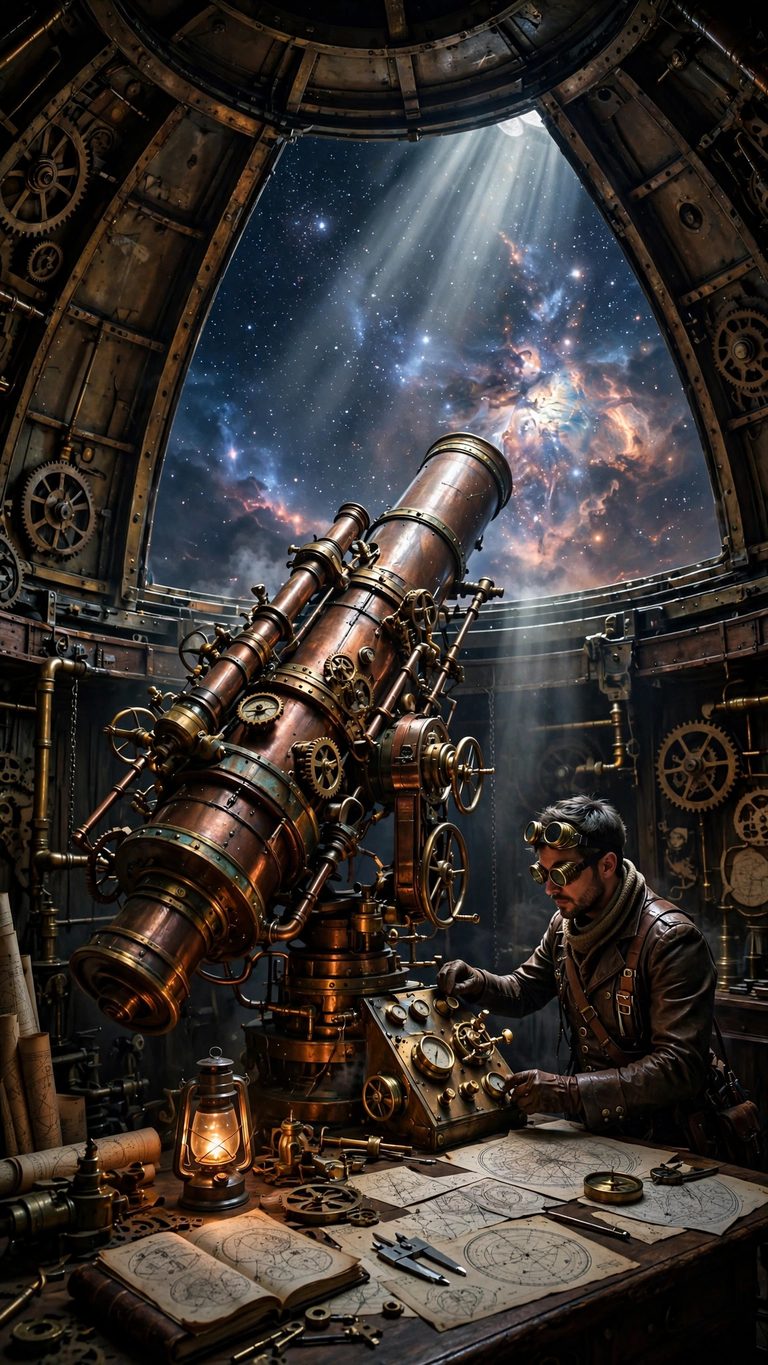
On a hill above a sleeping Victorian city, a brass dome stands open to the universe. Inside, a colossal copper telescope points at a glowing nebula, its gears and dials adjusted by an astronomer in goggles who has waited all night for the clouds to part. Star charts cover the desk, moonlight slices through the dome’s open slit, and the whole scene hums with the quiet electricity of discovery. This prompt captures the most romantic corner of steampunk: the moment human curiosity meets the cosmos through brass and glass. Observatory scenes are catnip for AI art lovers because they combine three irresistible ingredients, dramatic architecture, a sense of cosmic scale, and a lone figure chasing knowledge. The image works as a poster, a book cover, a desktop wallpaper, or the opening frame of a story about what we find when we look up. Rendering it well demands careful balance: the interior must feel warm and mechanical while the sky beyond feels infinite and cold. This prompt was engineered to hold both. In this guide we break down why every phrase matters, how to run it on Midjourney, DALL-E 3, Flux, and Stable Diffusion, and how to aim the telescope at a dozen new wonders.
The Prompt
Copy the prompt below exactly as written and paste it into your favorite image generator. Every word has been tuned for maximum visual impact.
Atmospheric steampunk photograph of a grand brass observatory dome open to a starry night sky, a colossal copper telescope pointed at a glowing nebula, an astronomer with goggles adjusting dials, star charts scattered on a desk, moonlight streaming through the dome slit, sense of cosmic discovery, ultra detailed, 8k, masterpiece
Why This Prompt Works
This prompt is built like the observatory itself: a solid dome of structure with an opening aimed at infinity. It begins with atmosphere as architecture: grand brass observatory dome open to a starry night sky. Open is the operative word, because it creates the crucial visual event of the image, a dark dome interior split by a shaft of night sky, and it gives the composition its natural leading line. The telescope description does triple duty: colossal establishes scale against the human figure, copper sets the warm material palette, and pointed at a glowing nebula aims the whole image at a specific, colorful target in the sky rather than vague stars. A glowing nebula gives the model permission to paint the sky with purples, teals, and magentas, which is what makes the final image unforgettable. The astronomer with goggles adjusting dials is the narrative engine: adjusting dials gives the figure an action, which produces a natural pose and avoids the stiff standing-around look, while goggles keep the steampunk identity on the character. The set dressing, star charts scattered on a desk, fills the foreground with authentic detail and texture, giving the eye places to rest and rewarding viewers who zoom in. The lighting phrase, moonlight streaming through the dome slit, is the cinematography of the piece: it motivates a dramatic shaft of cool light cutting through warm lamplit interior tones, a contrast that professional photographers chase and that AI models render gorgeously. The closing mood phrase, sense of cosmic discovery, acts as an emotional anchor that keeps the scene wondrous rather than merely technical. Finally the quality stack of ultra detailed, 8k, and masterpiece sharpens the brass rivets, the star field, and the nebula’s filaments. Every element points the viewer’s eye from the small human, up the telescope, and out into the universe, which is exactly the journey the prompt wants you to take.
How to Use This Prompt
Follow these steps to get the best result on each major platform.
Midjourney: Paste the full prompt and add –ar 9:16 –v 7 –style raw. For a richer sky, add vivid nebula colors, dense star field. If the dome interior feels cramped, add spacious interior, wide composition to give the telescope room to breathe.
DALL-E 3: Paste the prompt as-is; DALL-E 3 handles the layered composition of dome, telescope, figure, and sky reliably. Follow up with make the nebula larger and more colorful if you want the cosmic payoff to dominate the frame.
Flux: Paste the prompt unchanged at a portrait resolution such as 768 by 1344. Flux renders star fields and nebula gradients with beautiful smoothness. Use 28 steps and guidance near 3.5, and keep the cool-warm contrast by not over-warming the color balance.
Stable Diffusion: Use the prompt as your positive prompt with a negative prompt like blurry stars, deformed telescope, watermark, flat lighting. Thirty steps with DPM++ 2M Karras and CFG 7 is a good baseline. For extra sky quality, generate at higher resolution so the stars stay pinpoint sharp.
Pro Tips & Creative Variations
The observatory is a gateway to infinite variations, because the sky is never the same twice. Change the cosmic target: aim the telescope at Saturn with its rings, a blood-red lunar eclipse, a comet with a blazing tail, or a swirling galaxy that fills the dome slit. Change the astronomer: a young woman charting her first comet, an elderly professor asleep at the desk with cold tea, or two rivals arguing over a star chart. Change the time and weather: a storm clearing at midnight with ragged clouds racing past the moon, the blue hour just after sunset with the city lights twinkling below, or a snowy night with flakes drifting through the open slit. Change the instrument: a brass orrery projecting the solar system on the dome ceiling, a wall of ticking chronometers, or a giant lens being polished by apprentices. Go bigger: pull back to show the observatory on its hilltop with the whole Milky Way wheeling overhead, or go smaller with a macro shot of the astronomer’s eye reflected in the eyepiece, the nebula mirrored in the lens. Mash the genre: a floating sky-observatory on an airship, an underwater observatory with a glass dome full of stars and fish, or a desert observatory among ancient stone ruins. Each variation keeps the proven skeleton of brass dome, copper instrument, human wonder, and dramatic slit of sky, so your series feels like chapters of one story: humanity looking up, night after night, never quite finished.
Frequently Asked Questions
How do I get the nebula to look vivid instead of washed out? Strengthen the sky language: add vibrant glowing nebula, rich purple and teal colors, dense stars. In Midjourney, avoid –style raw if colors feel muted, since the default style boosts saturation. In Stable Diffusion, a slight increase in CFG to 8 can push color richness, and generating at higher resolution keeps the nebula filaments crisp.
Why does the telescope sometimes look bent or broken? Long straight instruments challenge AI geometry. Flux and Midjourney v7 handle the telescope best; in Stable Diffusion add straight telescope, correct perspective to the positive prompt and deformed telescope to the negative prompt. A slightly lower camera angle also helps by simplifying the perspective.
Can I make a landscape version for a desktop wallpaper? Yes. Switch to 16:9 and add wide interior view, telescope spanning the frame. The dome slit becomes a dramatic vertical element on the right or left third, which follows the rule of thirds beautifully and leaves clean space for desktop icons.
Which model captures the moonlight shaft best? Midjourney v7 renders volumetric moonlight streaming through the slit with gorgeous atmosphere. Flux is close behind with cleaner geometry on the dome. DALL-E 3 is the most dependable at keeping every described element, the charts, the dials, the goggles, present in one coherent scene.
Look up. Paste the prompt, open the dome, and let the nebula pour in. Then swing the telescope toward a new wonder from the variations above and keep the night watch going.
Related Viral Prompts
- Brass Airship AI Video Prompt: Soar a Colossal Steampunk Airship Over Victorian London in Golden-Hour Glory
- Clockwork City AI Video Prompt: A Mesmerizing Steampunk Metropolis Built Entirely From Giant Brass Gears
- Victorian Inventor AI Video Prompt: Inside a Cozy Steampunk Workshop Full of Brass, Steam and Genius
# A I P h o t o # P r o m p t B a z a r # S t e a m p u n k # O b s e r v a t o r y # S t a r s

Leave a Reply