
Introduction
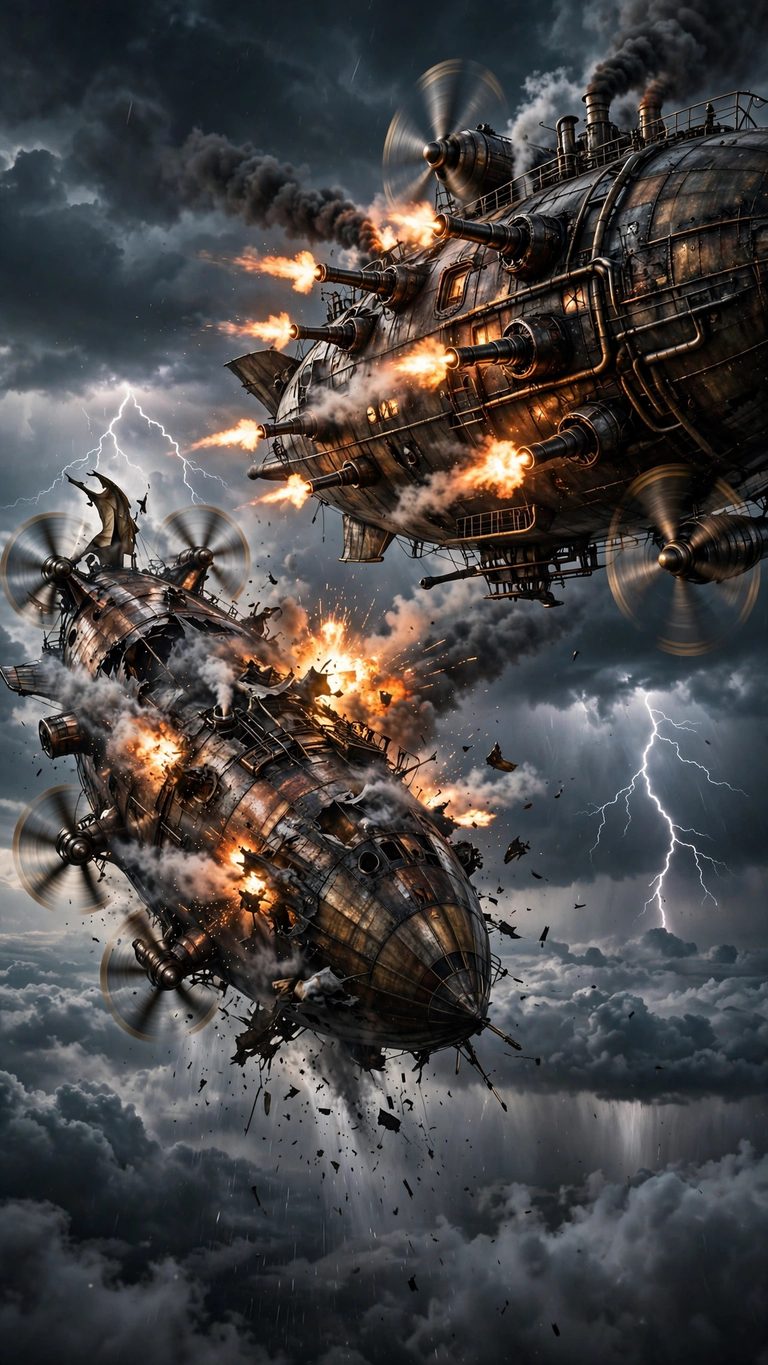
Thunder is not only in the clouds anymore. Two massive airships hang in a storm-dark sky, broadsides flashing as cannon fire arcs between them. Explosions bloom orange against the gray, shockwaves rippling through torn cloud banks. One vessel banks hard, propellers screaming, hull groaning as it turns into the attack. Debris tumbles past the camera, which weaves through the chaos like a war correspondent with nerves of steel. Lightning splits the sky behind the battle, freezing the brass warships in stark silhouette. This is steampunk at full war-movie intensity: the romance of the airship age colliding with the fury of naval combat, five thousand feet in the air. Action is the most competitive genre in short-form video, which means the bar is high, but the payoff is higher. A well-rendered battle clip earns rewatches, duets, and sound-on views. The prompt below is engineered to deliver that chaos with cinematic control, so every explosion lands and every camera move feels deliberate.
The Prompt
Copy the prompt below exactly as written and paste it into your favorite AI video generator.
Thrilling steampunk battle between two massive airships exchanging cannon fire above storm clouds, explosions blooming orange against grey sky, one ship banking hard with propellers screaming, debris tumbling, camera weaving through the chaos, dramatic lightning flashes, epic war-movie intensity, ultra realistic, cinematic
Why This Prompt Works
Action prompts fail when they are vague; this one works because every element is a directed event. “Exchanging cannon fire” establishes the core action loop. “Explosions blooming orange against grey sky” gives the model a color-contrast instruction that guarantees visual pop, warm fire against cold storm, the classic blockbuster palette. “One ship banking hard with propellers screaming” adds a specific maneuver, which prevents the two ships from hovering statically like museum models. Debris tumbling and the camera weaving through the chaos solve the biggest problem in AI action: flat, distant staging. The weaving camera forces foreground, midground, and background layers, creating the depth that makes combat feel real. Dramatic lightning flashes act as natural strobe cuts, breaking the ten seconds into punchy beats without any editing. The emotional dial is set to “epic war-movie intensity,” which pushes the render toward dramatic grading, lens flare, and high contrast rather than a polite skirmish. Finally, “ultra realistic, cinematic” keeps metal, fire, and smoke physically believable. The result is not random noise; it is choreographed chaos, the kind of clip that holds a viewer through all ten seconds and earns the replay.
How to Use This Prompt
This prompt is ready to copy and paste. Choose the AI video tool that fits your workflow and follow the steps below.
- Copy the prompt exactly as written in the box above, including the style tags at the end like “ultra realistic” and “cinematic”. These quality modifiers are what keep the output looking like a film frame rather than a cartoon.
- Veo 3: Paste the prompt into the text-to-video field, set the aspect ratio to 9:16 for vertical shorts, pick a duration of 8 to 10 seconds, and generate two variations so you can choose the better hull reflection or crowd detail.
- Runway: Use the prompt in Gen-4 or the current video model, lock the camera motion setting to match the described move (for example “sweeping aerial” means a lateral glide), and generate at 1080p.
- Kling: Paste the prompt, enable professional mode for richer detail, and let the built-in physics handle the steam, smoke, and fabric motion.
- Pika: Use the prompt as the core text input, then add negative prompts like “blurry, distorted, extra limbs, watermark” to clean up the render.
- Sora: The prompt works as-is in storyboard mode; if you want a longer cut, split the scene into two beats (wide establishing shot, then the described camera move) and generate each separately.
- Post and publish: Export vertical 9:16, add the caption and hashtags from this post, and upload to your shorts, reels, or TikTok feed.
For this chaotic battle, Veo 3 and Kling handle fast multi-object motion and explosion physics best; Runway users should generate twice and pick the take with the cleanest ship silhouettes.
Pro Tips & Creative Variations
Battle scenes are endlessly remixable. Shift the theater of war: “above a burning Victorian city at night” for high stakes, “over a calm ocean at dawn” for tragic beauty, or “inside a canyon of floating rock islands” for a claustrophobic dogfight. Change the combatants: a lone airship against a swarm of “clockwork fighter kites,” two fleets clashing for a “full armada battle, dozens of ships,” or an airship dueling a “giant storm kraken with brass-harpooned tentacles” for pure fantasy. Add hero moments: “a daredevil in a wingsuit leaping between the ships,” “the captain silhouetted on the bridge, coat whipping in the wind,” or “a boarding party swinging across on grappling lines.” For sound-on impact, pair the clip with booming percussion and a rising brass score. If explosions look soft, strengthen them with “massive fireballs, thick black smoke trails, shockwave rings.” If ships lose coherence in the chaos, add “both airships clearly defined, detailed hulls” and use Pika negative prompts like “morphing, melting, extra propellers.” Cut your best take with a slow-motion ramp on the biggest explosion for a trailer-style finish.
Frequently Asked Questions
Do I need to edit the prompt before using it?
No. It was written and tested for text-to-video models. Copy it exactly for your first generation. Edit only after you see the result and know what you want to change, such as the time of day or camera angle.
Which AI video tool gives the best steampunk look?
Veo 3 and Runway currently render brass, gears, and atmospheric smoke with the most convincing realism. Kling is excellent for motion fluidity, while Pika and Sora are strong on stylized or cinematic framing. Try two tools and compare.
Why does my video look cartoonish instead of realistic?
Usually because the style tags were dropped or the model defaulted to a stylized render. Keep “ultra realistic, cinematic” in the prompt, and in tools like Pika add negative prompts such as “cartoon, anime, flat colors”.
Can I use the generated video commercially?
That depends on the terms of the AI tool you use, so check your plan’s license before monetizing. The prompt itself is free to use and adapt for your own creative projects.
Cannons roar, lightning splits the sky, and the brass fleet holds the line. Copy the prompt, unleash the battle, and give your audience the most epic ten seconds steampunk has to offer.
Related Viral Prompts
- Clockwork Owl Flight: Cinematic Steampunk AI Video Prompt With a Magical Brass Owl Over Gaslit Streets
- Steampunk Submarine Dive: Cinematic AI Video Prompt of a Brass Submarine Descending Into the Deep Ocean
- Airship Dock at Sunset: Golden Steampunk AI Video Prompt of a Zeppelin Sky Harbor at Twilight for Cinematic Clips
# A I V i d e o # P r o m p t B a z a r # S t e a m p u n k # A i r s h i p B a t t l e # A c t i o n

Leave a Reply