
Introduction
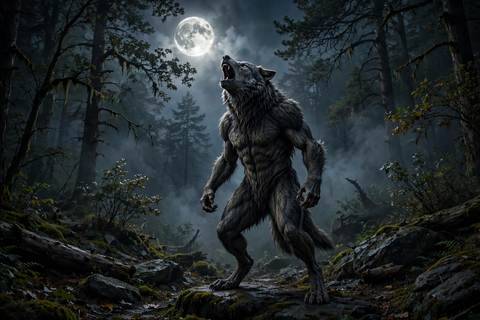
There are few Halloween images as dramatic as a werewolf howling at the full moon in a dark forest. It is wild, cinematic, and full of raw energy: head thrown back, fur bristling, fog curling between twisted trees, and moonlight cutting through the night. This Halloween werewolf night forest AI photo prompt is designed to capture that exact moment as a dramatic horror portrait, powerful enough for a poster, striking enough for a profile picture, and atmospheric enough to feel like a scene from a film.
Werewolf portraits are popular because they combine two things viewers love: a creature transformation and a beautiful night landscape. The forest gives depth and mystery, the fog adds movement, and the full moon provides a natural spotlight. When those elements come together with a strong, detailed creature design, the image feels epic rather than cartoonish. It is the kind of portrait that stops people mid-scroll, because it looks like a moment of real power caught on camera.
This article gives you a complete Gemini image prompt for this dramatic portrait, plus a guide to why it works, how to use it, and how to refine it for your own version. You will learn how to keep the werewolf looking realistic rather than silly, how to balance fog and moonlight, and how to adjust the intensity for a horror page, a costume showcase, or a cinematic art post.
The Prompt
Copy the full prompt below and paste it into Gemini image generation. Keep the howling pose and the foggy forest, as those define the drama.
Create a dramatic horror portrait of a werewolf howling in a foggy moonlit forest at night. The werewolf stands on a rocky hill in the centre of the frame, head thrown back, mouth open in a powerful howl, arms slightly spread. Creature design: a large realistic werewolf with thick dark grey and brown fur, detailed fur texture, pointed ears, glowing amber eyes, sharp claws, and a muscular build, fearsome but not gory, with no blood or wounds. Setting: a dense night forest with tall twisted trees, drifting fog between the trunks, fallen leaves on the ground, and a huge glowing full moon low in the sky behind the werewolf. Lighting: dramatic moonlight from behind creating a strong rim light on the fur, cool blue shadows in the forest, and warm amber glow in the eyes. Atmosphere: dramatic, cinematic, wild, and thrilling, like a climactic scene from a horror fantasy film. Style: ultra realistic creature portrait photography, sharp focus on the werewolf, shallow depth of field, detailed fur, moody cinematic colour grading, vertical portrait format.
Why This Prompt Works
This prompt works because it treats the werewolf as a cinematic character, not a generic monster. The creature description is specific: thick dark grey and brown fur, detailed texture, glowing amber eyes, pointed ears, and a muscular build. Those details prevent the image tool from producing a vague dog-like creature or a cartoon wolfman. At the same time, the prompt sets a clear boundary by saying fearsome but not gory, with no blood or wounds, which keeps the horror dramatic rather than graphic and makes the image suitable for wider sharing.
The composition also does heavy lifting. Placing the werewolf on a rocky hill, silhouetted against a low full moon, creates a classic heroic horror framing. The moonlight from behind outlines the fur with rim light, which is what makes the creature stand out from the dark forest. Fog between the trees adds layers of depth, so the forest feels vast rather than flat, while the cool blue shadows contrast beautifully with the warm amber eyes. That colour contrast is a key cinematic trick: cool background, warm focal point, and the eye goes straight to the howling figure.
The howling pose itself is the emotional core of the image. A werewolf standing still can look like a costume photo, but a werewolf mid-howl, head back and arms spread, feels alive and wild. It suggests sound, movement, and transformation, even in a still image. Viewers can almost hear the howl, and that sensory suggestion is what makes the portrait memorable long after they scroll past it.
How to Use This Prompt
Open Gemini image generation and paste the full prompt into the prompt box. For your first generation, do not change anything, so you can judge the core creature design and composition. Look closely at the fur texture, the eye glow, the pose, and the moon placement. A strong result will have a clearly defined werewolf, a visible full moon behind it, and fog that adds depth without hiding the figure.
If the result needs adjustment, change one element at a time. If the werewolf looks too friendly, increase the fur darkness and the eye glow. If the forest looks empty, add more twisted trees and drifting fog. If you want a transformation theme, add an instruction to show a half-transformed figure with human features still visible, while keeping the howling pose and forest setting. Small, focused edits will improve the image much faster than a complete rewrite.
Once you have a version you love, use it as a Halloween poster, a dramatic profile picture, a video thumbnail, or a piece of fantasy art for your feed. Pair it with a short, powerful caption about the full moon or the wild night, and let the image carry the drama. Because the prompt avoids gore, it works for horror pages, fantasy art accounts, and general Halloween audiences alike.
Pro Tips for Best Results
- Prioritise fur detail. Realistic fur texture is what separates a cinematic werewolf from a costume. Repeat detailed fur texture if your first result looks smooth or plastic.
- Keep the eyes glowing but not overpowering. Amber eyes should draw attention, not dominate the whole face. A subtle glow reads as more realistic and more threatening.
- Use the moon as a backlight. A low moon behind the werewolf creates rim light and a dramatic silhouette edge. A high moon can flatten the scene.
- Control the fog level. Drifting fog adds mystery, but thick fog can hide the werewolf. Ask for light drifting fog if details start disappearing.
- Try a side profile howl for variety. A profile shot emphasises the open mouth and neck line, and can look even more cinematic than a front view.
- Generate a before and after pair. Create a human portrait in the same forest first, then the werewolf version, for a striking transformation post.
Frequently Asked Questions
Is this werewolf prompt gory?
No. The prompt explicitly says fearsome but not gory, with no blood or wounds. The horror comes from the dramatic pose, the glowing eyes, the foggy forest, and the moonlight, not from graphic details, so it is safe to share on most platforms.
Can I turn myself into the werewolf?
Yes, if your tool supports photo upload. Upload a clear portrait and add an instruction to transform the person into a realistic werewolf while keeping their pose and general features. The forest, moon, and howling pose from the prompt will complete the transformation look.
What if my werewolf looks like a regular wolf?
Add humanoid details to your edit, such as standing upright, muscular build, arms slightly spread, and clawed hands. Those human features are what distinguish a werewolf portrait from a wildlife photo of a wolf howling.
Can I use this image for a Halloween video thumbnail?
Yes, this portrait is ideal for thumbnails because the centred werewolf, glowing eyes, and bright moon read clearly even at small sizes. Generate a horizontal version if your thumbnail format needs it, and keep the werewolf centred so cropping does not cut off the howl.
A howl in a moonlit forest is Halloween at its wildest: untamed, dramatic, and impossible to ignore. With this prompt, you do not need a costume, a forest location, or a full moon on schedule. You just need a few lines of description, and you can create a werewolf portrait that feels like a film still. So wait for the moon, step into the fog, and let the howl carry across the trees.
Related Viral Prompts
Explore more trending Halloween prompts: Halloween Witch Broom Moonlight AI Photo Prompt: Magical Silhouette, Halloween Clown Horror AI Photo Prompt: Suspenseful Theatrical Portrait, and Halloween Figure in Window Video AI Prompt: Chilling Clip.
#HalloweenAI #Werewolf #AIPhotoPrompt #FullMoon #HorrorPortrait #PromptBazar


Leave a Reply