
Introduction
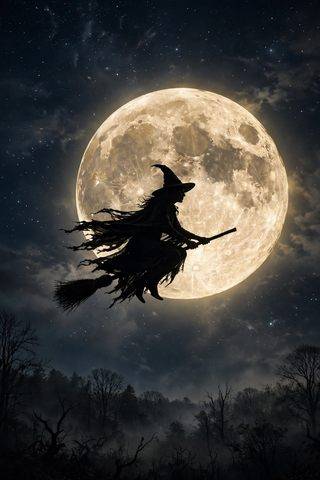
There is one Halloween image that never gets old: a witch silhouetted against a huge full moon, broom in hand, flying across a sky full of stars. It is simple, magical, and instantly recognisable, yet it still feels fresh every October. This Halloween witch broom moonlight AI photo prompt recreates that classic scene as a polished silhouette portrait, with a dramatic moon, a starry night sky, and a witch in mid-flight who looks powerful, graceful, and a little bit mysterious.
Silhouette portraits work so well because they let the viewer fill in the details. You do not need a perfect face or an elaborate costume close-up. The shape of the hat, the sweep of the cloak, the angle of the broom, and the glow of the moon tell the whole story. That simplicity is also why this prompt is so popular for profile pictures, posters, and Halloween greetings. It looks like art, it reads clearly even as a small thumbnail, and it carries a sense of wonder that realistic portraits sometimes miss.
In this article, you will get a complete Gemini image prompt for this magical silhouette, plus guidance on why it works, how to use it, and how to customise it for your own style. Whether you want a classic storybook witch, a modern elegant witch, or a dramatic cinematic version with clouds and bats, this prompt gives you a strong starting point that you can adapt in seconds.
The Prompt
Copy the full prompt below and paste it into Gemini image generation. Keep the moon large and central, as that is the key to the composition.
Create a magical silhouette portrait of a witch flying on a broom across a huge full moon on a Halloween night. The witch is shown in full silhouette in the centre of the frame, flying from left to right across the glowing moon. Figure: an elegant witch in a long flowing cloak and a classic pointed hat, hair flowing in the wind, holding a traditional broomstick, with a small cat sitting behind her on the broom. Moon: an enormous glowing full moon filling most of the background, with warm golden light, visible craters, and a soft halo. Sky: a deep midnight blue night sky filled with twinkling stars, wispy clouds drifting across the moon, and a few distant bats flying. Lighting: strong backlight from the moon, creating a crisp dark silhouette with a thin golden rim light around the cloak, hat, and broom. Atmosphere: magical, dreamy, enchanting, and slightly mysterious, like a storybook Halloween night. Style: ultra detailed digital art portrait, sharp silhouette edges, rich night colours, glowing moon texture, cinematic composition, vertical portrait format.
Why This Prompt Works
This prompt works because it builds the image around one powerful focal point: the huge full moon. Many night sky prompts fail because the moon is too small, leaving the image empty and unfocused. By describing the moon as enormous and filling most of the background, this prompt guarantees a bold, graphic composition. The witch silhouette then becomes a striking shape against that glow, which is exactly what makes the image readable at any size, from a phone screen to a poster.
The silhouette technique itself is another strength. Because the witch is backlit, the image tool does not need to render a detailed face or costume texture, which reduces the risk of awkward features. Instead, it can focus on clean edges, flowing shapes, and the golden rim light that separates the figure from the moon. Small details, such as the flowing hair, the cat on the broom, and the drifting clouds, add charm and storytelling without cluttering the scene. Bats in the distance complete the Halloween atmosphere while staying subtle.
Finally, the prompt sets a clear emotional tone with words like magical, dreamy, and enchanting. That tone guides the colour palette toward deep midnight blue and warm gold, rather than cold horror blues or harsh contrast. The result feels like a storybook illustration brought to life: beautiful enough to share as art, and Halloween enough to feel seasonal. That combination is why silhouette witch images are saved and shared so widely every October.
How to Use This Prompt
Start by pasting the full prompt into Gemini image generation and generating your first version. Check the composition first: the moon should dominate the background, the witch should be clearly silhouetted in the centre, and the broom should read as a clean diagonal line. If the witch looks too small, add the phrase large prominent silhouette. If the moon looks dull, emphasise glowing golden moon with a soft halo.
Once the core composition works, you can personalise it. Change the cloak colour edge to deep purple rim light for a more modern look, swap the cat for an owl, or add a trail of sparkling magic behind the broom for extra fantasy. If you want yourself as the witch, upload a photo and ask the tool to keep your silhouette profile and hairstyle shape, while keeping the moon and sky unchanged. Silhouette personalisation works best when you focus on outline details, such as hat shape and hair length, rather than facial features.
Use the finished image as a Halloween profile picture, a greeting card, a poster, or a social media header. Because the design is bold and simple, it also works beautifully as a phone wallpaper or a printed decoration. Pair it with a short magical caption, and let the moonlit flight speak for itself.
Pro Tips for Best Results
- Make the moon huge. If the moon shrinks in your result, repeat enormous full moon filling the background until the composition locks in.
- Keep the silhouette clean. Avoid asking for too many costume details, because fine details can break the silhouette effect. Focus on hat, cloak, and broom shape instead.
- Use rim light wisely. A thin golden rim light is what separates the witch from the moon. Without it, the figure can blend into the background.
- Add clouds sparingly. One or two wispy clouds add depth, but heavy clouds can hide the moon and weaken the focal point.
- Try a horizontal version for banners. The same prompt works in landscape format for covers and headers, with the witch flying across the wider moon.
- Generate a matching set. Create three versions with different sky colours, such as midnight blue, deep purple, and teal, for a cohesive Halloween series.
Frequently Asked Questions
Can I make the witch look like me in silhouette?
Yes, in outline form. Silhouettes hide facial details, so focus on recognisable shapes: your hairstyle, your hat style, and your pose on the broom. Upload a profile photo if your tool supports it, and ask it to preserve your silhouette profile while keeping the moonlit composition.
Why does my moon sometimes look small?
Image tools often default to a realistic moon size, which looks tiny in a portrait. Fix this by repeating huge, enormous, and filling most of the background in your prompt, and by keeping the witch centred on the moon rather than in an empty sky.
Is this prompt suitable for children and family pages?
Yes, it is completely family friendly. There is no horror, gore, or frightening element, just a magical witch flying across the moon. It is ideal for kids Halloween posts, classroom decorations, and family greeting cards.
Can I change the witch to a wizard or another character?
Yes, the composition works for any flying silhouette. Swap the witch for a wizard with a cloak and staff, a superhero, or a storybook character on a broom, and keep the huge moon, stars, and rim light. The magical silhouette formula stays the same.
Some Halloween images are about fright, and some are about wonder. A witch flying across a huge full moon belongs firmly in the second group: a moment of pure magic, frozen against the night sky, that reminds us why we loved Halloween stories in the first place. With this prompt, you can create your own version in minutes, and share a little moonlight magic with everyone who sees it.
Related Viral Prompts
Explore more trending Halloween prompts: Halloween Pumpkin Carving Video AI Prompt: Create a Cosy Clip, Halloween Werewolf Night Forest AI Photo Prompt: Dramatic, and Halloween Door Opens Itself Video AI Prompt: Terrifying 10 Second Clip.
#HalloweenAI #WitchMoon #AIPhotoPrompt #FullMoonMagic #SpookySeason #PromptBazar


Leave a Reply