
Introduction
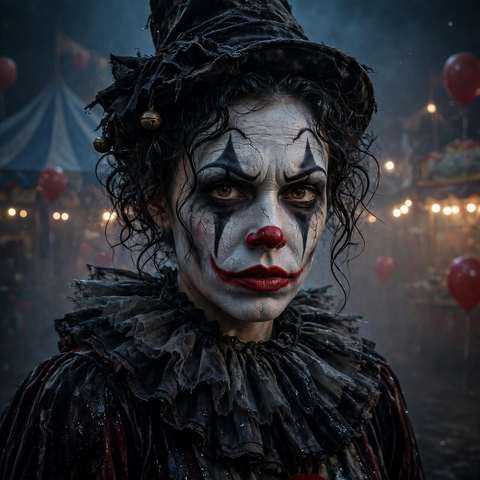
Not all Halloween horror needs blood, monsters jumping at the camera, or shocking gore to be effective. Some of the most memorable scary images are quiet ones: a painted face in the fog, a smile that lasts a second too long, and a carnival that should be fun but feels empty and wrong. This Halloween clown horror AI photo prompt is built around that kind of suspense. It creates a theatrical portrait of a clown in a dark, foggy carnival, dramatic and unsettling, but completely free of gore, so it is safe to share, stylish to post, and still genuinely chilling.
Clown portraits have become a Halloween classic for a reason. The makeup itself is theatrical: white face paint, bold red lips, dark eye details, and a costume that belongs on a stage. When you place that character in a foggy carnival at night, with dim lights, striped tents, and red balloons drifting in the background, the contrast does the scary work for you. The viewer feels uneasy not because something violent is happening, but because something feels out of place. That is suspense, and it photographs beautifully.
This article gives you a full, copy-paste Gemini image prompt for this exact portrait, plus a guide to why it works, how to use it, and how to customise it without losing the mood. Whether you want a profile picture for Halloween week, a poster-style portrait for your feed, or a dramatic photoshoot look without a real costume, this prompt will help you create a polished, cinematic clown portrait in minutes.
The Prompt
Copy the full prompt below and paste it into Gemini image generation. Replace the bracketed details only if you want a different costume colour or pose.
Create a suspenseful theatrical portrait of a clown in a dark foggy carnival at night, without any gore, blood, or violence. The clown stands in the centre of the frame, facing the camera with a calm, unsettling expression and a subtle painted smile. Face: classic theatrical clown makeup with smooth white face paint, bold black eye details, arched eyebrows, a red round nose, and deep red lips, flawless and symmetrical, like stage makeup. Costume: a vintage carnival clown outfit in deep red, black, and cream, with a ruffled collar, decorative buttons, and a slightly worn velvet texture. Setting: an old carnival at night, with a striped tent in the background, dim warm carnival lights, drifting fog, empty rides, and three red balloons floating softly behind the clown. Lighting: dramatic low-key lighting, with a soft spotlight on the face, warm rim light outlining the costume, and cool blue fog in the background for contrast. Atmosphere: suspenseful, cinematic, mysterious, and theatrical, but not gory or graphic in any way. Style: ultra realistic portrait photography, sharp focus on the face, shallow depth of field, rich colours, detailed fabric texture, moody cinematic colour grading, vertical portrait format.
Why This Prompt Works
This prompt works because it separates suspense from gore, and it does so explicitly. Many horror prompts fail because they rely on vague words like scary or creepy, which can push an image tool toward graphic or messy results. By saying theatrical, suspenseful, and without any gore, blood, or violence, this prompt steers the image toward performance and atmosphere instead. The clown becomes a stage character in a strange place, not a horror movie injury, and that is both more artistic and more shareable.
The visual details also work together as a system. The white face paint and red accents pop against the cool blue fog, while the warm carnival lights add depth behind the subject. The ruffled collar and velvet costume give the image texture, so it does not look flat or cartoonish. The three red balloons are a small but powerful storytelling detail: they are playful objects in a place that feels abandoned, and that mismatch creates unease without a single scary action. Fog softens the background, keeps the focus on the face, and hides the carnival just enough to let the viewer imagine what else might be there.
Finally, the prompt controls the expression carefully. A calm, unsettling expression with a subtle painted smile is far more effective than a screaming face, because it leaves room for interpretation. Is the clown friendly, sad, or waiting for something? The viewer has to decide, and that question is what makes people stop, look longer, and comment. That engagement is exactly why theatrical horror portraits outperform louder, gorier images on social media.
How to Use This Prompt
Start by opening Gemini image generation and pasting the full prompt into the prompt box. If you want the clown to look like you, first upload a clear front-facing photo and add a short instruction at the start, such as keep my face shape and features, transformed with theatrical clown makeup. Keep the rest of the prompt unchanged for your first generation, so you can judge the core look before customising it.
When the first image appears, check the face, the fog, and the lighting. The makeup should be symmetrical and clean, the face should be sharp, and the background should feel foggy without hiding the carnival tent completely. If the image feels too dark, add brighter warm carnival lights. If it feels too cheerful, increase the fog and cool blue tones. Change one element at a time, generate again, and compare the results side by side. This slow, deliberate process gives you a much stronger final portrait than rewriting the whole prompt at once.
Once you have a version you love, use it as a Halloween profile picture, a feed post, or a story background. Pair it with a short, mysterious caption rather than explaining the image, and let the portrait do the talking. Because there is no gore, it is suitable for all audiences and platforms, including pages and profiles that avoid graphic content. You can also print it as a poster or use it as a thumbnail for a Halloween video or live stream.
Pro Tips for Best Results
- Keep the expression calm. A subtle smile is scarier and more elegant than an exaggerated grin, and it keeps the makeup looking professional rather than messy.
- Use fog as your friend. Fog adds depth and mystery, but too much fog can hide the costume. Ask for drifting fog rather than thick fog if details start disappearing.
- Choose one strong accent colour. Deep red balloons, lips, and costume details against blue fog create a classic cinematic palette that photographs beautifully.
- Try a three-quarter angle for a second version. A slight turn of the head adds drama and can look more like a real photoshoot than a straight-on portrait.
- Protect the makeup symmetry. If one eye looks different from the other, regenerate or add symmetrical flawless makeup to your edit. Symmetry is what makes theatrical makeup look intentional.
- Add a prop sparingly. A single balloon string in hand or a vintage carnival ticket can add story, but too many props will distract from the face.
Frequently Asked Questions
Is this clown prompt really free of gore?
Yes. The prompt explicitly says without any gore, blood, or violence, and it describes a theatrical stage-style clown rather than a horror injury look. The scare comes from fog, lighting, expression, and setting, so the result is suspenseful but clean and safe to share anywhere.
Can I make the clown look like me?
Yes, if your tool supports image upload. Upload a clear, well-lit photo of yourself, then add an instruction to keep your facial features while applying the clown makeup and costume. The foggy carnival setting and lighting will still apply, giving you a personalised portrait that looks like a professional Halloween shoot.
What if my image looks too funny instead of suspenseful?
Shift the mood with lighting and expression. Increase the fog, cool the background tones to blue, lower the key light, and describe the expression as calm and still rather than smiling broadly. Small changes to light and expression usually move a funny clown portrait into suspenseful territory very quickly.
Can I use this portrait commercially, such as for a poster or thumbnail?
You can use an AI image you generated for your own social posts, thumbnails, and posters, but always check the terms of the tool you used and avoid using real trademarks, logos, or recognisable characters from films. A generic vintage carnival clown, as described here, is a safe original concept for personal and creative projects.
A great Halloween portrait does not need to shock you to stay with you. Sometimes a painted smile in the fog, a row of red balloons, and a carnival gone quiet are more haunting than anything loud or graphic. With this prompt, you can create that kind of image: theatrical, cinematic, and just unsettling enough to make people look twice. Step into the fog, hold the pose, and let the carnival do the rest.
Related Viral Prompts
Explore more trending Halloween prompts: Halloween Skeleton Couple Dance AI Photo Prompt: Fun Spooky Portrait, Halloween Witch Broom Moonlight AI Photo Prompt: Magical Silhouette, and Halloween Haunted House AI Photo Prompt: Create a Spooky Portrait.
#HalloweenAI #ClownHorror #AIPhotoPrompt #SpookyPortrait #CarnivalNight #PromptBazar


Leave a Reply