
Introduction
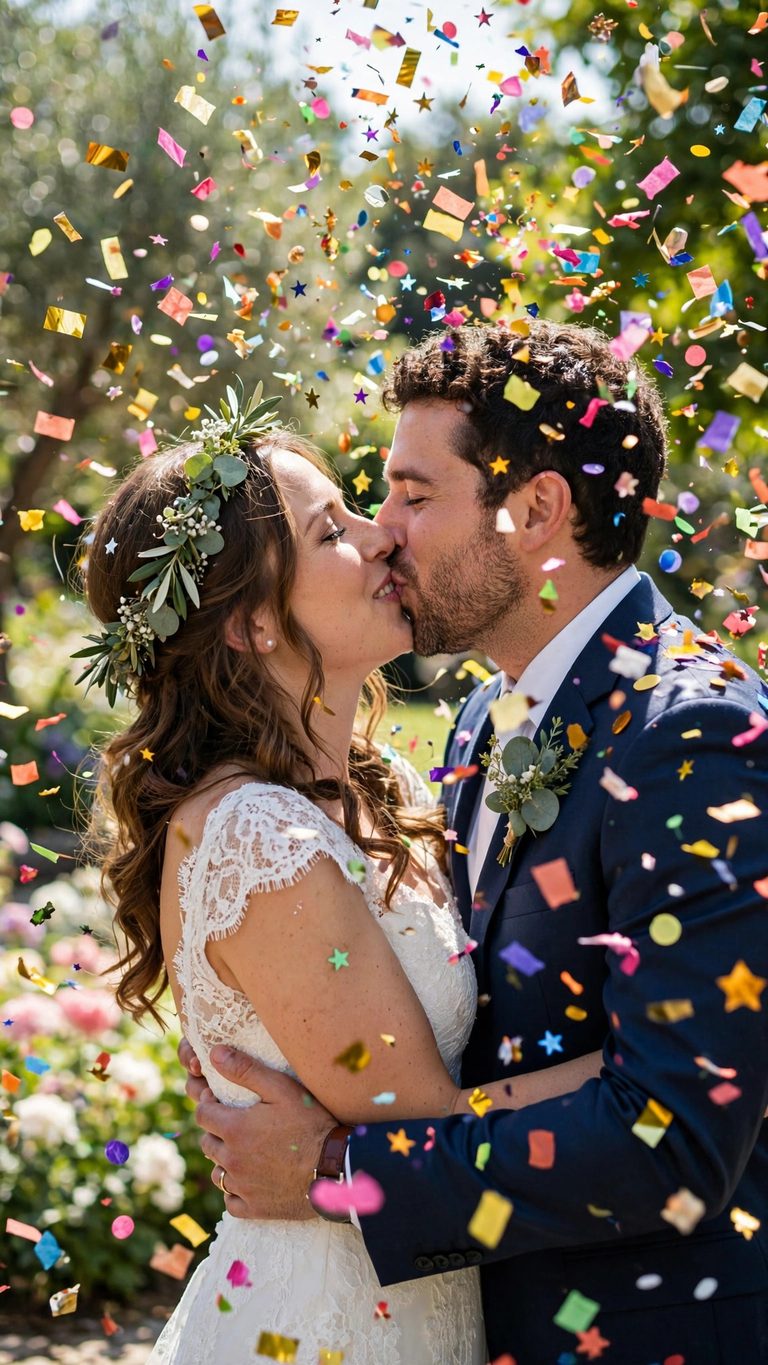
There is a split second at every great wedding when joy becomes almost physical — the air fills with color, laughter erupts, and two people lean in for a kiss right at the center of it all. Wedding photographers call it the money shot, and couples treasure it for decades. The problem is that catching this exact moment in real life demands perfect timing, a cooperative wind, and a confetti cannon fired at precisely the right instant. Now imagine freezing that entire celebration with a single sentence typed into an AI image generator. This Confetti Kiss AI Photo Prompt delivers a jubilant, hyper-detailed photograph of newlyweds kissing amid a burst of colorful confetti frozen mid-air — genuine laughter, bright daylight, and pure unfiltered happiness shining through every pixel. Whether you are a bride planning your dream album, a wedding photographer building a portfolio, or a content creator hunting for #ViralReels material, this prompt turns one line of text into a celebration that never fades. In this guide we break down the exact prompt, explain why it produces such contagious joy on screen, show you how to run it on Midjourney, DALL-E 3, and Flux, and share pro variations that keep your #Confetti and #Kiss shots fresh every single time.
The Prompt
Copy the full prompt below exactly as written — every descriptive phrase was tuned to produce that frozen-in-time celebration look. Paste it into Midjourney, DALL-E 3, or Flux and watch the magic happen.
Joyful photograph of a newlywed couple kissing amid a burst of colorful confetti frozen mid-air, genuine laughter, festive energy, bright daylight, hyper-detailed confetti pieces, celebratory wedding photography, ultra detailed, 8k quality, petals mixed with confetti in air, pure unfiltered happiness shining
Why This Prompt Works
This prompt works because it stacks three emotional triggers that social media algorithms and human brains both love: color, motion, and genuine human connection. The phrase “burst of colorful confetti frozen mid-air” does heavy lifting in two ways. First, “colorful confetti” guarantees a vibrant palette that stops thumbs mid-scroll — bright reds, golds, and blues against skin tones and daylight create instant visual contrast. Second, “frozen mid-air” tells the image model to render motion blur-free sharpness on every tiny paper shard, which reads as high-speed photography and immediately signals premium quality. Viewers subconsciously associate crisp frozen motion with professional cameras and expensive shoots.
The emotional core comes from “genuine laughter” and “pure unfiltered happiness shining.” AI generators often default to stiff, posed expressions, but these phrases steer them toward candid-feeling joy — the kind of unposed moment that makes #Wedding content so shareable. “Bright daylight” matters more than it seems: it gives the confetti colors full saturation, keeps skin tones flattering, and avoids the muddy shadows that can make celebration shots feel dull. “Hyper-detailed confetti pieces” forces the model to render each shard individually rather than smearing them into a blurry wash, which is exactly what separates an amateur-looking render from one that looks shot on a flagship camera. Finally, “petals mixed with confetti in air” adds texture variety, and “ultra detailed, 8k quality” anchors the whole composition in photorealism. Together these choices explain why this particular #AIPhotoPrompt consistently goes viral — it looks expensive, feels joyful, and celebrates a universal moment everyone wants to be part of.
How to Use This Prompt
Using this prompt across the three major AI image platforms is straightforward, and each one has a small trick worth knowing. On Midjourney, paste the full prompt and append parameters like --ar 4:5 --style raw --v 7 for a portrait-friendly, photorealistic result. The --style raw flag reduces Midjourney’s default beautification so the laughter looks genuine rather than glossy. If the confetti looks too sparse, add --chaos 15 for more variety across your four generations. On DALL-E 3 (via ChatGPT), paste the prompt as your message and add a short instruction like “portrait orientation, photorealistic wedding photography.” DALL-E 3 follows natural language well, so you can also ask for tweaks in plain English afterward: “make the confetti denser and the couple slightly off-center.” On Flux, keep the prompt exactly as written and set the aspect ratio to portrait (832×1216 or similar). Flux excels at fine detail, so the “hyper-detailed confetti pieces” instruction shines here — zoom in on your result to see individual confetti edges. For all three platforms, generate at least four variations and pick the one where the couple’s pose feels most natural. Then run a light pass in any photo editor: a touch of warmth and a slight vignette will make the celebration pop even more before you post it with #PromptBazar and your #Wedding hashtags.
Pro Tips & Creative Variations
Once you have the base result, these pro variations keep the concept fresh across an entire wedding album or content series. First, freeze the confetti denser: add “dense confetti storm filling the frame” to push the celebration energy even higher — ideal for a dramatic hero image. Second, time the kiss differently: swap “kissing” for “about to kiss, foreheads touching” for a tender pre-kiss moment that feels more intimate and less staged. Third, play with the palette: specify “rose gold and blush confetti” for a romantic editorial look, or “rainbow confetti against a clear blue sky” for maximum festive punch that performs beautifully on Instagram Reels covers.
Lighting swaps change the mood completely. Try “golden hour backlight” for glowing confetti edges and a dreamy halo around the couple, or “soft overcast light” for even, flattering skin tones when you want the colors to do all the talking. For composition variety, request “shot from a low angle” to make the confetti rain feel monumental, or “wide shot showing guests cheering at the edges” to add storytelling context. A clever seasonal twist: replace confetti with “autumn leaves and confetti mixed” for a fall wedding, or “flower petals and gold confetti” for a spring celebration — the prompt’s “petals mixed with confetti” seed already supports this. Finally, keep the “genuine laughter” anchor in every variation; it is the single phrase that keeps AI faces from slipping into mannequin mode. Save each winning variation with a clear filename so you can build a whole #Confetti collection for your #AIVideo and photo channels.
Frequently Asked Questions
Q1: Will the AI render the couple’s faces realistically?
Yes — the combination of “genuine laughter,” “hyper-detailed,” and “8k quality” pushes modern generators toward photorealistic faces. Midjourney v7 and Flux handle this especially well. If a face looks off, regenerate with a slightly different seed rather than editing; faces usually resolve within two or three tries.
Q2: Can I change the confetti colors to match a wedding theme?
Absolutely. Replace “colorful confetti” with your palette, such as “blush pink and gold confetti” or “ivory and sage confetti.” The rest of the prompt — the frozen motion, the laughter, the daylight — keeps working exactly the same, so your themed version stays just as vivid.
Q3: Which aspect ratio works best for social media?
The prompt is tuned for a 9:16 portrait, which fills phone screens on Instagram Reels, TikTok, and YouTube Shorts. For a feed post, 4:5 portrait is a great alternative. Both keep the couple and the confetti burst large in frame.
Q4: How do I avoid the image looking like a staged stock photo?
Keep the words “genuine,” “candid,” and “unfiltered” in your prompt — they are doing the anti-stock-photo work. You can strengthen the effect by adding “candid wedding photography, unposed moment” to steer the model further away from stiff poses.
Few images capture the spirit of a wedding like a confetti kiss — color in the air, laughter on faces, and love at the center of it all. Copy this Confetti Kiss AI Photo Prompt, paste it into your favorite generator, and create a celebration shot worthy of the biggest day. Share your results with #PromptBazar and #Wedding so the whole community can celebrate with you!
Related Viral Prompts
- Bridal Shoes AI Photo Prompt: Elegant Crystal Flat Lay Detail With Rose Petals and Soft Natural Light
- Mandap Night AI Photo Prompt: Magical Diya-Lit Wedding Decor Glowing Brightly Under a Starry Night Sky
- Monsoon Wedding AI Photo Prompt: Romantic Rain Portrait Under a Transparent Umbrella in Monsoon Rain
# A I V i d e o # P r o m p t B a z a r # A I P h o t o P r o m p t # C o n f e t t i # K i s s # W e d d i n g

Leave a Reply