
Introduction
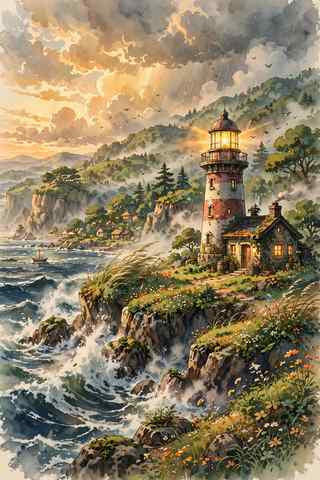
Some of the most unforgettable moments in Studio Ghibli films happen when the weather turns wild. Think of the raging storm that tosses Ponyo’s little boat across mountainous waves, or the brooding seas that open Tales from Earthsea. Ghibli’s artists paint storms not as disasters but as living, breathing characters — the clouds churn, the sea roars, and somewhere in the middle of it all, a small human figure stands their ground. That exact feeling is why the Ghibli style lighthouse storm AI photo prompt has exploded across TikTok and Instagram: it turns an ordinary selfie into a cinematic portrait of courage.
The lighthouse is the secret ingredient that makes this trend so emotionally powerful. In folklore and in film, a lighthouse means hope that refuses to go out — a beam of light sweeping through darkness while everything else is chaos. When your own face appears beside that lighthouse, wrapped in a Ghibli-painted storm, the image tells a story without a single word: here is someone who stands tall no matter how hard the wind blows. People are using it for profile pictures, motivational posts, and dramatic phone wallpapers, and the comments are always the same — it looks like a frame from a real anime movie.
What makes this particular prompt special is how it balances drama with beauty. The AI is instructed to keep the storm hand-painted and painterly rather than photorealistic and gloomy, so the waves glow with deep teal and foam-white highlights, the clouds carry warm amber breaks where the lighthouse beam passes through, and the rain becomes delicate diagonal streaks instead of a gray blur. Your face stays clearly recognizable in the middle of all that motion, lit softly as if by the lighthouse itself. It is the kind of image people stop scrolling for.
The Prompt
Copy the exact prompt below and paste it into your AI image generator together with your photo. Every technical instruction — face preservation, portrait format, cel shading, and the stormy lighthouse scene — is built in, so you do not need to add anything.
Transform this photo into a Studio Ghibli anime illustration, keeping the person's exact face, identity and likeness unchanged. Place them on a windswept cliff beside a tall lighthouse during a dramatic ocean storm — towering hand-painted waves, a sweeping lighthouse beam cutting through dark swirling clouds, rain streaking sideways and seagulls wheeling in the wind. Portrait orientation (9:16), soft cel shading, warm hand-painted Ghibli backgrounds, rich cinematic color, gentle film-grain texture, emotional and epic atmosphere.
Why This Prompt Works
This prompt works because it is built on contrast — the oldest trick in visual storytelling. The composition pairs the darkest elements of the scene (churning storm clouds, towering black-green waves) with the brightest (the sweeping lighthouse beam, foam highlights, the softly lit face at the center). That contrast creates instant depth and drama, and it is exactly how Ghibli’s background artists compose their most memorable seascapes. Your eye travels from the beam, to the waves, to the person, and back again — the image never feels flat or empty.
The prompt also works because every technical instruction serves the art style. The face-preservation clause keeps your likeness intact, the 9:16 portrait instruction frames you like a movie poster, and the soft cel-shading plus hand-painted background directions push the AI away from generic photorealism and toward genuine Ghibli texture. Mentioning the film-grain texture is a small but important detail: it softens the digital edges and gives the final image that warm, printed-animation-cel feeling that makes Ghibli art so timeless.
Finally, the prompt works because the scene is specific without being rigid. It names the lighthouse, the cliff, the beam, the rain, and the seagulls — enough concrete detail that every generation looks like a lighthouse storm — but it leaves the AI room to compose the waves and clouds differently each time. That means you can regenerate three or four times and get four genuinely different dramatic portraits instead of near-identical copies.
- The lighthouse beam creates a natural spotlight that keeps your face as the brightest, clearest part of a dark dramatic scene.
- Storm scenes are among the most shared Ghibli-style images because they feel cinematic and emotional rather than just pretty.
- The 9:16 portrait format is tailor-made for Stories, Reels covers, TikTok, and phone wallpapers — the places where this trend lives.
- Hand-painted wave and cloud directions prevent the AI from producing a gloomy photorealistic storm and keep the Ghibli warmth.
- Face-identity preservation means the dramatic scene never costs you recognizability — friends will instantly know it is you.
- The film-grain texture instruction gives the result an authentic anime-cel feel instead of a flat digital render.
How to Use This Prompt
- Pick a clear, well-lit photo of yourself — a head-and-shoulders selfie or a half-body shot works best. The prompt preserves your face identity while the AI rebuilds everything around you as a dramatic stormy lighthouse seascape, so a sharp, front-facing source photo gives the cleanest and most recognizable result.
- Open your favorite AI image generator — ChatGPT’s image mode, Gemini, Midjourney, Leonardo AI, or any tool that accepts a text prompt together with an uploaded photo — and upload your picture first.
- Copy the exact prompt from the
block above and paste it into the prompt box. Keep the wording untouched: the face-preservation clause, the portrait 9:16 instruction, and the soft cel-shading directions are tuned to work together as one package.
- Generate the image and review the result carefully. If a detail feels slightly off — the lighting, the background density, the mood — regenerate once or twice. AI image tools very often nail the composition on the second attempt.
- Download your new Ghibli-style portrait in full resolution and share it anywhere. It is sized 9:16, which is perfect for Instagram Stories, TikTok, WhatsApp status, Facebook posts, and phone wallpapers.
Pro Tips for Best Results
- Use a well-lit, front-facing photo with a simple background. Busy original backgrounds can confuse the AI, while a clean source photo lets the Ghibli scene take over completely.
- Do not edit the prompt's technical instructions — the face-preservation line, the 9:16 portrait note, and the cel-shading directions are the load-bearing parts of the prompt.
- Choose a source photo where your hair or clothes already suggest movement — windblown hair blends beautifully into a storm scene.
- If the lighthouse beam looks too faint in your first result, regenerate rather than editing the prompt — the beam strength varies naturally between generations.
- Use a close-up or head-and-shoulders photo so your face stays large and readable against the busy storm background.
- This scene makes a stunning phone lock-screen wallpaper — generate once, then crop slightly to fit your screen without losing the beam.
Frequently Asked Questions
Will this prompt really keep my face looking like me?
Yes — that is the entire point of the face-preservation clause in the prompt. It explicitly instructs the AI to keep your exact face, identity, and likeness unchanged while only the scene around you is rebuilt in Studio Ghibli anime style. For the most faithful likeness, start with a front-facing, well-lit photo where your face fills a good portion of the frame, and avoid heavy filters or sunglasses in the source picture.
Which AI image generator works best with this prompt?
This prompt works with any modern generator that accepts image input plus a text prompt — including ChatGPT's image mode, Gemini, Midjourney, and Leonardo AI. Free options like ChatGPT's image mode or Gemini handle a dramatic stormy lighthouse seascape scenes very well. If you want the most painterly, hand-drawn-looking backgrounds, Midjourney tends to produce the richest Ghibli-style textures, while ChatGPT is usually the most faithful at preserving your face.
Is this Ghibli AI photo prompt free to use?
Yes, the prompt itself is completely free to copy and use as many times as you like. You only need access to an AI image generator — many of which offer free daily generations. There are no watermarks added by the prompt, and you can regenerate the scene endlessly until you love the result.
Can I make the storm calmer or even fiercer than the default?
Yes. The prompt is written for a dramatic but beautiful storm, which suits most people. If you want it fiercer, you can add a phrase like 'even more dramatic towering waves and darker clouds' after pasting the prompt. If you prefer something gentler, add 'calmer sea, lighter rain, soft evening light.' Keep the rest of the prompt untouched so the face preservation and Ghibli styling stay intact.
A lighthouse storm is more than a dramatic backdrop — it is a portrait of resilience painted in Ghibli's warm, hand-crafted style. Copy the prompt, upload your photo, and let the beam find you in the storm.
Related Viral Prompts
Ghibli Style Seaside Cliff Village AI Photo Prompt
Ghibli Style Starry Night Sky AI Photo Prompt
Ghibli Style Volcano Island AI Photo Prompt
#GhibliAI #AIPhotoPrompt #StudioGhibliStyle #AnimePhoto #GhibliTrend




Leave a Reply