
Introduction
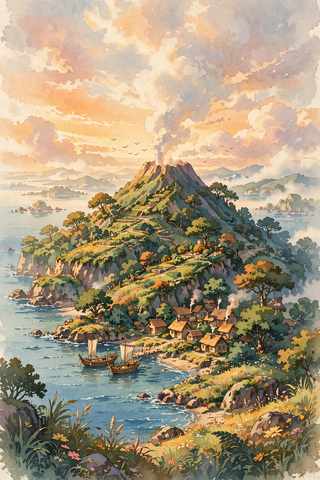
Smoke on the horizon, black sand underfoot, and a sunset doing something spectacular — the volcano island is Ghibli drama at full volume, and this trend drops you right into it. The Ghibli style volcano island prompt turns your photo into a portrait on a wild, beautiful edge of the world: a smoking peak behind you, turquoise surf in front, seabirds carving the painted sky. These portraits are going viral because they make the viewer feel the elements.
Ghibli’s coastlines have always had teeth. Ponyo’s seaside town faces down a storm-swollen sea with real fury, and the skies over the films are famously, operatically alive — towering clouds, impossible light, weather as emotion. This prompt taps that tradition: the volcano is not just scenery, it is a sleeping giant, and you are the small, brave figure standing calmly in its shadow. That is a story in a single frame.
Visualize the result: you stand on dark volcanic sand as foamy turquoise waves curl around scattered basalt rocks. Behind you the island rises — green lower slopes giving way to a grey smoking cone — while the sunset sky burns in bands of amber, rose, and violet. Seabirds wheel overhead, spray hangs in the golden air, and every texture, from wet sand to drifting smoke, carries the soft hand-painted finish of a Ghibli background.
Volcano island portraits dominate feeds because they combine two things algorithms love: high drama and high color. The dark-sand-versus-bright-sky contrast is naturally striking, and the Ghibli styling elevates it from vacation snapshot to film poster — the kind of image people save, not just like.
The Prompt
Copy the prompt below exactly as written and paste it into your AI image tool with your photo. It is tuned for the volcano island look — smoking peak, black sand, painterly sunset — so keep every phrase.
Transform my photo into a Studio Ghibli anime illustration while preserving my exact face, features, hairstyle and expression. Set the scene on a dramatic volcanic island, with a smoking peak rising behind black-sand beaches, turquoise waves rolling in, and seabirds wheeling through a painterly sunset sky. Use soft cel shading, hand-painted background detail, and an epic adventurous mood, in portrait 9:16 orientation.
Why This Prompt Works
This prompt works because it gives the AI a complete geological story: smoking peak, green slopes, black-sand beach, turquoise surf, sunset sky. Each zone has its own color and texture instructions, which prevents the washed-together look that plagues vague “island” prompts. The model can render zone by zone, the way a background painter would actually paint it.
The sunset sky is the emotional core, and the prompt’s “painterly sunset sky” plus Ghibli style language pushes toward those legendary Ghibli cloudscapes — sculpted, luminous, full of movement. Combined with wheeling seabirds and hanging sea spray, the sky becomes half the portrait, which is exactly how Ghibli frames its most memorable coastal shots.
Your likeness is explicitly preserved — face, features, hairstyle, expression — so the epic setting frames you rather than replacing you. In portrait 9:16, the volcano towers above and the surf pools below, placing you at the dramatic midpoint of the island’s full vertical story.
- Zone-by-zone scene description prevents washed-together, vague island renders
- Painterly sunset sky channels Ghibli’s legendary cloudscapes
- Smoking peak adds a sleeping-giant story to a single frame
- Preserves your exact face, hairstyle, and expression
- Black sand versus turquoise surf creates natural high drama
- Portrait 9:16 stacks volcano, figure, and surf into one epic column
How to Use This Prompt
Turning your photo into this Ghibli scene takes less than two minutes. Follow these steps:
- Choose a clear photo of yourself — front-facing, good lighting, and your whole face visible. Photos with strong, clear lighting hold up best against the prompt’s dramatic sunset contrast.
- Open an AI image generator that accepts photo uploads. ChatGPT, Google Gemini, and Microsoft Copilot all work for free — just start a new chat and upload your photo.
- Paste the complete prompt from the
box above into the chat, exactly as written, and send it together with your photo.
- Wait for the generation to finish, then review the result carefully: check your likeness, the smoking volcano and black-sand beach, and the overall Ghibli look.
- Download the portrait in the highest resolution available, then share it as a post, a Story, or your new wallpaper.
Pro Tips for Best Results
A few small choices separate a good Ghibli portrait from a breathtaking one:
- Start with a photo that has a simple, uncluttered background so the AI focuses on preserving your face.
- After generating, use a short follow-up message (“more …”) to fine-tune details instead of starting over.
- Generate first, then crop: the full 9:16 portrait gives you the most flexibility for wallpapers, Stories, and profile pictures.
- If the volcano looks too small or distant, follow up with “larger, more dramatic volcano looming behind me” to restore the epic scale.
- Wind-blown hair in your input photo sells the seaside gale; the AI will keep your hairstyle but add natural motion to it.
- Add “glowing lava light on the smoke plume” in a follow-up for a dusk shot with real volcanic drama.
Frequently Asked Questions
Will this prompt keep my face looking like me?
Yes — face preservation is written directly into the prompt. It instructs the AI to keep your exact face, features, hairstyle, and expression while transforming everything else into a hand-painted coastal epic. For the best likeness, upload a sharp, front-facing photo with even lighting and skip heavy beauty filters. If the first result drifts a little, generate once more with the same prompt; likeness usually locks in on the second pass.
Which free AI tools can I use this Ghibli prompt with?
The prompt works in any image-capable AI tool that accepts a photo plus text instructions: ChatGPT, Google Gemini, and Microsoft Copilot all handle it for free. Dedicated art generators like Leonardo AI, Adobe Firefly, and Playground AI also produce beautiful results. Paste the prompt exactly as written — its Ghibli-specific wording (soft cel shading, hand-painted backgrounds) is phrased to work consistently across different models.
Why does the prompt specify portrait 9:16 orientation?
The 9:16 vertical format is chosen deliberately for this scene: the island’s story is vertical — surf below, you in the middle, the smoking peak towering above. It is also the native size for phone wallpapers, Instagram Stories, TikTok, and Reels covers — exactly where Ghibli portraits go viral. If you need a square profile picture, generate the full portrait first and crop the center afterward so you keep the complete composition.
Can I change the setting or add my own details to the scene?
Absolutely. Keep the face-preservation line and the Ghibli style phrases untouched, then adjust the scenery to taste: change “sunset” to “stormy twilight” for a moodier Ponyo-like tempest, or add “a tiny fishing boat on the waves” or “steam vents on the beach”. Small, specific additions work best — AI image models handle concrete details far better than vague requests, so name exactly what you want to see.
Stand where the earth is still being made. Black sand, turquoise surf, a smoking giant at your back — your volcano island portrait is Ghibli adventure at full volume, and it is unmistakably, powerfully you.
Related Viral Prompts
Ghibli Style Seaside Cliff Village AI Photo Prompt
Ghibli Style Coral Reef Underwater AI Photo Prompt
Ghibli Style Lighthouse Storm AI Photo Prompt
#GhibliAI #AIPhotoPrompt #StudioGhibliStyle #GhibliAdventure #AnimePortrait




Leave a Reply