
Introduction
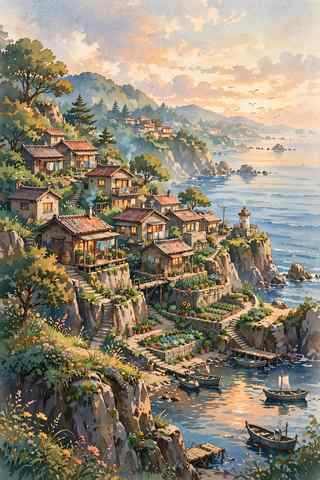
There is no coastline in animation more beloved than Ghibli’s. The cliff-top town of Kiki’s Delivery Service, the stormy shores of Ponyo, the harbor lights of Tales from Earthsea — Studio Ghibli turned seaside villages into places we all wish we could visit. The Ghibli style seaside cliff village prompt lets you stand on that cliff yourself, hair in the sea breeze, gazing down at a harbor that looks hand-painted just for you.
Travel-style anime portraits are dominating the trend right now, and the seaside village is the crown jewel. It combines everything people love about Ghibli landscapes — the vast ocean, the charming clustered houses, the wheeling seagulls — into one sweeping portrait. Unlike a plain beach photo, the cliff viewpoint adds drama and depth, making the image feel like the opening frame of an adventure film.
The emotional hook is wanderlust. Even viewers who have never seen the ocean feel the pull of that sparkling harbor and those tiny boats bobbing below. The prompt turns an ordinary selfie into a postcard from a world that feels both fantastical and achingly real — the exact blend that made Ponyo’s seaside town unforgettable.
Ready to stand on the cliff? Below is the exact copy-paste prompt, why it works so beautifully, step-by-step instructions, pro tips for a flawless coastal scene, and answers to the questions everyone asks.
The Prompt
Copy the complete prompt below, pair it with your photo in any AI image tool, and you will be standing on a grassy cliff above a sparkling Ghibli harbor.
Transform this photo into a Studio Ghibli anime-style illustration of a person standing on a grassy cliff overlooking a charming seaside village, keeping the person's face and likeness exactly the same. Below the cliff, show colorful houses cascading toward a sparkling blue harbor filled with small fishing boats, seagulls gliding on the ocean breeze, and waves lapping against rocky shores. Portrait orientation (9:16), soft cel shading, detailed hand-painted background, and a breezy adventurous mood like Ponyo and Kiki's Delivery Service.
Why This Prompt Works
This prompt works because it gives the AI a complete, layered world to paint. The cliff viewpoint creates natural depth — foreground grass, middle-ground village, background ocean and sky — and that depth is what separates breathtaking Ghibli landscapes from flat backdrops. Each layer gets its own hand-painted detail: wildflowers on the cliff, tiled roofs in the village, whitecaps on the waves.
The specific references do quiet work too. Naming Ponyo and Kiki’s Delivery Service anchors the AI to Ghibli’s coastal visual language: saturated blue water, storybook houses, dynamic skies. The seagulls and fishing boats add life and scale, so the harbor feels inhabited rather than empty — a crucial difference between a pretty picture and a place.
Face preservation plus portrait orientation keeps the image personal and phone-ready. Standing on the cliff, the subject becomes the viewer’s stand-in — we project ourselves into the scene, which is why these portraits get saved and shared so often. The breezy adventurous mood ties it all together, suggesting a story just beginning.
- Cliff viewpoint creates cinematic depth: grass, village, harbor, ocean, sky.
- Ponyo and Kiki references lock in Ghibli’s beloved coastal art style.
- Seagulls, boats, and waves add life, scale, and movement to the scene.
- Face preservation makes you the hero of your own seaside adventure.
- Hand-painted detail in every layer avoids flat, empty backgrounds.
- Portrait 9:16 format is ideal for travel-style posts and wallpapers.
How to Use This Prompt
Bringing your seaside cliff portrait to life is easy — just follow these steps.
- Choose a clear photo with your face well-lit; windblown-hair selfies match the breezy mood perfectly.
- Open your AI image generator of choice (ChatGPT, Gemini, Midjourney, or a photo-to-anime app) and upload the photo.
- Paste the full prompt from the box above while keeping your photo attached as the reference.
- Generate the image, then check the village detail and your likeness — regenerate if the houses look blurry or the face drifts.
- Download your coastal portrait and share it as a travel-style post or a dreamy new profile picture.
Pro Tips for Best Results
These pro tips will make your cliff village scene look like a genuine Ghibli background painting.
- Photos taken outdoors with natural light merge most convincingly with the bright coastal scene.
- Add ‘a lighthouse on the distant point’ for an extra storybook landmark in the harbor view.
- If the AI crops the village too tightly, add ‘wide sweeping view of the whole bay’ to open up the composition.
- For a moodier version, request ‘dramatic clouds gathering over the sea’ — very Ponyo storm-scene energy.
- Keep the horizon line clean in your source photo; busy backgrounds behind you can confuse the AI’s composition.
- Try generating at sunset (‘golden light on the water’) for a romantic variant that performs beautifully on social feeds.
Frequently Asked Questions
Will the village look the same every time I generate?
No — the AI paints a fresh village with each generation, which is part of the fun. The overall style stays consistent (colorful houses, sparkling harbor, cliff viewpoint), but the layout, boats, and details vary. Generate two or three times and pick your favorite harbor.
Can I use this prompt with a full-body photo?
Yes, full-body photos actually work well here since the scene shows you standing on the cliff. Just make sure your face is still large and clear enough for the AI to preserve your likeness — extreme distance shots lose facial detail.
Do I need to mention Ghibli films in the prompt?
The prompt already references Ponyo and Kiki’s Delivery Service, which strongly guides the art style. You can swap in your favorite — ‘like the coastal town in Kiki’s Delivery Service’ alone is enough to anchor the look if you prefer a shorter prompt.
Why do my seagulls look strange?
Birds in flight are a known AI weak spot. If the gulls look distorted, simplify with ‘a few distant seagulls as small silhouettes’ — distant silhouettes render cleanly and still add that perfect coastal atmosphere.
Stand on the cliff, feel the sea breeze, and look out over a harbor painted just for you. This Ghibli seaside prompt turns wanderlust into art — copy it, generate your portrait, and let the ocean do the rest.
Related Viral Prompts
Ghibli Style Lighthouse Storm AI Photo Prompt
Ghibli Style Coastal Railway AI Photo Prompt
Ghibli Style Coral Reef Underwater AI Photo Prompt
#GhibliAI #AIPhotoPrompt #StudioGhibliStyle #SeasideVillage #PonyoVibes #AnimeTravel




Leave a Reply