
Introduction
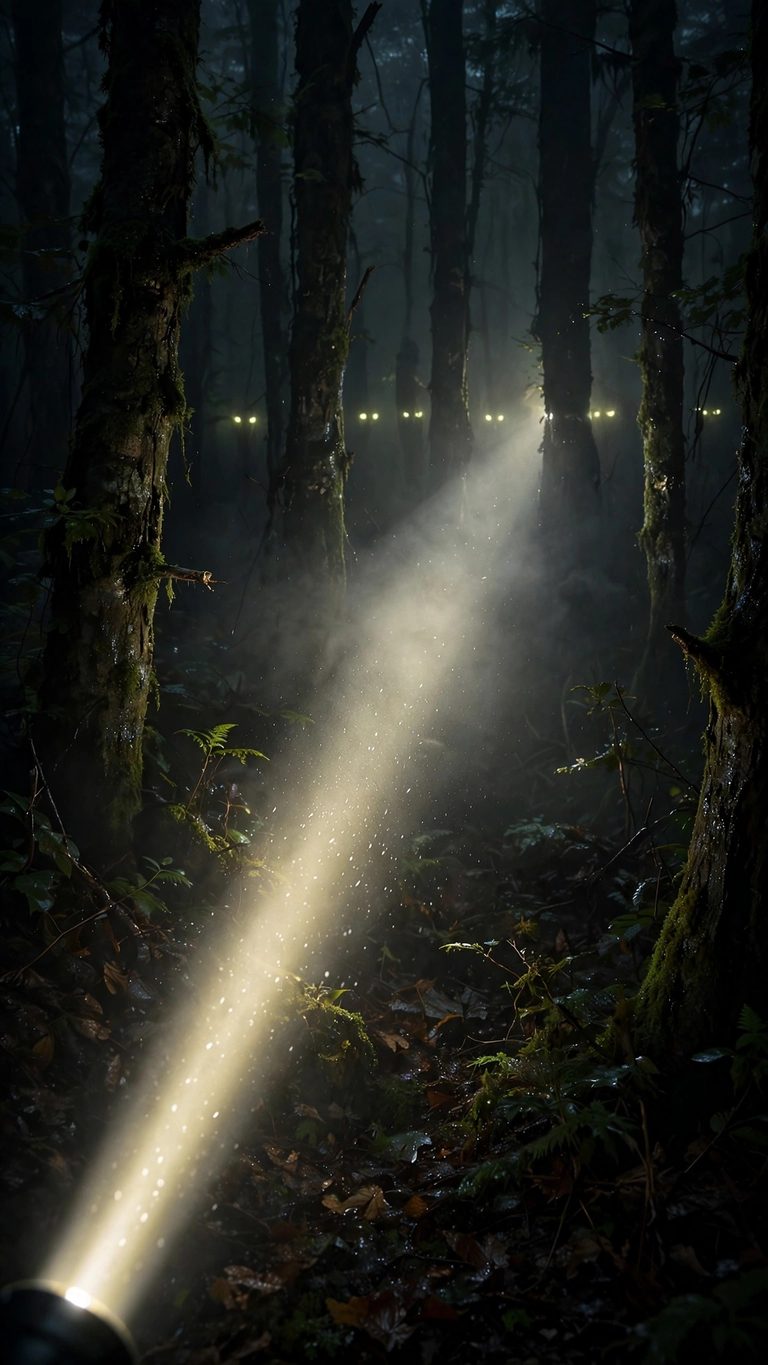
Your flashlight beam is the only thing standing between you and the dark. It sweeps across wet bark, catches a spiderweb, drops to the leaf-covered trail — and then you hear it: whispering, close enough that you can almost feel breath on your neck, in a forest where no one else should be. This AI horror prompt drops the viewer straight into that nightmare with a first-person walk through a pitch-black forest, armed with nothing but a shaking flashlight beam. The whispering is visualized as pale breath mist curling through the light. And then, between the trees, pairs of eyes begin to glow — watching, unblinking, from the dark the flashlight cannot reach. It is pure found-footage terror in ten seconds: no setup, no safety, no cutaway. Just you, the beam, the whispers, and the growing certainty that the eyes are getting closer every time the light swings back. If you want a horror short that makes viewers hold their phones a little tighter, this is the prompt.
The Prompt
Copy the prompt below exactly as written and paste it into your AI video generator. It is engineered for a single unbroken ten-second POV take:
Eerie POV walk through a pitch-dark forest, only flashlight beam, whispering sounds visualized as breath mist, eyes glowing between trees, found-footage horror, ultra realistic, terrifying
Why This Prompt Works
Found-footage horror works because it deletes the distance between the viewer and the victim. There is no protagonist on screen to absorb the danger — the camera is the protagonist, which means the viewer is the protagonist. When the flashlight beam trembles in this prompt, it is your hand trembling. When the beam swings toward the whispering, it is your curiosity overriding your survival instinct. Psychologists call this embodied perspective, and it is why POV horror consistently outperforms third-person horror in short-form: the scare is not happening to someone, it is happening to you. The “pitch-dark forest” setting amplifies this by removing all visual anchors. In darkness, the brain’s threat-detection system goes into overdrive, inventing dangers in every shadow — and this prompt feeds that system exactly what it wants.
The whispering is the masterstroke. Whispers are uniquely disturbing because they imply intention: something is communicating, deliberately, just below the threshold of understanding. The prompt’s instruction to visualize the whispering as breath mist is brilliant because it turns an invisible sound into a visible wrongness — cold breath in air that should be still, with no mouth to produce it. And then the glowing eyes between the trees deliver the oldest scare in the genre: the watcher in the dark. Note that the eyes never resolve into a creature. Like all great horror prompts, this one understands that the unknown is the actual monster; every viewer fills those glowing eyes with their own personal nightmare, which makes the clip hit harder than any fully-rendered beast could.
On platforms, found-footage POV is one of the most durable horror formats on TikTok, Reels, and Shorts — the “3 AM walk” genre never dies because it feels authentically captured rather than produced. Ten seconds is ideal: long enough for the dread to build through two or three flashlight sweeps, short enough to loop seamlessly. The loop is the growth engine here, because viewers rewatch to count the eyes or catch the whisper timing, and each replay pumps the completion rate. Shareability runs on the dare mechanic: “watch this with your brightness all the way up” and “do NOT watch this alone in the woods” are captions that practically write themselves, and every tagged friend is a new viewer the algorithm did not have to find for you.
How to Use This Prompt
Open your AI video tool — Kling and Runway handle POV motion particularly well, while Veo 3, Pika, and Sora all produce strong results. Set the canvas to 9:16 vertical and the duration to 10 seconds, and make sure any “camera motion” or “first-person” enhancement setting is enabled so the walk feels handheld and unsteady. Paste the prompt exactly as written. For the negative prompt, add “daylight, cartoon, static camera, tripod, smooth motion” — you want the footage to feel captured, not composed. Generate four or five takes; you are hunting for the version where the flashlight beam moves like a nervous human wrist, the breath mist drifts convincingly through the light cone, and at least two sets of glowing eyes appear at different depths between the trees.
Sound design will make or break this clip, so give it a dedicated pass. Layer a bed of night-forest ambience — crickets, distant owls, leaves shifting — then add the whisper track: reversed, pitched-down vocal murmurs panned to drift from ear to ear on headphones. Keep the whispers just barely intelligible; the moment a viewer thinks they almost understood a word, the dread spikes. Add a subtle low-frequency pulse under the final three seconds as the eyes appear. Export at 1080×1920, and post in the late evening between 9 PM and 11 PM local time, when your audience is in the dark and their threat-detection is already idling high. A caption like “POV: you took the shortcut through the forest” plus horror and found-footage hashtags will do the rest.
Pro Tips & Creative Variations
The secret weapon of found-footage horror is imperfection, so resist the urge to polish. A slightly-too-fast pan, a moment where the beam drops to the ground as if the holder stumbled, a half-second where the light catches nothing but fog — these flaws are what sell authenticity. If your AI tool renders the walk too smoothly, add micro-shake in CapCut afterward; a 2-3% handheld wobble convinces the brain this was filmed by a real terrified person. Another pro technique: let the flashlight beam pass over the glowing eyes once without stopping, then swing back. That delayed recognition — the brain registering the eyes a beat late — mirrors how real fear works and doubles the scare.
This prompt is a natural series starter. Build a three-night arc: Night 1 ends with the first pair of eyes. Night 2, “I went back with a brighter flashlight,” reveals the eyes are closer and there are more of them. Night 3, “the whispers said my name,” ends with the beam dropping and the screen going black. Serialized horror converts casual viewers into followers because nobody wants to miss the next installment — tease it explicitly with “part 2 tonight at 10 PM.” For standalone variations, change the forest’s character: a fog-choked pine forest reads differently from a dripping jungle or a dead winter woodland with bare branches like claws. You can also escalate the eyes — one take with a single pair, another where the final sweep reveals dozens — and let your audience vote in comments on which version scared them more. Comment votes are engagement gold.
For maximum reach, engineer the dare. Pin a comment on your own video: “brightness up, volume up, I dare you.” Viewers who accept the dare watch longer and comment their reactions, both of which the algorithm rewards. Thumbnail strategy matters less for POV since the video autoplays, but your opening frame should show the flashlight beam cutting into total darkness — that single diagonal of light is an irresistible visual hook in a feed. Finally, consider a collaboration angle: stitch or duet with creators who narrate horror stories, letting their voiceover play over your forest walk. Their audience discovers your visuals, your audience discovers their stories, and the found-footage format makes the pairing feel seamless.
Frequently Asked Questions
Q: My AI tool keeps rendering the forest too bright. How do I keep it pitch-dark?
A: Strengthen the darkness in your generation settings rather than the prompt — lower any brightness or exposure enhancement the tool offers, and add “near-total darkness, single light source” to a style field if one exists. In editing, you can crush the blacks in CapCut’s adjustment panel until only the flashlight cone is visible. The surrounding dark is not empty space; it is where the viewer’s imagination lives, so protect it aggressively.
Q: How do I create convincing whisper sounds without a microphone?
A: Record yourself whispering nonsense syllables, then reverse the audio and drop the pitch by 20-30% — reversed speech is inherently unsettling because the brain recognizes it as voice but cannot parse it. Layer two or three reversed whisper tracks panned left, right, and center so the sound seems to move around the listener’s head. Royalty-free whisper beds on Freesound and Pixabay work as a starting point if you prefer not to record.
Q: Why does POV horror outperform regular horror clips?
A: It removes the psychological buffer of watching someone else in danger. In third-person horror, the viewer can comfort themselves with “that’s happening to them.” In POV, the camera shake is your shake and the darkness ahead is yours to walk into. That embodied identification drives higher heart rates, longer watch times, more replays, and more shares — the exact metrics recommendation engines reward.
Q: Can I monetize found-footage horror, or do platforms suppress it?
A: Suggestive found-footage horror like this — no gore, no injury, no real people in distress — is generally fully monetizable. The risk zone is fake “real footage” framing: claiming a staged clip is genuine can trigger misinformation flags on some platforms. Keep your framing as entertainment (“POV horror short”), skip graphic content, and this format sits safely in monetizable territory.
The forest is dark, the whispers are close, and the eyes are watching — and all of it fits in ten seconds. Generate your takes, layer the whisper track, post it after dark, and dare your audience to turn their brightness up. The comments will tell you exactly how well it worked. Try this prompt tonight.
Related Viral Prompts
- Flickering Elevator Lights and a Mirror Extra Person: Viral AI Horror Video Prompt for a Jump-Scare Short (Free)
- Old Family Photo Faces Changing: Viral AI Horror Video Prompt for a Subtle Supernatural Chiller (Free)
- Monster Under the Bed at Night: Viral AI Horror Jump-Scare Video Prompt From a Terrified Child’s POV (Free)
# A I V i d e o # P r o m p t B a z a r # F o r e s t # P O V # S c a r y

Leave a Reply