
Introduction
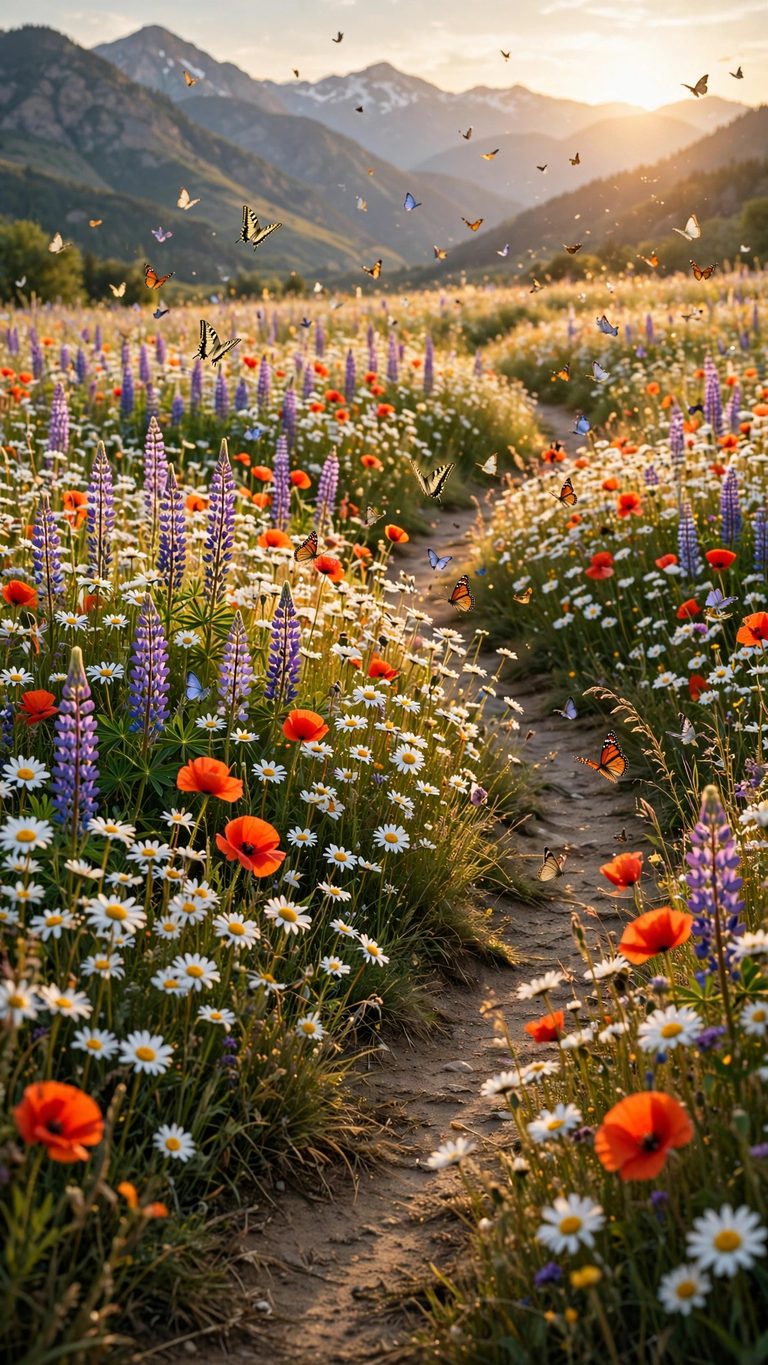
Close your eyes and picture it: a meadow that goes on forever, daisies and poppies and lupines swaying in a warm breeze, a narrow dirt path winding through the color toward distant mountains, butterflies drifting on the golden-hour light. It is the landscape equivalent of pure joy — spring at its most generous, nature at its least restrained. Wildflower meadows are the superstars of landscape photography for a reason: they combine abundance, color, depth, and light in a single frame, and they make every viewer feel like they have stumbled into a secret paradise.
The catch is that real superblooms are rare, remote, and brief — a two-week window in a desert you have never heard of, reached by a dirt road. This AI photo prompt removes the plane ticket. It composes the meadow, the path, the mountains, the butterflies, and the golden light into one paragraph that any image generator can render in seconds. The result is a breathtaking landscape that works as a desktop wallpaper, a travel-blog hero image, a print for the living room wall, or the opening frame of a spring campaign. Pure spring joy, on demand, with no hiking boots required.
The Prompt
Here is the complete, copy-ready prompt. Paste it exactly as written into your AI image generator of choice:
Breathtaking photograph of a wildflower meadow at golden hour, endless daisies poppies and lupines swaying, a narrow dirt path winding through, mountains behind, butterflies everywhere, pure spring joy, ultra detailed, 8k, professional landscape photography, photorealistic
Why This Prompt Works
This prompt works because it layers depth — literally. A great landscape is a journey for the eye, and every phrase in this prompt places an element at a different distance, building a three-dimensional world from foreground to horizon.
Wildflower meadow at golden hour opens with subject plus the single most flattering light in landscape photography. Golden hour — the hour before sunset — bathes everything in warm, low-angle light that makes colors glow and adds long, soft shadows. Naming it explicitly saves the model from defaulting to flat midday light.
Endless daisies poppies and lupines swaying provides botanical specificity. Three named flowers in three colors (white, red, purple-blue) create a rich, varied carpet rather than a monochrome blur — and “swaying” adds implied motion, a sense of breeze and life that static prompts lack. Specificity is credibility: the model renders named flowers far better than generic “flowers.”
A narrow dirt path winding through is the compositional spine. A winding path is the classic leading line of landscape photography — it gives the viewer’s eye a route into the image and creates irresistible depth. “Narrow” and “winding” keep it natural rather than road-like.
Mountains behind adds the background layer and a sense of scale. Mountains anchor the composition, give the sky something to relate to, and instantly elevate a pretty field into a grand landscape. Butterflies everywhere is the finishing touch — small points of life and movement scattered across the frame, the detail that makes viewers lean in.
The closing pure spring joy is an emotional steering token, nudging the overall mood toward brightness and warmth, while the technical tail (“ultra detailed, 8k, professional landscape photography, photorealistic”) guarantees maximum detail and photographic realism. Every layer reinforces the others, which is why this prompt rarely produces a dud.
How to Use This Prompt
Wide landscapes are a comfort zone for every major AI generator. Here is how to run this prompt on each.
Midjourney: Type /imagine and paste the full prompt. Use --ar 16:9 for a cinematic widescreen meadow or --ar 3:2 for a classic landscape ratio. Review the four variations for the best path curve and mountain placement, then upscale with U1–U4. Midjourney renders golden-hour light and flower fields with exceptional beauty — this prompt is squarely in its comfort zone.
DALL-E 3 (via ChatGPT): Paste the prompt with: “Generate this as a wide photorealistic landscape, 16:9.” DALL-E 3 is good at keeping all the named elements — path, mountains, butterflies — present in the frame. If butterflies are missing, add: “include many butterflies visible in the air.” Explicit requests for small elements help.
Flux: Paste the prompt as-is with a wide output size. Flux’s detail rendering shines on complex natural textures like dense flower fields. Keep guidance at default; the prompt is already well-balanced.
One compositional check applies everywhere: make sure the path actually leads somewhere. If the path dead-ends awkwardly at the frame edge, regenerate — a path that winds toward the mountains is what creates the depth that makes this image work.
Pro Tips & Creative Variations
A meadow is a playground — here are the best ways to make this prompt your own.
Change the flower mix. Swap the trio for “lavender and sunflowers,” “bluebonnets and Indian paintbrush” (a Texas classic), “poppies and cornflowers,” or “cherry blossom petals drifting over grass.” Each regional mix tells a different geographic story.
Change the light. Replace “golden hour” with “sunrise with morning mist” for dreamy softness, “dramatic sunset with pink clouds” for romance, or “bright spring morning” for cheerful clarity. Light is the biggest mood lever in any landscape.
Change the backdrop. Swap “mountains behind” for “a lone oak tree,” “rolling green hills,” “a distant lake,” or “a rustic barn.” The meadow-plus-path structure supports any background, letting you relocate the scene worldwide.
Add life. “A deer grazing at the meadow’s edge,” “a child running down the path,” or “hot air balloons over the mountains” adds narrative and scale. Living subjects turn a beautiful landscape into a story.
Fix common glitches. Dense flower fields can turn to mush in the distance — add “sharp detail throughout” if the background blurs unnaturally. Watch for floating or giant butterflies (a known AI quirk); if they look wrong, reduce to “a few butterflies” or remove them and let the flowers carry the frame. Also check that the path connects logically to the horizon.
Go panoramic. Generate at 21:9 or stitch two 16:9 generations for an ultrawide panorama — meadow landscapes make spectacular multi-monitor wallpapers and above-sofa prints.
Frequently Asked Questions
Q: Why does my meadow look blurry in the distance?
A: Some blur is natural depth of field, but mushy backgrounds usually mean the model under-rendered detail. Add sharp focus throughout, infinite depth of field to the prompt. In Midjourney, avoiding –style raw extremes helps; in DALL-E 3, explicitly asking for highly detailed background keeps the mountains and far flowers crisp.
Q: How do I keep all three flower types visible?
A: List them exactly as the original does — daisies poppies and lupines — near the start of the prompt. Models sometimes drop the last item in a list, so if lupines vanish, reorder or repeat: daisies, red poppies, and purple lupines throughout the meadow. One regeneration with the reinforced list usually fixes it.
Q: Can I use this as a commercial website hero image?
A: Yes, provided your generator’s license permits commercial use — paid Midjourney, ChatGPT Plus DALL-E 3, and most Flux options all do. Landscapes are among the safest AI images commercially since they contain no people, trademarks, or identifiable property. Generate at the highest resolution and check the path and horizon for glitches before publishing.
Q: What is the best aspect ratio for this prompt?
A: It depends on use. 16:9 is ideal for website heroes and desktop wallpapers; 3:2 suits prints and portfolios; 9:16 vertical works for phone wallpapers and stories (the path then winds upward, which looks dramatic). The prompt’s layered composition — foreground flowers, midground path, background mountains — adapts well to all three.
The wildflower meadow prompt is spring bottled in a sentence — path, petals, mountains, and golden light, composed for maximum joy. Copy it, generate your meadow, and try a new flower mix or a different sky. Somewhere in those variations is the landscape you have always wanted on your wall.
Related Viral Prompts
- Rose Blooming Timelapse AI Video Prompt: Create a Mesmerizing Macro Flower Video with Sunrise Light and Bokeh
- Rose Garden Walk AI Video Prompt: Create a Romantic Golden Hour Stroll Through an Endless Blooming Garden
- Cherry Blossom Wind AI Video Prompt: Create a Dreamy Petal Blizzard Scene in a Japanese Garden Paradise
# A I V i d e o # P r o m p t B a z a r # A I P h o t o # W i l d f l o w e r s # M e a d o w

Leave a Reply