
Introduction
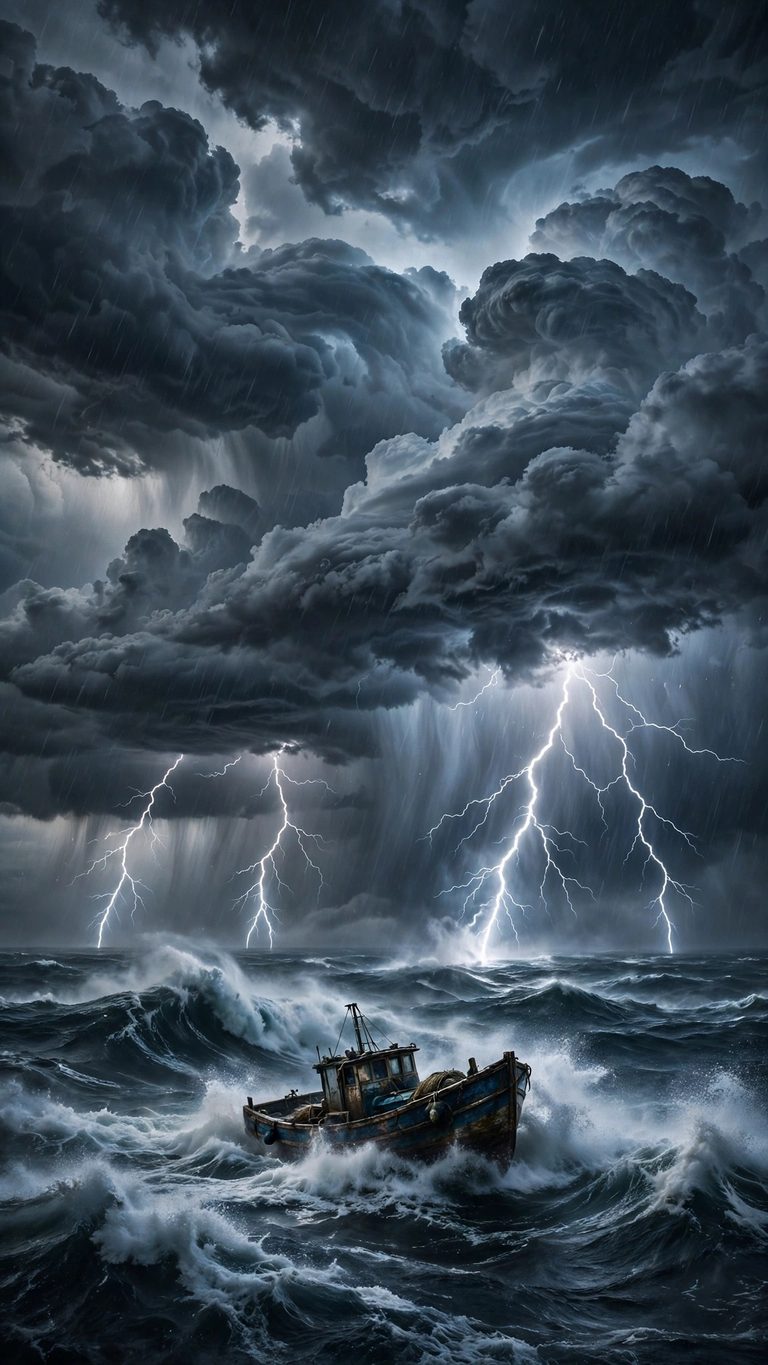
Nothing reminds you how small you are quite like a storm at sea. Towering black clouds stack to the horizon, lightning forks down into churning waves, curtains of rain sweep across the water, and a lone fishing boat fights the swells beneath it all. This AI video prompt captures that raw, thrilling power of nature in one epic, cinematic shot.
It is the kind of footage that makes viewers hold their breath, and breath-holding is excellent for watch time. Storm content has a devoted global audience, from weather enthusiasts to motivational pages that use the tempest as a metaphor for resilience. Tag your finished video with #Storm and #Epic to reach the thrill-seekers and nature lovers who share this content by the millions. Below you will find the exact prompt, why it electrifies audiences, and how to generate it in any AI video tool.
The Prompt
Here is the exact prompt, ready to copy and paste into your favorite AI video generator:
Epic dramatic shot of a massive storm rolling over the ocean, dark towering clouds, lightning forking into the waves, rain curtains sweeping across, a lone fishing boat battling swells, powerful raw nature, cinematic storm light, ultra realistic, thrilling
Why This Prompt Works
The visual psychology is pure awe, and awe is one of the most shareable emotions humans feel. The scale contrast does the work: a tiny fishing boat against a massive storm makes the danger feel real and the scene feel cinematic, triggering the same thrill as a blockbuster film. Lightning provides sharp attention spikes that reset viewer focus every few seconds, which is a natural retention mechanic. Dark, dramatic lighting reads as premium and cinematic on phone screens, while the churning motion of waves and rain keeps every pixel alive. There is also a deep respect response: viewers think of real fishermen and sailors, which adds an emotional layer beyond spectacle.
Platform trends love extreme weather. Storm clips, ocean drama, and lightning compilations routinely go viral, and dedicated weather and nature pages have enormous followings. Motivational creators constantly reuse storm footage as a visual metaphor for struggle and perseverance, which gives your clip a second life in an entirely different niche. A ten-second vertical epic fits Reels, TikTok, and Shorts perfectly, delivering a complete rush of adrenaline in the time it takes to read a caption. Pair it with deep thunder audio or swelling cinematic music and the impact doubles.
Shareability comes from thrill and admiration. People share storm videos to say you have to see this, and the lone boat invites comments about courage, livelihood, and respect for those who work the sea. The clip works as a dramatic background for quotes about strength and resilience, which motivational pages repost endlessly. It also sparks conversation about monsoon safety and the power of nature, driving meaningful comments. During storm season, timeliness alone can push a good generation onto the trending page.
How to Use This Prompt
Follow these steps for a flawless storm generation. Step one: copy the exact prompt from the box below. Step two: open Veo 3, Runway, Kling, Pika, or Sora and paste it into text-to-video. Step three: set 9:16 vertical and 10 seconds, giving the storm time to build and the lightning a chance to strike. Choose the most cinematic or dramatic preset your tool offers, since the prompt calls for cinematic storm light.
Step four: add a negative prompt such as blurry, cartoonish, distorted boat, watermark, and text to keep the scene realistic and the vessel intact. Step five: generate several variations, because lightning timing is luck of the draw, and pick the take with the most dramatic strike and the most powerful wave motion. Step six: sound design is half the thrill. Layer deep thunder rumbles, or use a swelling cinematic score that peaks with the lightning. Export at 1080 by 1920 and post with your hashtags while storm content is trending.
Pro Tips & Creative Variations
Storms offer dramatic creative range. Change the perspective: a deck-level point of view from the boat itself is terrifyingly immersive, while a lighthouse standing firm against the waves tells a story of endurance. Vary the storm’s phase, from the eerie calm before it hits, with green-tinted clouds, to the peak fury, to the golden aftermath with a rainbow over still-churning water. A night version where lightning illuminates the clouds from within is hauntingly beautiful and highly shareable.
Swap the vessel for different narratives: a large ship emphasizes industrial scale, a lone surfer paddling out emphasizes human daring, and an empty horizon with just the storm emphasizes nature’s indifference. Adjust the color grade toward teal and orange for a Hollywood disaster-film look, or keep it desaturated and grey for documentary realism. Add seabirds struggling against the wind for extra life, or distant rain curtains layered at multiple depths for dimension. For motivational pages, leave the sky area clean so bold text about resilience can sit over the clouds.
Handle this content responsibly. Real storms endanger real lives, so consider captions that honor fishermen and coastal communities rather than just glorifying danger. Technically, watch for the boat morphing or waves looping unnaturally, and regenerate if the lightning looks painted on. A subtle camera shake, added in your editor, sells the realism enormously. Build a series following one storm from approach to aftermath, and viewers will follow the story like a short film.
Frequently Asked Questions
Which AI video tool creates the most realistic storms?
Veo 3 and Kling lead on dramatic natural phenomena, rendering convincing clouds, waves, and lighting. Runway excels at cinematic color grading for that filmic storm look. Lightning is unpredictable in every tool, so generate multiple takes and choose the one with the best-timed strike.
How do I get the lightning to look good instead of fake?
Describe the lightning precisely, as this prompt does with forking into the waves, and add illuminating the clouds for extra realism. Lightning that appears for just a few frames looks more natural than a bolt that lingers. If a generation looks painted on, regenerate; timing and integration vary widely between takes.
My storm scene looks too dark. How do I fix it?
The prompt’s cinematic storm light should preserve detail, but if your take is murky, add rim lighting on wave crests or lightning-lit clouds to the prompt. In your editor, lift the shadows slightly and add contrast rather than overall brightness, which keeps the mood while revealing detail. Avoid overexposure, which kills the drama instantly.
Can I use storm videos for a motivational or brand page?
Yes, under your AI tool’s commercial terms, which you should check first. Storm footage is a staple of motivational content, and brands in outdoor gear, insurance, and travel use dramatic weather creatively. Pair the clip with respectful, original captions, especially when real communities face such storms.
A storm over the sea is nature’s most dramatic theater, and this prompt hands you a front-row seat. Copy it, generate your epic clip, and share it with #Storm and #Sea while weather content is surging. Try the night-lightning variation next, and watch the comments light up like the sky in your video.
Related Viral Prompts
- Chai In The Rain: Free Viral AI Video Prompt for Cozy Monsoon Veranda Tea Reels and Heartwarming Rain Clips
- Rickshaw Through Rainy Dhaka Streets: A Viral AI Video Prompt for Cinematic Monsoon City Life (Guide)
- Lightning Strike in Slow Motion: An Epic AI Video Prompt for Jaw-Dropping Storm Videos (Full Tutorial)
# A I V i d e o # P r o m p t B a z a r # S t o r m # S e a # E p i c



Leave a Reply