
Introduction
Few forces command attention like a lightning bolt. It arrives without warning, splits the sky into branching veins of white-hot electricity, and vanishes before your eyes fully believe what they saw. Slow motion changed everything: stretched across seconds, you can watch the bolt crawl downward in steps, see rain hang suspended in the flash, and witness a valley ignite white for one impossible instant. It is the closest thing to holding raw atmospheric power in your hands.
Lightning footage is perennial viral material, but capturing it with a real camera demands patience, luck, and expensive high-speed gear. AI video generation removes all of that friction. This AI video prompt describes a lightning strike with the precision video models need: branching veins, boiling thunderclouds, suspended rain, valley-wide illumination. In this article, you will learn why this prompt produces jaw-dropping results, how to run it across Veo 3, Runway, Kling, Pika, and Sora, and how to customize it into a library of storm content built for #AIVideo feeds.
The Prompt
Copy the full prompt below and paste it directly into your AI video generator of choice. Every phrase was chosen to guide the model’s physics and lighting.
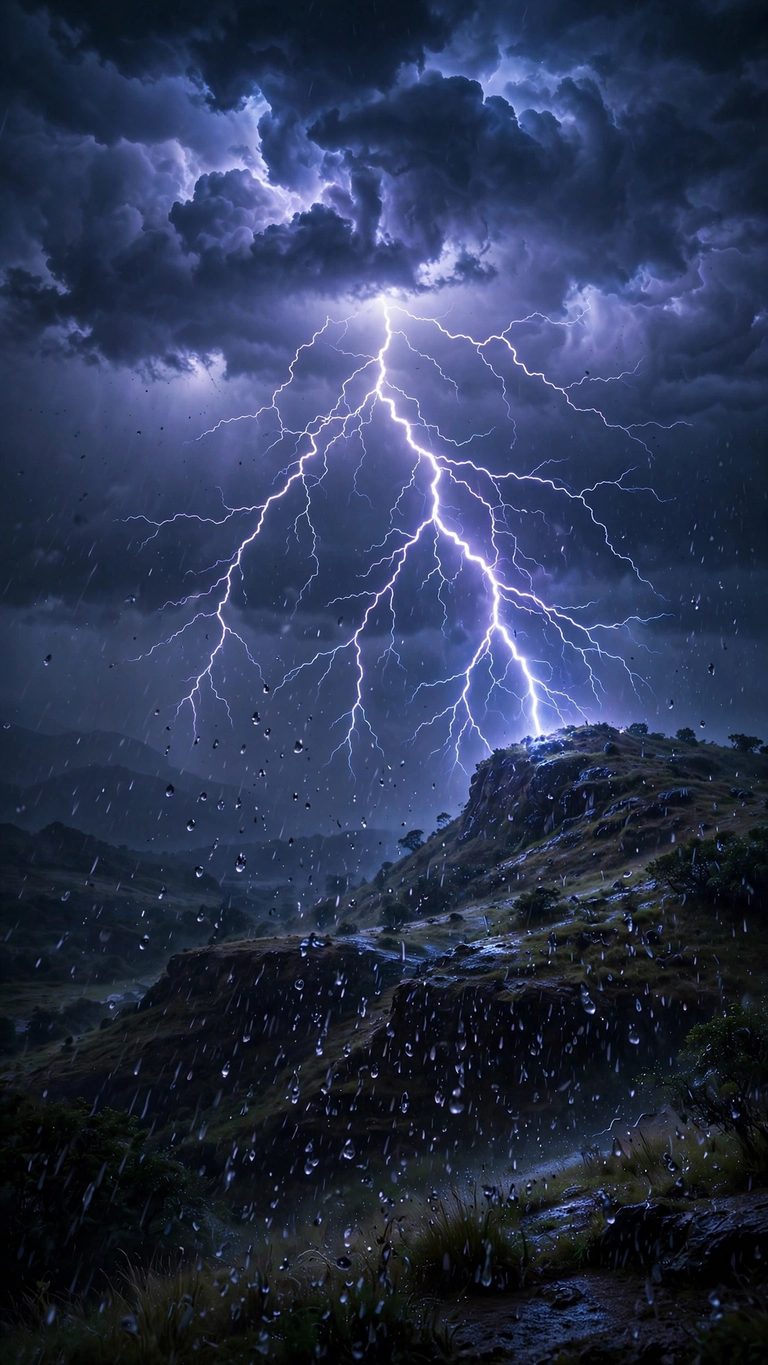
Electrifying slow motion capture of a lightning bolt striking a distant hilltop, branching electric veins freezing mid-air, thunderclouds boiling with inner light, rain suspended in the flash, then the bolt illuminating the whole valley white, raw power, cinematic, ultra realistic, jaw-dropping
Why This Prompt Works
Slow-motion lightning is a technical nightmare for generative video, and this prompt succeeds because it stages the event as a sequence the model can actually render. Notice the built-in timeline: the bolt strikes the hilltop, the branching veins freeze mid-air, the clouds boil with inner light, rain hangs suspended, and then the whole valley illuminates white. That is a shot list disguised as a sentence. Video models perform dramatically better when a prompt implies chronological beats rather than a single static image, because each phrase gives the model a frame-by-frame anchor to hold onto.
Visually, the prompt exploits contrast, the oldest trick in cinematography. A lightning bolt is only spectacular against darkness, so “thunderclouds boiling with inner light” and the final white illumination give the model a near-black canvas punctuated by extreme brightness. Human vision is drawn to the brightest point in a frame, which means viewers cannot look away during the strike. The phrase “raw power” and “jaw-dropping” may sound like marketing fluff, but they function as style steering: they push the model toward dramatic, high-contrast output instead of a timid, gray storm. “Cinematic, ultra realistic” keeps the electricity looking physical rather than cartoonish.
On platforms, storm content has one of the highest share rates of any nature niche. A great lightning clip gets sent in group chats with messages like “look at this,” which is the purest form of distribution. Slow motion doubles the effect because it reveals detail the naked eye misses, and viewers rewatch to catch the branching veins they missed the first time. The 9:16 vertical format with slow motion is purpose-built for Shorts and Reels, where a single strike can fill the entire screen. An #Epic storm clip like this also performs well as a loop: the darkness before the strike makes a perfect seamless restart point. This prompt is not just a pretty scene; it is a shareability machine tuned to how people actually watch storms on their phones.
How to Use This Prompt
Paste the prompt exactly as written into your tool of choice and set the duration to 8 seconds in 9:16. On Veo 3, slow-motion prompts render best at the highest available frame quality, so choose 1080p if your plan allows and let the model handle the timing; Veo interprets “slow motion capture” as stretched temporal dynamics without you needing to add frame-rate numbers. In Runway Gen-4, enable slow motion explicitly if the tool offers a speed control, and keep camera motion minimal: a static or near-static camera sells the realism of a high-speed capture.
In Kling, which is strong on dramatic skies, the prompt works at default settings; if the bolt looks thin, append “thick main channel with visible stepped leaders” for a beefier strike. Pika users should turn motion strength up, since lightning needs high energy, and generate at least three variations because bolt geometry varies wildly between takes. On Sora, use the prompt in a single scene and consider extending to 10 seconds so the pre-strike cloud boiling gets its own beat before the flash. Across all tools, watch for the classic failure mode: the bolt flickering or teleporting. If it happens, lower motion intensity slightly and regenerate. Save every good take, because no two AI bolts are alike and your extras become B-roll for future storm compilations.
Pro Tips & Creative Variations
Lightning is endlessly remixable once you control the setting. Move the strike from a hilltop to a city skyline for “lightning striking a skyscraper spire, windows glowing below,” or to the ocean for “bolt hitting the sea, spray lit electric blue.” Each location change keeps the slow-motion choreography but delivers a fresh thumbnail, which matters enormously for click-through. You can also change the bolt’s character: “a rare triple strike hitting three ridges at once” for spectacle, or “a single thin bolt in a purple dusk sky” for a calmer, more artistic variant.
Camera language transforms the drama. Try “extreme close-up of the bolt’s branching veins against black cloud” for an abstract, wallpaper-worthy clip, or “wide valley view, tiny village lights below, bolt illuminating everything” for scale and awe. Sound design in your edit matters too: pair the render with a deep, delayed thunder rumble in CapCut or Premiere to sell the distance. For a series, generate five strikes in different landscapes and cut them into a “storm chaser” compilation with quick white-flash transitions; compilations of #Thunder moments are among the most saved formats in the niche.
Advanced creators can composite: render the lightning clip, then layer it over their own storm-cloud footage with a screen blend mode for a hybrid look. You can also extend the prompt’s timeline by appending “and the afterglow fading as rain resumes” for a natural loop ending. Keep “ultra realistic” in every variation unless you are deliberately chasing a stylized anime-storm aesthetic. One prompt, a dozen storms: that is the real power of getting the base description right.
Frequently Asked Questions
Why does my lightning bolt look fake or flickery?
Flicker usually means the model’s temporal consistency broke between frames. Fix it by shortening the clip to 8 seconds, keeping the camera static, and lowering the motion or creativity setting one step. Generating three to five takes and picking the most stable bolt is standard practice; even professionals cherry-pick lightning renders.
Can I make the strike hit a specific object, like a tree or building?
Yes. Replace “distant hilltop” with your target, for example “a lone oak tree on a hill” or “a lighthouse on a cliff.” Keep the rest of the prompt intact so the slow-motion choreography stays the same. Be specific but simple: one clear target renders far more reliably than a complex scene.
Is slow motion better at 8 or 10 seconds for this clip?
Eight seconds is the sweet spot for a single strike: long enough to savor the branching veins, short enough to hold attention on Shorts and Reels. Ten seconds works if you want a slow cloud-boiling buildup before the flash. Test both and watch your average view duration to decide.
What is the best posting time for storm videos?
Storm content spikes during actual severe weather in your audience’s region, so watch weather trends. Generally, evening posts perform well as people unwind and share dramatic clips in chats. Pair the video with hashtags like #AIVideo and #Lightning, and pin a comment asking viewers where the wildest storm they have seen was.
The sky is electric and the camera is rolling. Paste this AI video prompt into your generator, slow down a lightning strike to a crawl, and give your audience a front-row seat to nature’s most dramatic show. Try it tonight and share the bolt that gives you goosebumps.
Related Viral Prompts
- Rain on a Village Tin Roof: A Nostalgic AI Video Prompt for Cozy Monsoon Memories (Step-by-Step Guide)
- Puddle Reflections of City Life: An Artistic AI Video Prompt for Dreamy Urban Videos (Full Creative Tutorial)
- Monsoon Waterfall Surge: A Powerful AI Video Prompt for Epic Nature Videos That Inspire Awe (Full Guide)
# A I V i d e o # P r o m p t B a z a r # L i g h t n i n g # T h u n d e r # E p i c



Leave a Reply