
Introduction
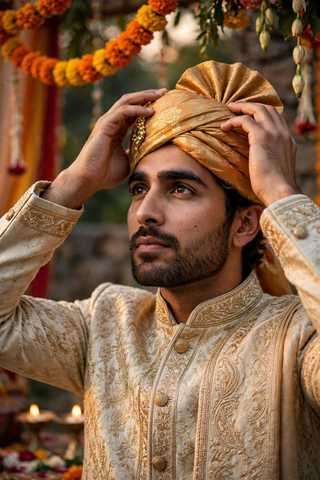
The groom’s portrait is the quiet, confident moment before the celebration begins. He stands in his sherwani, adjusting his turban in the mirror, calm on the outside and full of excitement within. Winter weddings in 2026 are giving groom portraits the attention they deserve, with rich fabrics, elegant turbans and warm light that make the groom look every bit as royal as the bride.
A great groom portrait needs confidence, detail and the right light. The sherwani’s embroidery, the turban’s shape, the groom’s expression and the soft winter glow all have to work together, and a detailed AI prompt makes that happen. The prompt below creates a realistic, regal portrait that works beautifully as a wedding invitation photo, a social media post, or a framed picture for the family home.
Grooms in 2026 are choosing sherwanis in ivory, maroon, royal blue and deep green, often paired with a contrasting turban, a brooch and a stole that matches the bride’s lehenga. The winter season suits these rich fabrics perfectly, because the cool air keeps the groom comfortable and the low golden sun adds a warm glow to every photograph. Many grooms also take their portrait in a palace courtyard or a garden with soft fairy lights, which gives the image a timeless, cinematic feel. With an AI preview, a groom can test his outfit colours and turban style before the tailor finishes the final fitting, so he walks into his wedding looking exactly as confident as he feels.
The Prompt
Copy the prompt below exactly as it is written and paste it into your favourite AI image generator. It is written to work with tools like Midjourney, DALL-E, Leonardo AI, Firefly and Gemini, and it produces a warm, realistic photograph rather than a flat illustration.
Photorealistic elegant portrait photograph of a handsome Indian groom in a royal ivory sherwani with gold embroidery, adjusting his ornate turban with one hand, confident gentle smile, a decorative brooch and stole, standing in a beautiful winter wedding venue with soft fairy lights and marigold flowers in the background, warm golden afternoon light, regal and calm atmosphere, shot on a Canon EOS R5 with an 85mm portrait lens, shallow depth of field, ultra detailed fabric texture, natural skin tones, no text, no watermark
You can customise this groom portrait prompt in seconds to match your own celebration. Change the outfit colours to suit your family, swap the background to your own venue, or adjust the lighting from bright daylight to a soft golden-hour glow. Keep the heart of the scene the same, the sherwani and the groom adjusting his turban, because that is what makes the image instantly recognisable and full of feeling. Small changes like these let you create a whole series of matching photos for your invitations, your social media posts and your wedding album, all with the same warm and joyful style. Try two or three variations and keep the one that feels most like your own special day.
Why This Prompt Works
- The turban moment feels real: adjusting the turban gives the portrait a natural, candid action instead of a stiff posed stare.
- Embroidery detail sells luxury: naming gold embroidery and fabric texture tells the AI to render the sherwani richly and realistically.
- Warm light adds royalty: golden afternoon light makes ivory and gold glow, giving the portrait a regal, film-like quality.
- Shallow depth keeps focus: the 85mm lens detail blurs the background gently, so all attention stays on the groom.
How to Use This Prompt
- Open your AI image generator, such as Midjourney, DALL-E, Leonardo AI or Gemini.
- Copy the full prompt from the box above and paste it into the prompt field.
- Choose a 4:5 portrait aspect ratio so the groom fills the frame elegantly.
- Generate three or four versions and choose the one with the most natural smile and the sharpest turban detail.
- Download the best portrait and use it for your invitation, profile photo or wedding album.
Pro Tips
- Match the sherwani colour to your real outfit by replacing ‘ivory sherwani’ with your colour, such as ‘deep maroon sherwani’ or ‘royal blue sherwani’.
- Add ‘sehra, a traditional veil of flowers’ if your wedding includes a sehra for the groom’s entry.
- For a sharper, editorial look, add ‘studio-style lighting with a soft warm key light’ to the end of the prompt.
- Try a full-body version by adding ‘full body portrait, showing the complete sherwani and mojari shoes’ for an invitation card.
- Pair the portrait with the bride’s portrait in the same style to create a matching couple set for your wedding stationery.
Frequently Asked Questions
Can I make the groom look like a specific person?
AI generators create new faces by default, so the portrait will not copy a real person’s face unless you use a face-reference tool. Describe the real groom’s outfit, turban and setting to make the image feel personal and close to the real day.
Which sherwani colour photographs best in winter light?
Ivory, cream, maroon and royal blue all photograph beautifully in warm winter light. Ivory and cream glow softly, while maroon and blue create a rich, dramatic contrast against golden backgrounds.
Why does the turban sometimes look wrong in AI images?
Turbans have complex folds, so AI can struggle with their shape. Adding the words ‘ornate turban, neatly tied’ and generating several versions helps you find one with a clean, believable turban.
Can I use this groom portrait for my wedding invitation?
Yes, it is ideal for invitations, because the image is text free and the portrait composition leaves space for your names and wedding details.
Every groom deserves a portrait that shows his confidence and joy. Try this prompt, find the look that feels most like you, and step into your winter wedding like royalty.
Related Viral Prompts
- Winter Wedding 2026 Baraat AI Photo Prompt: A Groom Arriving on a Decorated Horse
- Winter Wedding 2026 Couple Shoot AI Photo Prompt: A Newlywed Couple in a Misty Garden
- Winter Wedding 2026 Reception AI Photo Prompt: A Couple Cutting a Cake Under Sparkling Lights
#GroomPortrait #WinterWedding2026 #AIPhotoPrompt #IndianWedding #SherwaniStyle


Leave a Reply