
Introduction
The reception is when the wedding turns into a grand celebration. The couple cuts the cake under a canopy of sparkling lights, guests cheer and clap, cameras flash, and the whole hall glows with happiness. Winter receptions in 2026 are more glamorous than ever, with crystal chandeliers, fairy light ceilings and multi-tier cakes that look like works of art.
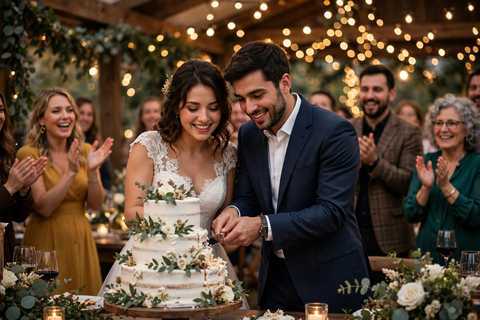
An AI reception photo captures the sparkle and joy of that cake-cutting moment in a single frame. The prompt below is written to create a realistic, cinematic image of the couple, the cake and the cheering guests, perfect for a thank-you post, a reception invitation, or a beautiful memory to share with everyone who celebrated with you.
Receptions in the winter season have a special sparkle, because the early evenings let the lights shine brighter and the cool air keeps the hall comfortable for hours of dancing and celebration. Couples in 2026 are choosing elegant cakes in white and gold, pastel flowers and sparkling toppers, while venues hang thousands of fairy lights to create a starry ceiling. The cake-cutting moment is the highlight of the evening, and photographers say it is one of the most shared images of any wedding. An AI preview helps you plan your cake design, your lighting and your stage decor, so the real moment looks as magical as the picture you imagined.
The Prompt
Copy the prompt below exactly as it is written and paste it into your favourite AI image generator. It is written to work with tools like Midjourney, DALL-E, Leonardo AI, Firefly and Gemini, and it produces a warm, realistic photograph rather than a flat illustration.
Photorealistic joyful photograph of a newlywed couple cutting a beautiful multi-tier wedding cake at a reception, sparkling fairy lights and crystal chandeliers glowing overhead, bride in an elegant red gown and groom in a black tuxedo, guests cheering and clapping around them, golden and white floral decorations, warm festive lighting, cool winter evening atmosphere, shot on a Canon EOS R5 with a 35mm lens, lively celebration, natural smiles, ultra detailed, no text, no watermark
You can customise this reception prompt in seconds to match your own celebration. Change the outfit colours to suit your family, swap the background to your own venue, or adjust the lighting from bright daylight to a soft golden-hour glow. Keep the heart of the scene the same, the sparkling lights and the cake-cutting moment, because that is what makes the image instantly recognisable and full of feeling. Small changes like these let you create a whole series of matching photos for your invitations, your social media posts and your wedding album, all with the same warm and joyful style. Try two or three variations and keep the one that feels most like your own special day.
The reception cake cutting is also the moment when the couple feeds each other the first sweet bite as husband and wife, a small gesture that guests always cheer for. Photographers say this playful exchange often produces the happiest, most natural smiles of the entire evening, which is why the image becomes a favourite in every wedding album.
Why This Prompt Works
- Sparkling lights set the scene: fairy lights and chandeliers create a glamorous, celebratory glow that defines a reception.
- Cheering guests add life: guests clapping around the couple make the image feel like a real party, not a staged photo.
- The cake is the centrepiece: a multi-tier cake gives the photograph a clear focal point and a sense of occasion.
- Warm lighting flatters everyone: golden festive light makes the couple and the guests glow with happiness.
How to Use This Prompt
- Open your AI image generator, such as Midjourney, DALL-E, Leonardo AI or Gemini.
- Copy the full prompt from the box above and paste it into the prompt field.
- Choose a wide 16:9 aspect ratio so the couple, the cake and the guests all fit in the frame.
- Generate a few versions and select the one where the couple’s smiles look most genuine.
- Download the best image and share it as your reception post, thank-you card or album highlight.
Pro Tips
- Change the cake colours to match your theme, for example ‘pastel pink and gold cake’ or ‘white cake with red roses’.
- Add ‘sparklers in the guests’ hands’ for an extra magical touch during the cake cutting.
- If you prefer an Indian-style reception, replace ‘black tuxedo’ with ‘cream sherwani’ and ‘red gown’ with ‘red lehenga’.
- Try a close-up version by adding ‘close-up of the couple’s hands cutting the cake together’ to the prompt.
- Use the image as the cover of your reception video or photo album for a polished, professional finish.
Frequently Asked Questions
Can I use this reception prompt for a Christian wedding reception?
Yes, the prompt already suits a Christian reception with a gown and tuxedo. For an Indian reception, simply swap the outfits to a lehenga and sherwani as suggested in the tips above.
Why does my reception photo look too crowded?
Reception scenes have many people, so the generator can overcrowd the frame. Add ‘spacious elegant hall’ to the prompt to give the couple and the cake more breathing room.
Which AI tool is best for a reception scene with many people?
Midjourney and Leonardo AI handle crowds well, while Gemini and DALL-E are great free options. Generate several versions, because crowd scenes vary a lot between generations.
Can I add my wedding date to the image?
It is better to keep the AI image text free and add your date in your photo editor or invitation tool, so the text stays sharp and correctly spelled.
Cake, lights, cheers and love, that is what a reception is made of. Try this prompt, capture the sparkle, and let your winter wedding celebration shine long after the night ends.
Related Viral Prompts
- Winter Wedding 2026 Sangeet AI Photo Prompt: Family Dancing Under Fairy Lights
- Winter Wedding 2026 Couple Shoot AI Photo Prompt: A Newlywed Couple in a Misty Garden
- Winter Wedding 2026 Decor AI Photo Prompt: A Royal Mandap Draped in Marigolds
#WeddingReception #WinterWedding2026 #AIPhotoPrompt #CakeCutting #IndianWedding


Leave a Reply