
Introduction
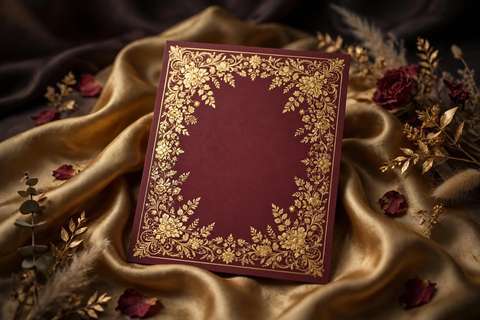
A wedding invitation is the first glimpse your guests get of your celebration, and in 2026 couples are making it unforgettable. An elegant gold and maroon card with delicate floral borders, resting on a soft silk cloth, speaks of tradition, luxury and love before a single word is read. The deep maroon, the shining gold and the gentle flowers create a look that feels royal and timeless.
AI image prompts make it easy to design a beautiful invitation card without hiring a designer. The prompt below creates a realistic, elegant photograph of a gold and maroon invitation card with floral borders on silk, perfect as a digital invitation background, a social media announcement, or a preview to share with your printer before the final cards are made.
Wedding invitations in 2026 are a blend of classic beauty and modern style. Couples choose rich colours like maroon, gold and ivory, paired with floral borders, gold foil patterns and soft silk or velvet backdrops for their photographs. The winter season suits these deep, warm colours perfectly, because the soft light makes the gold shine and the maroon look deep and luxurious. Many families now send digital invitations on WhatsApp first, using a beautiful AI-generated card image, and then print matching physical cards for close relatives. An AI preview lets you test your colour combination, your floral border style and your card layout before you spend money on printing, so the final invitation looks exactly as elegant as you imagined.
The Prompt
Copy the prompt below exactly as it is written and paste it into your favourite AI image generator. It is written to work with tools like Midjourney, DALL-E, Leonardo AI, Firefly and Gemini, and it produces a warm, realistic photograph rather than a flat illustration.
Photorealistic elegant photograph of a luxurious wedding invitation card in gold and deep maroon, delicate gold floral borders and ornate corner patterns, resting on a soft cream silk cloth, small white and pink roses placed beside the card, warm soft lighting, rich and royal atmosphere, top-down flat lay composition, shot on a Canon EOS R5 with a 50mm lens, ultra detailed gold foil texture, luxurious and timeless, no text, no watermark
You can customise this wedding invitation prompt in seconds to match your own celebration. Change the outfit colours to suit your family, swap the background to your own venue, or adjust the lighting from bright daylight to a soft golden-hour glow. Keep the heart of the scene the same, the gold and maroon card with floral borders on silk cloth, because that is what makes the image instantly recognisable and full of feeling. Small changes like these let you create a whole series of matching photos for your invitations, your social media posts and your wedding album, all with the same warm and joyful style. Try two or three variations and keep the one that feels most like your own special day.
Why This Prompt Works
- Gold and maroon feel royal: the deep maroon and shining gold combination is the classic palette of an elegant Indian wedding.
- Floral borders add softness: delicate flowers balance the rich colours and give the card a romantic, graceful feel.
- Silk adds luxury: a cream silk cloth underneath the card makes the whole photograph look expensive and refined.
- A flat lay shows everything: the top-down composition lets viewers see the full card design clearly, like a professional product photo.
How to Use This Prompt
- Open your AI image generator, such as Midjourney, DALL-E, Leonardo AI or Gemini.
- Copy the full prompt from the box above and paste it into the prompt field.
- Choose a square or 4:5 aspect ratio so the card fills the frame nicely.
- Generate a few versions and pick the one where the gold details and floral borders look sharpest.
- Download the best image and use it as your digital invitation background or share it with your printer.
Pro Tips
- Change the colours to match your wedding theme, for example ‘ivory and gold’ or ’emerald green and gold’.
- Add ‘a pair of gold bangles and a small diya beside the card’ for a richer, more festive flat lay.
- If you want a modern look, replace ‘floral borders’ with ‘minimal gold geometric patterns’ for a clean, contemporary card.
- Try a version with the card slightly open, by adding ‘card half open showing a glimpse of cream inner paper’, for a more dynamic photo.
- Keep the image text free and add your names and wedding details in your invitation editor, so the text stays perfectly sharp.
Frequently Asked Questions
Why should my invitation card image have no text?
AI generators often misspell words, so it is always better to generate a beautiful text-free card and add your names, date and venue in a design tool where the text stays sharp and correct.
Can I use this invitation image for a digital WhatsApp invitation?
Yes, it is perfect for WhatsApp and social media invitations. Add your event details in your phone’s photo editor or a free design app and send it to your guests.
What size should my invitation image be?
A square image works well for WhatsApp and Instagram, while a 4:5 portrait suits a printed card preview. Generate in the ratio you need, or crop the image afterwards.
Can I change the card colour to match my wedding theme?
Absolutely. Replace ‘gold and deep maroon’ with your own colours, such as ‘blush pink and gold’ or ‘royal blue and silver’, and the rest of the prompt works exactly the same.
Gold, maroon, flowers and silk, that is an invitation your guests will remember. Try this prompt, design the card of your dreams, and let your winter wedding begin with elegance.
Related Viral Prompts
- Pre Wedding Shoot 2026 AI Photo Prompt: A Couple Laughing in a Sunflower Field
- Winter Wedding 2026 Decor AI Photo Prompt: A Royal Mandap Draped in Marigolds
- Winter Wedding 2026 Reception AI Photo Prompt: A Couple Cutting a Cake Under Sparkling Lights
#WeddingInvitation #WinterWedding2026 #AIPhotoPrompt #GoldAndMaroon #ElegantCard


Leave a Reply