
Introduction
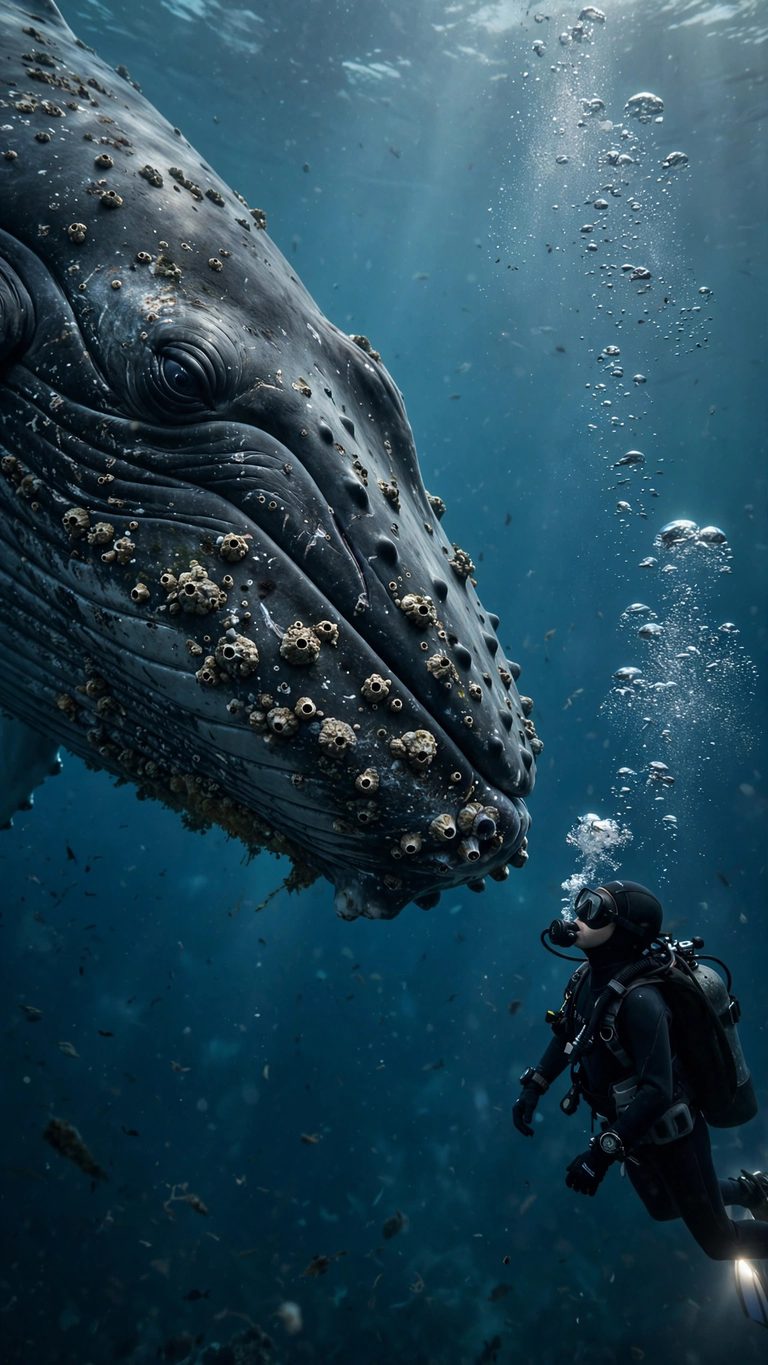
There is a moment every diver dreams about and almost nobody gets: a colossal humpback whale gliding past, close enough to meet its eye. In that single second, you understand exactly how small you are and how gentle something enormous can be. It is the kind of encounter people describe for the rest of their lives.
This AI video prompt bottles that once-in-a-lifetime feeling. It stages a heart-stopping meeting between a tiny diver and a massive humpback, tuned for vertical video and built for maximum emotion. In this article you will get the exact copy-paste prompt, a breakdown of why each phrase triggers awe, setup steps for Veo 3, Runway, Kling, Pika, and Sora, and pro variations that take the encounter even further. If you have ever wanted to film the unfilmable, your #Whale moment starts here.
The Prompt
Copy the full prompt from the box below into your video generator. Run it unchanged first, because the scale contrast and the eye-contact beat are carefully balanced.
Once-in-a-lifetime moment as a colossal humpback whale glides past a tiny diver, eye meeting eye, barnacled skin texture immense, diver's bubbles rising beside the giant, overwhelming scale and gentleness, heart-stopping encounter, ultra realistic, cinematic, emotional
Why This Prompt Works
The core power of this prompt is scale contrast. A tiny diver beside a colossal whale creates an instant, wordless sense of awe that no caption needs to explain. Human brains are wired to stare at enormous things, and the diver gives the whale something to be enormous next to. Remove the diver and you lose half the impact.
The emotional hook is “eye meeting eye.” That single phrase turns a wildlife clip into a connection. Viewers project intelligence and gentleness into that glance, which is why whale eye-contact footage consistently outperforms every other kind of ocean content. It makes the moment feel personal rather than observed.
Realism comes from the texture words. “Barnacled skin texture immense” tells the model to render rough, cratered skin instead of smooth cartoon rubber, and barnacles are exactly the detail that sells a humpback as real. The rising bubbles do double duty: they add motion and they act as a second scale reference, small and fragile against the giant.
Finally, the emotional framing, “overwhelming scale and gentleness, heart-stopping encounter,” pushes the model toward a reverent, cinematic mood rather than a nature-documentary one. Paired with “ultra realistic, cinematic, emotional,” the finish lands squarely in the territory that makes #Diver encounter clips go viral: awe you can feel in your chest.
How to Use This Prompt
Follow these steps to generate your whale encounter:
- Copy the prompt exactly as written in the box above.
- Choose your tool: Veo 3, Runway Gen-4, Kling 2.x, Pika 2, or Sora.
- Set 9:16 vertical and 10 seconds. The extra two seconds let the whale fully cross the frame, which matters for the scale reveal.
- Use a slow push-in or a static camera. Let the whale do the moving; a chasing camera breaks the reverent mood.
- Keep motion strength medium. Whales glide. Too much motion makes the giant look frantic and fake.
- Generate three takes and pick the one where the whale’s eye is clearly visible during the pass.
- Grade it deep blue, add a low whale-song rumble or soft ambient audio, and post.
Platform notes: Veo 3 currently renders large photorealistic animals with the fewest morphing artifacts. In Kling, keep the camera path simple to avoid the whale warping mid-pass. In Runway, image-to-video from a whale reference photo gives you strong control over the animal’s shape. A negative prompt like “extra fins, deformed face, two heads” prevents the most common large-animal glitches.
Pro Tips & Creative Variations
Pro tips first. The money beat is the eye contact, so if a take hides the eye, regenerate instead of settling. Keep the diver small in the frame; if the model keeps enlarging the diver, add “tiny distant diver” to reinforce the scale. Do not overcrowd the composition: one whale, one diver, open blue water. Negative space is what makes the giant feel giant.
Creative variations once the base works:
- Mother and calf: add “a small calf swimming beside the giant mother” to double the tenderness.
- Eye close-up: add “extreme close-up of the whale’s wise eye reflecting the diver” for an intimate, haunting cut.
- Surface breach: add “whale breaching at the sunlit surface, then diving past the camera” for a two-act mini story.
- Whale song: add “visible sound waves rippling from the whale, mystical deep blue” and pair with real whale audio.
- Silhouette pass: add “whale as a dark silhouette against god rays from above” for a more artistic, poster-like frame.
- Night encounter: add “diver’s torch beam lighting the whale’s eye in dark water” for a dramatic night-dive version.
When posting, let the clip breathe: no fast cuts, no meme captions on the first three seconds. The awe needs room, and viewers reward it with longer watch time.
Frequently Asked Questions
Which tool is best for photorealistic whales?
Veo 3 currently produces the most convincing large marine animals from text, with the fewest mid-clip shape changes. Kling 2.x is a close second. If the whale keeps morphing, shorten the camera move and simplify the prompt rather than switching tools immediately.
The whale changes shape halfway through my clip. How do I stop that?
Large animals are hard for models to keep consistent. Use a slow, simple camera move, keep the duration at 10 seconds or less, and avoid asking for complex actions like breaching plus a close pass in one shot. Generating three takes and picking the most stable one solves most cases.
Can I add a second whale to the scene?
Yes. Add a short phrase like ‘a second whale following in the distance’ at the end of the subject description. Keep the addition small so the model does not crowd the frame or merge the two animals into one strange creature.
Should I use vertical or horizontal framing?
Use 9:16 vertical for TikTok, Reels, and Shorts, where encounter clips earn the most views. The same prompt works in 16:9 if you are cutting a YouTube video; just change the aspect setting and leave every word of the prompt untouched.
Few visuals humble a viewer like a human dwarfed by a whale, and now that feeling is one prompt away. Generate your encounter, pick the take where the eye meets the lens, and share it with #Whale so the world can feel small for ten seconds. Tag PromptBazar, and dive into the next Underwater World prompt when you are ready.
Related Viral Prompts
- Seahorse Macro Drift AI Video Prompt: Copy This Magical Tiny Seahorse Video Prompt for Veo 3, Kling and Pika
- Kelp Forest Sun Rays AI Video Prompt: Copy This Spiritual Underwater Cathedral Prompt for Veo 3, Sora, Runway
- Night Dive Bioluminescent Plankton AI Video Prompt: Copy This Glowing Ocean Prompt for Veo 3, Runway and Kling
# A I V i d e o # P r o m p t B a z a r # W h a l e # D i v e r # E n c o u n t e r

Leave a Reply