
Introduction
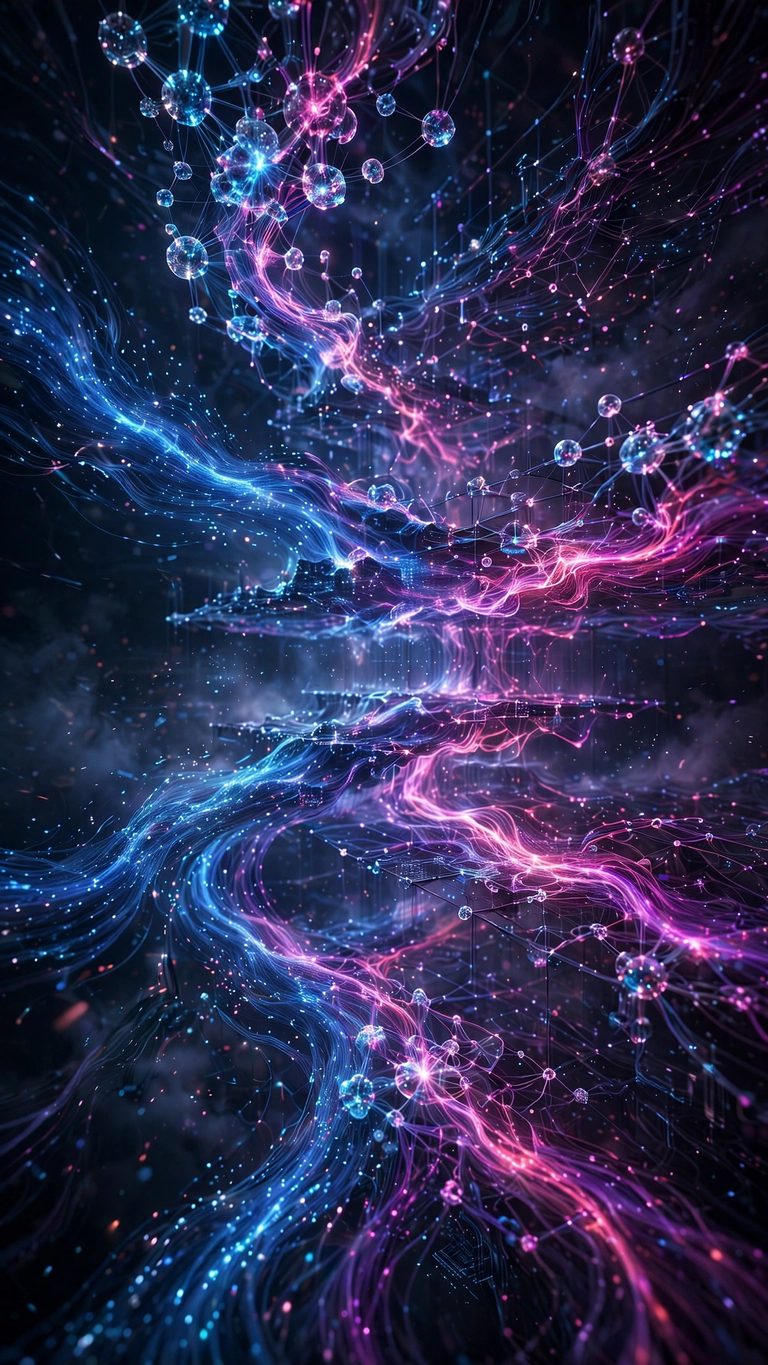
Some videos you watch, and some videos you fall into. This AI video prompt creates the second kind: a breathtaking dive through a glowing artificial neural network, where nodes pulse like distant stars and rivers of colored data flow endlessly through deep blue and magenta space. It is the visual equivalent of peeking inside a thinking machine’s dreams, and it is utterly mesmerizing. Abstract tech visuals like this have become one of the most reliable formats on short-form platforms because they hijack the brain’s love of pattern, motion, and light. They work as backgrounds, as meditation loops, as intros for tech content, and as pure digital eye candy that racks up millions of passive views. Whether you run a tech channel that needs a signature visual identity, create ambient content for focus and relaxation playlists, or simply want a showpiece clip that makes viewers whisper wow, this prompt delivers a hypnotic journey through the architecture of artificial intelligence. The camera does not just observe the network; it plunges through its layers, giving viewers the thrilling sensation of traveling inside thought itself. Let us explore why this abstract dive works so powerfully and how to perfect it.
The Prompt
Paste this exact prompt into your AI video generator to create the neural network dive:
Stunning abstract visualization of a glowing AI neural network, nodes pulsing with light, data streams flowing like rivers of color, camera diving through layers of connections, deep blue and magenta palette, hypnotic depth, futuristic wonder, ultra realistic, 8k, cinematic, infinite digital depth
Why This Prompt Works
The psychology behind this prompt’s success is rooted in how human vision and attention work. Flowing, symmetrical, luminous motion triggers what researchers call soft fascination, a state where the brain is engaged but relaxed, which is exactly why lava lamps, fireplaces, and aurora videos hold attention for so long. This prompt manufactures that effect digitally: pulsing nodes provide rhythm, streaming data provides continuous motion, and the dive-through camera move provides a constant sense of forward discovery that prevents the eye from getting bored. The color choice is equally strategic. Deep blue conveys intelligence, depth, and calm, while magenta injects energy and futuristic flair; together they create the signature cyber-aesthetic that audiences instantly associate with cutting-edge AI. On the trend side, abstract AI visuals are surging because they give creators a premium look without filming anything, and they loop seamlessly, which is a superpower on platforms that autoplay and replay. A perfect loop can double or triple average watch time as viewers let it cycle, and the algorithm reads that as deep engagement. Shareability comes from versatility: tech educators use clips like this behind explainers, musicians use them as visualizers, and brands use them as futuristic b-roll. The prompt also sparks curiosity, that irresistible itch to understand what one is looking at, which drives comments asking how it was made. Every comment is engagement fuel. In a feed crowded with talking heads, a full-screen dive through a living network stands out like a portal to another dimension.
How to Use This Prompt
Abstract prompts are forgiving, but a few targeted choices will elevate your result from pretty to jaw-dropping. In Google Veo 3, paste the prompt verbatim, select 9:16 vertical and an 8-second duration, and consider generating at the highest fidelity setting since fine particle detail is the star here. Runway Gen-4 users should keep camera motion set to auto or add a gentle forward push to reinforce the diving sensation through the network layers. Kling handles fluid particle motion exceptionally well, so it is a strong pick if you want the data rivers to feel silky and continuous; use its professional mode for cleaner node rendering. In Pika, try the prompt with an added style cue like octane render or volumetric glow if the platform supports style modifiers, to deepen the luminosity. For OpenAI Sora, the prompt works as written, and you may want to generate a slightly longer clip and then select the smoothest 8-second segment for posting. Whichever tool you choose, generate at least three variations, because abstract outputs vary wildly, and pick the one with the most coherent depth and the least visual noise. Export in maximum resolution, and if your platform supports it, enable any glow or bloom-friendly color profile. Pair the final clip with ambient electronic music or a soft synth pad to complete the immersive effect.
Pro Tips & Creative Variations
Small refinements make a huge difference with abstract work. Keep your color palette disciplined: the deep blue and magenta pairing is already ideal, and adding more hues tends to muddy the premium feel, so resist the urge to rainbow it up. Keep the dive speed smooth and consistent; a steady forward glide feels like flying, while jerky acceleration breaks the trance and reminds viewers they are watching a render. Give the node pulses a rhythmic quality, almost like a heartbeat, by adding descriptors such as rhythmic pulsing or synchronized glow waves, which makes the network feel alive rather than random. For creative variations, try a macro variation that starts wide on the whole network and then dives into a single node, revealing an entire galaxy inside it, a mind-bending scale shift audiences love. You can theme the network for specific content: gold and emerald tones for finance explainers, icy cyan for science content, or warm amber for a more organic, brain-like feel. Another powerful trick is to composite text over the clip: the moving background makes titles and statistics look expensive with zero extra effort. Create a seamless loop by generating the clip and then crossfading the end into the beginning in your editor; loopable versions dramatically outperform linear ones as ambient posts. Finally, try reversing the camera move for an emergence effect, flying out of the network toward the viewer, which works beautifully as a video intro or transition between scenes.
Frequently Asked Questions
What is this video best used for?
It shines as background visuals for tech explainers, podcast clips, music visualizers, website hero sections, and ambient focus content. Many creators also post it standalone as satisfying or oddly mesmerizing content, which reliably earns saves and shares.
How do I make it loop perfectly?
Generate the clip, then in any editor place a copy of the first half-second over the last half-second with a crossfade, or use your platform’s loop or ping-pong playback setting. Keeping the camera motion constant and the palette limited makes the seam nearly invisible.
Will the text or labels I add stay readable over the animation?
Yes, if you keep typography bold with a subtle dark outline or place it in a calmer region of the frame. The constant motion actually helps text pop when there is strong contrast, which is why this style is a favorite for quote cards and data callouts.
Can I match this to my brand colors?
Absolutely. Swap deep blue and magenta for your brand palette in the prompt, for example emerald and gold, and the AI will restyle the entire network. Keep it to two dominant hues for the cleanest, most professional result.
Dive into the mind of the machine and bring back something beautiful. Try this prompt today and give your content the futuristic glow it deserves: one hypnotic loop is all it takes to level up your feed.
Related Viral Prompts
- Robot Teacher AI Video Prompt: Film an Inspiring Classroom With Holographic Planets and Eager Young Kids
- Delivery Robot AI Video Prompt: Roll a Cute Cyberpunk Hero Through Neon-Lit Rainy City Streets at Night
- Robot Gardener AI Video Prompt: Plant a Peaceful Morning Garden With Butterflies and Gentle Robot Hands
# A I V i d e o # P r o m p t B a z a r # N e u r a l N e t w o r k # A I # A b s t r a c t

Leave a Reply