
Introduction
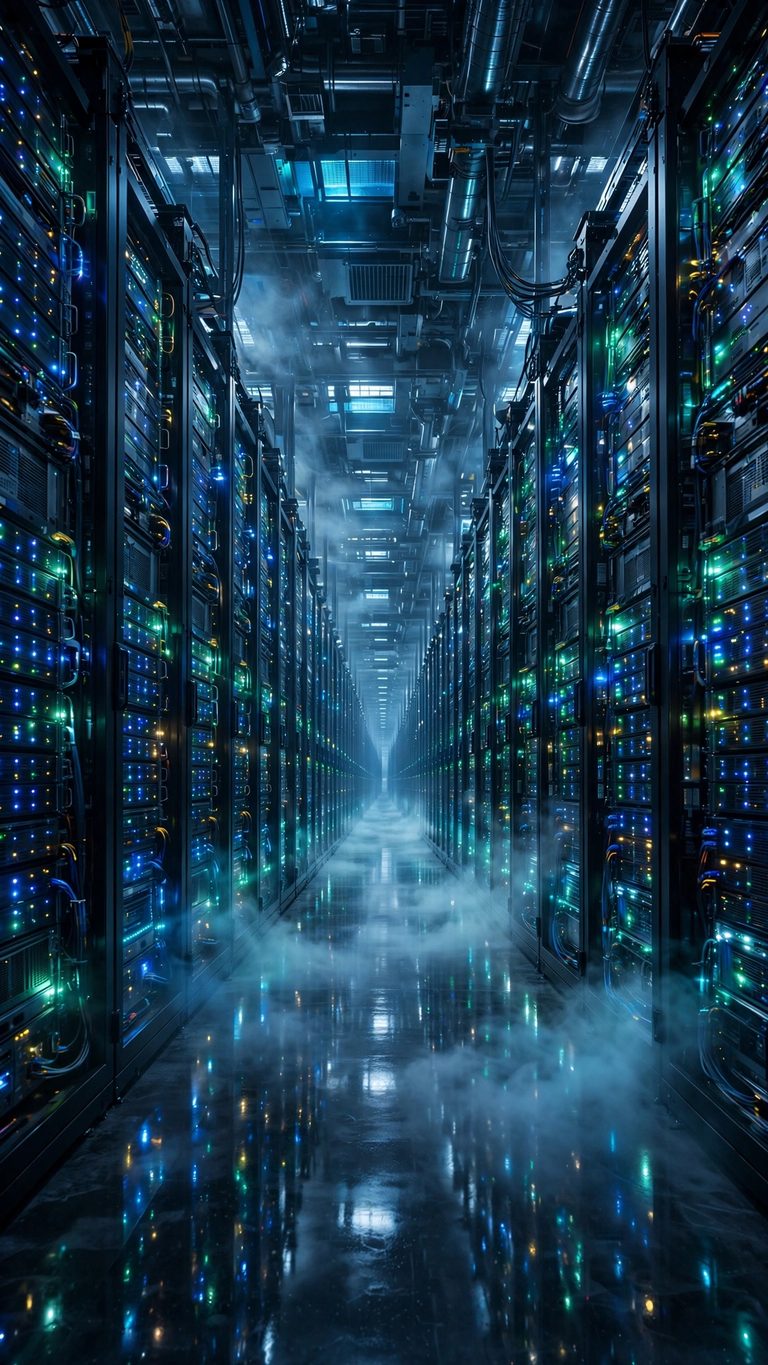
There is a place almost none of us will ever visit, yet it quietly runs the modern world: the AI data center, a cathedral of blinking servers where humanity’s collective intelligence is stored, trained, and served. This prompt takes you inside — gliding down an endless corridor of towering server racks, blue and green lights pulsing like a mechanical heartbeat, cool mist curling across a mirror-polished floor. It is ten seconds of pure technological awe, and it is hypnotizing millions of viewers who had no idea infrastructure could feel this cinematic.
Scale is the oldest trick in visual storytelling, and this prompt wields it masterfully. The human brain responds to vastness with a specific cocktail of emotions — wonder, humility, a touch of delicious unease — that researchers call the sublime. A corridor that stretches beyond sight, filled with the humming energy of thousands of machines thinking at once, delivers that sublime hit in a format short enough to loop endlessly. Viewers do not just watch it once; they ride it again and again, each replay deepening the trance.
In 2026, curiosity about AI infrastructure has exploded alongside the technology itself. People want to see where the magic lives — the physical reality behind the chatbots and video generators they use every day. This prompt turns that curiosity into one of the most rewatchable tech visuals on the feed. Here is the exact prompt, the psychology of why it captivates, and how to render your own epic walkthrough.
The Prompt
Paste this prompt exactly as written into your AI video generator. The sensory layering — mist, reflections, pulsing lights, forward motion — is what transforms a simple hallway into an epic experience.
Epic walkthrough of a massive AI data center corridor, endless server racks with blinking blue and green lights, cool mist on the floor, camera gliding forward smoothly, reflections on polished floor, humming futuristic energy, dramatic scale, ultra realistic, 8k, cinematic
Why This Prompt Works
The corridor is one of cinema’s most psychologically loaded spaces. A hallway that vanishes into infinity triggers what filmmakers call “depth pull” — the viewer’s eye is dragged forward involuntarily, creating a sensation of movement even before the camera glides. By combining that infinite perspective with smooth forward camera motion, this prompt creates a mild vestibular thrill, the same reason drone flythroughs and roller-coaster POVs dominate watch-time charts. The brain experiences the glide as its own journey, and journeys demand completion — viewers stay to the end because leaving mid-corridor feels unresolved.
The lighting design is equally deliberate. Blinking blue and green lights do three jobs at once: they establish the unmistakable visual language of “serious technology” that audiences learned from decades of sci-fi, they create rhythmic visual variation that prevents the long corridor from feeling monotonous, and their cool color temperature triggers associations with precision, intelligence, and calm power. The cool mist on the floor adds atmosphere and mystery while softening the hard geometry of the racks, and the polished floor reflections double every light source — a classic cinematography trick that makes the space feel twice as vast and twice as expensive.
On the trend level, this prompt rides two powerful currents. First, infrastructure curiosity: in 2026, “how AI actually works” content consistently overperforms because the audience’s daily lives now depend on systems they cannot see. This clip makes the invisible visible. Second, ambient and “oddly satisfying” tech aesthetics have a massive dedicated audience that collects exactly this kind of footage for backgrounds, edits, and mood content. Shareability comes from awe itself — people send epic-scale videos with captions like “this is insane” because sharing wonder is a form of social currency. The ten-second duration, slightly longer than the standard eight, gives the glide room to breathe and makes the loop feel like a journey rather than a gif.
How to Use This Prompt
Step 1: Choose a generator with strong camera control. The forward glide is the soul of this clip, so prioritize tools that handle camera motion well: Runway’s camera controls, Kling 2’s smooth motion model, and Veo 3 all excel here. Sora produces gorgeous lighting, and Pika works for quick drafts. Whichever you choose, look for a “camera path” or “motion” setting and favor slow, steady forward movement.
Step 2: Paste the prompt verbatim and set 9:16 vertical, 10 seconds. Vertical format turns the corridor into a towering experience that fills the phone screen; the extra two seconds over the usual eight let the sense of endlessness fully develop. Keep “ultra realistic, 8k, cinematic” at the tail to push photographic quality.
Step 3: Protect the endlessness. The most common failure is the corridor visibly ending in a wall or the camera drifting sideways into a rack. Generate three to four takes and select the one where the hallway genuinely feels infinite and the glide stays centered. If your tool supports negative prompts, add “dead end, wall at end of corridor, camera drift.”
Step 4: Tune the atmosphere. If the mist is missing, strengthen it with “thick low fog.” If the lights feel static, add “lights pulsing in rhythm.” Small atmospheric pushes make an outsized difference in this concept.
Step 5: Finish with sound design. A deep ambient hum or synth drone underneath transforms the viewing experience — this is one of the rare prompts where audio matters as much as visuals. Add a minimal caption like “Where AI lives” and disclose AI generation. Consider releasing a 60-second extended loop version for YouTube as ambient content; the format has a hungry audience.
Pro Tips & Creative Variations
The three details that elevate this from a nice render to a jaw-dropping one are all in the prompt’s DNA. Keep the mist low and cool on the floor — it should read as atmosphere, not weather; a corridor swallowed by fog loses its epic geometry. Keep the light blinking in a rhythm rather than random flicker — rhythmic pulsing reads as intelligent and alive, while chaotic flicker reads as broken. And above all, the corridor must feel endless: frame the vanishing point dead center, keep the racks receding symmetrically, and never let the camera reveal a terminus. Endlessness is the entire emotional payload.
Variations can take this concept in spectacular directions. Try a night-shift version with deeper blues and sparser lighting for a moodier, more mysterious feel. Flip the perspective to a top-down drone shot soaring over the server aisles like city blocks. Render the “underwater cable” companion piece — the subsea cables that connect data centers — for a two-part infrastructure series. Add a tiny human engineer walking the corridor for scale contrast; a single figure makes vastness legible in a way empty space cannot. You can also theme the corridor: a quantum computing lab with golden chandeliers of hardware, a retro 1980s mainframe hall for nostalgia, or a futuristic white clean-room version. Each variation reuses the proven corridor psychology while opening a new audience.
Frequently Asked Questions
Q: My renders keep showing a wall at the end of the corridor. How do I fix it?
A: This is the number one issue with this prompt. Use a negative prompt like “dead end, wall, corridor ending” if your tool supports it, emphasize “endless” and “vanishing point” in positive terms, and generate multiple takes — models vary widely in how they handle infinite perspective. Selecting the best take is part of the workflow, not a failure of it.
Q: Why ten seconds instead of eight for this one?
A: The glide needs time to establish the sensation of endless forward motion. At eight seconds the clip can feel like it ends just as the trance begins; ten seconds lets the viewer settle into the journey. For ambient-loop versions, extend to 30-60 seconds.
Q: What audio works best with data center footage?
A: Deep ambient drones, subtle server-hum textures, or slow cinematic synth pads. Avoid anything with lyrics or sharp percussion — they break the meditative spell. Royalty-free ambient tracks or AI-generated soundscapes both work well.
Q: Can this style of content build an audience, or is it a one-off novelty?
A: It absolutely builds audiences. “Infrastructure awe” is a durable niche spanning tech enthusiasts, sci-fi fans, and the massive ambient-video community. A consistent series — data centers, server farms at night, cable landing stations, chip fabrication plants — gives viewers a reason to follow, and the content doubles as premium background footage other creators will license or credit.
Every revolution has a room where it happens, and for the AI age, that room hums with a thousand blinking lights. This prompt hands you the keys to that room — ten seconds of pure technological sublime, rendered in cinematic detail. Paste it, glide down the corridor, and give your audience a glimpse of the invisible engine running their world. They will not just watch it; they will feel small in the best possible way.
Related Viral Prompts
- Humanoid Robot City Walk AI Video Prompt: The Candid Street Scene Everyone Cannot Stop Watching in 2026
- Robot Barista Latte Art AI Video Prompt: The Coziest Viral Coffee Moment You Will See Right Now in 2026
- Robot Dog Fetch AI Video Prompt: Create a Heartwarming Slow-Motion Frisbee Catch in a Sunny Park Today
# A I V i d e o # P r o m p t B a z a r # D a t a C e n t e r # A I # E p i c



Leave a Reply