
Introduction
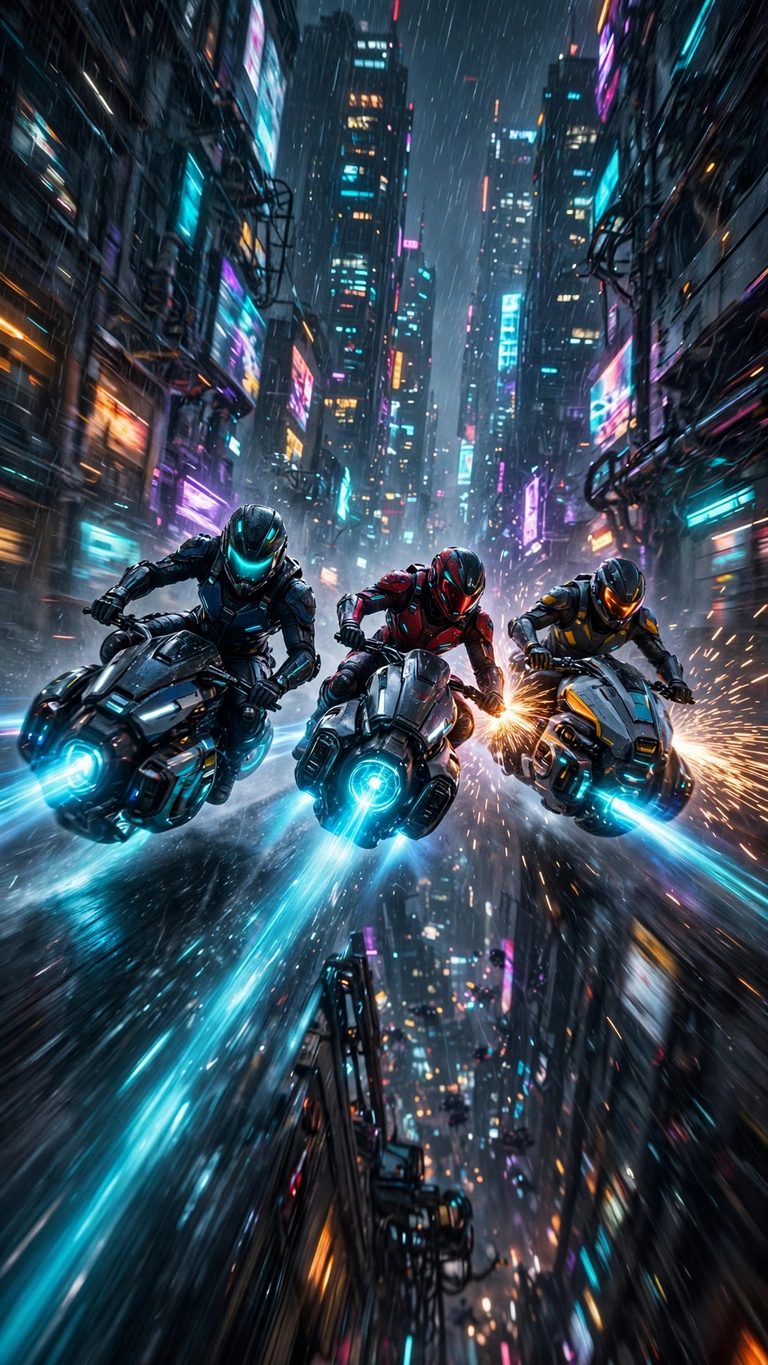
Picture this: rain hammering down on a canyon of glass towers, neon signs bleeding color into the wet air, and three hover bikes screaming through the gap at impossible speed, their engine glow painting cyan streaks across the night. That is the exact scene this AI video prompt creates, and it does it with a single paragraph of text. Few AI video prompts on PromptBazar deliver this level of instant cinematic payoff, because speed is one of the hardest things for generative video models to fake convincingly, and this prompt is engineered around motion from the first word to the last. The phrase “heart-pounding speed” is not decoration; it is a direct instruction that shapes frame-to-frame displacement, motion blur, and camera shake in the final render. Whether you are a YouTube Shorts creator hunting for a viral opener, a TikTok editor building a cyberpunk montage, or a filmmaker prototyping a chase sequence without a stunt budget, this #HoverBike #Race concept hands you blockbuster energy on demand. In this guide we break down the prompt, explain the visual psychology that makes it work, show you how to run it on Veo 3, Runway, Kling, Pika, and Sora, and share pro variations that keep the footage fresh clip after clip.
The Prompt
Copy the block below exactly as written and paste it into your AI video generator of choice. Every comma matters: the prompt has been tuned so that each phrase steers one specific visual element of the race.
Adrenaline-fueled cyberpunk hover-bike race tearing through a neon canyon of skyscrapers, three riders leaning hard into turns, engine glow streaking cyan, sparks flying off a near-miss, camera chasing inches behind the leader, rain whipping past, heart-pounding speed, ultra realistic, cinematic action
Why This Prompt Works
This prompt works because it speaks the language that video diffusion models understand best: concrete, physical, visual verbs. “Tearing through,” “leaning hard into turns,” “streaking,” “flying off,” “chasing,” “whipping past” — almost every clause contains motion, and motion is what separates a flat slideshow from footage that feels alive. Many beginners write prompts full of adjectives and wonder why their cyberpunk video looks like a still image with a shimmer filter. This prompt does the opposite: it choreographs the shot like a director. The specification of “three riders” is another quiet masterstroke. It gives the model a countable composition instead of a vague crowd, which keeps anatomy and vehicle geometry coherent across frames. The “near-miss” with “sparks flying” injects a micro-story into an eight-second clip — conflict, danger, consequence — and that narrative spark is what makes viewers rewatch, which is the single biggest driver of #AIVideo reach on TikTok and Reels right now. Color discipline matters too. By naming “cyan” engine glow against an implied magenta-red neon city, the prompt locks in the classic complementary palette that the human eye reads as “cyberpunk” instantly, the same teal-and-orange logic Hollywood colorists have used for a decade. Rain does triple duty: it adds atmosphere, it gives the camera something to move through so speed reads clearly, and it creates reflective surfaces that multiply every neon source. Finally, “camera chasing inches behind the leader” dictates a dynamic chase-cam grammar — close, unstable, intimate — which is far more exciting than a static wide shot. Stack all of this under “ultra realistic, cinematic action” and you get footage that looks less like AI output and more like a second-unit stunt reel from a big-budget sci-fi film.
How to Use This Prompt
Start by pasting the full prompt into the text field of your generator. On Google Veo 3, set the aspect ratio to 9:16 vertical and the duration to 8 seconds, matching the intended chase-cam framing; Veo 3’s native physics handling makes the rain and bike banking look especially convincing. In Runway’s Gen-4 or newer, use the same 9:16 ratio, choose an 8-second generation, and set camera motion to “chase” or “follow” if a preset is available — the prompt already asks for it, but reinforcing it in the camera controls sharpens the result. Kling users should pick the high-quality mode and 9:16 output; Kling’s motion coherence is excellent for multi-vehicle shots, so the three riders stay distinct instead of melting together. In Pika, append a simple negative prompt like “blurry, morphing, extra wheels” to protect the bike geometry, and keep the clip at 8 seconds for maximum motion intensity. If you have access to Sora, the prompt’s rich motion verbs play to its strengths — let it run the full duration and expect strong temporal consistency. Across all platforms, generate two or three variants and pick the one where the near-miss spark moment lands cleanly; that single frame cluster is the clip’s money shot. Export in the highest resolution available, and avoid cropping afterward, since the prompt was composed for vertical framing from the start.
Pro Tips & Creative Variations
Once the base race looks great, the fun starts: this prompt is a template, not a finished product. Swap the weather first — “sandstorm” or “blizzard” instead of rain completely changes the mood while keeping the choreography intact, and a dust storm at golden hour gives you a Mad Max flavor that stands out in a feed full of rainy night clips. Change the rider count for different energy: a lone rider being hunted by two corporate interceptors turns the race into a pursuit, while five riders in formation reads like a sanctioned league event. Try a camera swap by replacing “camera chasing inches behind the leader” with “drone camera swooping overhead” or “first-person handlebar view” — POV generations are performing exceptionally well for #Cyberpunk content because viewers feel the speed in their gut. For a villain edit, change the engine glow from cyan to blood red and add “ominous” to the tone; for a hero edit, keep cyan and add “triumphant.” A slow-motion variation works beautifully: append “extreme slow motion, sparks hanging in the air, rain droplets suspended” and render at a longer duration if your tool allows, then speed-ramp it in editing for a trailer-style beat. You can also relocate the race — through a desert canyon of rock formations, inside a massive storm drain, or between the legs of a colossal orbital elevator — while keeping every other phrase identical, which preserves the motion grammar that makes the prompt reliable. Finally, chain clips: generate the same race from three angles (chase cam, overhead, rider POV) with matched colors, and cut between them every two seconds for a genuinely edited action sequence that no single generation could produce alone.
Frequently Asked Questions
Which AI video model gives the best result for this hover bike prompt?
Veo 3 and Kling currently handle the multi-vehicle motion best, with the most stable bike geometry across frames. Runway is a close third with excellent rain and lighting. Pika is fastest for iteration. There is no single winner — generate the same prompt on two platforms and compare.
Should I keep the 9:16 aspect ratio?
Yes, if your destination is TikTok, Reels, or Shorts. The chase-cam framing was composed vertically, with the canyon walls closing in on both sides. Reframe to 16:9 only if you are cutting it into a longer horizontal project, and expect to lose some of the claustrophobic speed.
The bikes look melted or merge together. How do I fix that?
Reduce the rider count to two, add “each bike clearly separated” to the prompt, and use a negative prompt like “morphing, merging, distorted.” Shorter 5-second generations also help, since there are fewer frames for the model to drift across.
Can I use this footage commercially?
That depends on your generator’s terms of service, not on the prompt itself. Most paid tiers grant commercial rights to outputs, but check your plan’s license before using the clip in client work or monetized ads.
This hover bike race prompt is one of the most reliable action generators in the #Cyberpunk collection: paste it, pick 9:16, render, and you have a chase scene that looks like it cost a stunt team. Try it on your favorite model today, then remix the weather, camera, and rider count — and tag your results so the PromptBazar community can see what you built.
Related Viral Prompts
- Cyberpunk Rooftop Chase AI Video Prompt: Create a Drone-Hunted Night Sprint Across Neon Towers in 9:16
- Holographic Android Geisha AI Video Prompt: Render a Mesmerizing Cyberpunk Dance of Tradition and Future
- Neon Subway Rush AI Video Prompt: Generate a Kinetic Cyberpunk Crowd Scene With a Laser Violinist Onboard
# A I V i d e o # P r o m p t B a z a r # C y b e r p u n k # H o v e r B i k e # R a c e

Leave a Reply