
Introduction
There is no choreography in the world more honest than a toddler dancing. No counted steps, no practiced poses, just pure physical joy bursting out the moment music starts. A little one bouncing on chubby legs, arms flailing, spinning in clumsy circles with a grin so wide it barely fits the face. Anyone who has ever watched a toddler lose themselves in a song knows the feeling: your own shoulders start moving, a smile pulls at your mouth, and for eight perfect seconds the world feels lighter.
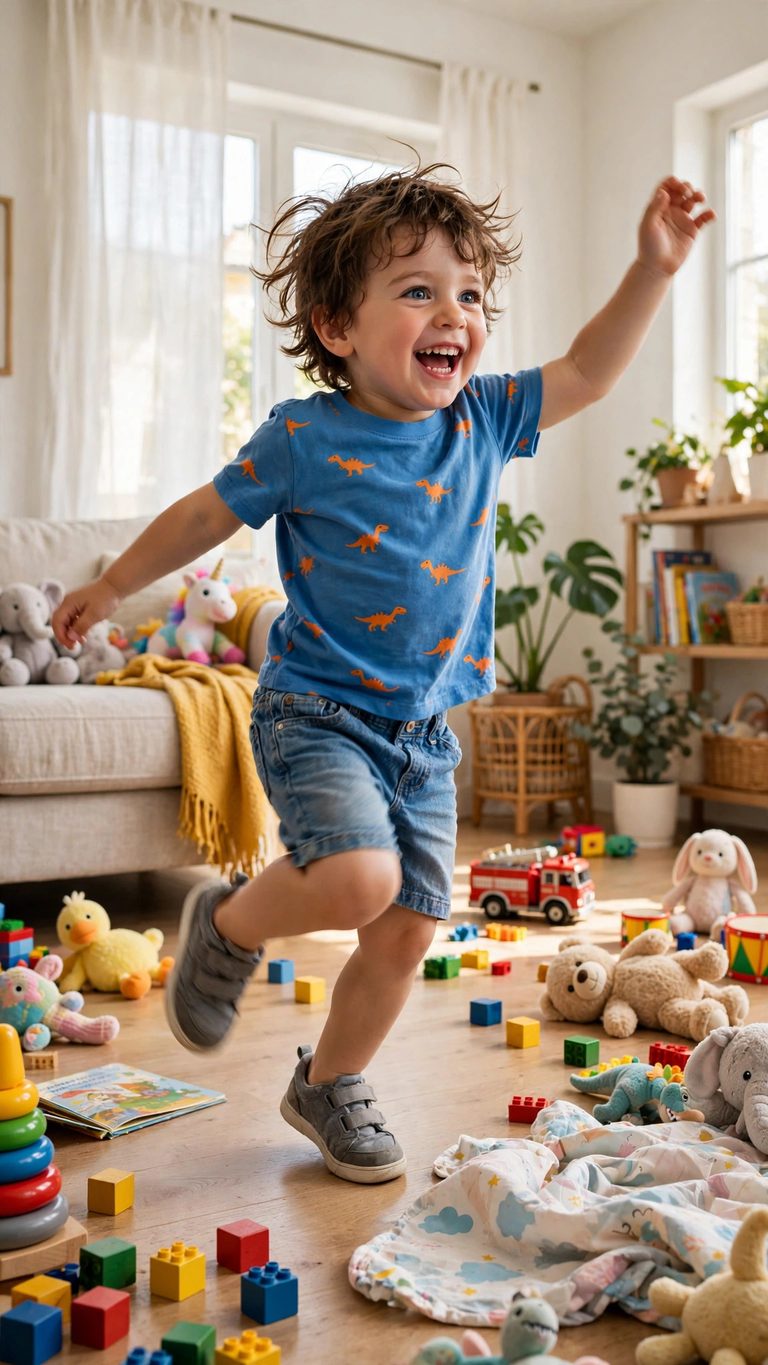
This AI video prompt bottles that feeling. It generates a super joyful shot of a toddler dancing energetically in a bright living room, bouncing and twirling with uninhibited happiness while toys lie scattered around. The camera sits slightly low to capture every bit of that full-body energy. You do not need a real toddler, perfect timing, or a camera that can keep up with a two-year-old. The AI handles the motion, the lighting, and the giggles. What you get is a ready-to-post vertical clip that radiates the kind of happiness people cannot scroll past, and it is built to go viral on TikTok and Reels.
The Prompt
Copy the text below exactly and paste it into your favorite AI video generator to create this scene:
Super joyful shot of a toddler dancing energetically to music in a bright living room, bouncing and clumsy twirling, huge happy grin, toys scattered around, camera slightly low capturing full energy, pure uninhibited happiness, ultra realistic, cinematic family film, 8k
Why This Prompt Works
Joy is contagious, and science backs that up. Watching someone genuinely happy activates mirror responses in the viewer’s brain, which is why dance videos of toddlers consistently rank among the most shared content online. A toddler dancing is not performing for the camera the way an adult influencer does. There is no self-consciousness, no brand deal, no filter strategy. Viewers sense that authenticity instantly, and authenticity is the currency that buys attention in a feed full of staged content.
The prompt is engineered to maximize that effect. “Bouncing and clumsy twirling” tells the AI exactly what kind of movement to render: not graceful, not choreographed, but the wobbly, enthusiastic flailing that makes toddler dancing so funny and endearing. “Huge happy grin” locks in the facial expression that sells the whole clip, because a dancing toddler with a neutral face would feel wrong to any viewer. “Toys scattered around” grounds the scene in a believable lived-in home instead of a sterile studio, which makes the moment feel real and relatable to every parent watching. The slightly low camera angle is a subtle but powerful choice: it makes the toddler look bigger, bolder, and more triumphant, like a tiny superstar commanding the living room stage.
On the platform side, high-energy happy content is algorithmic gold. TikTok and Reels both track replays, shares, and the speed of early engagement, and dance clips score well on all three because viewers rewatch the funniest twirl and send the video to friends with a laughing emoji. The prompt also taps into the evergreen dance trend ecosystem: pair the generated clip with a trending sound and you plug directly into an existing wave of discovery traffic. Creators who post under hashtags like #Dancing and #Toddler find built-in audiences already browsing those tags for their daily dose of joy.
How to Use This Prompt
Paste the full prompt into your AI video tool and configure the output for short-form vertical video. In Veo 3, choose text-to-video, paste the prompt, and set a 9:16 vertical aspect ratio with an 8-second duration, matching the original energetic settings. Veo 3 handles human motion particularly well, which matters here because the toddler’s bouncing and twirling needs to look natural rather than glitchy. In Runway, paste the prompt, select vertical 9:16 output, and keep the motion intensity at a medium-high level so the dance feels lively without turning into a blur.
In Kling, use the standard video model with the prompt pasted verbatim and request a vertical 8-second clip. Kling’s motion rendering is strong for full-body action, so the clumsy twirls should come out smoothly. In Pika, paste the prompt, set vertical framing, and let the default motion settings do the work; Pika renders playful motion quickly, which is ideal if you want to iterate on several takes. Sora users can paste the prompt directly and ask for a vertical 8-second render. Across all tools, generate at least three takes, because dance motion is where AI models occasionally produce an odd limb frame. Pick the take with the cleanest twirl and the happiest grin. Once you have your clip, add a trending upbeat sound on TikTok or Reels; the right audio can multiply the reach of a dance video several times over.
Pro Tips & Creative Variations
To make your dancing toddler clip stand out, start with the music pairing. The prompt says the toddler dances “to music,” but the generated video is silent, so your audio choice defines the vibe. A trending pop track makes it feel like a mini dance challenge, a classic oldies song makes it feel nostalgic and funny, and a goofy cartoonish tune leans into pure comedy. Try the same clip with two different sounds to see which one the algorithm favors; creators are often surprised by which pairing takes off.
Next, play with the setting and wardrobe for themed variations. A toddler dancing in pajamas at 7 a.m. tells a “morning energy” story that parents find painfully relatable. A tiny party hat turns the same dance into a birthday celebration clip. Dancing in a living room decorated with soft evening lamp light gives a cozy family-movie-night feel that contrasts beautifully with the high energy. You can also vary the camera language by regenerating with a slow push-in, which makes the dance feel more cinematic and triumphant.
For series potential, create a “dance break” collection: the same toddler dancing in different rooms, different outfits, or to different genres of music. Post them as a carousel or a multi-part series and viewers will follow for the next installment. Another strong variation is the reaction format: generate the dancing toddler clip and edit it side by side with a clip of a pet “watching” in confusion, which doubles the comedy. You can even build a before-and-after story: a sleepy toddler on the couch, then a hard cut to the same toddler mid-dance when the beat drops. The contrast is instant comedy gold, and it is exactly the kind of edit that gets shared in group chats.
Frequently Asked Questions
Will the AI render the toddler’s dance moves realistically? Modern video models handle simple full-body motion like bouncing and twirling quite well, especially in short 8-second clips. The most common issue is a briefly odd limb during a fast spin. The fix is simple: generate three to four takes and choose the cleanest one. Veo 3 and Kling currently produce the most reliable results for energetic human motion.
What aspect ratio and length should I export? Stick with the 9:16 vertical format and 8-second duration from the original settings. Vertical fills the phone screen on TikTok, Reels, and Shorts, and eight seconds is long enough to show the full dance burst while staying short enough to loop. Looping videos earn higher completion rates, which directly boosts algorithmic reach.
What sound should I add to the video? Add a trending upbeat track from within TikTok or Instagram so your clip can ride the sound’s discovery page. Funny, bouncy, or nostalgic songs all work. Avoid quiet or slow music, since the mismatch with the energetic dancing will feel off to viewers. If the platform offers a “use this sound” trend tied to dancing, that is your best bet.
Can I make a series out of this one prompt? Absolutely. Keep the core prompt and change one element at a time: the room, the outfit, the time of day, or the implied music genre. A consistent series, like a weekly toddler dance break, builds a returning audience. Viewers who laughed at episode one will come back for episode two, and that returning viewership is what turns a single viral clip into a growing account.
Nothing spreads happiness faster than a toddler dancing like nobody is watching. Copy this AI video prompt, generate your vertical dance clip, pair it with a trending sound, and post it. Try the prompt today and let the tiny dance moves do the rest.
Related Viral Prompts
- Dreamy Dandelion Wishes AI Video Prompt for Kids: Magical Slow Motion Meadow Scene for Viral TikTok Reels
- Adorable Baby Bath Splash AI Video Prompt: Create a Viral Bubbly Tub Time Clip for TikTok Reels and Shorts
- Touching Siblings Hug AI Video Prompt: Create a Viral Brother and Sister Love Scene for TikTok Reels
# A I V i d e o # P r o m p t B a z a r # D a n c i n g # T o d d l e r # H a p p y # V i r a l R e e l s

Leave a Reply