
Introduction
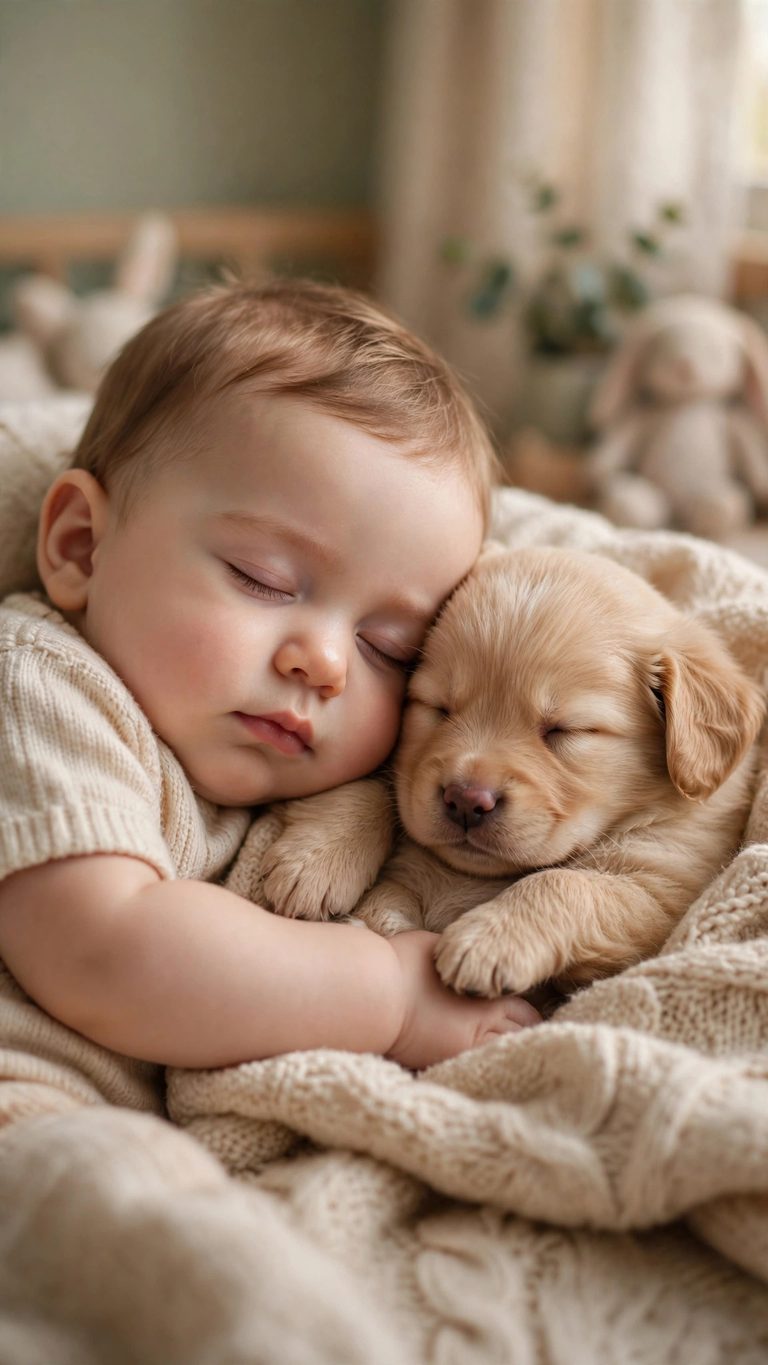
Some images on the internet stop the scroll instantly. A baby asleep next to a tiny puppy, their breathing falling into the same slow rhythm, is one of them. There is something almost primal about the combination of a sleeping infant and a sleepy puppy curled together on a soft blanket. It speaks to the part of us that is wired to protect, to nurture, and to feel tenderness at the sight of two of the gentlest creatures in the world sharing one peaceful moment. Social feeds are flooded with loud, chaotic content, so a quiet, still scene like this one stands out precisely because it does the opposite of shouting.
This AI video prompt recreates that magic without needing a cooperative baby, a trained puppy, or a perfect nursery setup. It generates a cinematic close-up of a baby and a tiny puppy napping side by side, with synchronized gentle breathing, warm nursery light, and one tiny paw resting on a chubby cheek. The result looks like a frame from a family film and feels like a warm blanket in video form. Parents, pet lovers, and anyone with a soft spot for adorable content will watch it on repeat, tag their friends, and save it for a rough day. That is the recipe for a viral reel, and it starts with the exact prompt below.
The Prompt
Copy the text below exactly and paste it into your favorite AI video generator to create this scene:
Adorable shot of a baby and a tiny puppy cuddled together napping on a soft blanket, synchronized gentle breathing, warm nursery light, extreme cuteness, camera close and still, heart-melting peaceful moment, ultra realistic, cinematic family film, 8k, tiny paw resting on cheek, unconditional tender love
Why This Prompt Works
Baby and animal content is one of the most reliably viral categories on every major platform, and this prompt stacks two of the strongest emotional triggers at once. Psychologists call it the baby schema effect: humans are biologically primed to respond with warmth and attention to large eyes, round cheeks, and small helpless creatures. Babies trigger it. Puppies trigger it too. Put them together in one frame, and you get what creators call double cuteness, a combination so potent that viewers cannot help but stop, watch, and engage.
The details inside the prompt do the heavy lifting. “Synchronized gentle breathing” gives the scene a hypnotic, almost meditative quality that keeps eyes on the screen. “Tiny paw resting on cheek” is the money shot, a single small detail that becomes the thumbnail moment people remember and describe to friends. “Warm nursery light” creates a cozy, safe atmosphere that makes the scene feel intimate rather than staged. And the explicit instruction for the camera to stay “close and still” forces the AI to resist adding distracting movement, which is exactly what a peaceful nap scene needs. The “cinematic family film, 8k” quality tags push the generator toward film-grade realism instead of a flat cartoon look.
Platform trends favor this kind of content right now. TikTok, Instagram Reels, and YouTube Shorts all reward high watch-through rates, and calming cute videos routinely outperform loud ones in completion percentage because viewers let them loop. A still, breathing scene loops seamlessly, which quietly inflates view counts. Parents share it, grandparents save it, and pet communities repost it, giving the video three separate audiences instead of one. That is why prompts like this one do not just get likes; they get shared across family group chats, which is where the deepest kind of virality begins.
How to Use This Prompt
Using this prompt is simple, and it works across all the major AI video tools. Start by pasting the full prompt text into your generator of choice. If you are using Veo 3, open a new project, select text-to-video, and paste the prompt into the description field. Set the aspect ratio to 9:16 vertical so the video fills a phone screen exactly the way this cozy close-up deserves. The original settings call for an 8-second clip, which is the sweet spot for a looping reel: long enough to feel the calm, short enough to replay endlessly.
In Runway, paste the prompt and choose a vertical 9:16 output with a duration of around 8 seconds. Keep motion settings low, since the prompt asks for a still camera and the magic comes from subtle breathing motion rather than dramatic action. In Kling, the same prompt works well with the standard realism model; enable high-quality mode if your plan allows it for smoother fur and skin texture. In Pika, paste the prompt and set the aspect ratio to vertical, keeping camera movement at zero so the stillness holds. Sora users can paste the prompt directly and request a vertical 8-second render. Whichever tool you use, generate two or three takes and pick the one where the breathing looks most natural and the puppy’s paw placement lands closest to the cheek. A tiny adjustment to the seed between takes can fix any odd hand or paw artifacts.
Pro Tips & Creative Variations
The base prompt is already strong, but a few tweaks can make your version stand out from every other cute baby video on the feed. First, try changing the breed of the puppy in your own words: a golden retriever puppy gives warm golden tones, a tiny pug adds comedy through its wrinkled face, and a fluffy white Samoyed puppy creates a cloud-like monochrome palette against a pastel blanket. Each breed shifts the mood of the whole clip, and breed-specific audiences will share videos featuring their favorite dog.
Second, experiment with the blanket and setting. A chunky knit cream blanket feels like a winter hug, while a soft blue muslin blanket gives a fresh morning-nursery vibe. Adding a detail like soft morning light through curtains instead of warm lamp light can change the emotional register from bedtime calm to peaceful awakening. Third, consider the sound design after generation: layer a soft lullaby, gentle white noise, or even just the faint sound of breathing over the clip. Audio is half the experience on Reels and TikTok, and a calm soundscape will double the soothing effect.
For a creative variation with series potential, generate a matching pair of clips: one of the baby and puppy falling asleep, and one of them waking up with a tiny stretch and a yawn. Posting them as a two-part series encourages follows and profile visits. Another strong variation is a seasonal take, such as the pair napping beside a softly glowing nightlight during the holidays, or surrounded by flower petals in spring. You can also extend the scene by generating the same prompt with a slightly wider framing and editing the two clips together for a gentle push-in effect. Just keep the core ingredients intact: closeness, stillness, warmth, and that tiny paw.
Frequently Asked Questions
Which AI video tool gives the best results for this prompt? Veo 3 and Kling currently produce the most realistic skin and fur textures for close-up scenes like this one, which matters because the camera sits very close to the subjects. Runway is excellent if you want fine control over camera stillness. Pika is the fastest option for quick drafts. All four handle the prompt well, so choose based on the subscription you already have.
How do I avoid weird AI artifacts on the baby’s hands or the puppy’s paws? Generate multiple takes and inspect the paws and fingers closely before publishing. Close-up scenes are where artifacts show most. If a paw looks off, try regenerating with the same prompt and a different seed, or slightly rephrase the paw detail, for example describing the paw as “tucked gently near the cheek” instead. Most creators find a clean take within three attempts.
What is the best length and format for posting? Keep the 9:16 vertical format and an 8-second duration from the original settings. Eight seconds loops perfectly on TikTok and Reels, and loop-friendly videos earn higher completion rates, which the algorithms reward with wider distribution. Add a soft lullaby trending sound to boost discoverability.
Can I use this video commercially, for example on a parenting page? Check your AI tool’s terms of service for commercial use rights, since they vary by plan. Most paid tiers allow commercial use of generated videos. As a best practice, avoid implying the baby or puppy is real if you are running a page that presents real family content; audiences value transparency, and a small “AI-generated” note in the caption keeps trust intact.
There is no faster way to warm up a feed than a sleeping baby and a puppy sharing one quiet moment. Copy this AI video prompt, generate your 8-second vertical clip, and watch the comments fill with heart emojis. Try the prompt today and let the cuteness do the talking.
Related Viral Prompts
- Joyful Dancing Toddler AI Video Prompt: Create a Viral Happy Dance Clip for TikTok Reels and YouTube Shorts
- Dreamy Dandelion Wishes AI Video Prompt for Kids: Magical Slow Motion Meadow Scene for Viral TikTok Reels
- Adorable Baby Bath Splash AI Video Prompt: Create a Viral Bubbly Tub Time Clip for TikTok Reels and Shorts
# A I V i d e o # P r o m p t B a z a r # B a b y # P u p p y # C u t e # V i r a l R e e l s

Leave a Reply