
Introduction
Few sights on the internet can freeze a scroller mid-swipe like a great white shark gliding straight toward the camera. The grey torpedo body, the rhythmic sway of that enormous tail, the cold intelligence in a passing eye: it triggers something ancient in us, a cocktail of fear and fascination that no other animal quite matches. That is exactly why AI-generated shark footage has become one of the most reliable viral engines in short-form video. A real great white encounter demands a dive boat, a cage, perfect luck, and genuine courage. An AI-generated one demands only a strong prompt and about a minute of your time, with zero risk and infinite retakes.
This particular prompt distills the perfect shark clip into a single dense sentence: majestic slow motion, deep blue water, a steady camera, and a pass so close you can see the scars on the animal’s skin. Viewers cannot look away because the scene plays on our deepest instincts, proximity danger rendered beautiful. Across Facebook Reels, TikTok, and YouTube Shorts, ocean content consistently outperforms almost every other nature niche, and shark clips sit at the very top of that hierarchy. They rack up millions of views because they deliver instant adrenaline inside eight seconds, no context required. Below you will find the exact prompt, a breakdown of why every word earns its place, step-by-step instructions for running it in today’s best AI video generators, and creative variations that turn one clip into an entire shark series your audience will follow.
The Prompt
Copy the prompt below exactly as it is written. Every adjective and camera direction was chosen deliberately to steer the AI generator toward a cinematic, photoreal result, so paste it verbatim for the most reliable outcome.
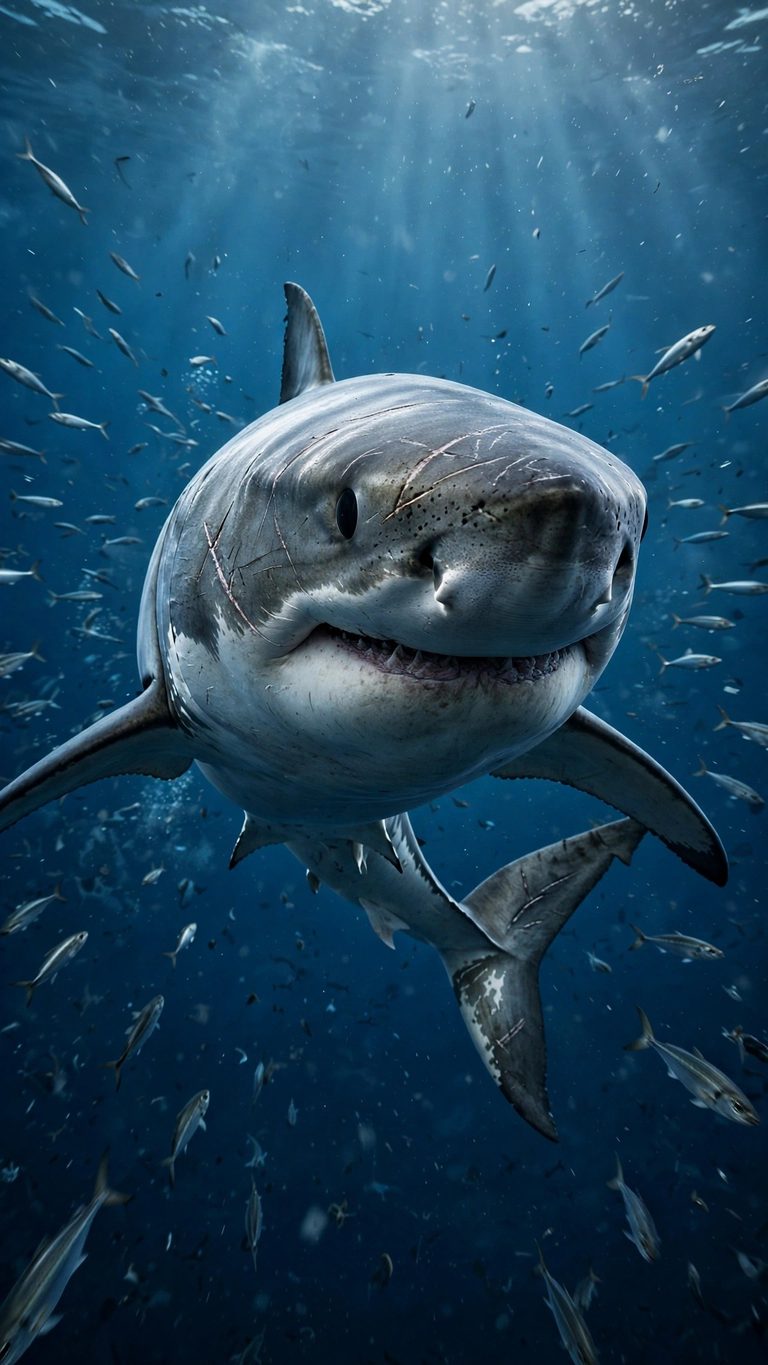
Majestic slow motion of a great white shark gliding through deep blue water toward the camera, powerful tail swaying, scars visible on its grey skin, smaller fish scattering, camera holding steady as it passes inches away, tense and awe-inspiring, ultra realistic, cinematic, 8k
Why This Prompt Works
The opening phrase, “majestic slow motion,” does two jobs at once. Slow motion stretches eight seconds of footage into a lingering, dreamlike pass, and it gives the AI model permission to render fine detail: water sheeting off the snout, the flex of the caudal fin, the texture of scarred grey skin. Fast shark footage looks chaotic; slow shark footage looks cinematic, and cinematic is what gets watched to the end.
Then comes the proximity choreography. “Gliding through deep blue water toward the camera” sets a head-on approach, the single most arresting composition in wildlife film, because the animal grows larger in frame every second and the viewer feels the approach physically. “Camera holding steady as it passes inches away” is the masterstroke: a locked-off camera reads as documentary truth, so the audience’s brain files the clip under “real footage” instead of “animation.” That perceived authenticity is the engine of virality for AI ocean content.
The realism details seal the deal. “Scars visible on its grey skin” adds battle-worn texture that generic smooth 3D sharks lack, and “smaller fish scattering” supplies scale, depth, and a living ecosystem around the predator. Finally, “tense and awe-inspiring” directs the emotional register, while “ultra realistic, cinematic, 8k” are proven quality tokens that push generators toward high-fidelity rendering. On vertical platforms this is a perfect loop: the shark approaches, passes, and the clip can replay seamlessly, doubling watch time. Expect comments like “my heart stopped” and tags of friends, which is precisely the engagement signal algorithms reward.
How to Use This Prompt
Turning this prompt into a finished vertical video takes less than ten minutes. Follow these steps exactly.
Step 1: Pick your generator. Paste the prompt into any leading text-to-video model: Google Veo 3, Runway, Kling, Pika, or OpenAI Sora. Veo 3 and Kling currently produce the most photorealistic underwater footage, Runway offers excellent motion control, Pika is the fastest for quick drafts, and Sora handles complex scenes well. Any of them can render this prompt beautifully.
Step 2: Paste the prompt verbatim. Open the text-to-video mode and paste the full prompt from the box above. Do not paraphrase it on your first generation; the wording has been tuned for realism, camera behavior, and mood.
Step 3: Set vertical format and duration. Choose a 9:16 vertical aspect ratio so the clip fills a phone screen on Reels, TikTok, and Shorts. Set the duration to 8 seconds, or the closest option your tool offers. If the tool has a slow-motion or camera-lock setting, enable it to match the prompt.
Step 4: Generate two or three variations. Generation usually takes one to three minutes. Create a few variants and pick the one with the cleanest anatomy and smoothest motion; AI video sometimes warps fins, eyes, or water physics, so a quick quality check matters.
Step 5: Download and post. Download the MP4, upload it to Facebook Reels, TikTok, or YouTube Shorts, add a short hook caption with the post hashtags, layer a subtle ambient or trending sound at low volume, and publish during peak evening hours. Reply to early comments to push the video into wider distribution.
Pro Tips & Creative Variations
Once the base clip works, remix it relentlessly; one viral format can fuel a week of posts. Change the time of day: add “at dawn, god rays piercing the surface” for a heavenly backlit pass, or “at dusk, shark silhouetted against the sunball” for pure drama. Change the camera angle: try “low angle looking up at the shark’s white belly,” “side profile tracking shot,” or “top-down drone view of the shark’s shadow over sand.” Each angle feels like a brand-new video.
Swap the species while keeping the choreography: a tiger shark with its striped flanks, a lightning-fast shortfin mako, or a hammerhead with that unmistakable cephalofoil all reuse the “inches away” thrill. Shift the mood by replacing “tense” with “serene”: “a curious great white, gentle and calm, making soft eye contact” produces a surprisingly tender viral variant. Change the environment: a kelp forest, a sunken shipwreck, or a swirling bait ball behind the shark adds narrative depth.
For series thinking, run an “Apex Week”: seven predators, seven days, same camera grammar. Pair this prompt with the dolphin pod prompt for a contrast duet of fear versus joy. Sound design matters enormously: a low heartbeat pulse or deep ocean drone under the clip multiplies tension. Add a text overlay hook such as “POV: you are the camera” in the first second to stop thumbs even faster, and always keep the highest-resolution export your generator allows.
Frequently Asked Questions
Q: Which AI video generator makes the most realistic shark?
A: Right now Veo 3 and Kling lead for photorealistic marine life, with Runway close behind on motion quality. Pika is excellent for fast drafts. Generate the same prompt in two tools and keep the better take; realism varies more between generations than between platforms.
Q: My shark came out deformed, with warped fins or extra gills. How do I fix it?
A: Regenerate rather than repair. You can append “anatomically correct shark anatomy” to the prompt, and avoid adding extra motion words that confuse the model. Two or three generations almost always yield one clean take, so budget your credits accordingly.
Q: Can I monetize AI-generated shark videos?
A: In most cases yes: original AI-generated content is generally eligible for Reels and Shorts monetization programs. However, platforms increasingly require AI-content disclosure labels, so tick the “altered content” or AI-generated checkbox when uploading to stay compliant and keep your reach intact.
Q: What length and posting schedule works best?
A: Eight seconds is ideal for completion rate; loop the clip two or three times for a 20-plus-second Reel without hurting retention. Post one ocean clip daily during your audience’s evening peak, and pin your best performer to your profile.
In short, this prompt bottles the single most electrifying eight seconds in the ocean: a great white choosing to glide past your lens. Paste it, generate it, post it, then remix it into a series. The scrollers will stop, the comments will flood in, and your page will ride the most reliable viral current on the internet.
Related Viral Prompts
- Glowing Jellyfish AI Video Prompt: Hypnotic Pink-Violet Bloom Pulsing Slowly Through Dark Ocean Water Depths
- Dolphin Pod AI Video Prompt: Joyful Bow Wave Race With Leaping Spins and Sparkling Sunlit Ocean Splashes
- Manta Ray Night Dive AI Video Prompt: Graceful Slow Barrel Roll Over Diver Lights in Glowing Plankton Seas
# A I V i d e o # P r o m p t B a z a r # S h a r k # G r e a t W h i t e # O c e a n

Leave a Reply