
Introduction
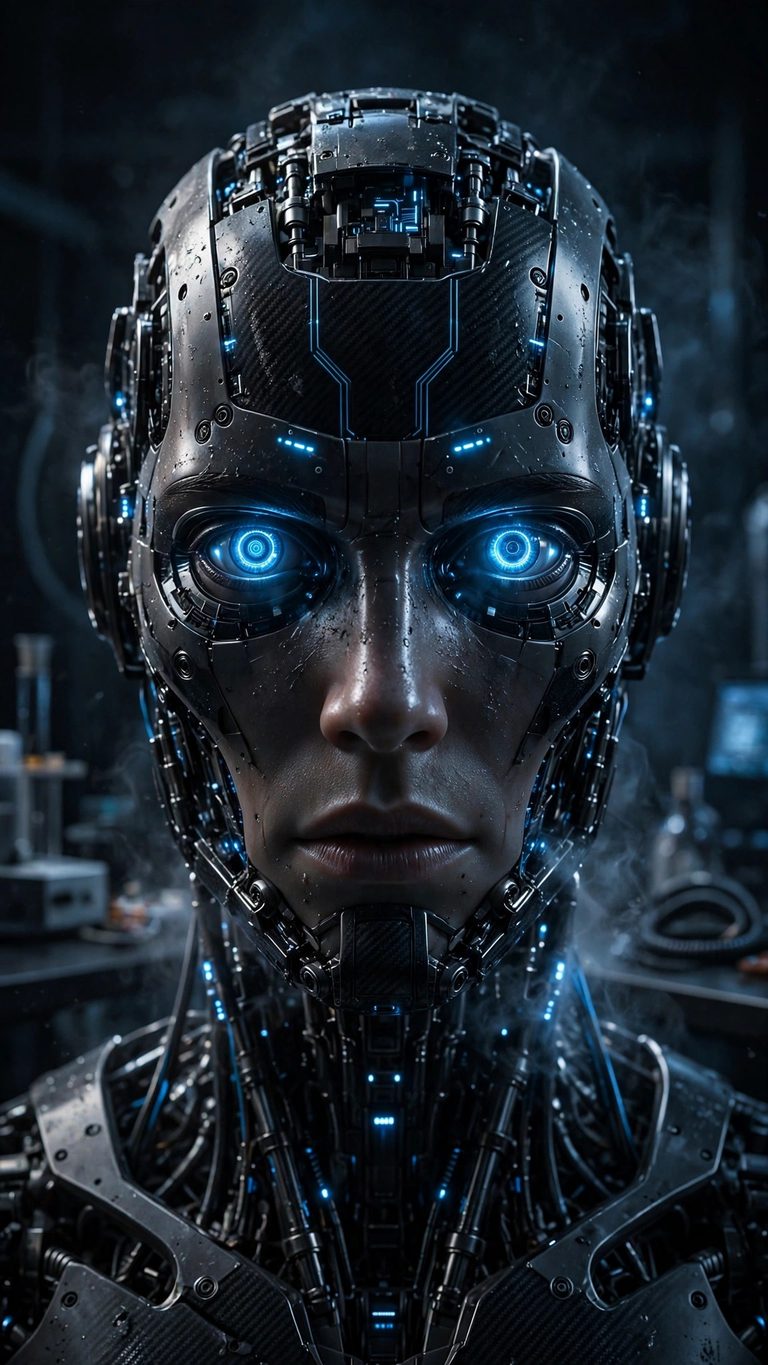
Darkness. A laboratory hums with sleeping machines. Then, in extreme close-up, a pair of eyes ignites — cold blue light blooming across a synthetic face as systems boot one by one. Camera sensors whir into focus. The head turns, slowly, deliberately, until it is staring directly at you. In that single held gaze, an entire story is told: something artificial has just become aware. It is the most electrifying eight seconds in science fiction, and now you can generate it with a single prompt.
The “robot waking up” moment is pure cinematic catnip. It is the scene every great AI film builds toward — the birth of machine consciousness — and it compresses beautifully into short-form video because it is all about the face. No expensive sets, no sprawling action sequences; just light, shadow, and the uncanny thrill of being watched by something that was not alive a moment ago. AI video creators love this prompt because close-ups are where modern video models shine brightest: skin-like textures, reflective eyes, and dramatic rim lighting are exactly what tools like Veo 3 and Runway render best. The result looks like a frame from a blockbuster, generated in under a minute, ready to hypnotize a scrolling audience that cannot look away from a gaze that meets their own.
The Prompt
Copy the prompt below exactly as written — every word, every comma — and paste it into your AI video generator of choice. The exact wording has been tuned for strong composition and consistent results:
Dramatic close-up of a humanoid AI robot waking up in a dark lab, eyes glowing blue as systems boot, camera sensors focusing, head turning toward camera, sci-fi movie style, ultra realistic, dramatic lighting
Why This Prompt Works
This prompt is a masterclass in visual psychology because it weaponizes the most powerful trigger in human perception: direct eye contact. When the robot’s head turns toward the camera, the viewer experiences a jolt of social attention — the brain cannot help but treat a face looking at it as significant. On a phone screen, where the face fills the frame, that effect is magnified enormously. Viewers stop scrolling not because they decided to, but because their neurology demanded it. Add the glowing blue eyes emerging from darkness, and you get a second hook: light appearing in darkness is the oldest attention signal in visual storytelling, from campfires to lightsabers.
The “systems booting” sequence adds a third layer: anticipation. Human beings are compelled by processes that build toward a payoff — progress bars, countdowns, awakenings. Each flicker of the eyes and each focusing sensor is a micro-payoff that holds attention through the full eight seconds, which drives completion rate, the metric short-form algorithms prize above all. The dark lab setting is equally strategic: darkness hides the imperfections AI models still struggle with (hands, complex backgrounds) while making the glowing eyes and dramatic lighting the undisputed stars of the frame.
On Reels, TikTok, and Shorts, this prompt rides several proven waves at once. AI and robotics content is perpetually trending as real-world AI news keeps the topic hot — every headline about humanoid robots makes this video more shareable. The “sci-fi movie style” and “ultra realistic” keywords push generators toward the filmic look that separates viral AI videos from forgettable ones. Shareability comes from the uncanny: people forward this to friends with captions like “this is actually terrifying” or “we’re so close to this,” sparking debates about AI in the comments. Comments drive reach, reach drives more comments, and the loop feeds itself. A single well-executed robot awakening can anchor an entire account’s growth because it is endlessly rewatchable — viewers replay it to catch the exact frame the eyes ignite.
How to Use This Prompt
Follow these steps to turn the prompt into a finished vertical video:
- Copy the prompt exactly. Paste the full text into the prompt box. The phrase order — close-up first, then the action beats, then style keywords — guides the model to frame the face before animating it.
- Pick your tool. Veo 3 (via the Gemini app or Flow) excels at realistic faces and dramatic lighting. Runway Gen-4 gives you precise control over the head-turn timing. Kling 2.x handles the eye-glow effect beautifully on its free tier, Pika 2.x is ideal for fast iterations, and Sora renders gorgeous atmospheric lab detail.
- Set vertical format. Use 9:16 at 1080×1920. A close-up in vertical fills the screen with the face, which maximizes the eye-contact effect — this shot loses half its power in landscape.
- Set the duration and mood. The source settings call for 8 seconds with a dramatic tone. Eight seconds is perfect: roughly two seconds of darkness, three seconds of eyes igniting and sensors focusing, three seconds of the head turn and held gaze. Keep any “drama” or “cinematic intensity” slider at high if your tool offers one.
- Consider image-to-video for control. For maximum quality, generate a still portrait of the robot face first, then use image-to-video with a motion prompt like “eyes glow brighter, head slowly turns toward camera.” This two-step workflow dramatically improves facial consistency.
- Generate multiple seeds. Run at least three variations. Watch for the uncanny details that matter: symmetrical eye glow, smooth head rotation without warping, and sensors that look mechanical rather than blurry. Pick the most unsettling one — unsettling wins here.
- Finish and post. Add a deep bass swell and a subtle mechanical servo sound as the head turns. A caption like “It just woke up.” in the first frame doubles the hook. Post with #AIVideo #AIRobot #SciFi and publish when your audience is most active.
Pro Tips & Creative Variations
The awakening is just the opening scene — the real growth comes from building a series around it. Try a perspective flip: “point-of-view shot from the robot’s perspective, vision flickering on, seeing the dark lab and a scientist’s surprised face” turns the watcher into the watched and performs brilliantly as a part two. Or go macro: “extreme macro of the robot’s eye, mechanical iris dilating, blue light reflecting” — eye macros are among the highest-retention shots in AI video because they are pure texture and light.
Experiment with emotional variants: add “a single tear of synthetic oil rolls down its cheek” for tragedy, or “the robot smiles faintly as it wakes” for something far more disturbing. Change the setting with “waking up in an abandoned factory, dust particles in light beams” or “waking up on a spaceship, stars visible through a viewport.” You can also play with era and style: “1950s retro robot waking up, vacuum tubes glowing” or “anime-style android awakening, cinematic” each open different audience niches.
Technically, faces are where AI artifacts show most, so use negative prompts like “blurry, asymmetric eyes, distorted face, extra eyes” wherever supported. If the head turn warps, shorten the motion: “head turns slightly toward camera” is safer than a full rotation. For extra cinema, add “anamorphic lens flare, shallow depth of field, film grain” — grain in particular sells realism by hiding digital smoothness. Sound design is half the scare: layer a low rising drone, a camera-shutter-like sensor click, and a soft servo whir. Finally, try the loop trick: end on the glowing stare and cut back to darkness for a perfect loop — looping uncanny faces get rewatched compulsively, and every rewatch tells the algorithm your video is irresistible.
Frequently Asked Questions
Why do the robot’s eyes sometimes look uneven or flickery?
Glowing elements are hard for video models to keep consistent across frames. Generate several seeds and choose the most stable, or use image-to-video starting from a clean still. Adding “symmetrical glowing eyes, consistent light” to the prompt also helps, and some tools let you lock the first frame as a reference.
Can I make the robot look friendly instead of scary?
Absolutely — swap “dark lab” for “bright modern lab, soft morning light” and “dramatic lighting” for “warm soft lighting,” then add “gentle curious expression.” The same structure produces a Pixar-like awakening that performs wonderfully with family audiences. Test both tones; scary usually wins on shares, friendly wins on saves.
Which tool gives the most realistic robot faces?
As of now, Veo 3 and Sora lead on photorealistic faces, with Runway close behind and offering better motion control. Kling’s free tier is surprisingly strong for close-ups. The honest answer: run the same prompt on two tools and compare — the “best” varies by week as models update, and comparison videos themselves make great content.
How do I avoid the video being flagged as misinformation?
Always label AI content. Add “Made with AI” in your caption or as an on-screen tag, and use the platform’s AI-content label when available. Transparency does not hurt virality — audiences love AI spectacle when it is honest — but undisclosed realistic fakes can get removed and damage your account.
A robot waking up is the moment machine becomes character, and characters are what audiences remember. Copy the prompt, chase the perfect glowing stare, add that bass swell, and post it — then watch your comments fill with people who swear they felt watched. Try it free tonight.
Related Viral Prompts
- Spaceship Landing AI Video Prompt: Free Viral Epic Sci-Fi Scene Over a Bengal Village (Veo 3 & Sora) — Full Guide
- Hologram Concert AI Video Prompt: Free Viral Futuristic Stage Scene for Veo 3, Runway, Pika & Sora — Guide
- Cyberpunk Rickshaw AI Video Prompt: Free Viral Neon Dhaka Night Scene Now (Veo 3, Kling & Sora Guide)
# A I V i d e o # P r o m p t B a z a r # A I R o b o t # S c i F i # D r a m a t i c



Leave a Reply