
Introduction
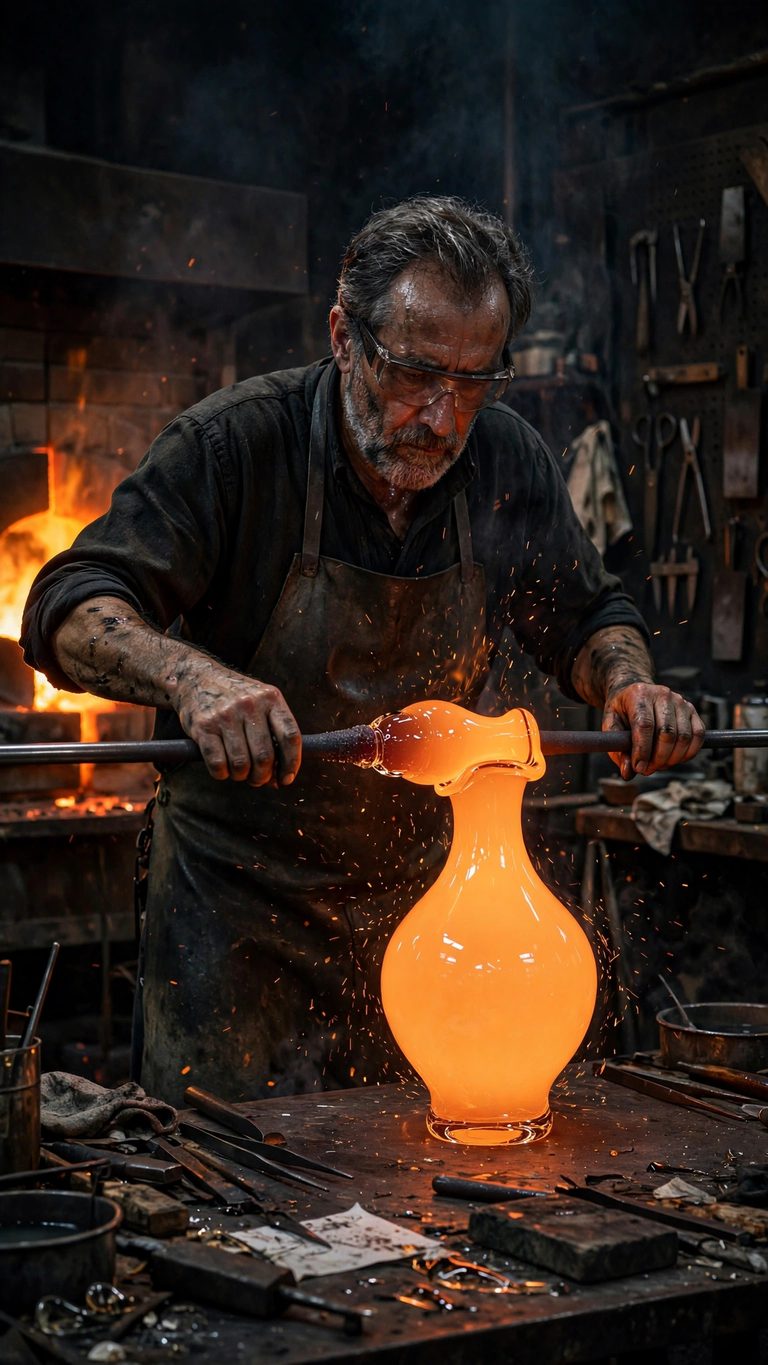
There are few sights on Earth more hypnotic than molten glass. One moment it is a glowing orange blob at the tip of a steel pipe, and seconds later it stretches, twists, and swells into a perfect vase with the help of a skilled human hand. Glass blowing is one of humanity’s oldest art forms, and it translates beautifully into AI-generated video because it is pure visual physics: heat, gravity, rotation, and light doing all the heavy lifting. The moment glowing glass catches the light of a dark workshop, viewers cannot look away. This AI video prompt captures that magic in a compact eight-second clip designed for vertical screens. AI video creators love this subject because it combines fire, craftsmanship, and transformation, three of the most dependable ingredients for viral short-form content. Whether you run a craft channel, an oddly satisfying compilation page, or you simply want a reliable loop that holds attention from the first frame, this glass blowing prompt delivers cinematic quality without a camera, a furnace, or a single degree of burn risk.
The Prompt
Copy the exact text below into your favorite AI video tool. Do not change a single word, because every phrase was chosen to shape the lighting, motion, and mood of the final clip:
Mesmerizing shot of a master glassblower shaping glowing molten glass, the orange-hot glass stretching and twisting into a perfect vase, sparks flying, dark workshop, cinematic lighting, ultra detailed
Why This Prompt Works
This prompt works because it triggers a deep visual satisfaction loop. Human brains are wired to enjoy transformation: a raw, glowing material becoming a finished object is inherently rewarding to watch. The orange glow of molten glass against a dark workshop creates maximum color contrast, which makes the clip pop on crowded feeds where muted content gets ignored. Sparks flying add tiny bursts of unpredictable motion, and the slow stretching and twisting motion activates the same pleasure centers as popular ASMR and oddly satisfying compilations. Platform trends strongly favor this kind of content. Reels, TikTok, and Shorts all reward watch time and replays, and transformation videos naturally earn both because viewers rewatch the moment the vase takes shape. The cinematic lighting language in the prompt pushes the generator toward film-grade imagery with rich shadows and glowing highlights, which elevates a simple clip into something that looks professionally shot. Shareability is the final ingredient: craftsmanship content performs exceptionally well because it is universally understood, language-independent, and family friendly. People share videos that make them feel calm and amazed, and this prompt delivers both in just eight seconds. In a feed full of loud talking-head videos, a silent, glowing, cinematic craft moment stands out immediately and earns the pause, the like, and the share.
How to Use This Prompt
How to Use This Prompt
Copy the prompt above and paste it into any modern AI video generator. Here is a numbered walkthrough for the most popular tools:
- Google Veo 3: Open the text-to-video panel, paste the full prompt, and set the aspect ratio to 9:16. Choose an 8-second duration for a tight Shorts and Reels cut. The recommended settings from the source are 9:16 vertical at 8 seconds.
- Runway Gen-3 / Gen-4: Paste the prompt into the prompt box, switch the output to 9:16 portrait, and set the duration to 8 seconds. Enable the high-quality upscale pass for extra macro sharpness.
- Kling 2.x: Create a new task, paste the prompt, select 9:16 vertical mode and an 8-second clip length. Kling handles flowing liquid and glowing materials particularly well.
- Pika 2.x: Paste the prompt, pick 9:16 portrait, and generate at 8 seconds. If the first result has flicker, re-roll with a higher consistency setting.
- OpenAI Sora: Paste the prompt exactly as written, select vertical 9:16 framing, and an 8-second duration. Review the render, then export at 1080×1920 for upload.
For best results on Reels, TikTok, and Shorts, always render at 9:16 vertical, keep the duration at 8 seconds for the loop to feel tight, and export at the highest bitrate the tool allows. Add no music over the natural ASMR of the scene unless you are re-uploading, and keep the first frame strong because it becomes the video thumbnail.
Pro Tips & Creative Variations
The base prompt is already strong, but small tweaks can produce entire series of fresh content from the same idea. Try changing the object being shaped: swap vase for bowl, wine glass, or sculpture, and each variation feels like a new video while keeping the same satisfying structure. You can also change the glass color language: replace orange-hot with cobalt blue, emerald green, or ruby red to give the molten glass a completely different mood, which is a favorite trick for channels that post daily without repeating themselves. For a more dramatic feel, add the word slow motion to emphasize the stretch of the glass, or specify extreme close-up to make the glow fill the entire frame. Another powerful variation is to describe a two-part transformation: glass being gathered, shaped, then revealed as a finished vase, which gives the generator a mini story arc inside eight seconds. If you want a series, generate the same prompt with tiny seed changes and post them as a Glass Masters collection. Finally, experiment with background details like glowing furnace doors or hanging tools to add depth. Always keep the 9:16 framing and 8-second duration so every video in your series feels consistent, and always export at maximum resolution because the glow details are where the wow factor lives.
Frequently Asked Questions
Can I use this AI video prompt for free? Yes. The prompt text is free to copy and use with any AI video generator. You only need an account with the generator tool you choose, and many offer free tiers with limited monthly generations.
Which tool gives the best results for this prompt? Veo 3 and Kling produce excellent glowing-material results, while Runway is strong on cinematic lighting. Try two or three tools and keep the best render, since each engine interprets glow and sparks slightly differently.
How do I make the video loop seamlessly? Render the 8-second clip and cut it so the opening and closing frames match, or use your editing app’s loop function. Transformation clips loop best when the vase rotation is centered in the frame.
Will this get views on TikTok and Reels? Craft and oddly satisfying content is among the most consistently viral categories on both platforms. Pair the clip with trending ambient audio and a simple caption, and it has every ingredient needed to perform well.
This glass blowing AI video prompt turns fire, light, and ancient craft into a modern viral moment. Try it free today, render your first clip, and watch how a few seconds of glowing art can light up your entire feed.
Related Viral Prompts
- Free AI Video Prompt: Perfect Chocolate Pour Loop – Viral Oddly Satisfying Dessert Short for Reels Creators
- Free AI Video Prompt: Cake Decorating Piping Rosettes – Viral Oddly Satisfying Short for TikTok & Reels
- Free AI Video Prompt: Glittery Galaxy Slime Stretching Macro – Viral ASMR Short for TikTok & Reels Now
# A I V i d e o # P r o m p t B a z a r # G l a s s B l o w i n g # C r a f t # S a t i s f y i n g

Leave a Reply