
Introduction
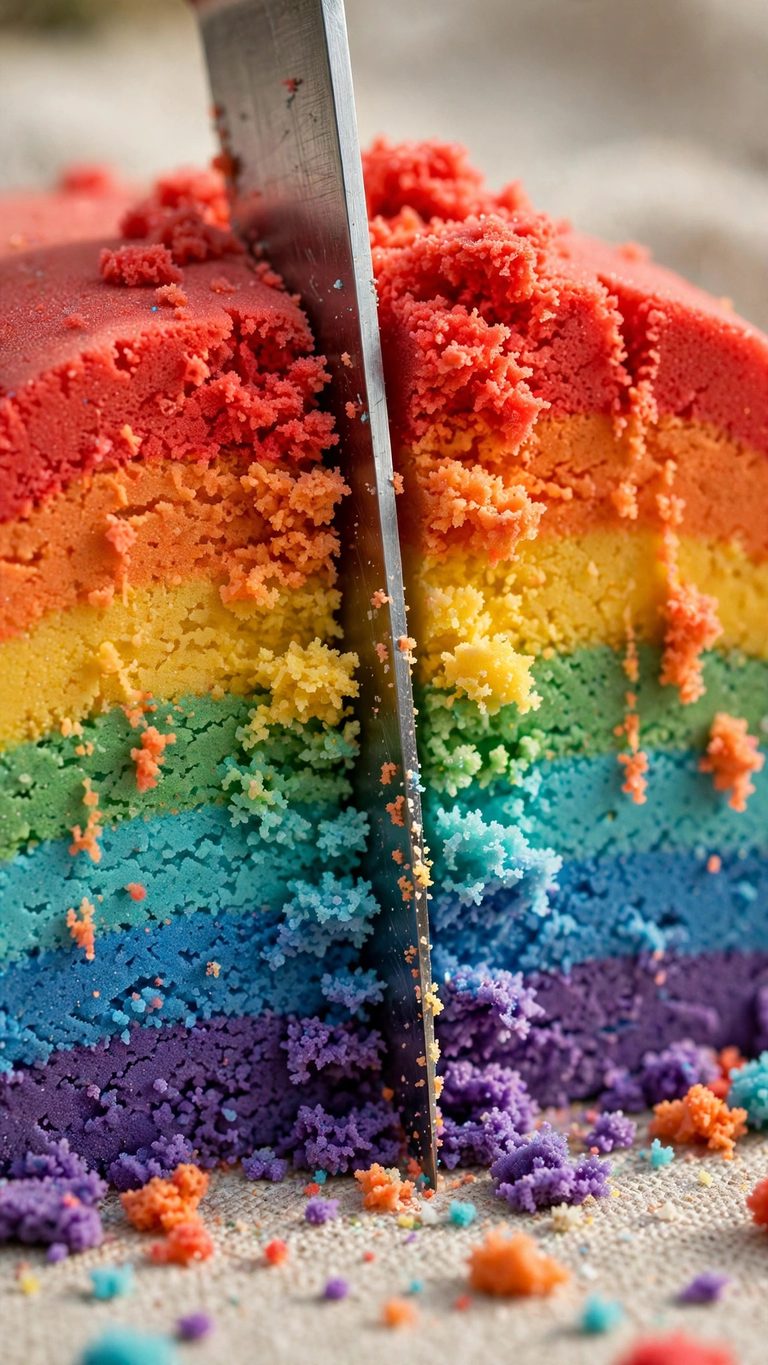
Few things calm a restless mind faster than a knife gliding through rainbow kinetic sand. The blade sinks in with zero resistance, the sand parts in a clean ribbon, and inside — layer upon layer of vivid color, revealed like a geological cross-section. It is visual ASMR at its purest, and millions of viewers watch these clips on repeat to unwind after a stressful day. Kinetic sand cutting has become one of the most reliable formats in the oddly satisfying universe because the payoff is guaranteed: every slice reveals something beautiful.
AI video generators have made this format accessible to anyone, no sandbox or studio lighting required. With one carefully written prompt, you can produce an ultra detailed macro clip of a knife slicing through colorful layered kinetic sand — smooth cuts, crumbling textures, and rainbow interiors that look impossibly real. This article gives you the exact prompt, explains the psychology that makes it so shareable, and walks you through generating, customizing, and posting sand-cutting videos that stop the scroll on TikTok, Reels, and Shorts.
The Prompt
Copy this prompt exactly as written into your AI video tool of choice. The combination of “macro shot,” “clean smooth cuts,” and “ASMR visual style” is what produces that signature satisfying look:
Macro shot of a knife slicing perfectly through colorful layered kinetic sand, clean smooth cuts revealing rainbow layers inside, soft crumbling texture, ASMR visual style, ultra detailed, oddly satisfying
Why This Prompt Works
This prompt works because it is built around the two pillars of satisfying content: anticipation and revelation. The macro framing puts the viewer inches from the blade, so the cut fills the entire screen and every grain of sand is visible. Before the slice, the viewer sees a neat block of layered color and instinctively wonders what is inside — that curiosity is the hook. Then the knife moves, the cut opens, and the rainbow layers are revealed. That moment of revelation delivers the same small neurological reward as unwrapping a gift, and it is precisely why viewers rewatch the slice multiple times and send it to friends.
The words “clean smooth cuts” are critical because they instruct the model to render the ideal version of the action, not a messy one. Real-world sand cutting can crumble unevenly, but AI lets you guarantee perfection every time — and perfection is what the satisfying niche sells. “Soft crumbling texture” adds the tactile realism that makes viewers feel the cut in their fingertips, a key ingredient of ASMR-style content that people describe as relaxing or even sleep-inducing. “Ultra detailed” and “oddly satisfying” act as quality and style anchors that push the generator toward crisp, high-fidelity output rather than a soft, blurry render.
On the platform side, sand cutting videos are algorithmic gold. They are silent-friendly, meaning they perform beautifully with the sound off — a huge advantage since most social video is watched muted. They are language-independent, so a single clip can travel across every region and demographic without localization. The format also invites the loop: the end of one cut flows naturally into the start of the next, and looped videos rack up completion rates that platforms reward with broader distribution. Add in the fact that kinetic sand content has years of proven search and hashtag demand, and you have a prompt that targets an audience already primed to watch, save, and share.
How to Use This Prompt
The source settings for this prompt are 9:16 vertical, 8 seconds. Here is how to get the best result on each major platform:
- Choose 9:16 vertical framing. Macro content needs to fill the phone screen edge to edge. Vertical framing keeps the knife and the sand block large and immersive on TikTok, Reels, and Shorts.
- Set an 8-second duration. In Veo 3, Runway, Kling, Pika, or Sora, eight seconds gives you time for the blade to enter, glide through, and reveal the layers — a complete micro-story with a beginning, middle, and payoff.
- Paste the prompt verbatim. Do not trim “ASMR visual style” or “soft crumbling texture”; these phrases steer the model toward the relaxed, tactile aesthetic that defines the genre.
- Generate a batch of three to five. Look for the take where the cut is straightest and the rainbow layers are most vivid. Discard any render where the knife warps or the sand looks like liquid.
- Enhance with sound design. Layer a soft slicing whisper, gentle crumbling grains, and a low ambient hum. Even though the video works muted, viewers who unmute should get a full ASMR experience — that contrast drives saves and shares.
- Post as part of a series. Number your sand-cutting videos and promise new color combinations. Series formats turn casual viewers into followers who return for the next slice.
Pro Tips & Creative Variations
The base prompt is a proven winner, but variations are how you build a channel instead of a one-hit wonder. Start by changing the color palette: pastel rainbow layers for a soft, dreamy feel; neon and black layers for a dramatic, high-contrast look; or earthy terracotta and gold tones for an elegant, premium aesthetic. Each palette attracts a slightly different audience, and testing them shows you which one your followers prefer. You can also change the cutting tool — swap the knife for a wire cutter, a spatula, or even a credit card edge for a fresh visual rhythm.
Experiment with what is hidden inside the sand. The prompt’s rainbow layers are the classic, but you can describe metallic gold veins, galaxy swirls, or a hidden pattern like a heart or star revealed in cross-section. These “surprise inside” variations create an extra layer of curiosity that boosts comments as viewers guess what will appear. Another strong twist is changing the action: instead of a single slice, describe the knife making a grid of cuts, or a hand crumbling a corner of the block in slow motion. Multi-cut sequences extend watch time because each cut is its own mini-payoff.
For maximum shareability, pair the visuals with text overlays that create open loops, such as “Wait for the inside” or “The last cut is the best one.” Film-style color grading in your editor — slightly boosting saturation and sharpness — makes AI renders pop even more on small screens. And do not overlook compilations: stitch your five best sand cuts into a 40-second relaxation video for YouTube, where longer satisfying compilations earn strong ad revenue. Keep a swipe file of your top-performing color combos and rotate them seasonally — holiday palettes in December and bright neons in summer keep the format feeling fresh year-round.
Frequently Asked Questions
Q: Which generator renders kinetic sand most realistically?
A: Kling and Veo 3 currently lead on granular textures and clean blade motion. Runway produces beautiful cinematic macro lighting, while Pika is the fastest option for testing new color palettes. Sora handles the prompt well too. Generate the same prompt on two platforms once, then standardize on the one whose sand texture you prefer.
Q: Is this prompt really free to use?
A: Yes — the prompt text is free for you to copy, modify, and use in commercial content. You only pay for the AI video tool’s generation credits, and every major platform offers a free tier or trial to get you started.
Q: Why do my cuts look messy instead of clean?
A: Messy cuts usually mean the model needs stronger guidance. Keep “clean smooth cuts” and “slicing perfectly” in the prompt, and avoid adding chaotic descriptors. If the blade still wobbles, shorten the described action — a single straight slice renders more reliably than complex zigzag cuts.
Q: How often should I post satisfying videos to grow?
A: Consistency beats volume. One high-quality sand-cutting video per day is enough to build momentum on TikTok and Reels, since each video has a long shelf life and can be discovered weeks later. Focus on making every cut feel perfect rather than rushing out filler.
This free viral AI video prompt delivers the internet’s favorite calming ritual — a perfect knife gliding through rainbow kinetic sand — with zero mess and infinite color combinations. Copy the prompt, slice your first block, and give your audience the satisfying reveal they cannot resist. Try it today.
Related Viral Prompts
- Free Viral AI Video Prompt: Skilled Hands Carving Flowers Into Pastel Soap, Oddly Satisfying Viral Art
- Free Viral AI Video Prompt: Hypnotic Neon Paint Mixing Swirls in Mesmerizing Slow Motion Macro Video
- Free Viral AI Video Prompt: Thousands of Giant Dominoes Toppling in an Epic Slow Motion Spiral Wave HD
# A I V i d e o # P r o m p t B a z a r # K i n e t i c S a n d # A S M R # S a t i s f y i n g



Leave a Reply