
Introduction
There is something quietly magical about watching a flower open in just a few seconds, and a time lapse bloom video captures that magic perfectly. In real life, a flower takes hours to unfold its petals, but with an AI video prompt, you can watch a tight bud slowly open into a full, glowing bloom, with tiny drops of morning dew sparkling on every petal as soft sunlight washes across the scene. It is the kind of video that makes people stop scrolling, because it feels calm, hopeful, and alive all at once. Whether you love nature photography, gardening, or simply beautiful videos, this prompt gives you a gentle, cinematic clip that feels like a small piece of poetry.
Time lapse flower videos are loved everywhere right now, from Instagram reels and YouTube Shorts to meditation apps and wedding slideshows, because they turn a slow natural process into a short, satisfying story. People share them to celebrate new beginnings, spring mornings, and the simple beauty of growth. The best part is that you do not need a camera, a garden, or a week of waiting. One detailed AI prompt creates the whole scene for you, complete with dew, golden light, and a soft background blur. In this article, you will get the full ready-to-use prompt, an explanation of why each detail matters, and practical tips to make your bloom video look like it was filmed by a professional nature photographer.
The Prompt
Copy the prompt below and paste it into your favorite AI image or video generator. Every detail is there for a reason, from the camera and lens to the light and the mood, so keep the whole prompt together for the best result.
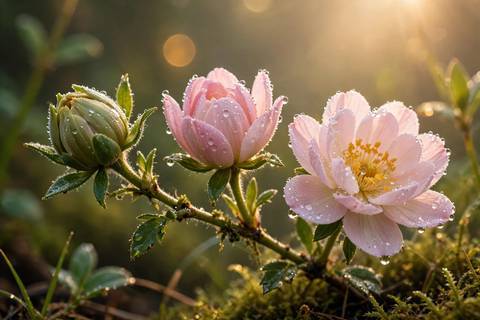
Cinematic macro time lapse video of a single pink peony flower blooming in slow motion, tight bud gradually opening into a full soft bloom, tiny crystal drops of morning dew sparkling on delicate petals, warm golden sunlight streaming through from the side, soft green garden bokeh background, gentle breeze moving the leaves, photorealistic detail, shot on a 100mm macro lens at f/2.8, shallow depth of field, smooth slow motion, serene and hopeful mood, ultra detailed, 4K, no text, no watermark
Why This Prompt Works
This prompt works because it gives the AI generator clear, concrete details instead of vague ideas. Here is what makes it so effective:
- A clear subject: one single peony keeps the viewer’s eye fixed on the bloom, so the slow opening of the petals becomes the whole story instead of getting lost in a busy garden scene
- Morning dew detail: tiny sparkling water drops add sparkle, freshness, and a sense of early morning, and they catch the light beautifully in every single frame of the video
- Soft golden sunlight: warm side light makes the petals glow from within and gives the clip a hopeful, peaceful mood that feels like the very first hour of a new day
- Macro lens realism: naming a 100mm macro lens and a shallow depth of field tells the AI to render fine petal texture and a creamy blurred background, just like a real nature film
How to Use This Prompt
You do not need any editing experience to turn this prompt into a beautiful result. The steps below work with the most popular AI tools, including ChatGPT, Gemini, Midjourney, Leonardo AI, Runway, Pika, and Kling. Follow them in order and you will have a finished image or video in just a few minutes.
- Copy the full prompt from the box above, exactly as it is written, including the camera, lighting, and composition details, because every one of those details shapes the final result.
- Open your favorite AI image or video generator, paste the prompt into the text box, and choose the highest quality or most detailed mode the tool offers for the best output.
- Generate two or three versions of the same prompt so you can compare them side by side and pick the one with the most natural colors, the clearest subject, and the warmest light.
- If a detail looks wrong, change only one word or phrase at a time, such as the time of day or the color of an object, and generate again until the picture matches what you imagined.
- Download your favorite version, crop it lightly if needed for Instagram, WhatsApp status, or a reel cover, and share it with a short caption and the hashtags listed at the end of this article.
Pro Tips
These small adjustments can turn a good result into a great one. Try one or two of them and see which version you love most.
- Ask for a white or yellow rose instead of a peony if you want a different flower, and keep the dew and sunlight details exactly the same for a consistent look.
- Try the words soft pastel petals for a dreamy version, or deep red petals for a bold, dramatic bloom that stands out on a dark feed.
- Add a small bee landing gently on the flower for a charming surprise that makes viewers watch the clip twice.
- If you want a calmer mood, change golden sunlight to soft overcast morning light and remove the breeze so the scene feels completely still.
- Use the first frame of your video as a thumbnail, because the tight bud covered in dew is mysterious and makes people curious to press play.
Frequently Asked Questions
Can I use this prompt for a still image instead of a video?
Yes, you can. Simply remove the words time lapse video and slow motion, and the same prompt will give you a beautiful macro photograph of a blooming flower with dew and sunlight. The composition, lighting, and lens details work just as well for a still image.
Which AI tools work best for this time lapse prompt?
Runway, Pika, Kling, and Luma Dream Machine all handle flower time lapse videos very well. For a still image, try Midjourney, Leonardo AI, or ChatGPT image generation, and keep the prompt exactly as written for the most realistic result.
How do I make the bloom look more realistic?
Keep the macro lens and shallow depth of field details, and ask for photorealistic detail and natural colors. Avoid adding too many extra objects, because a clean background makes the flower and the dew look much more believable.
Can I use this video for a reel or a status?
Absolutely. A short blooming flower clip is perfect for a morning greeting reel, a WhatsApp status, or the opening shot of a nature video. Add soft instrumental music and a short caption about new beginnings for the best effect.
A flower blooming in time lapse is one of the simplest and most beautiful videos you can create with AI. Copy the prompt, generate your clip, and share a little morning calm with the world. Every bloom is a reminder that beautiful things take time, and your video can carry that gentle message to everyone who watches it.
Related Viral Prompts
If you enjoyed this prompt, you will love these related ideas from the same collection:
- Christmas 2026 AI Video Prompt: Santa’s Sleigh Flying Over a Snowy Town
- Wedding Teaser AI Video Prompt: A Cinematic Teaser of a Couple Walking Through Falling Petals
- Childrens Day 2026 AI Video Prompt: Children Releasing Colourful Balloons Into a Bright Blue Sky
#TimeLapseBloom #AIVideoPrompt #FlowerBloom #MorningDew #NatureVideo


Leave a Reply