
Introduction
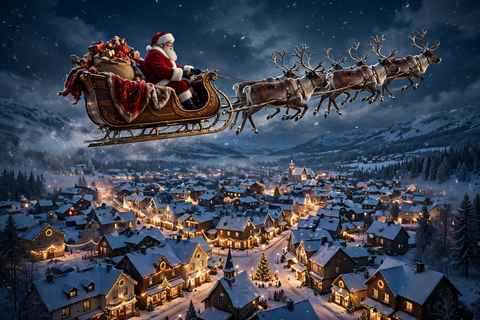
Few images feel as magical as Santa’s sleigh gliding across a starry Christmas sky, and this AI video prompt brings that classic scene to life in full motion. Picture a snowy town glowing with warm windows and twinkling lights below, while Santa’s sleigh, pulled by a team of graceful reindeer, sweeps across the moonlit sky with a trail of golden sparkles behind it. Snowflakes drift slowly through the air, chimneys puff gentle smoke, and the whole town looks like a scene from a beloved Christmas storybook. It is the kind of video that fills people with warmth and wonder, and it is perfect for Christmas 2026 greetings, reels, and family videos.
Christmas videos are shared millions of times every December, and the sleigh-over-the-town scene is one of the most loved of all, because it captures the excitement and joy of Christmas Eve in a single sweeping shot. Parents use it to delight their children, creators use it to open their holiday videos, and businesses use it for festive greetings that feel personal and warm. With this prompt, you do not need animation skills or expensive software. One detailed description gives you a cinematic, storybook-quality clip that looks like it came from a holiday movie. Below you will find the full prompt, why it works so well, and easy tips to make your Christmas video truly sparkle.
The Prompt
Copy the prompt below and paste it into your favorite AI image or video generator. Every detail is there for a reason, from the camera and lens to the light and the mood, so keep the whole prompt together for the best result.
Cinematic Christmas Eve video of Santa Claus in a golden sleigh pulled by eight reindeer flying gracefully across a starry night sky, a cozy snowy town glowing below with warm windows and twinkling fairy lights, gentle snowflakes falling slowly, a bright full moon behind soft clouds, magical golden sparkles trailing from the sleigh, storybook style, photorealistic detail, wide cinematic shot, shot on a 35mm lens, warm and cool light contrast, joyful and magical mood, ultra detailed, 4K, no text, no watermark
Why This Prompt Works
This prompt works because it gives the AI generator clear, concrete details instead of vague ideas. Here is what makes it so effective:
- A sweeping wide shot: the wide cinematic view shows both the sleigh in the sky and the glowing town below, which makes the scene feel grand, magical, and full of Christmas wonder
- Warm and cool light contrast: the warm golden windows and the cool blue moonlight work against each other, creating a rich, storybook glow that makes the whole frame look like a painting
- Eight reindeer in motion: naming the reindeer team gives the AI a clear, classic image to build, and their graceful movement adds life and energy to the night sky
- Snowfall and sparkles: falling snow and a trail of golden sparkles add gentle motion everywhere in the frame, so the video feels alive even in its quietest moments
How to Use This Prompt
You do not need any editing experience to turn this prompt into a beautiful result. The steps below work with the most popular AI tools, including ChatGPT, Gemini, Midjourney, Leonardo AI, Runway, Pika, and Kling. Follow them in order and you will have a finished image or video in just a few minutes.
- Copy the full prompt from the box above, exactly as it is written, including the camera, lighting, and composition details, because every one of those details shapes the final result.
- Open your favorite AI image or video generator, paste the prompt into the text box, and choose the highest quality or most detailed mode the tool offers for the best output.
- Generate two or three versions of the same prompt so you can compare them side by side and pick the one with the most natural colors, the clearest subject, and the warmest light.
- If a detail looks wrong, change only one word or phrase at a time, such as the time of day or the color of an object, and generate again until the picture matches what you imagined.
- Download your favorite version, crop it lightly if needed for Instagram, WhatsApp status, or a reel cover, and share it with a short caption and the hashtags listed at the end of this article.
Pro Tips
These small adjustments can turn a good result into a great one. Try one or two of them and see which version you love most.
- Add a large decorated Christmas tree in the town square with a glowing star on top if you want a stronger focal point below the sleigh.
- Try the words soft snowfall and dreamy haze for a gentler, more romantic version of the scene, perfect for a family greeting video.
- If you want a playful version, ask for Santa waving from the sleigh and one reindeer with a glowing red nose leading the team.
- Use this clip as the opening shot of a longer Christmas video, then cut to your own family photos or a warm message for a personal touch.
- Pair the video with a classic Christmas song or gentle sleigh bells in your editing app, because music doubles the festive feeling instantly.
Frequently Asked Questions
Can I use this prompt for a Christmas greeting card?
Yes, you can. Generate the video, take a beautiful still frame, or use the same prompt without the motion words for a still image. Add your greeting text in a photo editing app and your card will look wonderfully festive.
Which AI video tools handle Santa and reindeer best?
Runway, Kling, Pika, and Luma Dream Machine all create strong Christmas scenes. Generate two or three versions, because reindeer and sleighs can look slightly different each time, and pick the most natural one.
How can I make the town look more Indian or more European?
Add a few words to the prompt, such as cozy European rooftops with chimneys for a classic look, or warm Indian town lights and colorful decorations for a local festive feel. Keep the sleigh and sky details the same.
Is this video good for a YouTube or Instagram Christmas reel?
Yes, it is perfect for a reel cover or an opening clip. The wide shot and the glowing lights catch the eye immediately, and a short caption wishing everyone a Merry Christmas will complete the post beautifully.
Santa’s sleigh flying over a snowy town is Christmas magic in its purest form, and now you can create it in minutes. Copy the prompt, make your video, and share the wonder of Christmas Eve with everyone you love. May your Christmas 2026 be as bright and joyful as the lights in this little town.
Related Viral Prompts
If you enjoyed this prompt, you will love these related ideas from the same collection:
- Time Lapse Bloom AI Video Prompt: A Flower Blooming in Time Lapse
- St Nicholas Day 2026 AI Photo Prompt: Children Finding Small Gifts in Their Shoes
- New Year 2027 Party AI Photo Prompt: A Glamorous Party With Gold Balloons
#Christmas2026 #AIVideoPrompt #SantaSleigh #ChristmasMagic #SnowyTown


Leave a Reply