
Introduction
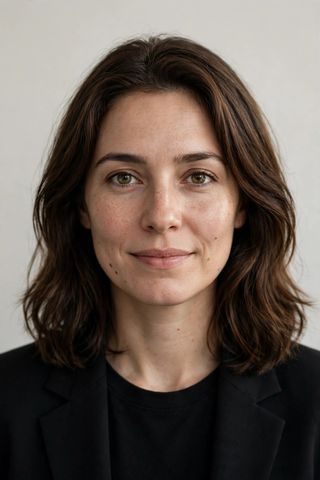
A passport style portrait is one of the most useful photos you can have. You need it for visa applications, ID cards, exam forms, job applications and a dozen official documents that always seem to ask for one at the worst possible moment. Getting one taken at a studio means travelling, waiting and paying for a set of prints you may not even like, and the photo booth at the station rarely flatters anyone. With Nano Banana 2 you can turn a normal photo into a clean, official-looking portrait in seconds, with the plain background and neutral expression that documents require.
This prompt is written to produce exactly what official photos need: even lighting, a plain light background, a straight front-facing pose and a gentle neutral smile. It keeps your features faithful while it removes distractions, balances the light and tidies the framing, so the result looks calm, clear and professional. It is perfect when you need a quick ID-style photo for an online form or a profile that asks for a formal portrait. One important note: always check the photo rules of the document you are applying for, because some official IDs require a photo taken by an approved studio and will not accept an AI-generated image.
The Prompt
Copy the prompt below and paste it into Nano Banana 2. It is written to work on the first try, so use it exactly as it is.
Transform this photo into a clean passport style portrait, straight front-facing pose, head centred in the frame, plain light grey background, even soft studio lighting with no harsh shadows, neutral gentle smile, natural skin tones, wearing a plain dark top, hair neatly away from the face, both ears visible, sharp focus, shot on a professional camera, 50mm lens, official ID photo style, photorealistic, high resolution, no text, no watermark
Why This Prompt Works
- Even lighting is the foundation of an official portrait. The prompt removes harsh shadows and bright spots so your face is lit uniformly, which is exactly what ID photo guidelines require and what makes the image look trustworthy.
- A plain light grey background eliminates every distraction. There is nothing competing with your face, nothing to confuse an automated system, and nothing that makes the photo look casual instead of official.
- The straight front-facing pose with both ears visible matches the geometry that ID systems expect. Symmetry and a level head position make the portrait easy to verify, and they give the image its calm, formal feeling.
- A neutral gentle smile strikes the right balance. A big grin looks informal and can distort facial features, while no expression at all can look stern, so the prompt asks for a soft smile that is both friendly and acceptable for documents.
How to Use This Prompt
- Open Nano Banana 2 and upload your photo — Start with a clear, well-lit photo of yourself or your subject. A sharp front-facing shot with a neutral expression works best, because the model keeps your face and pose faithful while it rebuilds the style, lighting and background around you.
- Paste the full prompt exactly as written — Copy the entire prompt from the box below and paste it into Nano Banana 2. Do not shorten it or leave out the camera, lighting and texture details, because those small phrases are what push the result from a plain filter look to a believable photograph.
- Generate and compare two or three versions — Run the prompt two or three times and compare the results side by side. Nano Banana 2 varies the grain, light and framing slightly on every run, so one version usually nails the mood while the others feel a little flat.
- Refine with one small follow-up edit — If something is off, ask for a single targeted fix, such as softer flash, warmer tones or a tighter crop. Small follow-up edits protect the parts you already like instead of rebuilding the whole image from scratch.
- Download and share your finished photo — Save the best version at full resolution and share it on Instagram, WhatsApp or your profile. A short caption about the style you recreated helps friends understand the look and often gets them asking for the prompt.
Pro Tips
- Use a front-facing photo with both ears visible and a straight, level head position, because passport style portraits depend on symmetry and a neutral expression to look official.
- Keep the background of your source photo simple. A plain wall behind you gives the model a clean canvas, so the new scene it builds looks intentional instead of cluttered.
- If the first result looks too clean or too digital, add the words heavier grain and softer flash to your follow-up edit for a more authentic vintage feel.
- Try the same prompt with a full-body photo and a close-up portrait. The style adapts beautifully to both, and you will get two very different images worth sharing.
- Save your favourite result before making more edits. Keeping a copy of the version you love means you never lose a great image to an experiment that did not work out.
Frequently Asked Questions
Can I use this photo for a real passport application?
It depends on your country’s rules. Many passport offices require photos taken by an approved studio or photo booth and will reject AI-generated images, so always check the official guidelines first. This prompt is ideal for online forms, profiles and practice, but verify before submitting to a government office.
Why does the prompt ask for both ears to be visible?
Official ID photo guidelines usually require both ears to be visible and the hair to be kept away from the face, because it helps identification systems and officers compare the photo with the person. The prompt includes this detail so the result matches the standard format.
Can I use this portrait for a visa photo?
Visa photo rules vary by country, and many embassies have strict requirements about background colour, head size and photo origin. Use this prompt to prepare a clean draft, then compare it carefully with the embassy’s published specifications before submitting anything.
What makes a good source photo for this prompt?
A sharp front-facing photo taken in daylight with your face clearly visible works best. Avoid sunglasses, hats and heavy shadows, because the model needs a clear view of your features to produce a clean, faithful official-style portrait.
A clean official portrait is one of those small things that saves you time again and again, and this prompt makes one in seconds. Keep a copy ready for the next form that asks, and you will never be caught without a proper photo again.
Related Viral Prompts
- Nano Banana 2 LinkedIn Headshot AI Photo Prompt: A Professional Studio Portrait With a Blazer and a Soft Grey Backdrop
- Nano Banana 2 Film Look AI Photo Prompt: A 1990s Film Photo With Soft Grain, Warm Light Leaks and Natural Colours
- Nano Banana 2 Ghibli Style AI Photo Prompt: A Dreamy Ghibli Style Portrait With Soft Colours and a Magical Forest
#NanoBanana2 #PassportPhoto #IDPhoto #OfficialPortrait #AIPhotoPrompt


Leave a Reply