
Introduction
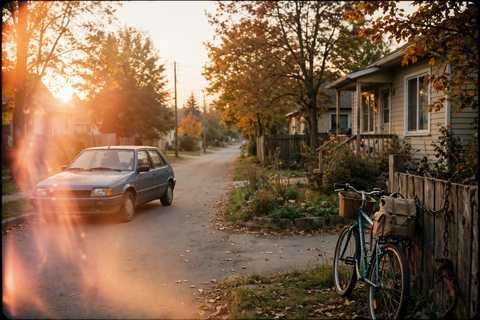
There is something about a photograph from the nineties that a modern phone camera simply cannot fake on its own. The colours were softer, the grain was visible, and every roll of film seemed to catch a little extra warmth from the sun, sometimes with a happy accident of light leaking in from the edge of the frame. Those imperfections are exactly what make old family albums feel so alive, and they are the reason the 1990s film look has become one of the most requested styles in AI photo editing. People do not want another perfect digital image; they want a photo that feels like a memory.
This Nano Banana 2 prompt rebuilds your photo the way a 35mm film camera would have seen it, with soft grain across the whole frame, gentle light leaks warming the corners, and natural colours that lean warm instead of cold and clinical. It is perfect for portraits, travel photos, couple shots and childhood-style pictures, because the film treatment flatters skin tones and turns ordinary moments into something worth framing. You do not need a film camera or a darkroom. You only need one photo and this prompt, and in a few seconds you will have an image that looks like it spent twenty-five years in a family album.
The Prompt
Copy the prompt below and paste it into Nano Banana 2. It is written to work on the first try, so use it exactly as it is.
Transform this photo into an authentic 1990s film photograph shot on a 35mm film camera, Kodak Portra 400 film, 50mm lens at f/2.0, soft visible film grain across the frame, warm orange and red light leaks bleeding in from the top right corner, natural true-to-life colours with a warm golden tint, soft diffused daylight, gentle contrast, slightly faded shadows, candid relaxed composition, nostalgic family album feeling, shallow depth of field, photorealistic, no text, no watermark
Why This Prompt Works
- Kodak Portra 400 is the secret ingredient. This film stock is famous for its warm skin tones and soft contrast, so naming it in the prompt steers the model toward the exact colour palette that people recognise as nineties film.
- Soft grain is what separates a real film photo from a digital filter. The prompt spreads fine grain evenly across the frame, which breaks up the unnaturally smooth skin and flat colours that give away AI images.
- Warm light leaks add the happy accident that makes film feel human. A gentle orange glow in one corner suggests sunlight slipping past the camera seal, and that tiny imperfection makes the whole photo feel authentic and unplanned.
- Natural colours with low contrast complete the illusion. Modern cameras chase punchy saturation and razor-sharp edges, while nineties film was softer and warmer, so this prompt deliberately pulls the colours back toward that gentler, truer look.
How to Use This Prompt
- Open Nano Banana 2 and upload your photo — Start with a clear, well-lit photo of yourself or your subject. A sharp front-facing shot with a neutral expression works best, because the model keeps your face and pose faithful while it rebuilds the style, lighting and background around you.
- Paste the full prompt exactly as written — Copy the entire prompt from the box below and paste it into Nano Banana 2. Do not shorten it or leave out the camera, lighting and texture details, because those small phrases are what push the result from a plain filter look to a believable photograph.
- Generate and compare two or three versions — Run the prompt two or three times and compare the results side by side. Nano Banana 2 varies the grain, light and framing slightly on every run, so one version usually nails the mood while the others feel a little flat.
- Refine with one small follow-up edit — If something is off, ask for a single targeted fix, such as softer flash, warmer tones or a tighter crop. Small follow-up edits protect the parts you already like instead of rebuilding the whole image from scratch.
- Download and share your finished photo — Save the best version at full resolution and share it on Instagram, WhatsApp or your profile. A short caption about the style you recreated helps friends understand the look and often gets them asking for the prompt.
Pro Tips
- Outdoor photos taken in soft daylight give the most believable film result, because the warm light leaks and grain blend naturally with real sunlight instead of fighting artificial indoor lighting.
- Keep the background of your source photo simple. A plain wall behind you gives the model a clean canvas, so the new scene it builds looks intentional instead of cluttered.
- If the first result looks too clean or too digital, add the words heavier grain and softer flash to your follow-up edit for a more authentic vintage feel.
- Try the same prompt with a full-body photo and a close-up portrait. The style adapts beautifully to both, and you will get two very different images worth sharing.
- Save your favourite result before making more edits. Keeping a copy of the version you love means you never lose a great image to an experiment that did not work out.
Frequently Asked Questions
Does this prompt work on black and white photos?
It works, but it is designed for colour photos, since the warm light leaks and golden tint are the stars of the look. If your source photo is black and white, the model will add a warm sepia tone instead, which still looks lovely and vintage, just in a different way.
Can I use this prompt for a professional portrait?
Yes, many people use it for relaxed professional portraits and personal branding photos. The film look feels warm and approachable, which suits creative professionals, writers and photographers very well, though a formal corporate headshot may suit a cleaner style better.
Why do the light leaks sometimes appear too strong?
Light leaks vary from run to run because the model interprets the strength differently each time. If a leak washes out part of the image, ask for softer and subtler light leaks in a follow-up edit, and the model will tone it down while keeping the rest of the film look.
Will this prompt change my face or my clothes?
No, the prompt is written to keep your face, expression and outfit faithful to the original photo. It changes the texture, colour and lighting of the image, not the person in it, so you will still look like yourself, just photographed on film in the nineties.
A nineties film photo is really a feeling, warm, soft and a little imperfect, and this prompt captures that feeling beautifully. Try it on a photo you love, let the grain and the light leaks do their quiet work, and enjoy an image that feels like it has been treasured for decades.
Related Viral Prompts
- Nano Banana 2 Y2K Flash AI Photo Prompt: A Y2K Style Flash Photo With a Camcorder Look and a Timestamp in the Corner
- Nano Banana 2 Retro Saree AI Photo Prompt: A Vintage Bollywood Saree Portrait With Golden Hour Glow and Film Grain
- Nano Banana 2 Oil Painting AI Photo Prompt: A Classical Oil Painting Portrait With Rich Colours and a Dark Background
#NanoBanana2 #FilmPhotography #90sAesthetic #VintagePhoto #AIPhotoPrompt


Leave a Reply