
Introduction
Long before cameras existed, the oil painting portrait was how important people were remembered. The great masters painted their subjects with rich colours, deep shadows and a quiet dignity that made an ordinary person look timeless, and those paintings still hang in museums centuries later because they captured something a quick photograph rarely does: presence. Today you do not need to sit for a painter for weeks to get that feeling. With Nano Banana 2, a single photo can become a classical oil painting portrait, complete with visible brushwork, glowing skin and a dark background that makes the subject shine.
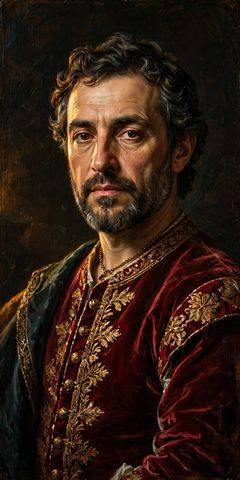
This prompt rebuilds your photo in the style of a Renaissance or Baroque master, with warm skin tones lit by a single soft light, deep rich colours in the clothing, and a dark atmospheric background that fades into shadow. The result looks like it belongs in a gallery, and it makes a stunning profile picture, a printed gift for a loved one, or a piece of wall art for your home. Your face stays faithfully yours, but the painting treatment gives it a gravity and elegance that no filter can match, because it borrows four hundred years of artistic craft in a single prompt.
The Prompt
Copy the prompt below and paste it into Nano Banana 2. It is written to work on the first try, so use it exactly as it is.
Transform this photo into a classical oil painting portrait in the style of a Renaissance master, rich warm oil paint colours, visible expressive brushstrokes, chiaroscuro lighting with one side of the face glowing softly and the other falling into deep shadow, dark moody background fading to black, elegant formal pose, deep crimson and gold tones in the clothing, detailed canvas texture, soft glowing skin, timeless museum-quality painting, Baroque portrait composition, photorealistic face kept faithful, no text, no watermark
Why This Prompt Works
- Chiaroscuro lighting is the soul of classical portraiture. The strong contrast between a glowing face and a dark background creates depth, drama and a sense of importance that flat even lighting can never achieve.
- Visible brushstrokes are what make the image read as a painting rather than a filtered photo. The prompt asks for expressive oil paint texture, so the skin, fabric and background all carry the hand of an artist.
- Rich warm colours give the portrait its museum quality. Deep crimson, burnished gold and warm umber are the colours of the old masters, and they make the subject glow against the darkness instead of disappearing into it.
- The dark background is a deliberate artistic choice. By letting the background fade into shadow, the prompt removes every distraction and forces the viewer to look exactly where the painter wanted them to look, at the face.
How to Use This Prompt
- Open Nano Banana 2 and upload your photo — Start with a clear, well-lit photo of yourself or your subject. A sharp front-facing shot with a neutral expression works best, because the model keeps your face and pose faithful while it rebuilds the style, lighting and background around you.
- Paste the full prompt exactly as written — Copy the entire prompt from the box below and paste it into Nano Banana 2. Do not shorten it or leave out the camera, lighting and texture details, because those small phrases are what push the result from a plain filter look to a believable photograph.
- Generate and compare two or three versions — Run the prompt two or three times and compare the results side by side. Nano Banana 2 varies the grain, light and framing slightly on every run, so one version usually nails the mood while the others feel a little flat.
- Refine with one small follow-up edit — If something is off, ask for a single targeted fix, such as softer flash, warmer tones or a tighter crop. Small follow-up edits protect the parts you already like instead of rebuilding the whole image from scratch.
- Download and share your finished photo — Save the best version at full resolution and share it on Instagram, WhatsApp or your profile. A short caption about the style you recreated helps friends understand the look and often gets them asking for the prompt.
Pro Tips
- Choose a portrait with dramatic side lighting in your source photo, because the chiaroscuro contrast of a classical oil painting depends on one side of the face glowing while the other falls into shadow.
- Keep the background of your source photo simple. A plain wall behind you gives the model a clean canvas, so the new scene it builds looks intentional instead of cluttered.
- If the first result looks too clean or too digital, add the words heavier grain and softer flash to your follow-up edit for a more authentic vintage feel.
- Try the same prompt with a full-body photo and a close-up portrait. The style adapts beautifully to both, and you will get two very different images worth sharing.
- Save your favourite result before making more edits. Keeping a copy of the version you love means you never lose a great image to an experiment that did not work out.
Frequently Asked Questions
Will the oil painting still look like me?
Yes, the prompt keeps your facial features faithful while it changes the medium to oil paint. Your face shape, expression and eyes stay yours, so the result looks like a portrait of you painted by a master, not a portrait of a stranger.
Can I use this portrait as wall art?
Absolutely, it is one of the best uses for this prompt. Print the result on canvas or fine art paper and frame it, and it will look like a genuine classical painting hanging in your home. Many people use it for gifts because it feels so personal and timeless.
Does this style work for a couple or family portrait?
Yes, group portraits in the oil painting style look like grand family paintings from centuries ago. Make sure every face is clearly lit in the source photo, because the dramatic lighting needs to reach each person for the result to look balanced.
Can I ask for a different painting era, like Impressionism?
Yes, you can guide the style with a follow-up edit. Ask for loose Impressionist brushwork with bright outdoor light, or a soft watercolour look, and the model will shift the painting technique while keeping your portrait at the centre.
A classical oil painting portrait is a reminder that you are worth remembering, and this prompt gives you that timeless feeling in seconds. Try it on a photo you love, print the result if you can, and enjoy owning a small masterpiece with your own face in it.
Related Viral Prompts
- Nano Banana 2 Film Look AI Photo Prompt: A 1990s Film Photo With Soft Grain, Warm Light Leaks and Natural Colours
- Nano Banana 2 Retro Saree AI Photo Prompt: A Vintage Bollywood Saree Portrait With Golden Hour Glow and Film Grain
- Nano Banana 2 Movie Poster AI Photo Prompt: A Dramatic Movie Poster Portrait With Bold Title Text and Cinematic Light
#NanoBanana2 #OilPainting #ClassicalPortrait #FineArt #AIPhotoPrompt


Leave a Reply